The best external GPU enclosures for laptops can add desktop-class graphics performance to a compatible notebook, handheld PC, or compact workstation without replacing the entire system. The right enclosure depends on your laptop’s port standard, graphics card, power requirements, and operating system.
We’ve selected 10 options spanning Thunderbolt 3, Thunderbolt 4, Thunderbolt 5, USB4, and OCuLink designs. Use the guide below to narrow the field by compatibility, bandwidth, expandability, and overall value.
Best 10 External GPU Enclosures for Laptops Picks for 2026
Best Classic Thunderbolt 3 Value
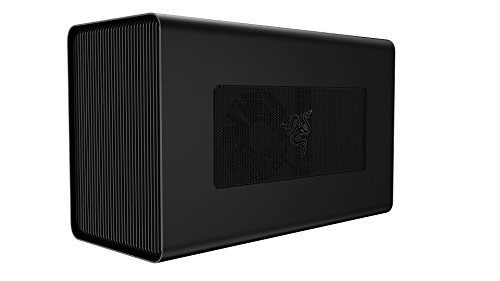
- 650W PSU with up to 100W laptop charging
- Fits full-size GPUs up to three slots wide
- Windows NVIDIA/AMD; macOS AMD compatibility
Best For: Compatible Thunderbolt 3 laptops needing a roomy, high-power enclosure
Best High-Power OCuLink Dock
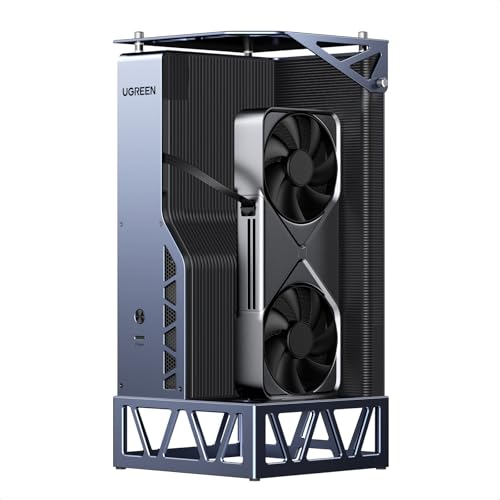
- OCuLink 64Gbps and USB4 40Gbps connectivity
- Includes an 850W ATX 3.1 PSU
- Supports NVIDIA, AMD, and Intel GPUs
Best For: High-performance gaming, creation, and AI setups
Best Next-Generation Compatibility

- Thunderbolt 5, Thunderbolt 4, and USB4 support
- Fits GPUs up to four slots wide
- 140W USB-C power delivery with active cooling
Best For: Windows 11 users building a modern, upgradeable eGPU setup
Best Professional Thunderbolt 3 Expansion

- Thunderbolt 3 to PCIe expansion design
- Supports up to 8K UHD display resolution
- AMD graphics and DisplayPort support listed
Best For: Professional laptop users needing high-resolution AMD graphics expansion
Best Compact Thunderbolt Option

- Thunderbolt 3/4 and USB4 support
- 85W PD with handheld Turbo Mode support
- Accepts flexible PSU types; GPU and PSU not included
Best For: Compact laptop, mini PC, and USB4 handheld setups
Best High-Power Workstation Enclosure

- 750W power supply for demanding GPUs
- Supports compatible AMD and NVIDIA cards
- Four USB-A ports plus Gigabit Ethernet
Best For: GPU-accelerated creative work on compatible Windows or Mac systems
Best OCuLink Performance Dock

- 64Gbps PCIe 4.0 x4 OCuLink connection
- Supports large cards such as RTX 4090 and RX 7900 XTX
- Detachable design; ATX PSU and GPU required
Best For: OCuLink-equipped laptops and mini PCs seeking a direct high-bandwidth GPU connection
Best Thunderbolt 5 Powerhouse

- 80 Gbps Thunderbolt 5 bandwidth
- 850W supply for triple-wide GPUs
- Built-in 5GbE and USB-A ports
Best For: Power users with Windows 11 laptops
Best Open-Frame Flexibility

- Supports Thunderbolt 3/4 and USB4
- Open frame has no GPU length limit
- 85W PD charging for compatible devices
Best For: Flexible laptop, NUC, and handheld setups
Best Compact Charging Dock

- 85W charging with external GPU use
- Supports NVIDIA and AMD card families
- Compact aluminum portable design
Best For: Laptops, handhelds, and NUCs needing one-cable expansion
Best Classic Thunderbolt 3 Value – Razer Core X
The Razer Core X is a practical choice among external gpu enclosures for laptops when you want desktop-grade graphics support without a built-in GPU. Its aluminum enclosure accepts full-size PCIe graphics cards up to three slots wide and includes a 650W power supply.
Best For: Windows Thunderbolt 3 users and Mac users with compatible AMD graphics cards who want a spacious, high-power eGPU enclosure.
Pros:
- Supports full-size desktop NVIDIA and AMD graphics cards on compatible Windows systems.
- Includes a 650W ATX power supply with up to 100W laptop charging.
- Aluminum enclosure with air cooling and room for cards up to three slots wide.
Cons:
- Graphics card is not included.
- macOS support is limited to compatible AMD cards; NVIDIA cards are not supported.
- Requires a compatible Thunderbolt 3 laptop and eGPU support.
Choose this model if broad card compatibility, strong power delivery, and a straightforward Thunderbolt 3 setup matter more than newer Thunderbolt standards or extra connectivity.
Best High-Power OCuLink Dock – UGREEN LinkStation
The UGREEN LinkStation is a performance-focused option among external gpu enclosures for laptops, handhelds, and mini PCs. It combines OCuLink 64Gbps and USB4 40Gbps connectivity with an 850W ATX 3.1 power supply for a full-size desktop GPU.
Best For: Gamers, creators, and AI users who need a high-wattage graphics dock for a compatible laptop, handheld, or mini PC.
Pros:
- Supports OCuLink speeds up to 64Gbps and USB4 up to 40Gbps.
- Includes an 850W ATX 3.1 power supply.
- Designed to work with NVIDIA, AMD, and Intel GPUs.
Cons:
- Compatibility depends on the host device supporting the required OCuLink or USB4 connection.
- The included power supply is non-modular.
- Graphics card is not specified as included.
This is a compelling fit when connection bandwidth and power headroom are priorities, particularly for demanding gaming, rendering, or local AI workloads.
Best Next-Generation Compatibility – Razer Core X V2
The Razer Core X V2 is built for newer external gpu enclosures for laptops, supporting Thunderbolt 4, Thunderbolt 5, and USB4 devices. It accepts PCIe 4.0 desktop graphics cards up to four slots wide and provides up to 140W USB-C power delivery, but the GPU and PSU must be purchased separately.
Best For: Windows 11 laptop and handheld users seeking a future-facing enclosure for large NVIDIA or AMD desktop graphics cards.
Pros:
- Supports Thunderbolt 5 bandwidth up to 80Gbps, plus Thunderbolt 4 and USB4 devices.
- Fits PCIe 4.0 graphics cards up to four slots wide.
- Offers 140W USB-C power delivery and a built-in 120mm active cooling fan.
Cons:
- Graphics card and power supply are sold separately.
- Compatible only with Windows 11 devices listed in the supplied specifications.
- Mac devices with M1 or later chipsets do not support eGPUs.
Consider the Core X V2 if you want broad modern host compatibility and room for oversized GPUs. Budget separately for an ATX power supply and graphics card before comparing total cost.
Best Professional Thunderbolt 3 Expansion – Sonnet Breakaway Box 650
Sonnet eGFX Breakaway Box 650 - Thunderbolt 3 to eGPU PCIe Card Expansion System
Check Price On AmazonThe Sonnet eGFX Breakaway Box 650 is a focused Thunderbolt 3 to PCIe expansion system for laptops. Its supplied specifications emphasize AMD graphics support, PCI Express connectivity, and display output capable of resolutions up to 8K UHD.
Best For: Laptop users and professional workflows that need an AMD-based external PCIe graphics solution with high-resolution display support.
Pros:
- Connects a laptop to an external PCI Express graphics solution over Thunderbolt 3.
- Supports DisplayPort or Mini DisplayPort video output.
- Lists a maximum display resolution of 7680×4320, or 8K UHD.
Cons:
- The supplied notes do not specify the exact included graphics card model.
- Uses Thunderbolt 3 rather than newer Thunderbolt 4 or 5 connectivity.
- Graphics compatibility is identified as AMD in the supplied specifications.
This enclosure suits buyers who value a dedicated Thunderbolt 3 expansion path and high-resolution output. Confirm the graphics configuration and laptop compatibility before purchase.
Best Compact Thunderbolt Option – ANQ-L336 Mini eGPU Enclosure
If you want one of the more flexible external gpu enclosures for laptops, the ANQ-L336 supports Thunderbolt 3, Thunderbolt 4, and USB4 systems. It accepts NVIDIA and AMD graphics cards, includes 85W power delivery, and can also function as a small connectivity hub.
Best For: Laptop, mini PC, and USB4 handheld users who want a compact enclosure with flexible power-supply support.
Pros:
- Supports Thunderbolt 3/4 and USB4 with PCIe 4.0 x4 connectivity.
- Works with NVIDIA and AMD GPUs, including AMD’s latest 9000 series according to the supplied specifications.
- Offers 85W PD charging and can support ROG Ally X 30W Turbo Mode.
- Includes Thunderbolt 4 ports and a 10Gbps USB-A port for added connectivity.
Cons:
- Power supply and graphics card are not included.
- NVIDIA RTX 50-series support is limited.
- Its compact power options may require more careful PSU selection than an enclosure with a built-in supply.
The ANQ-L336 is a versatile choice when size, broad interface compatibility, and handheld charging matter. Check your laptop’s port capabilities and choose a compatible PSU before buying.
Best High-Power Workstation Enclosure – Sonnet Breakaway Box 750ex
The Sonnet Breakaway Box 750ex is a high-wattage option among external gpu enclosures for laptops, pairing Thunderbolt 3 connectivity with a 750W power supply. It is designed for GPU-accelerated editing, rendering, color grading, animation, and effects work, while its 750ex model adds USB ports and wired networking.
Best For: Windows users and compatible Mac workflows that need substantial GPU power plus built-in USB and Gigabit Ethernet connectivity.
Pros:
- 750W power supply supports demanding compatible graphics cards.
- Supports many AMD Radeon and professional cards, as well as NVIDIA GeForce RTX, TITAN, and Quadro models.
- Accepts GPUs up to 312mm and provides 375W of continuous GPU power.
- Adds four USB-A ports and RJ45 Gigabit Ethernet.
Cons:
- M1 Macs are not compatible with GPUs.
- Uses Thunderbolt 3 rather than Thunderbolt 4 or USB4.
- The graphics card is not included.
Choose the 750ex when sustained power and workstation-oriented connectivity are more important than a compact footprint. Confirm your operating system, Mac compatibility, and GPU dimensions before purchase.
Best OCuLink Performance Dock – OwlTree PCIe 4.0 eGPU Dock
The OwlTree PCIe 4.0 dock takes a different approach to external gpu enclosures for laptops by using an OCuLink SFF-8612 connection rather than Thunderbolt. Its PCIe 4.0 x4 interface is rated for 64Gbps, and the detachable design helps with storage and portability.
Best For: Laptop and mini PC users with OCuLink support who want to pair a large external graphics card with a standard ATX power supply.
Pros:
- Provides PCIe 4.0 x4 OCuLink connectivity rated at 64Gbps.
- Supports graphics cards of various sizes, including examples such as RTX 4090 and RX 7900 XTX.
- Detachable ends and a flexible, shielded cable improve portability and storage.
- Gold-plated contacts and status LEDs support connectivity and monitoring.
Cons:
- GPU and power supply are not included.
- Requires a standard ATX power supply only.
- OCuLink does not support hot-plugging; the computer must be turned off before disconnecting.
This dock is compelling for systems equipped with OCuLink and users prioritizing a high-bandwidth direct connection. It is less convenient than plug-and-play Thunderbolt options, so verify the laptop or mini PC has the required interface and plan for a shutdown when disconnecting.
Best Thunderbolt 5 Powerhouse – Breakaway Box 850 T5
For shoppers comparing external gpu enclosures for laptops, the Sonnet Breakaway Box 850 T5 is a high-power option for Thunderbolt 5 Windows 11 systems. Its 80 Gbps bidirectional bandwidth, 850W power supply, and support for triple-wide GPUs make it suited to demanding creative, AI, and gaming workloads.
Best For: Windows 11 laptop users who need maximum GPU capacity for editing, rendering, animation, visual effects, or AI applications.
Pros:
- Thunderbolt 5 delivers up to 80 Gbps of bidirectional bandwidth.
- 850W power supply supports demanding current and future GPU cards.
- Supports triple-wide NVIDIA GeForce and AMD Radeon GPUs.
- Built-in dock adds 5GbE and three 10Gbps USB-A ports.
Cons:
- Its 14.1-pound size is less convenient for portable setups.
- Designed primarily around Windows 11 Thunderbolt systems.
The Breakaway Box 850 T5 stands out when expansion, cooling, and GPU headroom matter more than compactness. Thunderbolt 4 and most USB4 Windows 11 computers are also supported, though the fastest bandwidth requires a Thunderbolt 5 host.
Best Open-Frame Flexibility – Maskedfish MK-L18
The Maskedfish MK-L18 is a flexible choice among external gpu enclosures for laptops, NUCs, and handhelds. It connects over Thunderbolt 3, Thunderbolt 4, or USB4, uses a PCIe 4.0 x16 interface, and leaves graphics-card length unrestricted with its open-frame aluminum design.
Best For: Users who want an airflow-focused enclosure with broad GPU compatibility, 85W charging, and support for Windows or Linux systems.
Pros:
- Supports NVIDIA and AMD cards, including listed RTX 50-series and RX 7000 models.
- Open-frame design imposes no graphics-card length limit and improves airflow.
- 85W power delivery can charge compatible laptops and handhelds.
- Official JHL7540/7440 controllers support PCIe 4.0 x16 mode.
Cons:
- Non-Thunderbolt and non-USB4 USB-C ports are not supported.
- Its open-frame construction offers less enclosure than a closed chassis.
- Apple Silicon TinyGPU support is limited to AI deep-learning development, not gaming or 3D rendering.
The MK-L18 is a practical fit for buyers prioritizing GPU flexibility and cooling access. Confirm that the laptop has a compatible Thunderbolt or USB4 port before purchasing.
Best Compact Charging Dock – VIKINYEE VK-Y900
The VIKINYEE VK-Y900 combines an external GPU connection with 85W power delivery in a compact aluminum design. For external gpu enclosures for laptops, it offers support for Thunderbolt 3/4 and USB4 systems, dual Thunderbolt ports, and compatibility with a wide range of NVIDIA and AMD graphics cards.
Best For: Laptop, handheld, and NUC users who want a compact eGPU setup with single-cable charging and external graphics support.
Pros:
- Supports NVIDIA cards up to the RTX 50 series and AMD Radeon cards up to RX 9000.
- 85W PD pass-through can charge a laptop and enable ROG Ally X 30W Turbo Mode.
- Official Intel JHL7440/7450 controller supports stable data transfer.
- Compact aluminum chassis is portable and includes DisplayPort.
Cons:
- Requires a Thunderbolt 3/4 or USB4-compatible host port.
- Uses an ATX power supply, which must be provided separately according to the supplied notes.
- Apple Silicon TinyGPU support is intended for AI deep-learning development, not gaming or 3D rendering.
The VK-Y900 is a space-conscious option for users who value charging and portability alongside GPU expansion. Its broad card compatibility is appealing, but buyers should verify host-port support and plan for the ATX power supply.
How We Picked the Best External GPU Enclosures for Laptops
We compared these enclosures by connection standard, advertised bandwidth, graphics-card support, power capacity, operating-system compatibility, and practical flexibility. We also considered whether each model suits a full-size desktop GPU, a compact card, an ATX power supply, or a portable gaming device. Because performance depends heavily on the host computer, we treated published specifications as a starting point rather than a guarantee of identical real-world results.
Compatibility is especially important: Thunderbolt and USB4 models are generally easier to deploy, while OCuLink designs can offer a more direct PCIe connection but require the correct port, cable, and system support.
Quick Comparison
| Connection | Best For | Main Advantage |
|---|---|---|
| Thunderbolt 3/4 or USB4 | Most laptops and flexible setups | Broad compatibility and simpler connectivity |
| Thunderbolt 5 | Newer premium laptops | Higher potential bandwidth and longer-term headroom |
| OCuLink | Gaming handhelds and performance-focused PCs | Lower-overhead PCIe connectivity |
| ATX-compatible designs | Custom or upgradeable builds | Power-supply flexibility |
Key Buying Factors for External GPU Enclosures for Laptops
Port and Bandwidth Compatibility
Check the exact port on your laptop rather than relying on the connector shape. Thunderbolt 3, Thunderbolt 4, Thunderbolt 5, and USB4 are not interchangeable in every situation, and a USB-C port without the required protocol may not support an eGPU at all. OCuLink requires a dedicated OCuLink interface or an appropriate adapter.
Power and Graphics-Card Fit
Match the enclosure’s power supply to the GPU’s recommended wattage, including transient demands. Confirm the internal slot, card length, card thickness, and auxiliary power connectors. A high-wattage enclosure offers more upgrade flexibility, but it may also be larger, heavier, and noisier.
Operating System and Drivers
Windows typically offers the broadest eGPU support, while macOS compatibility varies by Mac generation, graphics brand, and enclosure. Linux support depends on the distribution, kernel, drivers, and desktop configuration. Verify current manufacturer guidance before buying, particularly for newer GPUs and Thunderbolt 5 systems.
Ports, Charging, and Portability
Some models provide USB ports, Ethernet, display outputs, or USB Power Delivery for charging the laptop. These features can reduce cable clutter, but PD wattage may not equal the laptop’s original charger. A compact enclosure may suit a handheld or travel setup, while a larger chassis is usually better for full-size cards and cooling.
Who Should Buy Which External GPU Enclosures for Laptops?
- Most laptop users: Choose a well-supported Thunderbolt 3/4 or USB4 enclosure with enough power for your intended GPU.
- Owners of newer premium systems: Consider Thunderbolt 5 if both the laptop and enclosure support it and you want greater future bandwidth.
- Gaming handheld owners: Look for compact USB4 or OCuLink models, checking the handheld’s exact port and power requirements first.
- Performance-focused builders: OCuLink or ATX-compatible enclosures can be attractive when maximum throughput and component flexibility matter more than simplicity.
- Mac users: Confirm GPU-brand and macOS support before purchase; Windows-oriented compatibility claims may not apply.