Fast, dependable media offloads matter when you are moving large RAW photo libraries or high-bitrate video. The right reader can turn a long transfer session into a quick, repeatable part of your workflow.
This roundup compares 10 CFexpress readers across Type A, Type B, SD, XQD, and multi-format designs, with attention to speed, compatibility, portability, and everyday usability.
Best 10 Memory Card Reader with Cfexpress Type a Picks for 2026
Best Balanced Option
Lexar CFexpress Type A/SD Reader

- Supports CFexpress Type A and SD UHS-II cards
- Up to 10Gbps USB 3.2 Gen 2 transfers
- Includes USB-C and USB-A connection options
Best For: Mixed CFexpress Type A and UHS-II SD workflows
Fastest Interface
Sony MRWG3 CFexpress Type A Reader
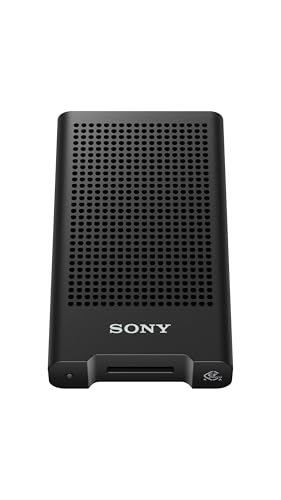
- USB 40Gbps support
- Compatible with CFexpress Type A version 4
- Designed for Sony CEA-G series cards
Best For: Sony users with high-speed USB-C host devices
Best Portable Value
Rytaki CFexpress Type A Reader

- Up to 10Gbps USB 3.2 Gen 2 transfers
- Built-in USB-C and USB-A connectors
- Compact aluminum-alloy plug-and-play design
Best For: Traveling creators using phones, tablets, and computers
Most Versatile
8-Slot CFexpress Type A & B Reader

- Reads eight card formats, including CFexpress Type A and B
- Supports simultaneous multi-card offloads
- 10Gbps USB 3.2 with USB-A and USB-C connectivity
Best For: Multi-format creators and mobile production teams
Best for Type B Workflows
Lexar Dual-Slot CFexpress Type B Reader

- Dedicated CFexpress Type B and SD card slots
- Supports simultaneous offloads
- Up to 10Gbps with USB-C and USB-A adapter
Best For: CFexpress Type B and SD card users
Fastest Claimed Interface
40Gbps CFexpress Type A & B Reader

- Two-in-one support for CFexpress Type A and Type B
- USB 4.0 Gen 2 interface claims up to 40Gbps
- Durable braided cable and aluminum housing
Best For: Modern USB 4.0 systems needing Type A and Type B support
Versatile Type B Workhorse
Dual-Slot CFexpress & SD Reader

- Supports CFexpress Type B and SD cards
- USB-C 3.2 Gen 2 up to 10Gbps
- Includes USB-A adapter
Best For: Type B and SD card workflows
Type A Specialist
BENFEI CFexpress Type A Reader

- Built for CFexpress Type A cards
- USB 3.2 Gen 2 up to 10Gbps
- USB-C and USB-A connectivity
Best For: Dedicated Type A card transfers
Professional Multi-Format Hub
3-in-1 Type B, XQD & SD Reader

- Supports Type B, XQD, and SD cards
- Can transfer between two cards simultaneously
- Includes USB-C and USB-A cables
Best For: Multi-format professional media workflows
Best Balanced Option – Lexar CFexpress Type A/SD Reader
If you need a memory card reader with CFexpress Type A support plus SD compatibility, the Lexar Professional reader is a practical all-around choice. Its USB 3.2 Gen 2 interface supports transfer rates up to 10Gbps, with claimed speeds of up to 900MB/s for CFexpress Type A cards and 312MB/s for UHS-II SD cards.
Best For: Photographers and videographers who use both CFexpress Type A and UHS-II SD cards.
Pros:
- Supports CFexpress Type A and SD UHS-II cards.
- Includes both USB-C-to-C and USB-C-to-A cables.
- Compact, portable design with a two-year limited warranty.
- Supports dual-slot simultaneous offload according to the listed highlights.
Cons:
- Its USB 3.2 Gen 2 connection is slower than newer 40Gbps readers.
- The reader has one listed card-reader slot configuration, so it may not suit users needing broader media support.
The Lexar stands out for flexibility rather than maximum interface speed. It is a strong fit for workflows that alternate between CFexpress Type A and SD media and need straightforward computer connectivity.
Fastest Interface – Sony MRWG3 CFexpress Type A Reader
The Sony MRWG3 is a memory card reader with CFexpress Type A support built around a USB 40Gbps connection. It is compatible with CFexpress Type A version 4 cards and is optimized for Sony CEA-G series cards, making it an appealing option for high-speed transfers to computers, phones, and tablets.
Best For: Sony camera users with compatible CFexpress Type A cards who want a high-bandwidth USB connection.
Pros:
- Supports USB 40Gbps for high-speed data transfers.
- Compatible with CFexpress Type A version 4 cards.
- Optimized for Sony CEA-G series cards.
- Works with desktops, smartphones, and tablets.
Cons:
- Supports CFexpress Type A only rather than SD or other card formats.
- Maximum real-world speed depends on the card and host device.
- Includes a one-year manufacturer warranty.
For users with a USB 40Gbps-capable device, the Sony reader offers the highest listed interface bandwidth in this group. Its focused Type A design makes the most sense when compatibility with Sony’s newer cards matters more than multi-format versatility.
Best Portable Value – Rytaki CFexpress Type A Reader
This Rytaki memory card reader with CFexpress Type A support combines a 10Gbps USB 3.2 Gen 2 interface with integrated USB-C and USB-A connectors. Its compact aluminum-alloy body is designed for plug-and-play transfers from compatible cards to phones, tablets, laptops, and desktops.
Best For: Mobile creators who want one compact reader for USB-C and USB-A devices.
Pros:
- Supports up to 10Gbps transfer bandwidth.
- Integrated USB-C and USB-A connectors reduce the need for extra adapters.
- Compatible with Windows, macOS, Linux, and Android.
- Aluminum-alloy construction helps dissipate heat during extended transfers.
Cons:
- It has one CFexpress Type A slot and does not list SD support.
- Actual transfer speeds depend on the card and connected device.
- Compatibility with iPhone is specifically listed for iPhone 15/16/17 series models.
The Rytaki is especially convenient for travel because its dual-connector setup supports a broad range of listed devices without carrying separate cables. It is a sensible pick for Type A users who prioritize portability and simple cross-device transfers.
Best Type B Alternative – Acer CFexpress Type B Reader
The Acer ODK5C0 is not a memory card reader with CFexpress Type A support; it is designed exclusively for CFexpress Type B cards. Its USB 3.2 Gen 2 interface offers up to 10Gbps transfer bandwidth, with USB-C and USB-A connectors for compatible computers, tablets, and smartphones.
Best For: Users whose cameras use CFexpress Type B cards and who do not need Type A compatibility.
Pros:
- Provides up to 10Gbps USB 3.2 Gen 2 transfer bandwidth.
- Includes USB-C and USB-A connectivity.
- Plug-and-play compatibility with Windows, Mac, Linux, and Android.
- Compact aluminum-alloy design with an automatic locking and ejection mechanism.
Cons:
- Explicitly incompatible with CFexpress Type A, SD, XQD, and several other formats.
- Full-speed performance requires a compatible USB 3.2 Gen 2 port.
- The connected mobile device must support OTG for mobile use.
This Acer reader should only be considered after confirming that your camera uses CFexpress Type B. It is a useful alternative for Type B workflows, but it does not meet the Type A requirement and should not be purchased as a substitute for a Type A reader.
Most Versatile – 8-Slot CFexpress Type A & B Reader
If you need a memory card reader with CFexpress Type A support plus broad format coverage, this Rytaki Pro model is built for flexible workflows. It offers eight slots, 10Gbps USB 3.2 connectivity, simultaneous multi-card reading, and a portable aluminum design.
Best For: Photographers and filmmakers who work with several card formats and want to offload multiple cards without changing adapters.
Pros:
- Supports CFexpress Type A and Type B, XQD, SD, TF, MS, XD, and CF formats.
- Can read multiple cards simultaneously.
- Includes USB Type-A and Type-C connection options and supports Windows, Mac, Linux, iOS, iPadOS, and Android.
- Aluminum construction helps dissipate heat during demanding transfers.
Cons:
- Actual transfer speeds depend on the card and connected hardware.
- XQD support is limited to USB-protocol XQD cards.
- Its eight-slot design may be more than needed for users with a single card format.
This is the strongest choice for a studio or travel kit that needs one reader to cover many media types. Its 10Gbps ceiling is practical for fast offloads, while the included cable helps it connect to both newer and older computers.
Best for Type B Workflows – Lexar Dual-Slot CFexpress Type B Reader
The Lexar RW520 is a straightforward high-speed reader for CFexpress Type B and SD cards. While it is not a memory card reader with CFexpress Type A support, its dual-slot layout and USB 3.2 Gen 2 connection make it a focused option for compatible cameras and storage media.
Best For: Creators who use CFexpress Type B and SD cards and want a compact reader with simultaneous offload support.
Pros:
- Supports transfer speeds up to 10Gbps.
- Provides separate CFexpress Type B and SD slots for simultaneous offloads.
- Includes a USB-C cable and USB-C-to-USB-A adapter.
- Backed by a two-year limited warranty.
Cons:
- Does not support CFexpress Type A cards.
- Designed around two formats rather than a broad range of media.
- Maximum speed depends on the card and host computer connection.
Choose this Lexar when your workflow is centered on Type B and SD media. It keeps the setup simple while still allowing two-card offloads, making it a sensible fit for compatible cameras and both studio and location work.
Fastest Claimed Interface – 40Gbps CFexpress Type A & B Reader
This CHIPFANCIER model is a memory card reader with CFexpress Type A and Type B support in a compact two-in-one design. Its headline feature is USB 4.0 Gen 2 compatibility with claimed transfer rates up to 40Gbps, though reaching that level requires a matching USB 4.0 Gen 2 port and suitable hardware.
Best For: Users with newer USB 4.0-equipped computers who want one reader for both CFexpress Type A and Type B cards.
Pros:
- Supports both CFexpress Type A and Type B cards.
- Offers claimed USB 4.0 Gen 2 transfer speeds up to 40Gbps with compatible hardware.
- Works with Windows, Mac, Linux, Chrome OS, and Android devices.
- Braided cable and aluminum housing are designed for durability and heat resistance.
Cons:
- Only one card slot is provided.
- Reaching 40Gbps requires a USB 4.0 Gen 2 port and compatible device hardware.
- The listed connectivity is USB Type-C, so USB-A use may require an appropriate adapter or port arrangement.
This reader is appealing when Type A and Type B compatibility matters more than multi-card convenience. Its performance claims are highly dependent on the host system, so it is best matched with a modern USB 4.0 setup rather than an older computer.
Versatile Type B Workhorse – Dual-Slot CFexpress & SD Reader
If you need a memory card reader with cfexpress type a support, note that this model is designed for CFexpress Type B instead. It combines a CFexpress Type B slot with an SD slot and uses USB-C 3.2 Gen 2 for transfers up to 10Gbps.
Best For: Photographers and videographers using CFexpress Type B and SD cards across USB-C or USB-A computers.
Pros:
- Supports CFexpress Type B plus SD, SDHC, and SDXC cards.
- USB-C 3.2 Gen 2 offers up to 10Gbps transfer speeds.
- Includes a USB-C to USB-A adapter for broader computer compatibility.
- Aluminum alloy housing helps with heat dissipation during sustained transfers.
Cons:
- Does not support CFexpress Type A cards.
- Only two card slots are provided.
This is a practical dual-slot option for Type B and SD workflows, especially if you use both newer USB-C devices and older USB-A computers. Choose a Type A-specific reader if your camera uses CFexpress Type A media.
Type A Specialist – BENFEI CFexpress Type A Reader
For shoppers specifically seeking a memory card reader with cfexpress type a support, this BENFEI model is the most direct match. It is a single-card reader built for CFexpress Type A media and supports USB 3.2 Gen 2 speeds up to 10Gbps when paired with a suitable port.
Best For: Camera owners who use CFexpress Type A cards and want USB-C and USB-A connectivity in one compact reader.
Pros:
- Designed specifically for CFexpress Type A cards.
- Supports USB 3.2 Gen 2 transfer speeds up to 10Gbps.
- Works through USB-C or USB-A connections with the included 2-in-1 cable design.
- Aluminum alloy construction and braided nylon housing add durability.
Cons:
- Does not support CFexpress Type B or SD cards.
- Single-slot design limits simultaneous card handling.
- Actual speed depends on the card and the connected USB port.
This is the clearest fit for a Type A-only setup. Its dual-interface cable design helps it work with both newer and older computers, while the focused single-slot layout keeps the reader straightforward.
Professional Multi-Format Hub – 3-in-1 Type B, XQD & SD Reader
This reader is not a memory card reader with cfexpress type a support; it is designed for CFexpress Type B, XQD, and SD cards. Its two-slot layout supports simultaneous reading and writing, while USB 3.2 Gen 2 provides transfer speeds up to 10Gbps for large photo and video files.
Best For: Professional photographers, filmmakers, and teams handling Type B, XQD, and SD cards in the field.
Pros:
- Combines CFexpress Type B/XQD and SD support in one reader.
- Supports simultaneous transfers between two cards.
- Includes USB-C to USB-C and USB-A to USB-C cables.
- Compact aluminum alloy body is suited to mobile workflows.
Cons:
- Does not support CFexpress Type A cards.
- XQD compatibility excludes some listed XQD N, S, and H series cards.
- Its broad format support may be unnecessary for users with only one card type.
Choose this model when your workflow spans older XQD media, CFexpress Type B, and SD cards. The simultaneous two-card capability is useful for backups and production work, but Type A users should select a dedicated Type A reader instead.
How We Picked the Best Memory Card Reader with Cfexpress Type a
We focused on readers that support CFexpress cards and offer a practical connection for modern computers, especially USB-C with USB 3.2 Gen 2 or faster interfaces. We also considered whether each model supports CFexpress Type A, Type B, SD, XQD, or several formats, since compatibility can matter as much as headline speed.
Other selection factors included stated transfer bandwidth, included USB-A or USB-C connectivity, portability, slot layout, simultaneous-read capability, and suitability for field or desktop workflows. A reader’s advertised interface speed is a ceiling rather than a guarantee; actual results depend on the card, computer, cable, and file sizes.
Quick Comparison
- Best for Sony Type A users: Choose a dedicated Type A reader from Sony, Lexar, or another reputable brand.
- Best for mixed media: Multi-format readers can combine Type A or Type B support with SD, XQD, microSD, or other slots.
- Best for Type B cards: Select a Type B-specific model if your cameras use the larger CFexpress format.
- Best for newer computers: Look for USB-C and at least USB 3.2 Gen 2; USB4 models may offer greater headroom.
- Best for travel: A compact two-in-one USB-C and USB-A reader reduces the need for adapters.
Key Buying Factors for a Memory Card Reader with Cfexpress Type a
Card and Camera Compatibility
Confirm the reader supports CFexpress Type A, not only Type B. Type A and Type B cards use different physical formats, so a Type B-only reader will not accept a Type A card. If you use multiple camera systems, a dual-format or multi-slot model may be more useful.
Connection Speed
For large video files, a 10Gbps USB 3.2 Gen 2 reader is a sensible baseline. USB4 can provide additional bandwidth, but the computer and cable must support it. Do not assume a faster interface automatically makes every card faster.
Ports and Cables
USB-C is common on current laptops, tablets, and desktop computers, while USB-A remains useful with older systems. Built-in dual-interface support or a supplied adapter improves flexibility, but check whether the cable is detachable and replaceable.
Workflow and Build
Photographers working at a desk may prefer multiple slots or simultaneous transfers. Travelers often benefit more from a small, sturdy reader with minimal cable clutter. Ventilation, a secure card fit, and clear activity indicators can also improve daily use.
Who Should Buy Which Memory Card Reader with Cfexpress Type a?
Sony Alpha shooters using CFexpress Type A should prioritize a dedicated Type A reader with reliable 10Gbps USB performance. Creators using both Type A and Type B should consider a dual-format reader, provided its slot arrangement matches their workflow. Photographers who also use SD or XQD may save time and space with a multi-format model. Mobile and travel users should choose a compact USB-C reader, ideally with USB-A compatibility when working across different computers.
Before buying, verify the exact card type, host-device ports, cable standard, and operating-system compatibility. That checklist will usually matter more than a maximum speed printed on the packaging.