The right lighting controller can make an event feel polished, energetic, and professionally produced. This roundup compares 10 DMX solutions for DJs, mobile entertainers, clubs, stages, and production teams.
We included traditional consoles, wireless DMX kits, app-based systems, and advanced Art-Net/DMX hardware so you can match control features to your fixtures, venue, and workflow.
Best 10 Dmx Controllers for Events Picks for 2026
Professional DJ Lighting Control

- Two DMX universes with Thru option
- Engine DJ hardware integration
- Tactile pads, encoders, and touch strip
Best For: DJs running interactive, software-driven light shows
Wireless DMX Expansion
CHINLY 8-Piece Wireless DMX Kit

- One transmitter and seven receivers
- 400-meter visible-distance range
- Seven selectable wireless ID groups
Best For: Wireless DMX distribution across larger event setups
Simple RGB Fixture Control

- Manual, automated, and sound-activated RGB
- Adjustable dimming and fade controls
- Variable 2Hz–33Hz strobing
Best For: Small events with 3-channel RGB LED fixtures
App-Based Event Lighting

- 256-channel tablet-based DMX control
- 15,000+ fixture library
- 50 presets and 21 automatic effects
Best For: Operators wanting quick, low-programming tablet control
Best for Scene-Based Shows
384-Channel DMX Stage Controller

- 384 DMX channels for detailed fixture control
- 30 banks with 8 programmable scenes each
- Compact console with gooseneck light and handles
Best For: Bars, clubs, and live stage shows using DMX512 fixtures
Best for Pixel and Network Control
K16 Art-Net and DMX LED Controller

- Combines Art-Net, DMX, and SPI LED control
- Supports online software and offline SD-card playback
- 16 outputs with high addressable-LED capacity
Best For: Concerts and event displays using networked or pixel LEDs
Best for Fast Wireless Setups
2.4G Wireless DMX Transmitter and Receivers

- Includes one transmitter, two receivers, and power adapters
- 126-channel frequency hopping helps reduce interference
- Seven group IDs and up to 1,000-foot stated range
Best For: Mobile DJs and events needing cable-free DMX links
Easy-Start Show Control
CO-Z 192-Channel DMX Controller

- Controls up to 12 fixtures with 192 channels
- Stores up to 240 scenes
- Organized controls with voice operation
Best For: Amateur DJs, weddings, churches, and small events
Programmable Event Scenes

- Controls up to 12 fixtures
- Programs 40-step scenes
- Adjusts pause and fade timing
Best For: Events needing customized lighting transitions
Cable-Included Fixture Control
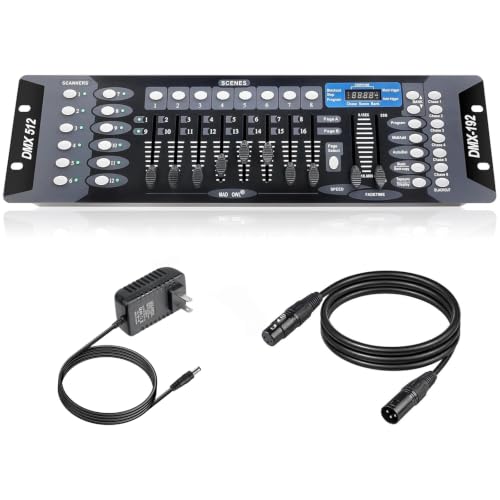
- Controls up to 12 lighting fixtures
- Supports six programmable chases
- Includes a 6.6-foot DMX cable
Best For: DJs, clubs, stages, and performance venues
Professional DJ Lighting Control – SoundSwitch Control One
For DJs building polished DMX controllers for events, the SoundSwitch Control One combines tactile hardware with SoundSwitch software control. It offers two DMX universes, dual USB connections, Engine DJ integration, and hands-on controls for intensities, parameters, and lighting effects.
Best For: DJs and event performers who want hands-on control of scripted and live lighting shows.
Pros:
- Provides two DMX universe inputs and outputs with a Thru option for installations.
- Connects directly to compatible Denon DJ and Numark Engine DJ hardware without a computer.
- Includes a touch strip, smooth encoders, and customizable RGB performance pads.
- Supports live audio BPM detection and control of colors, brightness, strobes, moving heads, and gobos.
Cons:
- Full capabilities depend on SoundSwitch software and compatible hardware.
- PRO DJ LINK Bridge use requires a laptop running SoundSwitch.
Control One is a feature-rich choice when your event setup calls for real-time performance control rather than basic fixture playback. Its broad integration and tactile layout make it especially suitable for DJ-led shows.
Wireless DMX Expansion – CHINLY 8-Piece Wireless DMX Kit
This CHINLY kit is a wireless add-on for event lighting systems that already use a DMX console. With one transmitter and seven receivers, it sends standard DMX512 data over 2.4G wireless connections for cleaner stage and venue setups.
Best For: Event crews extending DMX control to multiple fixtures without running long cable paths.
Pros:
- Includes one transmitter and seven receivers with 3-pin XLR connectors.
- Transmits standard DMX512 data in real time with no stated signal delay.
- Offers a visible-distance communication range of up to 400 meters.
- Provides automatic frequency hopping and seven selectable ID groups for interference management.
Cons:
- It is a wireless transmission system, not a standalone DMX lighting console.
- Performance depends on venue conditions and the stated visible-distance range.
For event productions that already have a DMX controller and compatible fixtures, this kit can simplify distribution across a stage or venue. Its multiple receivers are useful when several lighting positions need wireless access to the same control signal.
Simple RGB Fixture Control – CHAUVET DJ Obey3
The CHAUVET DJ Obey3 is a compact option among DMX controllers for events that use compatible LED fixtures in 3-channel mode. It keeps operation straightforward with manual, automated, and sound-activated RGB playback, plus direct control over dimming, fading, blackout, and strobing.
Best For: Small event setups using RGB LED fixtures that need simple manual or sound-responsive control.
Pros:
- Designed as a compact DMX-512 controller for LED fixtures in 3-channel mode.
- Offers automated, sound-activated, and manual RGB playback options.
- Includes adjustable audio sensitivity and a master-dimmer fader.
- Provides variable fade times and on-the-fly strobing from 2Hz to 33Hz.
Cons:
- Its control is limited to LED fixtures operating in 3-channel mode.
- It offers a simpler feature set than controllers intended for more complex lighting rigs.
The Obey3 is a practical fit when ease of use matters more than advanced programming. Its focused RGB controls can cover basic party, DJ, and small-stage lighting needs without adding unnecessary complexity.
App-Based Event Lighting – ADJ MyDMX Go
The ADJ MyDMX Go offers an approachable app-based solution for event lighting control. Its 256-channel interface works with iPad or Android tablets, supports Wi-Fi and USB connections, and uses a fixture library with more than 15,000 entries to simplify setup.
Best For: Event operators who want quick tablet-based control without traditional lighting programming.
Pros:
- Provides 256-channel DMX control through an iPad or Android tablet.
- Requires no programming for creating manual displays and effects.
- Includes 50 user presets and 21 automatic effects.
- Supports up to two lighting universes and includes truss-mounting O-Clamp brackets.
Cons:
- Operation depends on a compatible tablet and app-based workflow.
- Additional upgrades are available separately through the stated DMXsoft store.
MyDMX Go is well suited to mobile event crews that prioritize fast setup and visual control. The large fixture library, presets, and automatic effects make it a convenient alternative to more programming-intensive DMX systems.
Best for Scene-Based Shows – 384-Channel DMX Stage Controller
For events that need hands-on programming, this 384-channel console gives you a straightforward way to manage multiple fixtures, banks, and scenes. It is a practical choice among DMX controllers for events when you want programmed lighting looks and manual control from one compact unit.
Best For: Bars, clubs, live shows, and stage productions using conventional DMX512 fixtures.
Pros:
- Provides 384 DMX channels and supports up to 24 fixtures.
- Offers 30 banks with 8 programmable scenes each for show preparation.
- Includes a lightweight compact design, side handles, and an LED gooseneck light.
Cons:
- Its feature set is centered on DMX512 control rather than network-based protocols.
- The unit requires an external DC 9–12V power supply rated at not less than 500mA.
This controller is a sensible fit for operators who prefer organized scene playback and direct console control. Its 384-channel capacity offers room for moderately complex event lighting setups without moving to a larger console.
Best for Pixel and Network Control – K16 Art-Net and DMX LED Controller
For large LED installations and software-driven event visuals, the K16 combines DMX with Art-Net and supports online or offline operation. It stands out among DMX controllers for events that require programmable effects, addressable LEDs, or networked control.
Best For: Concerts, DJ performances, weddings, and event displays using addressable LED or SPI installations.
Pros:
- Supports Art-Net, DMX, and online control through Madrix, Resolume 6, and Arkaos.
- Offers offline SD-card playback with support for up to 100 program effects.
- Provides 16 outputs and supports substantial IC loads, with Cat5e networking up to 100 meters between controllers.
Cons:
- The setup involves software, project creation, controller selection, and SD-card export steps.
- LedMagic may be flagged by antivirus software and require whitelisting.
- Its advanced pixel-control features may be more than needed for simple fixture-only systems.
The K16 is best suited to technically involved productions rather than basic standalone DMX operation. Its combination of network protocols, software compatibility, and offline playback makes it a flexible choice for synchronized LED effects.
Best for Fast Wireless Setups – 2.4G Wireless DMX Transmitter and Receivers
This three-piece wireless DMX kit is designed to reduce cable runs between a controller and compatible lighting fixtures. For mobile productions, it is a convenient option among DMX controllers for events where faster installation and flexible fixture placement matter.
Best For: Mobile DJs, weddings, discos, and stage events using moving heads or PAR lights.
Pros:
- Includes one transmitter, two receivers, and three power adapters.
- Uses 2.4G frequency hopping across 126 channels for anti-interference operation.
- Supports seven independent group IDs and is rated for a range up to 1,000 feet.
Cons:
- Each unit needs a power adapter; the set does not include built-in batteries.
- It provides wireless DMX transmission rather than serving as a standalone scene-programming console.
- Compatibility still depends on the connected fixtures supporting DMX512 connections.
This kit is a practical add-on for event crews that already have a DMX controller but want to eliminate some XLR cabling. The two receivers allow separate fixture locations, while the group IDs help manage multiple lighting rigs in the same venue.
Easy-Start Show Control – CO-Z 192-Channel DMX Controller
For shoppers comparing dmx controllers for events, the CO-Z 192 DMX controller offers a straightforward layout with capacity for up to 12 intelligent lights, each using up to 16 channels. It also supports up to 240 scenes, making it suitable for building more involved event lighting setups.
Best For: Amateur DJs, weddings, church gatherings, family events, and small venue lighting.
Pros:
- Controls up to 12 fixtures with 192 channels.
- Supports up to 240 scenes for complex shows.
- Organized controls include scene, channel, speed/time, and function sections.
- Voice control and a three-pin connection support convenient operation with compatible equipment.
Cons:
- Uses corded electric power, so placement depends on access to an outlet.
- The plastic construction may be less substantial than a metal-bodied controller.
Its clearly divided control surface and voice-control feature make this a practical choice for users who want broad scene capacity without an especially complicated interface.
Programmable Event Scenes – 192-Channel DMX512 Console
This 192-channel console is a strong option among dmx controllers for events when programmable transitions matter. It controls up to 12 fixtures with up to 16 channels each, while allowing scenes of up to 40 steps with adjustable pause and fade times.
Best For: DJs, stage-lighting users, clubs, weddings, and event setups requiring customized scene transitions.
Pros:
- Controls up to 12 intelligent lights and supports up to 240 scenes.
- Allows up to 40 steps per scene.
- Offers adjustable pause times from 1 to 25.5 seconds and fade speeds from 0.1 to 25.5 seconds.
- Includes a DMX512 output with a three-core XLR connector.
Cons:
- The many programming controls may take time for beginners to learn.
- Its notes do not specify that a DMX cable is included.
Choose this model if your event lighting needs more than simple manual adjustments and you want control over the timing and progression of programmed scenes.
Cable-Included Fixture Control – WK-192 192-Channel DMX Board
For event operators who want a cable included, this WK-192 is a practical contender among dmx controllers for events. Its 192 channels control up to 12 fixtures, and its banks, scenes, and chases provide a framework for creating repeatable lighting sequences.
Best For: DJs, clubs, stages, and performance venues using multiple compatible lighting fixtures.
Pros:
- Controls up to 12 fixtures with up to 16 channels each.
- Includes 23 banks of 8 programmable scenes.
- Supports 240-step scenes across 6 programmable chases.
- Includes a 6.6-foot DMX cable.
Cons:
- The rack-mount design and larger dimensions may require more setup space.
- Its programming-focused interface may be more than needed for simple lighting control.
The included cable and chase programming make this a useful pick for buyers assembling a more structured stage or DJ lighting system.
How We Picked the Best Dmx Controllers for Events
We focused on practical control, fixture compatibility, portability, programming flexibility, and suitability for live event work. The selection covers simple 192-channel boards, larger 384-channel controllers, wireless transmitter-and-receiver kits, app-based control, and professional systems that support DMX or Art-Net workflows.
We also considered how easily each type of controller can fit common setups, including PAR lights, moving heads, party fixtures, LED bars, and addressable lighting. Because event needs vary widely, the best choice is not necessarily the controller with the most channels; it is the one that matches your fixtures and operating style.
Quick Comparison
| Controller Type | Best For | Main Advantage | Potential Limitation |
|---|---|---|---|
| Basic 192-channel console | Small events and beginners | Simple, affordable hands-on control | Limited fixture capacity and automation |
| 384-channel controller | More complex small-to-mid-size rigs | Additional scenes and fixture control | Requires more programming time |
| Wireless DMX kit | Clean installations and mobile setups | Reduces long cable runs | Needs careful range and interference planning |
| App-based controller | DJs and compact event systems | Portable interface and flexible operation | Depends on a compatible device and network setup |
| Art-Net or professional console | Production teams and advanced rigs | Scalable control and deeper programming | Higher learning curve and setup demands |
Key Buying Factors for Dmx Controllers for Events
Channel and Fixture Capacity
Count the DMX channels used by every fixture, not just the number of lights. A moving head may use many channels, while a basic PAR may use only a few. Leave spare capacity for future additions.
Programming and Live Control
Look for the controls your workflow requires: faders, banks, scenes, chases, sound activation, blackout, and tap-tempo functions. Physical faders can be faster during live shows, while software may offer more detailed fixture programming.
Compatibility and Connectivity
Confirm that the controller uses the DMX standard and has the appropriate connectors, addressing options, and fixture profiles. Advanced systems may also support Art-Net, SPI, or other protocols. Wireless systems should provide compatible transmitters and receivers for the required fixtures.
Portability and Reliability
Mobile operators should prioritize manageable size, durable construction, straightforward setup, and dependable power. For permanent venues, prioritize expandability, networking, and repeatable show storage.
Who Should Buy Which Dmx Controllers for Events?
- Beginners and small-party DJs: Start with a straightforward 192-channel console or compact app-based controller.
- Mobile entertainers: Consider wireless DMX kits or portable controllers to reduce cable clutter and speed up setup.
- Clubs and regular venues: Choose a controller with scene, chase, and sound-active functions for repeatable programming.
- Stage crews and growing event companies: A 384-channel or more advanced system offers useful headroom for additional fixtures.
- Installers and programmers: Look at Art-Net-capable or professional controllers when networked and addressable lighting is part of the plan.
Before buying, list your fixtures, total their channel requirements, check connector and protocol compatibility, and decide whether you need hands-on faders, wireless operation, or software control. That checklist will narrow the field quickly and help you choose Dmx Controllers for Events that remain useful as your lighting rig grows.