The best high-speed memory card readers make it easier to move photos, video, and other large files without waiting on slow transfers. The right model depends on your card format, host-device ports, and whether you need basic portability or UHS-II and CFexpress performance.
We selected 10 options spanning multi-format desktop readers, compact USB-C adapters, dual-slot designs, and specialized professional readers. Use the guide below to match transfer speed, compatibility, and convenience to your everyday workflow.
Best 10 High Speed Memory Card Readers Picks for 2026
Best All-Around 4-in-1
BENFEI USB-C/USB 3.0 Card Reader

- Supports four card formats
- Reads four cards simultaneously
- Up to 160MB/s UHS-I transfers
Best For: Mixed-format media workflows
Fastest Pro Workflow
ProGrade CFexpress Type B & SD Reader
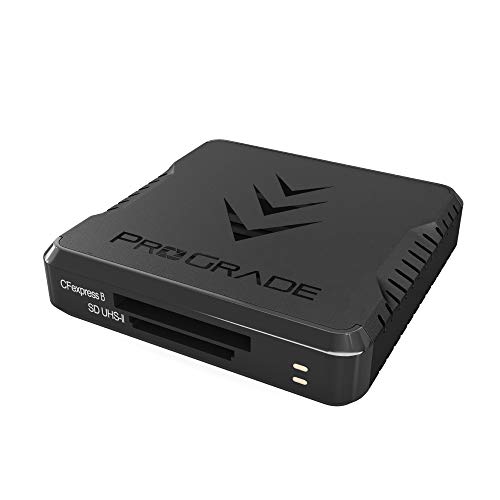
- Up to 1.25GB/s transfers
- Reads CFexpress and SD simultaneously
- Magnetic mobile mounting system
Best For: Professional photo and video workflows
Compact SD Speed Pick
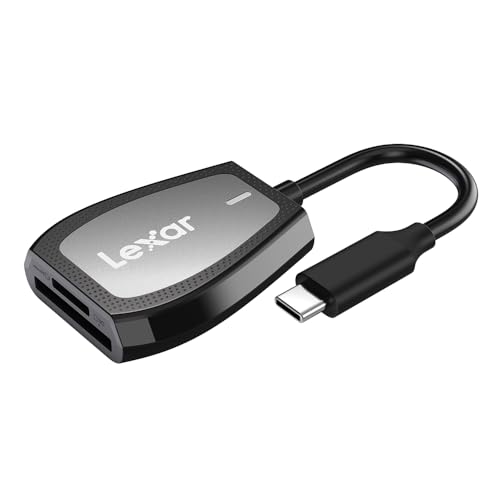
- Up to 312MB/s read speed
- Dedicated SD and microSD slots
- LED activity indicator
Best For: USB-C SD and microSD transfers
Best Phone-Friendly Value

- Supports SD and microSD cards
- Includes an extra USB 3.0 port
- Up to 90MB/s transfers
Best For: Direct phone, tablet, and camera-card transfers
Best UHS-II Speed Pick
UGREEN USB C SD 4.0 Card Reader

- Up to 312MB/s with compatible UHS-II cards
- Reads and writes SD and microSD simultaneously
- Durable aluminum case with braided cable
Best For: Fast UHS-II transfers on USB-C devices
Best 3-in-1 Versatility

- SD, microSD, and USB 3.0 in one device
- Up to 5Gbps transfer speed
- Compact aluminum design for travel
Best For: USB-C users needing card and accessory connectivity
Best Multi-Format Value
SmartQ C368 USB 3.0 Card Reader

- Four-in-one support for SD, microSD, MS, and CF
- USB 3.0 speeds up to 5Gbps
- Plug-and-play support for Windows, Mac, and Linux
Best For: USB-A users with mixed camera card formats
Best Compact USB-C Pick
Anker PowerExpand Dual-Slot Reader
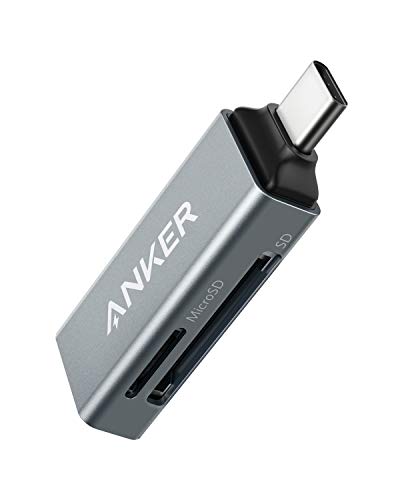
- Compact 9 g design
- SD and microSD slots
- Up to 5 Gbps via USB-C
Best For: USB-C users prioritizing portability
Best Versatile Interface
uni USB-C and USB-A Card Reader

- USB-C and USB-A connectivity
- Simultaneous SD and microSD access
- Up to 5 Gbps transfers
Best For: Mixed-device users and frequent file transfers
Best Dual-Connector Design

- USB-C and USB-A headers
- Dual-card simultaneous access
- Aluminum, dust-protective build
Best For: Creators switching between modern and legacy ports
Best All-Around 4-in-1 – BENFEI USB-C/USB 3.0 Card Reader
For shoppers seeking high speed memory card readers with broad format support, the BENFEI 4-in-1 is a versatile choice. Its USB-C and USB 3.0 connections support SD, microSD, MS, and CF cards, while UHS-I transfer rates can reach up to 160MB/s when the card and host port support the required speeds.
Best For: Photographers and laptop users who need one reader for several card formats and simultaneous transfers.
Pros:
- Reads and writes SD, microSD, MS, and CF cards.
- Can access four cards simultaneously.
- Includes both USB-C and USB 3.0 connectivity.
- Backed by an 18-month warranty.
Cons:
- Actual transfer speed depends on the memory card and USB port.
- Not compatible with standard Memory Stick, Memory Stick Micro, or CF Type I cards.
- Some older operating systems may not support exFAT SDXC cards.
This BENFEI model stands out for flexibility rather than specialized maximum speed. It is a practical high speed memory card reader for mixed media collections, especially if you use both USB-C and USB-A equipment.
Fastest Pro Workflow – ProGrade CFexpress Type B & SD Reader
Professionals handling large photo and video files will appreciate this high speed memory card reader’s USB 3.2 Gen 2 interface. It supports CFexpress Type B and SD cards, with transfers advertised up to 1.25GB/s or 10Gb/s from both cards simultaneously.
Best For: Professional photographers, videographers, and creators using CFexpress Type B and SD media.
Pros:
- Supports simultaneous CFexpress Type B and SD card transfers.
- Offers up to 1.25GB/s or 10Gb/s transfer speeds.
- Includes a magnetic mounting system with an adhesive metal plate.
- Includes a two-year warranty.
Cons:
- Only two card slots are provided.
- Its benefits are most relevant to users with CFexpress Type B or high-speed SD cards.
- Requires a compatible USB 3.2 Gen 2 connection to approach its rated performance.
With its high throughput and mobile mounting option, this ProGrade reader is the strongest fit for demanding post-production workflows. It is less versatile than multi-format readers but better suited to compatible professional media.
Compact SD Speed Pick – Lexar Dual-Slot USB-C Reader
The Lexar dual-slot reader is a compact option for users who want high speed memory card readers focused on SD and microSD media. Its USB 3.2 Gen 1 Type-C connection supports read speeds up to 312MB/s, while remaining compatible with USB 2.0 ports and UHS-I cards.
Best For: Laptop and desktop users who regularly move files between SD or microSD cards and USB-C devices.
Pros:
- Rated for read speeds up to 312MB/s.
- Provides separate SD and microSD slots.
- Includes an LED activity indicator.
- Offers backward compatibility with USB 2.0 and UHS-I cards.
Cons:
- It does not provide CF or Memory Stick support.
- Maximum performance depends on the card and connected port.
- The supplied details specify read speed rather than a matching write-speed rating.
Lexar keeps the design focused and straightforward. Choose it when SD and microSD compatibility matters more than supporting a wider range of professional card formats.
Best Phone-Friendly Value – SZHAIYIJIN USB-C SD Reader
This SZHAIYIJIN adapter combines SD and microSD slots with a USB port, making it a convenient high speed memory card reader for USB-C phones, tablets, and computers. It supports simultaneous card access at speeds up to 90MB/s and requires no driver installation on the listed operating systems.
Best For: iPhone 15–17 Pro users, Android device owners, and photographers transferring files directly from camera cards.
Pros:
- Supports SD and microSD cards, including SDHC, SDXC, and UHS-I/UHS-II cards.
- Can read and write two cards simultaneously.
- Adds a USB 3.0 port for compatible peripherals and storage devices.
- Plug-and-play design requires no additional power.
Cons:
- Advertised transfer speed is up to 90MB/s, below the fastest readers in this roundup.
- Compatibility and speed can vary by device, card, and operating system.
- The supplied warranty information is limited.
Its combination of dual card slots, a USB port, and USB-C compatibility makes this reader useful for mobile file transfers. It is a sensible pick for convenience, though speed-focused users may prefer a faster USB 3.2 model.
Best UHS-II Speed Pick – UGREEN USB C SD 4.0 Card Reader
If you need high speed memory card readers for large photos, 4K movies, or video projects, the UGREEN USB C SD 4.0 Card Reader is a strong fit. Its UHS-II support reaches up to 312MB/s with compatible cards, while the dual slots let you work with SD and microSD media without repeatedly swapping devices.
Best For: Photographers, vloggers, and USB-C device users who need fast UHS-II SD and microSD transfers.
Pros:
- Supports UHS-II SD and microSD cards with speeds up to 312MB/s.
- Reads and writes two cards simultaneously.
- Works across Windows, macOS, Linux, ChromeOS, iPadOS, and Android with plug-and-play setup.
- Aluminum housing and a braided cable support everyday durability.
Cons:
- Requires a USB-C device; Android phones also need OTG support.
- Performance depends on using compatible UHS-II cards and hardware.
Choose this reader when transfer speed is the priority and your workflow uses USB-C plus UHS-II media. Its two-slot design also adds convenience for moving files between cards.
Best 3-in-1 Versatility – Acer USB-C 3-in-1 Card Reader
The Acer 3-in-1 reader is a practical choice among high speed memory card readers when you want card access plus an extra USB 3.0 port. It supports SD and microSD cards and can transfer data at up to 5Gbps, making it useful for laptops, tablets, and compatible USB-C phones.
Best For: Travelers and mobile workers who need SD, microSD, and USB-A accessory connectivity in one compact reader.
Pros:
- Combines SD, microSD, and USB 3.0 connectivity.
- Supports transfer speeds up to 5Gbps.
- Aluminum shell helps with heat dissipation during transfers.
- Works with Windows, macOS, ChromeOS, Linux, and compatible USB-C devices.
Cons:
- Does not support UHS-II, CF, XQD, SDUC, or several other card formats.
- Thick device cases may prevent full connector insertion.
- Not compatible with Lightning or USB-A host devices.
This Acer model makes the most sense if your cards are SD or microSD and you value the added USB 3.0 port. Check your device ports and card formats before buying.
Best Multi-Format Value – SmartQ C368 USB 3.0 Card Reader
For users handling several older and current card formats, the SmartQ C368 is a flexible option among high speed memory card readers. Its four-in-one design supports SD, microSD, MS, and CF cards, with USB 3.0 transfer speeds up to 5Gbps and a straightforward plug-and-play setup.
Best For: Camera users and travelers who need one USB-A reader for SD, microSD, Memory Stick, and CompactFlash cards.
Pros:
- Supports SD, microSD, Memory Stick, and CompactFlash formats.
- Offers USB 3.0 transfer speeds up to 5Gbps.
- Compatible with Windows, macOS, and Linux without extra drivers.
- Blue LED indicates when the reader is powered.
Cons:
- Uses USB-A rather than USB-C.
- Memory cards are not included.
- Transfer speed depends on the card and connected USB hardware.
The C368 is a sensible pick when broad format support matters more than a modern USB-C connection. It is especially useful for mixed camera-card collections and legacy Memory Stick media.
Best Compact USB-C Pick – Anker PowerExpand Dual-Slot Reader
The Anker PowerExpand is a practical choice for shoppers seeking high speed memory card readers for USB-C phones, laptops, and tablets. Its compact design includes separate SD and microSD slots, while USB 3.0-class transfer speeds reach up to 5 Gbps.
Best For: USB-C users who want a small, dependable reader for SD and microSD cards.
Pros:
- Compact, lightweight design at just 9 g.
- Includes standard SD and microSD slots.
- Supports SDHC, SDXC, UHS-I, microSDHC, and microSDXC cards.
- Works with many USB-C devices, including compatible MacBook, Galaxy, Chrome OS, and Mac OS systems.
Cons:
- May require removing a device case for proper connection.
- Uses USB-C only, so it is not suited to devices without a compatible port.
This Anker reader is a strong everyday option when portability matters most. Its two slots and broad card support cover common photography and mobile-storage needs without adding much bulk.
Best Versatile Interface – uni USB-C and USB-A Card Reader
The uni card reader stands out among high speed memory card readers because it supports both USB-C and USB-A connections. With dual card slots and transfer speeds up to 5 Gbps, it is suited to moving photos, videos, and other files between cards and computers, tablets, or phones.
Best For: Users who need one reader for both USB-C and USB-A devices and occasional simultaneous card access.
Pros:
- USB-C and USB 3.0 interfaces support transfers up to 5 Gbps.
- Dual slots support SD and microSD card formats.
- Can read and write two cards simultaneously.
- Plug-and-play operation works with Windows, macOS, Android, and compatible devices.
Cons:
- Not compatible with Lightning-port devices.
- Does not support CFexpress, SIM, XQD, MS, or Memory Stick cards.
- Transfers data from cards rather than connecting directly to a camera.
The uni reader is a flexible pick for households or workspaces that use a mix of newer USB-C and older USB-A equipment. Its covers and attached cord also make it convenient to carry in a camera bag.
Best Dual-Connector Design – Acer USB-C and USB-A Reader
The Acer ODK4E0 combines USB-C and USB-A connectivity with dual SD and microSD slots, making it a useful option for shoppers comparing high speed memory card readers for computers, phones, tablets, and cameras. Its USB 3.0 interface supports up to 5 Gbps and the aluminum construction is designed for regular use.
Best For: Photographers and creators who switch between USB-C and USB-A devices.
Pros:
- USB 3.0 transfer speeds reach up to 5 Gbps.
- Supports simultaneous reading and writing on SD and microSD cards.
- Dual USB-C and USB-A headers improve device flexibility.
- Compact, dust-protective design with heat-resistant aluminum construction.
Cons:
- Thick device cases may prevent full insertion.
- Not compatible with Lightning-port devices.
- Does not support CFexpress, SIM, XQD, MS, or Memory Stick cards.
This Acer reader is a practical fit for users who want broad port compatibility without carrying separate adapters. The dual-slot layout is especially helpful when organizing files from multiple cards.
How We Picked the Best High Speed Memory Card Readers
We focused on readers that support common camera-card formats and provide a practical connection for current laptops, tablets, phones, and desktops. The lineup includes USB 3.0 and USB-C models for everyday transfers, UHS-II-capable options for faster SD workflows, and a CFexpress Type B reader for compatible professional cameras.
We also considered slot flexibility, simultaneous card access, plug-and-play operation, portability, and the likelihood that a reader will remain useful as your devices change. Advertised speeds are theoretical maximums; actual results depend on the card, files, host port, cable, and device operating system.
Quick Comparison
| Best For | Look For | Typical Strength |
|---|---|---|
| Everyday SD and microSD transfers | USB 3.0 or USB-C | Good speed and broad compatibility |
| Photographers using newer UHS-II cards | UHS-II support | Faster sustained SD performance |
| Professional CFexpress workflows | CFexpress Type B support | High-speed camera offloads |
| Travel and phone use | Compact USB-C design | Easy connection with minimal bulk |
| Mixed media collections | Multiple card slots | Less need for separate adapters |
Key Buying Factors for High-Speed Memory Card Readers
Card Format and Generation
Start with the cards you already own. SD and microSD are widely supported, while CompactFlash and Memory Stick require specific slots. If you use UHS-II SD cards, choose a reader with UHS-II support; a basic UHS-I reader can work, but it may limit transfer speeds.
Connection and Real-World Speed
USB 3.0 is sufficient for many UHS-I cards, while USB 3.2 and USB 3.2 Gen 2 readers can better serve faster media. USB-C describes the connector, not necessarily the transfer standard, so check the specifications rather than assuming every USB-C reader is equally fast. Your computer or phone port must support the reader’s advertised rate.
Slots and Simultaneous Access
A dual-slot reader is convenient for SD and microSD users, but confirm whether both slots can operate at once. Multi-format readers are useful for mixed archives, although they may be larger. If you regularly copy from several card types, a four-in-one design can be more practical than carrying separate adapters.
Build, Cable, and Device Compatibility
For travel, prioritize a compact body, a protected connector, and a cable or plug that will not strain your device. Phone users should verify operating-system support, available storage, and whether their device can power the reader. A reader cannot bypass a phone’s file-management or accessory limitations.
Who Should Buy Which High Speed Memory Card Readers?
Choose a compact USB-C SD or microSD reader if you mainly transfer files between one card type and a modern laptop or phone. Select a dual-slot model when you alternate between full-size SD and microSD cards. A multi-format reader is the better fit for older cameras, Memory Stick media, or CompactFlash collections.
Photographers and videographers using UHS-II cards should prioritize a reader that explicitly supports UHS-II and pair it with a capable USB port. Professionals shooting CFexpress Type B should choose the dedicated CFexpress reader rather than relying on a general-purpose SD adapter. If speed is secondary to convenience, a simple plug-and-play USB 3.0 model may offer the best value.