A dedicated shifter can make American Truck Simulator and Euro Truck Simulator 2 feel far more natural than keyboard controls or paddle shifting. The right model adds tactile gear changes, better immersion, and a more convincing truck-cab driving experience.
This roundup compares 10 sim racing shifters for truck simulators, including USB truck-specific units, H-pattern and sequential designs, and established add-ons from Logitech, Thrustmaster, and Turtle Beach.
Best 10 Sim Racing Shifters for Truck Simulators Picks for 2026
Best PC Truck-Sim Upgrade
aikeec USB Truck Simulator Shifter

- Supports up to 18 gears
- High/low range switches
- Plug-and-play Windows USB
Best For: PC players running ATS or ETS2
Best Premium Multiplatform Pick
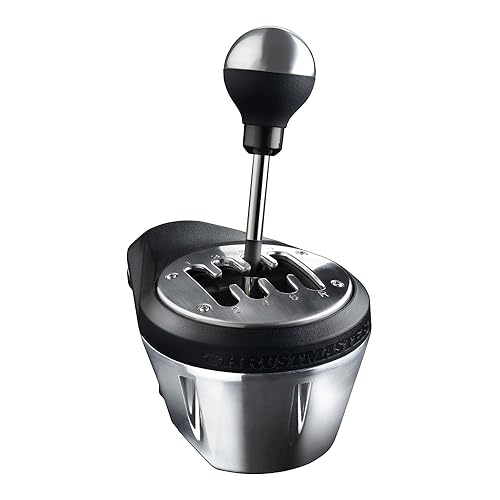
- All-metal construction
- H-pattern and sequential modes
- Works with PC and major consoles
Best For: Durable mixed-use simulator rigs
Best Logitech Wheel Match
Logitech Driving Force Shifter

- Six-speed H-pattern layout
- Push-down reverse gear
- Secure clamps and bolt points
Best For: G29, G920, or G923 owners
Best Compact Thrustmaster Option

- Seven gears plus reverse
- Metal shift lever
- PC, PlayStation, and Xbox support
Best For: Thrustmaster-based truck and racing rigs
Truck-Shift Realism Pick

- High/low truck-style selector
- Supports up to 18 gear settings
- Windows USB plug-and-play setup
Best For: ATS and ETS2 players seeking a truck-style shift knob
Versatility Pick
Nitho 6-Speed H-Pattern and Sequential Shifter

- 6+R H-pattern gearbox
- Interchangeable sequential plate
- USB setup with 55 mm clamp
Best For: PC players mixing truck simulators with racing games
Adjustable Build Pick

- 7+R truck-sim layout
- Height-adjustable construction
- Driver-free Windows USB connection
Best For: PC truck sim users wanting an adjustable dedicated shifter
Premium Xbox Pick

- Seven-speed H-pattern plus sequential mode
- Handbrake and high/low range controls
- PC compatible; Xbox support via VelocityOne Race
Best For: PC and Xbox users wanting one versatile shifter unit
Plug-and-Play Value

- Independent USB connection for Windows PC
- 7+R layout with height adjustment
- Works with Logitech and Thrustmaster setups
Best For: PC players seeking a simple compatible USB shifter
High-Gear Truck Sim Pick

- Supports up to 18 gears
- Includes three adapter sizes
- Built for ATS and ETS2 on PC
Best For: Truck-sim players using complex multi-speed transmissions
Best PC Truck-Sim Upgrade – aikeec USB Truck Simulator Shifter
The aikeec USB shifter is built specifically for truck-sim players who want more control than a standard racing shifter provides. It supports up to 18 gears, includes high/low range switches, and connects directly to a Windows PC for ETS2 and ATS.
Best For: PC players using Eaton Fuller-style transmissions in American Truck Simulator or Euro Truck Simulator 2.
Pros:
- Supports up to 18 gears with customized high/low switching.
- Includes adapter accessories for Logitech, Thrustmaster, and other shifter shafts.
- Independent USB connection offers plug-and-play Windows setup without a driver.
Cons:
- PC Windows use only.
- Setup requires configuring the shifter layout and toggle buttons in-game.
Choose this model when truck-specific range and gear controls matter more than broad console compatibility. Its dedicated USB connection and included adapters make it a practical choice for a PC-focused simulator rig.
Best Premium Multiplatform Pick – Thrustmaster TH8A Shifter
The Thrustmaster TH8A is a durable option among sim racing shifters for truck simulators, especially for users who also play other driving games. Its all-metal construction, H-pattern and sequential modes, and multiplatform support give it flexibility beyond truck simulation.
Best For: Players building a durable PC or console rig that needs both H-pattern and sequential shifting.
Pros:
- 100% metal construction is designed for long-term use.
- Switches between H-pattern and sequential operation.
- Compatible with PS5, PS4, Xbox Series X|S, Xbox One, and PC.
- Hall Effect technology is designed to maintain shifting accuracy.
Cons:
- Its 7+1 configuration may be less suitable for multi-range truck transmissions than a dedicated 18-speed shifter.
- At 5.2 pounds, it is comparatively substantial for a compact add-on.
The TH8A makes sense for a mixed-use simulator setup. It offers a sturdy, mountable design and two shifting styles, although truckers seeking extensive gear-range controls may prefer a more specialized model.
Best Logitech Wheel Match – Logitech Driving Force Shifter
The Logitech Driving Force Shifter is a straightforward choice for Logitech wheel owners considering sim racing shifters for truck simulators. It pairs with the G29, G920, and G923 ecosystem and provides a traditional six-speed H-pattern layout with push-down reverse.
Best For: PC and console players who already use a compatible Logitech Driving Force racing wheel.
Pros:
- Designed for Logitech G29 and G920 wheels and compatible with G923 setups.
- Six-speed H-pattern shifting includes push-down reverse.
- Steel gear shaft and leather-wrapped knob and boot provide a substantial feel.
- Built-in clamps and bolt points help secure it to a table or racing rig.
Cons:
- The six-speed layout is less versatile for trucks requiring many ranges.
- It is primarily suited to Logitech wheel ecosystems.
This is a sensible plug-in choice when your rig already centers on Logitech hardware. Its familiar H-pattern and secure mounting are appealing, but its fixed six-speed layout is not as truck-specific as an extended-range shifter.
Best Compact Thrustmaster Option – Thrustmaster TH8S Shifter
The Thrustmaster TH8S is a compact H-pattern add-on for players who want a dedicated manual shifter without moving to a larger premium unit. It provides seven gears plus reverse and works across PC, PlayStation, and Xbox with compatible Thrustmaster force-feedback wheels.
Best For: Truck-sim and racing players wanting a straightforward metal-lever shifter for a Thrustmaster-based setup.
Pros:
- Offers a realistic seven-gear-plus-reverse H-pattern layout.
- Metal shift lever and included clamp support everyday simulator use.
- Compatible with Thrustmaster force-feedback wheels on PC, PlayStation, and Xbox.
- Includes the shifter, clamp, required cables, and owner’s manual.
Cons:
- It does not provide the multi-range gear count of a dedicated truck shifter.
- Compatibility is centered on Thrustmaster force-feedback wheel systems.
The TH8S is a balanced choice for a Thrustmaster cockpit that needs an H-pattern shifter for trucks and other driving games. Its seven-plus-reverse layout is more flexible than a basic six-speed unit, while remaining focused and simple to mount.
Truck-Shift Realism Pick – ATS High/Low USB Shifter Knob
For shoppers comparing sim racing shifters for truck simulators, this ATS-focused USB shift knob emphasizes truck-style operation rather than a conventional car gearbox. Its high/low selector, customizable buttons, and support for up to 18 gear settings make it a practical match for American Truck Simulator and Euro Truck Simulator 2 on a Windows PC.
Best For: Truck-sim players who want an authentic-style shift knob for compatible USB shifters.
Pros:
- High/low handball design supports truck-style gear changes.
- Customizable buttons can be configured for up to 18 gears.
- USB plug-and-play setup with automatic driver installation on Windows PCs.
- Compatible with several Logitech, Thrustmaster, PXN, Fanatec, and Moza shifter setups when shaft dimensions fit.
Cons:
- Designed for PC Windows systems only.
- Compatibility depends on the existing shifter and a shaft diameter under 12 mm.
- Setup requires configuring controls in ATS or ETS2.
This is the most truck-specific option of the three, especially for users who value a realistic high/low range selector. Check your shifter shaft size and follow the included illustrated instructions before ordering.
Versatility Pick – Nitho 6-Speed H-Pattern and Sequential Shifter
Among sim racing shifters for truck simulators, the Nitho Gear Shifter stands out for its flexible H-pattern and sequential modes. It connects directly to a Windows PC by USB and includes a clamp for desks or racing setups up to 55 mm thick, making it useful for mixed driving and racing libraries.
Best For: PC users who want one shifter for manual truck simulation and sequential racing games.
Pros:
- Offers six forward gears plus reverse in H-pattern mode.
- Interchangeable plates provide H-pattern and sequential shifting.
- USB plug-and-play connection requires no driver or additional software.
- Adjustable clamp supports compatible surfaces up to 55 mm thick.
Cons:
- Made for Windows PCs rather than console systems.
- Games may require manual gear mapping in their control settings.
- Six-speed H-pattern operation may be less suited to truck-sim layouts requiring more ranges.
The interchangeable plates give this shifter broader use than a truck-only accessory, while the 6+R layout covers familiar manual transmissions. It is a sensible choice if you switch regularly between trucking, circuit racing, and sequential-style driving.
Adjustable Build Pick – aikeec 7+R USB Truck Shifter
The aikeec USB Truck Simulator Shifter is aimed at drivers who want a dedicated 7+R layout for PC truck and racing games. Its stainless-steel internal body, aluminum-alloy base, height adjustment, and included clamp focus on a more substantial, customizable setup for ATS, ETS2, and supported racing titles.
Best For: PC sim drivers who prioritize a 7+R truck layout and adjustable shifter positioning.
Pros:
- 7+R configuration is well suited to truck-simulator gear layouts.
- Height-adjustable design helps tailor the shifter position.
- USB connection is driver-free on Windows 10, Windows 7, and XP.
- Independent USB operation works with compatible Logitech and Thrustmaster setups.
Cons:
- Compatibility is specified for Windows PCs.
- Requires configuring the device as H7R in the Windows USB Game Controller settings.
- The supplied notes identify one button, offering less button customization than the ATS-focused option.
This model is a strong middle ground for truck and racing use when a 7+R arrangement and adjustable height matter. Its independent USB design also makes it easier to pair with a supported wheel base without relying on a proprietary connection.
Premium Xbox Pick – VelocityOne Multi-Shift
The Turtle Beach VelocityOne Multi-Shift is a versatile choice among sim racing shifters for truck simulators, especially for PC and Xbox users who want H-pattern, sequential, and handbrake functionality in one unit. Its seven-speed H-gate, reverse gear, high/low range button, and Hall-effect sensors support a broad range of driving setups.
Best For: PC and Xbox sim racers seeking an all-in-one shifter and analog handbrake.
Pros:
- Combines a seven-speed H-gate, reverse, sequential mode, and handbrake mode.
- High and low range gear button supports up to 14 gears.
- Includes desk-clamp and permanent-mounting options, plus short- and long-throw shafts.
- Hall-effect magnetic technology is designed for smooth, durable operation.
Cons:
- Xbox compatibility requires the VelocityOne Race ecosystem.
- At 3.9 pounds, it may be more substantial than a basic USB shifter.
This is the most feature-rich option in the group. It makes sense for truck-sim players who want range controls and a handbrake without adding several separate peripherals, while PC users also get broad compatibility.
Plug-and-Play Value – Aikeec USB Truck Shifter
The Aikeec USB Truck Simulator Shifter is a straightforward option for PC players comparing sim racing shifters for truck simulators. It connects independently through USB, supports a 7+R layout, and is designed to work with Logitech and Thrustmaster wheel setups as well as truck-sim titles such as ATS and ETS2.
Best For: Windows users who want an independent USB shifter with broad wheel compatibility.
Pros:
- Compatible with Logitech G25, G27, G29, G920, and Thrustmaster T300RS/GT systems.
- Independent USB connection works directly with a PC.
- Driver-free setup is supported on Windows 10, Windows 7, and XP.
- Height-adjustable design helps users position the shifter comfortably.
Cons:
- Windows PC compatibility is listed; console support is not specified.
- The notes describe a 7+R shifter but do not mention a dedicated range selector for higher truck transmissions.
The Aikeec focuses on accessible PC setup rather than extra controls. It is a practical fit when you already have a compatible wheel and want a dedicated USB gear lever for truck and racing games.
High-Gear Truck Sim Pick – Kelegaan USB Shifter
The Kelegaan USB Truck Simulator Shifter stands out among sim racing shifters for truck simulators by supporting up to 18 gears and customizable switching buttons. Its setup is aimed specifically at ATS and ETS2, with adapters for several shifter sizes and compatibility with popular Logitech and Thrustmaster hardware.
Best For: ATS and ETS2 players running multi-speed Eaton Fuller-style transmissions.
Pros:
- Supports up to 18 gears with customizable buttons for quick switching.
- Includes 8 mm, 10 mm, and 12 mm adapters for broader shifter compatibility.
- USB plug-and-play design includes an English illustrated manual.
- Two-year warranty and stated 24/7 support add setup reassurance.
Cons:
- Designed for PC rather than consoles.
- Configuration in ATS or ETS2 requires selecting the appropriate transmission and toggle settings.
- Its truck-focused features may be unnecessary for simpler racing-game setups.
For serious truck simulation, the Kelegaan offers the most extensive gear-range support here. Its adapter set and configuration guidance make it a strong match for players who want to replicate complex truck transmissions in ATS or ETS2.
How We Picked the Best Sim Racing Shifters for Truck Simulators
We focused on the features that matter most in truck simulation: compatibility with ATS and ETS2, support for common racing wheels and Windows PCs, realistic H-pattern or sequential operation, connection type, and mounting practicality. We also included options at different price points, from straightforward USB truck shifters to versatile multi-mode units.
Because compatibility can vary by game, wheel, and platform, check the manufacturer’s current requirements before buying. A shifter may connect directly to a PC by USB, while some console-oriented add-ons require a compatible wheel base or adapter.
Quick Comparison
| Type | Best For | What to Check |
|---|---|---|
| USB truck shifter | ATS and ETS2 PC setups | Windows support, button mapping, mounting |
| H-pattern add-on | Manual truck-style shifting | Wheel-base compatibility and gear layout |
| H-pattern/sequential | Flexible sim racing setups | Mode switching and included hardware |
| Shifter with handbrake | Multi-purpose racing rigs | Console support, software, and installation |
Key Buying Factors for Sim Racing Shifters for Truck Simulators
Compatibility and Connection
First decide whether you want a standalone USB device or an add-on designed for a specific wheel ecosystem. Standalone USB models are often the simplest choice for PC truck simulators, while Logitech and Thrustmaster units can offer cleaner integration when paired with the matching wheel hardware.
Shift Pattern and Range
An H-pattern layout usually provides the most authentic manual-truck feel. Sequential operation is useful for racing or situations where you prefer faster, simpler shifts. Some models support both modes, but verify how the changeover works and whether reverse requires a separate action.
Mounting and Durability
Look for a firm clamp, screw points, or a mounting plate that suits your desk or cockpit. A loose shifter can be frustrating during frequent gear changes. Metal construction and a positive mechanical feel may improve durability, but they can also add weight and cost.
Controls and Configuration
Extra buttons, range selectors, or a handbrake can reduce the need for a separate accessory. Confirm that ATS or ETS2 recognizes the inputs as expected, and allow time to map gears, reverse, splitter functions, or range controls manually.
Who Should Buy Which Sim Racing Shifters for Truck Simulators?
Choose a standalone USB truck shifter if you mainly play ATS or ETS2 on PC and want broad wheel compatibility. Choose a Logitech or Thrustmaster add-on if you already own a compatible wheel and prefer a more integrated setup. Choose a dual-mode shifter if you switch between truck simulation and conventional racing games. Choose a model with extra controls or a handbrake if you are building a versatile rig and want to consolidate accessories.
Before ordering, confirm the connector, supported platform, gear layout, mounting method, and return policy. Those details matter more than appearance when choosing among Sim Racing Shifters for Truck Simulators.