Managing multiple case fans can quickly become a cable-management project, especially when your motherboard has limited headers or you want to adjust lighting without opening your PC. The best PC fan controllers with remote controls combine fan expansion, RGB management, and convenient wireless or infrared adjustments.
This roundup compares 10 options ranging from compact ARGB hubs to high-capacity PWM controllers. We focus on compatibility, port count, power delivery, control method, and installation practicality so you can choose a controller that fits your build.
Best 10 PC Fan Controllers with Remote Controls Picks for 2026
Best Budget ARGB Remote
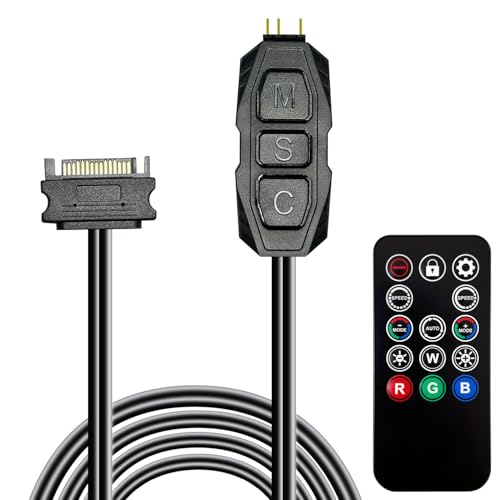
- 215 dynamic modes and four static colors
- 14-key remote with SATA power
- Compact 5V 3-pin ARGB design
Best For: Budget-focused PC lighting upgrades
Best Wireless Speed Control

- 10 wireless fan-speed settings
- PWM control for airflow and noise
- LED display with backup memory
Best For: Compatible AC Infinity ventilation fans
Best Magnetic 9-Fan Hub
upHere PWM and ARGB Controller

- Supports nine PWM fans and ARGB devices
- Magnetic mounting for easy placement
- Includes remote and connection cables
Best For: Multi-fan custom RGB PC builds
Best 10-Port Protection
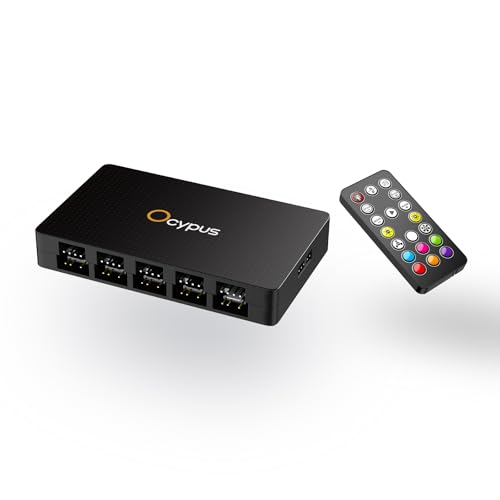
- 10 PWM fan and 10 ARGB output ports
- 19-key remote for lighting control
- Per-port ARGB protection and magnetic mount
Best For: Large desktop cooling and ARGB setups
Compact ARGB Hub
Thermalright X12 IR Fan Controller

- Supports up to 12 PWM fans and ARGB devices
- Includes remote lighting control
- Does not support 12V 4-pin RGB
Best For: Expanding fan and ARGB connections in compact builds
High-Capacity Remote Hub
DARKROCK 20-Port Fan Controller
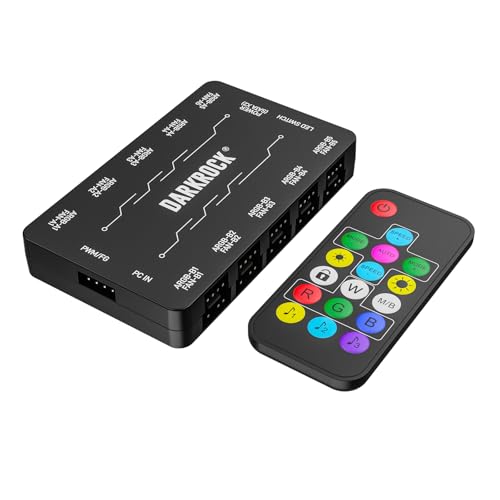
- Handles up to 10 PWM fans and 10 ARGB fans
- Remote adjusts fan speed and lighting
- Uses dual SATA power and magnetic mounting
Best For: Large PWM and 5V ARGB gaming builds
Independent Software Control

- Provides individual PWM control for 10 fans
- Supports Windows and Linux Kernel 7.2+
- Up to 2 A per port and 4.5 A total
Best For: Software-managed airflow with per-fan adjustment
Best for Simple ARGB Control

- 12 static colors plus dynamic lighting modes
- SATA-powered, software-free installation
- Supports 5V 3-pin ARGB devices
Best For: Independent ARGB lighting control for compatible PC components
Best for Nine-Fan Setups
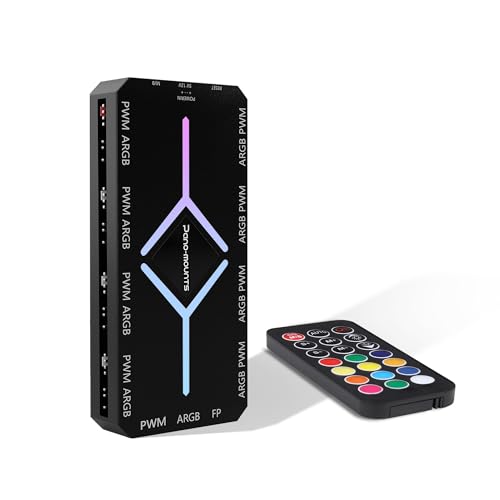
- Manages up to nine fans simultaneously
- Nine PWM and nine 5V ARGB ports
- Magnetic mounting with SATA power
Best For: Centralized speed and lighting control in larger PC builds
Best for Ten-Fan Builds

- Supports up to 10 ARGB fan groups
- Handles 5V ARGB and 12V PWM connections
- Dual SATA input for stable full-load power
Best For: Large PC builds with extensive fan and lighting requirements
Best Budget ARGB Remote – 5V ARGB Fan Controller Kit
This compact 5V 3-pin ARGB controller kit is a practical choice among pc fan controllers with remote controls when you want straightforward lighting management without installing software. It connects to SATA power and supports up to 215 dynamic lighting modes plus four static colors.
Best For: PC builders seeking an inexpensive, tool-free ARGB lighting controller for 5V 3-pin fans, strips, coolers, or other compatible devices.
Pros:
- Includes a 14-key remote for convenient lighting adjustments.
- Offers 215 dynamic modes and four static color options.
- Compact SATA-powered design is easy to hide inside a case.
- Includes a 12-month warranty.
Cons:
- Compatible with 5V 3-pin ARGB devices, not 12V 4-pin RGB equipment.
- Designed primarily for lighting control rather than documented fan-speed management.
This kit is a sensible entry-level option if remote-controlled ARGB effects are your priority. Confirm your components use the required 5V 3-pin connection before buying.
Best Wireless Speed Control – AC Infinity Controller 63
The AC Infinity Controller 63 is a specialized option among pc fan controllers with remote controls, built for wireless speed adjustment in compatible AC Infinity ventilation fans. Its PWM control provides 10 selectable fan speeds, while the LED display and backup memory make settings easy to monitor and retain.
Best For: Users with compatible CLOUDLINE, AIRLIFT, CLOUDWAY, or CLOUDLIFT fans who need wireless ventilation and noise control.
Pros:
- Provides 10 fan-speed levels through a wireless remote.
- Uses PWM control to balance airflow and fan noise.
- White LED indicators show the selected speed.
- Backup memory retains settings after adjustment or interruption.
Cons:
- Compatibility is limited to specified AC Infinity EC motor fan lines.
- Additional receivers are required to control more fans simultaneously and are sold separately.
- This is a ventilation-focused controller rather than a general PC case-fan hub.
Choose this controller when you already use compatible AC Infinity equipment and want precise wireless speed control. It is less suitable for a conventional desktop PC with unrelated fan brands.
Best Magnetic 9-Fan Hub – upHere PWM and ARGB Controller
The upHere P10PARGB BK combines fan and lighting management in one SATA-powered unit, making it a flexible choice among pc fan controllers with remote controls. It supports up to nine PWM fans and 5V ARGB devices, with a magnetic enclosure that simplifies placement and cable organization inside a compatible case.
Best For: Custom PC builders who need centralized control for multiple PWM fans and synchronized 5V ARGB lighting.
Pros:
- Manages up to nine PWM fans and 5V ARGB devices.
- Magnetic mounting supports flexible installation inside the case.
- SATA power is designed for stable output under full load.
- Includes the remote, SATA cable, PWM/ARGB cables, and sync cable.
Cons:
- Requires compatible 5V ARGB equipment for addressable lighting.
- The notes do not specify support for 12V 4-pin RGB devices.
- Its full feature set may be unnecessary for smaller builds with only a few fans.
This hub is a strong fit for builds with several fans and coordinated lighting. The magnetic mount and included cables also make it appealing when clean internal installation is important.
Best 10-Port Protection – Ocypus Delta EH10 PRO
The Ocypus Delta EH10 PRO is a high-capacity option among pc fan controllers with remote controls, offering 10 PWM fan ports and 10 ARGB outputs. Its SATA-powered design, magnetic mounting, and individual ARGB short-circuit and overload protection make it suited to larger PC cooling and lighting setups.
Best For: Larger desktop builds that require many PWM fans, multiple 5V 3-pin ARGB connections, and remote lighting control.
Pros:
- Provides 10 PWM fan ports and 10 ARGB output ports.
- Includes a 19-key remote for lighting modes, brightness, speed, and color.
- Individual ARGB port protection can limit the impact of a connection fault.
- Magnetic mounting and a compact enclosure simplify installation.
Cons:
- Supports 5V 3-pin ARGB, not 12V 4-pin RGB fans.
- PWM fan-speed reading is taken only from the white FAN 1 port.
- Incorrect connector orientation may damage the hub or connected ARGB device.
For a heavily populated case, the EH10 PRO offers unusually broad port capacity and useful safety features. Carefully verify connector types and orientation before installation, especially when mixing PWM and ARGB cables.
Compact ARGB Hub – Thermalright X12 IR Fan Controller
The Thermalright X12 IR is a compact option among PC fan controllers with remote controls, combining support for up to 12 PWM fans and ARGB lighting devices. It helps consolidate connections while providing remote lighting control, but it requires 5V 3-pin ARGB and does not support 12V 4-pin RGB components.
Best For: Builders who need to expand motherboard fan and ARGB connections while keeping cabling organized.
Pros:
- Supports connections for up to 12 PWM fans and compatible ARGB devices.
- Includes an IR remote for convenient lighting color control.
- Compact housing and dual-sided connectors help simplify cable management.
- Can synchronize PWM fan speed and ARGB lighting with compatible motherboard headers.
Cons:
- Does not support 12V 4-pin RGB devices.
- Only the fan connected to the red interface has its speed recognized by the motherboard.
This hub is a practical expansion solution for crowded builds, especially when lighting control matters. Verify your components use 5V 3-pin ARGB and that the motherboard connection setup matches the hub’s limitations.
High-Capacity Remote Hub – DARKROCK 20-Port Fan Controller
The DARKROCK 20-Port hub is designed for large cooling and lighting setups, supporting up to 10 4-pin PWM fans and 10 5V 3-pin ARGB fans. As one of the PC fan controllers with remote controls, it offers remote fan-speed adjustment and lighting control, with dual SATA power for stable operation.
Best For: High-fan-count gaming PCs and showcase builds using compatible PWM and 5V ARGB components.
Pros:
- Provides 10 PWM fan ports and 10 ARGB lighting ports.
- Remote control supports fan-speed adjustment and lighting selection.
- Dual SATA power is designed for stable power delivery.
- Magnetic mounting allows attachment directly to the case.
Cons:
- Supports 5V 3-pin ARGB only and does not support 12V RGB components.
- Requires compatible motherboard headers for the stated connections.
Choose this hub when your build has more fans and lighting devices than the motherboard can conveniently accommodate. Its capacity and magnetic mounting are useful, provided all RGB hardware uses the supported 5V ARGB standard.
Independent Software Control – ARCTIC 10-Port PWM Controller
The ARCTIC 10-Port Fan Controller takes a software-focused approach to PC fan controllers with remote controls, offering individual PWM control for each connected fan rather than relying on a single shared hub signal. It supports Windows and Linux with native driver support and mounts magnetically or with adhesive.
Best For: Users who want per-fan PWM adjustment and software-based control on Windows or supported Linux systems.
Pros:
- Offers independent control for up to 10 fans.
- Supports up to 2 A per port and 4.5 A total.
- Native driver support is listed for Windows and Linux Kernel 7.2+.
- Centralizes fan wiring and supports magnetic or adhesive mounting.
Cons:
- The supplied notes do not indicate an included handheld remote control.
- Linux support is specified for Kernel 7.2 and later.
This controller is better suited to software-managed airflow than remote lighting or handheld operation. It stands out when separate fan adjustment, documented current capacity, and operating-system support are more important than RGB features.
Best for Simple ARGB Control – 21-Key Remote RGB Controller
If you want pc fan controllers with remote controls without relying on motherboard software, this compact ARGB controller offers a straightforward setup. It uses SATA power and supports 5V 3-pin ARGB devices, with dynamic effects, static colors, brightness, and speed adjustments handled by the included 21-key remote.
Best For: PC builders who need independent control for compatible ARGB fans, coolers, LED strips, or other 5V 3-pin lighting devices.
Pros:
- Offers multiple dynamic lighting modes and 12 static colors.
- Wireless 21-key remote adjusts lighting mode, brightness, and speed.
- Tool-free, SATA-powered installation does not require motherboard ARGB support.
- Compact design and copper wiring help simplify case installation.
Cons:
- Designed for 5V 3-pin ARGB devices rather than 12V 4-pin RGB hardware.
- Provides lighting control, but the supplied notes do not describe fan-speed control.
This is a practical choice for adding remote-controlled ARGB effects to a build with compatible 5V 3-pin components. Its main advantage is easy, software-free lighting control, while users seeking centralized PWM fan management should consider a dedicated fan hub instead.
Best for Nine-Fan Setups – 9-Port PWM & ARGB Fan Hub
For builders comparing pc fan controllers with remote controls, this 9-port hub combines fan-speed and ARGB lighting management in one SATA-powered unit. It provides nine PWM ports and nine ARGB ports, with remote operation, magnetic mounting, and compatibility with several major motherboard lighting ecosystems.
Best For: Larger PC builds using up to nine compatible PWM and 5V ARGB fans that need centralized control and tidy installation.
Pros:
- Controls up to nine fans’ speed and lighting from one hub.
- Includes nine PWM ports and nine 5V ARGB ports.
- Magnetic backplate attaches easily to a metal PC chassis.
- Supports ASUS Aura Sync, MSI Mystic Light, and Gigabyte RGB Fusion.
Cons:
- Compatibility is centered on 5V ARGB fans and PWM connections.
- The supplied details list differing warranty information: one year in specifications and two years in the product highlights.
This hub is the more complete option when both fan speed and lighting need to be managed across a multi-fan build. SATA power, magnetic mounting, and broad software compatibility make it well suited to organized installations with up to nine fans.
Best for Ten-Fan Builds – Dual-SATA RF Remote Fan Hub
If your build uses many case fans, this hub stands out among pc fan controllers with remote controls by supporting up to 10 groups of ARGB fans. It combines 5V 3-pin ARGB lighting with 12V 4-pin PWM fan connections, while dual SATA inputs help provide stable power under a full load.
Best For: High-device-count PC builds needing remote fan-speed and ARGB lighting control with magnetic mounting.
Pros:
- Supports up to 10 groups of case ARGB fans.
- Works with 5V 3-pin ARGB and 12V 4-pin PWM connections.
- Dual SATA power inputs are designed for stable operation under full load.
- RF remote, magnetic mounting, and included sync cables simplify installation and control.
Cons:
- Dual SATA connections require additional cable routing inside the case.
- The supplied details identify the display color as white, which may not suit every build aesthetic.
This is a strong fit for expansive builds where a nine-port hub may not provide enough capacity. Its combination of 10-channel support, PWM adjustment, ARGB synchronization, dual SATA input, and protection features makes it the most feature-oriented choice of the three.
How We Picked the Best PC Fan Controllers with Remote Controls
We compared these controllers by looking at the features that matter most in a real PC build: supported fan and lighting standards, number of ports, power input, control range, installation options, and ease of use. We also considered whether a controller is designed primarily for PWM speed control, ARGB lighting, or both.
Port claims alone do not determine performance. A hub must receive adequate power, and connected fans may still depend on motherboard headers or software for advanced speed control. Products with SATA power are generally better suited to multi-fan setups because they draw power directly from the power supply rather than overloading a single motherboard header.
Quick Comparison
| Controller type | Best for | What to check |
|---|---|---|
| ARGB hub | Lighting expansion and remote effects | 5V 3-pin ARGB compatibility |
| PWM fan hub | Managing several fan speeds | 4-pin PWM support and header control |
| Combined PWM/ARGB hub | Fan and lighting management in one unit | Separate connectors and power requirements |
| High-port controller | Large cases and many fans | Total current capacity and cable layout |
Key Buying Factors for PC Fan Controllers with Remote Controls
Fan and RGB Compatibility
Check whether your fans use 3-pin DC, 4-pin PWM, 5V 3-pin ARGB, or 12V 4-pin RGB connections. These standards are not interchangeable. A controller may support one, two, or all of them, so match every connector before purchasing.
Port Count and Power Delivery
Choose more ports than you currently need if you plan to add fans later. For larger arrays, SATA-powered models are preferable. Also check the stated current limit per port and for the controller as a whole, particularly with high-performance fans or multiple lighting-equipped units.
Remote Type and Control Method
Infrared remotes usually require a visible receiver and work best at shorter distances. RF remotes tend to offer more flexibility because they do not need direct line of sight. Some controllers also pass control through a motherboard header or software, which can be useful when you want automatic temperature-based fan curves.
Installation and Cable Management
Magnetic housings make it easier to mount a hub behind the motherboard tray or on a steel case panel. Before buying, confirm cable lengths, available mounting space, and whether the controller includes the adapters needed for your fan layout.
Who Should Buy Which PC Fan Controllers with Remote Controls?
Choose a compact ARGB controller if your main goal is changing lighting effects with a remote. A PWM-focused hub is the better choice for quiet cooling and motherboard-based speed control. If you want one device for both functions, select a combined PWM and ARGB model, while builders with many fans should prioritize a high-port, SATA-powered controller with clearly stated current limits.