Adding several case fans can quickly exceed the number of motherboard headers available. PC fan controllers with SATA power provide a practical way to run larger fan setups while drawing power directly from the power supply.
This roundup compares 10 hubs and controllers across fan capacity, PWM compatibility, manual speed adjustment, ARGB support, protection features, and installation flexibility.
Best 10 PC Fan Controllers with Sata Power Picks for 2026
Best High-Capacity Hub
Thermalright 10-Port SATA Fan Hub
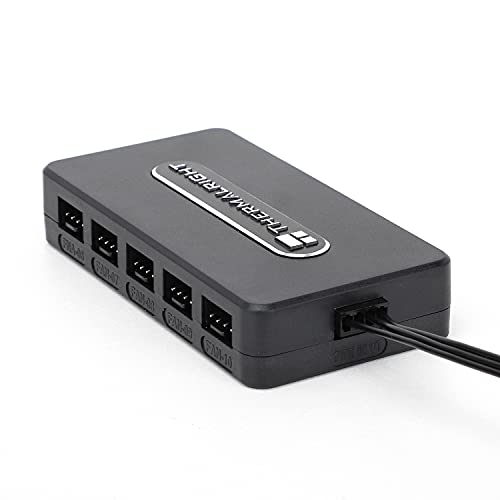
- Supports up to 10 four-pin fans
- Stable direct SATA power for high loads
- Adhesive mounting and organized cable routing
Best For: Large multi-fan case builds
Best Safety-Focused Hub

- Eight-port PWM fan expansion
- Up to 54W via SATA power
- Fuses and magnetic tool-free mounting
Best For: Protected, flexible fan control
Best Manual Speed Control

- Knob adjusts speed from 0 to 100
- 60W or 5A maximum output
- Controls up to four four-pin fans
Best For: Simple hands-on fan adjustment
Best Fan-and-RGB Combination
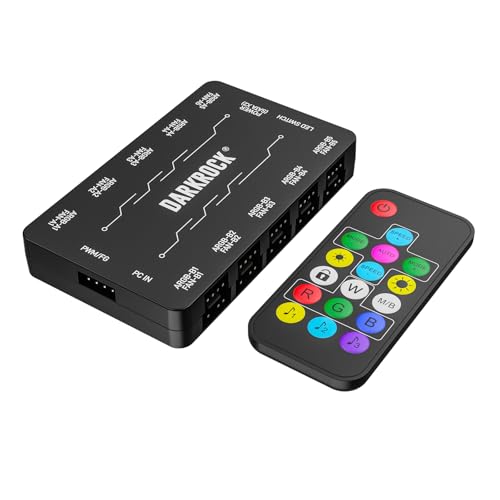
- 10 PWM fan and 10 ARGB ports
- Dual SATA power connections
- Remote control and magnetic mounting
Best For: PWM cooling with 5V ARGB lighting
Flexible PWM Control

- Supports six 4-pin PWM fans
- SATA or DC 5525 power input
- 1%–99% speed adjustment
Best For: Manual control of multiple 4-pin PWM fans
ARGB Expansion Pick

- Supports up to nine fan ports
- Handles 5V 3-pin ARGB devices
- Magnetic mounting for metal cases
Best For: ARGB-focused desktop builds with multiple fans
Best Expansion Hub
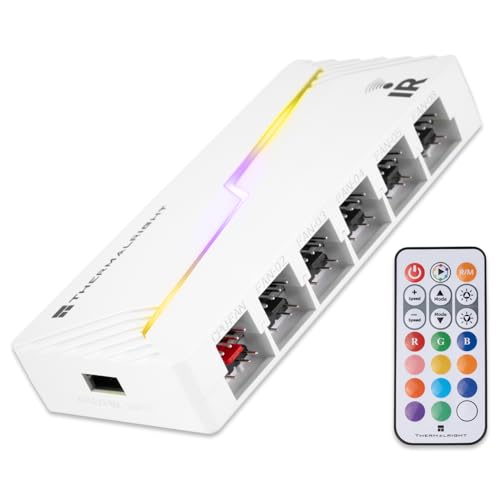
- Supports up to 12 PWM fan and ARGB groups
- Direct SATA power for stable output
- Expands connections but does not independently control speed
Best For: Large ARGB and PWM builds needing organized motherboard expansion
Best Heavy-Duty Pick

- Controls six standard 4-pin PWM fans
- 1%–99% stepless rotary adjustment
- Includes SATA cable and supports up to 60W
Best For: Manual, software-free speed control for 4-pin PWM fans
Best PCI-Bracket Option
SinLoon 8-Channel Fan Controller
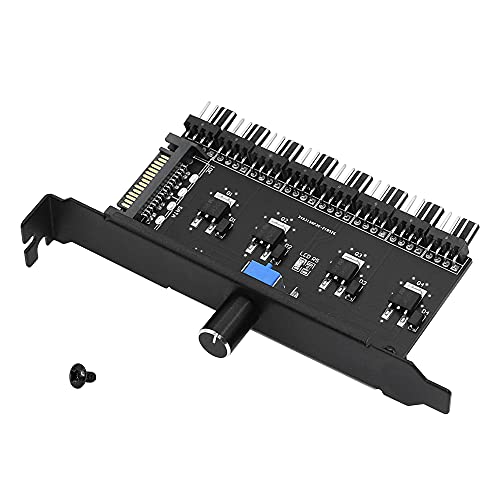
- Offers eight manual fan-control channels
- SATA-powered with 4-pin and 3-pin fan compatibility
- Installs in a PCI position to save space
Best For: Desktop systems needing many channels and physical fan adjustment
Best High-Capacity Hub – Thermalright 10-Port SATA Fan Hub
If you need pc fan controllers with sata power for a larger case setup, this Thermalright hub supports up to 10 four-pin fans. Direct SATA power is designed to maintain stable output under high load, while the compact body and cable-management layout help keep wiring organized.
Best For: Builders running many 12V four-pin fans from one compact hub.
Pros:
- Supports up to 10 four-pin fans.
- Direct SATA power input is intended for stable high-load output.
- Built-in double-sided adhesive supports simple chassis mounting.
- Reads fan speed from the fan connected to the designated red interface.
Cons:
- SATA cable must be purchased separately.
- Only one fan’s speed is recognized due to motherboard PWM reading limitations.
This is a practical choice when fan quantity and tidy installation matter most, but confirm that you have a separate SATA cable before completing your build.
Best Safety-Focused Hub – Noctua NA-FH1 8-Port PWM Hub
The Noctua NA-FH1 is one of the more feature-rich pc fan controllers with sata power, combining eight fan ports with PWM signal distribution and built-in protection. It can use SATA for fan power while receiving RPM and PWM control through a motherboard four-pin connection.
Best For: Users who want protected, flexible fan expansion with magnetic mounting.
Pros:
- Supports up to eight 12V or 5V fans, with SATA limited to 12V applications.
- Provides up to 54W through SATA power.
- Safety fuses help protect against overcurrent and short circuits.
- Magnetic installation and included motherboard input cable simplify setup.
Cons:
- Its 5V fan support requires compatible Noctua fans with USB power adaptor cables.
- It has fewer ports than 10-port alternatives.
With safety certifications, status LEDs, and a six-year manufacturer’s warranty, the NA-FH1 is a strong option for buyers prioritizing protection and long-term support.
Best Manual Speed Control – 12V 4-Pin PWM Fan Controller
For pc fan controllers with sata power and hands-on adjustment, this compact 12V PWM controller uses a physical knob to vary fan speed from 0 to 100. It supplies up to 60W and connects four small four-pin fan plugs through SATA power.
Best For: Users who want a simple manual knob for adjusting up to four case fans.
Pros:
- Full-range knob adjustment from 0 to 100.
- Rated for up to 60W or 5A total output.
- Supports four small four-pin fan connections.
- Includes strong 3M adhesive and extension wires for flexible placement.
Cons:
- Supports only four fans.
- Manual knob control may be less convenient than motherboard-based control.
- Designed for 12V fans rather than mixed-voltage applications.
This controller suits straightforward builds where a physical speed dial is more useful than a larger hub or software-based control system.
Best Fan-and-RGB Combination – DARKROCK 20-Port Hub
The DARKROCK hub combines pc fan controllers with sata power and addressable lighting control in one unit. It supports up to 10 four-pin PWM fans and up to 10 ARGB fans, with remote speed adjustment and dual SATA power connections for stable operation.
Best For: Gaming PC builders managing multiple PWM fans and 5V ARGB lighting.
Pros:
- Provides 10 PWM fan ports and 10 5V three-pin ARGB ports.
- Dual SATA power connects the hub to the PSU.
- Remote control adjusts the speed of supported PWM fans.
- Rear magnets allow direct attachment to the case.
Cons:
- Does not support 12V RGB components.
- Requires a compatible 5V three-pin ARGB motherboard header for the described lighting setup.
This is the most versatile pick in the group for combined cooling and lighting control, provided your components use 5V ARGB rather than 12V RGB.
Flexible PWM Control – 6-Fan SATA PWM Controller
This compact option is a practical choice if you need pc fan controllers with sata power and a physical speed adjustment knob. It supports up to six 4-pin 12V PWM fans, accepts either SATA or DC 5.5×2.5mm power, and provides up to 60W total output.
Best For: Users running multiple 4-pin PWM fans who want manual, centralized speed control.
Pros:
- Supports up to six 4-pin PWM fans.
- Offers SATA and DC 5525 12V input options.
- Provides adjustable 1%–99% PWM duty-cycle control.
- Supports up to 60W total output, with a 2A per-port limit.
Cons:
- Fans are not included.
- Not compatible with 2-pin or 3-pin fans.
- Total combined current must remain within 5A.
Choose this controller when straightforward knob-based control and flexible power input matter more than lighting features. Confirm that your fans use 4-pin PWM connectors before buying.
ARGB Expansion Pick – 9-Port SATA ARGB PWM Hub
For builds that combine cooling and lighting, this is one of the more versatile pc fan controllers with sata power. Its SATA connection supplies the hub directly, while nine ports support standard 4-pin PWM fans and 5V 3-pin ARGB devices.
Best For: Desktop builders who need centralized fan and ARGB device connectivity with magnetic case mounting.
Pros:
- Provides nine ports for PWM fans and ARGB devices.
- Uses SATA power to help maintain stable fan operation.
- Magnetic backing allows repositioning on metal PC cases.
- Compact design helps reduce cable clutter.
Cons:
- PWM control requires connecting the 12V 4-pin lead to the motherboard.
- The controller manages lighting only according to the supplied note.
- Requires compatible 5V 3-pin ARGB devices for lighting support.
This hub is the strongest fit for a larger RGB-equipped system rather than a simple fan-only setup. Check your motherboard and device connectors carefully, especially the distinction between 5V 3-pin ARGB and 12V 4-pin connections.
Precision Knob Control – 6-Fan SATA PWM Hub
This 6-port hub suits buyers comparing pc fan controllers with sata power for a multi-fan cooling setup. It accepts SATA or DC 5.5×2.5mm 12V input, supports up to six 4-pin PWM fans, and uses a knob for stepless 1%–99% speed adjustment.
Best For: DIY PC, router, or mini PC cooling setups using multiple 12V 4-pin chassis fans.
Pros:
- Supports up to six 4-pin PWM fans.
- Offers both SATA and DC 5525 power inputs.
- Provides 60W total capacity with a 5A combined-current limit.
- Enables precise knob-based 1%–99% PWM adjustment.
Cons:
- Not compatible with 2-pin or 3-pin fans.
- Each port is limited to 2A.
- It is designed for 12V 4-pin fans, so connector compatibility must be checked.
Its specifications make it a focused cooling controller for users who want direct, manual adjustment without relying entirely on motherboard fan headers. Stay within the stated per-port and total current limits for stable operation.
Best Expansion Hub – Thermalright ARGB and PWM X12
For builders who need pc fan controllers with sata power, the Thermalright X12 expands a motherboard’s fan and lighting connections through direct SATA power. It supports up to 12 groups of 4-pin PWM fans and 3-pin 5V ARGB devices, while keeping connections organized.
Best For: PC builds needing expanded PWM fan and 5V ARGB connectivity with synchronized motherboard control.
Pros:
- Supports up to 12 groups of PWM fans and ARGB devices.
- Direct SATA-powered output is designed for stable operation under high loads.
- Provides a 500 mm cable and plug-and-play connection layout for easier cable management.
Cons:
- SATA wire is not included.
- Does not support 12V 4-pin RGB devices.
- It expands connections but does not control fan speed itself; only one fan’s speed is reported through the red interface.
The X12 is primarily an expansion hub rather than a standalone speed controller. Choose it when motherboard synchronization and high-capacity ARGB/PWM expansion matter more than manual speed adjustment.
Best Heavy-Duty Pick – 6-Port PWM SATA Controller
This 6-port model is a practical pick among pc fan controllers with sata power when you want direct, manual cooling adjustment. It powers up to six standard 4-pin PWM fans and uses a rotary knob for stepless speed control without software.
Best For: Users who want straightforward manual control of multiple 4-pin PWM fans in a PC, mini PC, router, or similar system.
Pros:
- Controls up to six 4-pin PWM fans.
- Offers 1%–99% stepless adjustment through a physical knob.
- Supports SATA and DC 5.5×2.5 mm 12V power inputs.
- Provides up to 60W total output with overload protection.
Cons:
- Incompatible with 2-pin and 3-pin fans.
- Fans and a DC power adapter are not included.
With its included SATA cable, dual-input design, and broad manual adjustment range, this controller suits users who prioritize simple hardware-based speed tuning. Confirm that your fans are standard 4-pin PWM models before buying.
Best PCI-Bracket Option – SinLoon 8-Channel Fan Controller
The SinLoon 8-channel controller offers a compact way to add manual fan adjustment when shopping for pc fan controllers with sata power. It uses SATA power, supports 4-pin fans with 3-pin connection compatibility, and installs at a PCI position in the case.
Best For: Desktop users who want centralized knob control for up to eight connected fan channels and a space-saving PCI-mounted installation.
Pros:
- Provides eight fan-control channels.
- Uses a manual independent adjustment knob.
- Supports 4-pin fans and allows 3-pin fan connections.
- PCI-position installation helps save internal case space.
Cons:
- The notes do not specify a maximum wattage or current rating.
- It has no stated warranty.
- Fan speed adjustment is manual rather than software-based.
The SinLoon is a flexible choice for a desktop that needs many channels and a physical control point. Its support for both 4-pin and connectable 3-pin fans gives it broader compatibility than strictly 4-pin-only hubs, though the unspecified power limits warrant careful system matching.
How We Picked These PC Fan Controllers with Sata Power
We focused on controllers that use a SATA connection to supply power, allowing them to support multiple 12V fans without placing the entire load on one motherboard header. We also considered the number of supported fans, whether the hub passes PWM control from the motherboard, available speed controls, connector compatibility, mounting options, and advertised power limits.
Products with extras such as magnetic mounting, short-circuit protection, remote controls, ARGB support, or dual-input power options received additional consideration. Because connector layouts and specifications vary, confirm the product’s pin configuration and maximum wattage before buying.
Quick Comparison
| Best For | What to Look For |
|---|---|
| Large fan arrays | 8- to 20-port capacity and a dedicated SATA power lead |
| Quiet automatic control | 4-pin PWM support and motherboard signal passthrough |
| Manual adjustment | External knob, remote, or PCI-bracket control |
| ARGB-equipped builds | Separate 5V 3-pin ARGB compatibility |
| Easy installation | Magnetic backing, adhesive mounting, or compact cabling |
Key Buying Factors for PC Fan Controllers with Sata Power
Fan Capacity and Connector Type
Choose a hub with more ports than you currently need if you expect to add intake, exhaust, radiator, or storage-area fans later. Most options here use 4-pin PWM connectors, but a controller may not provide full PWM control to every connected fan unless the motherboard signal is properly passed through.
Power Limits and SATA Wiring
SATA power reduces the load on the motherboard header, but it does not make every hub suitable for unlimited fans. Check the stated total wattage or amperage, especially when using high-performance fans or multiple fans with integrated lighting. Avoid mixing unsupported 12V RGB accessories with 5V 3-pin ARGB ports.
Control Method
A motherboard-controlled hub is usually best for automatic temperature-based fan curves. A knob or remote is more convenient when you want quick manual adjustments, but it may offer less precise software control. Some controllers combine both approaches.
Lighting and Installation
ARGB support is useful only when your fans use compatible 5V 3-pin lighting connectors; it is separate from fan-speed control. Magnetic housings are convenient in steel cases, while adhesive or screw mounting may work better in other enclosures. Plan cable length and airflow direction before mounting the hub.
Who Should Buy Which PC Fan Controllers with Sata Power?
Choose a high-port hub if your case has many fans or you want room for future expansion. Choose a PWM-focused model if quiet, automatic control through the motherboard is your priority. Choose a knob or remote-controlled unit if you prefer hands-on speed adjustments without opening software. Choose an ARGB-capable hub when coordinated 5V lighting is part of the build.
For the safest match, count your fans, identify their connector types, add up their rated current, and compare that figure with the controller’s published limit before connecting everything.