Choosing among today’s PC fan controllers can be confusing: some provide simple manual speed adjustment, while others combine PWM fan management, ARGB lighting, software control, and powered expansion.
This roundup compares 10 practical options for gaming PCs, workstations, compact builds, and multi-fan cases so you can match the controller to your motherboard, fan type, and cooling goals.
Best 10 PC Fan Controllers Picks for 2026
Best Manual PWM Controller

- Manual dial with motherboard PWM support
- No-stop mode helps prevent low-speed errors
- Controls up to three 4-pin fans
Best For: Hands-on control of a small PWM fan setup
Best RGB Fan Controller
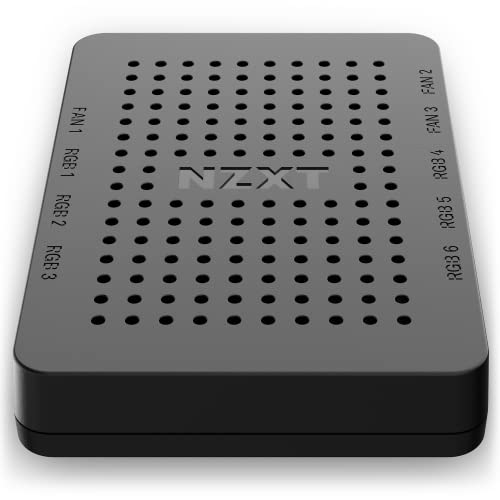
- Powers up to nine PWM fans
- Provides six RGB lighting channels
- Flexible magnetic or adhesive mounting
Best For: Software-managed fan and RGB setups
Best High-Capacity Fan Hub

- Supports up to eight 12V or 5V fans
- Offers SATA-powered 54W output for 12V fans
- Magnetic design with short-circuit protection
Best For: Multi-fan builds needing centralized PWM control
Best Standalone Speed Controller
Adjustable AC-to-DC Fan Supply

- Adjustable 3–12V DC output
- Supports four 3-pin or 4-pin fans
- 36W maximum output with global AC input
Best For: Independent fan control outside a motherboard header
Best for Individual Fan Management

- 10 ports with individual PWM control
- 2 A per port, 4.5 A total
- Windows and Linux support
Best For: Complex multi-fan airflow setups
Best for ARGB Expansion

- Supports up to eight ARGB fan groups
- SATA-powered with adhesive and magnetic mounting
- 5V 3-pin ARGB only; no independent lighting control
Best For: Expanding compatible ARGB fans and organizing case wiring
Best for Manual PWM Control

- Controls up to six 4-pin PWM fans
- Physical knob with 1%–99% PWM adjustment
- SATA or DC input with 60W total output
Best For: Manual speed adjustment for compatible PWM cooling fans
Best for Large ARGB Setups

- Connects up to nine 4-pin PWM fans
- Supports 5V 3-pin ARGB fans and LED strips
- SATA-powered with magnetic case mounting
Best For: Large desktop builds using multiple PWM fans and ARGB devices
Best Manual PWM Controller – Compact PWM Fan Speed Control
The Noctua NA-FC1 is a compact choice among pc fan controllers for adjusting compatible 4-pin PWM fan speed manually. Its dial can work independently as a speed reducer or alongside motherboard control, while the included splitter supports up to three fans.
Best For: Users who want simple, hands-on control of up to three 4-pin PWM fans.
Pros:
- Manual dial can combine with automatic motherboard PWM control.
- No-stop mode helps keep fans above 300 rpm.
- Includes a 3-way splitter and a six-year warranty.
Cons:
- Designed for 4-pin PWM fans rather than general fan types.
- Controls up to three fans, which may be limiting for larger builds.
This is a focused, low-complexity controller for quiet operation and direct speed adjustment. It is especially useful when you do not need RGB management or a large multi-fan hub.
Best RGB Fan Controller – NZXT CAM RGB and Fan Hub
The NZXT RGB & Fan Controller combines fan management with RGB customization, making it one of the more feature-focused pc fan controllers for compatible desktop setups. NZXT CAM can manage fan profiles, power up to nine PWM fans, and customize accessories across six lighting channels.
Best For: PC builders who want software-controlled PWM fans and expanded RGB lighting management.
Pros:
- Supports power and control for up to nine PWM fans.
- Offers six RGB lighting channels through NZXT CAM.
- Mounts with magnets, adhesive strips, or drive-bay screw holes.
Cons:
- Its lighting and fan features are centered on NZXT CAM compatibility.
- More involved than a basic manual speed controller.
Choose this model when coordinated lighting is as important as fan control. Its mounting options also make installation flexible, particularly in builds using compatible NZXT accessories.
Best High-Capacity Fan Hub – Noctua 8-Port PWM Hub
The Noctua NA-FH1 is a practical high-capacity option among pc fan controllers for powering, monitoring, and distributing control to multiple fans. It passes the motherboard or optional NA-FC1 PWM signal to eight connected fans and adds SATA power, short-circuit protection, and magnetic installation.
Best For: Builds that need centralized control and power for up to eight 12V or 5V fans.
Pros:
- Supports up to eight 12V or 5V fans.
- SATA input provides up to 54W for 12V fans; the 4-pin interface provides up to 24W.
- Includes safety protection, status LEDs, magnetic mounting, and a six-year warranty.
Cons:
- It is a hub that relays control rather than a standalone manual dial controller.
- SATA power is for 12V fans only.
The NA-FH1 suits systems with many fans and a compatible motherboard header or NA-FC1 controller. Its broad fan support and external SATA power make it more capable than a basic splitter.
Best Standalone Speed Controller – Adjustable AC-to-DC Fan Supply
This 12V PC fan speed controller takes a different approach from motherboard-connected pc fan controllers by converting 100–240V AC input to adjustable 3–12V DC output. It includes a four-way splitter for 3-pin or 4-pin fans and provides up to 36W, making it useful for fans in PCs, amplifiers, AV receivers, and gaming consoles.
Best For: Users who need an independent adjustable power source for several 3-pin or 4-pin fans.
Pros:
- Adjustable 3–12V DC output supports direct speed adjustment.
- Accepts 100–240V AC input and delivers up to 36W or 3A.
- Includes a four-way splitter and extended cable reach.
Cons:
- It is an external AC adapter/controller rather than an internal motherboard hub.
- Its supplied splitter supports four fans, fewer than some dedicated hubs.
This model is a flexible solution when fan power and speed control need to be independent of a PC motherboard. Verify the fan load and connector arrangement before connecting multiple fans.
Best for Straightforward Six-Fan Builds – ASUS TUF ARGB PWM Fan Hub
The ASUS TUF Gaming ARGB PWM Fan Hub is a practical choice for builders who need to connect several case fans while keeping PWM speed control and ARGB lighting organized. It supports up to six fans and uses dual SATA connectors for stable power under full load.
Best For: Six-fan desktop and gaming PC builds that need simple PWM and ARGB expansion.
Pros:
- Supports up to six case fans.
- Combines PWM fan and RGB connections for synchronized cooling and lighting.
- Magnetic mounting and visible power and operation indicators simplify installation and status checks.
- Dual SATA power connectors support stable input under full load.
Cons:
- Limited to six connected fans.
- Requires SATA power connections from the system.
Choose this hub if you want a compact, easy-to-mount solution for a conventional six-fan setup. It focuses on convenient expansion and coordinated lighting rather than individually managing each fan.
Best for Individual Fan Management – ARCTIC 10-Port Fan Controller
The ARCTIC Fan Controller is designed for complex airflow setups where a standard hub’s shared signal is not enough. Its 10 ports provide individual PWM control, with up to 2 A per port and 4.5 A total output for compatible PC fans.
Best For: Multi-fan PC builds that need independent control and centralized cable management.
Pros:
- Offers 10 fan ports with individual PWM control.
- Supports up to 2 A per port and 4.5 A total.
- Native Windows and Linux support, including Linux Kernel 7.2+.
- Magnetic or adhesive mounting helps keep installation flexible and cables centralized.
Cons:
- Output is limited by the 4.5 A total maximum.
- Linux compatibility is specified for Kernel 7.2+.
- Its larger port count may be unnecessary for simpler builds.
This is the strongest fit among these options for airflow tuning across many fans. Independent control and broad operating-system support make it more flexible than a basic multi-fan hub, provided your fan load stays within its current limits.
Best for NZXT RGB Ecosystems – NZXT Control Hub
The NZXT Control Hub combines PWM fan control and digital RGB management for NZXT builds. It can handle up to five PWM fans and five NZXT RGB components, with Zero RPM mode and CAM software for speed adjustments, lighting, and custom profiles.
Best For: NZXT systems using compatible single-frame fans and RGB components.
Pros:
- Controls speeds for up to five PWM fans.
- Supports Zero RPM mode for silent operation during low loads.
- Synchronizes lighting across up to five NZXT RGB components.
- NZXT CAM provides fan, lighting, and profile control with automatic device detection.
Cons:
- Its feature set is specifically oriented toward NZXT RGB components and single-frame fans.
- Supports up to five PWM fans, fewer than the ARCTIC controller’s 10 ports.
- CAM is needed for software-based adjustment and customization.
For an NZXT-centered build, this hub offers a cohesive way to manage cooling and lighting from CAM. It is less compelling as a general-purpose controller if your system uses mixed-brand RGB hardware.
Best for ARGB Expansion – 8-Port ARGB Fan Hub
If you need to organize several ARGB fans and lighting accessories, this Thermalright hub is a compact option for expanding a compatible PC setup. It supports up to eight groups of fans, uses SATA power, and includes adhesive and magnetic-style mounting features. Note that it supports 5V 3-pin ARGB—not 12V 4-pin RGB—and is primarily an expansion hub rather than a standalone lighting or speed-control unit.
Best For: Builders adding multiple 5V 3-pin ARGB fans or light bars while keeping case wiring tidy.
Pros:
- Supports up to eight groups of ARGB fans.
- SATA power provides direct power delivery and helps reduce cable clutter.
- Supports fan-speed reading and PWM regulation through the compatible setup.
- Includes strong adhesive and magnetic-style mounting options.
Cons:
- Does not support 12V 4-pin RGB devices.
- Does not independently control fan speed or adjust lighting effects.
- Only the fan connected to the designated red port has its speed recognized.
This is a practical choice among pc fan controllers when your priority is expanding 5V ARGB connections and simplifying cable management. Verify your lighting connector type and motherboard compatibility before installation.
Best for Manual PWM Control – 6-Fan Speed Controller
This compact 4-pin PWM controller is designed for users who want direct manual adjustment of compatible PC fans. It supports up to six 4-pin PWM fans, offers a physical speed knob, and can draw 12V power through either SATA or a 5.5×2.5mm DC input. Its stated 60W total output gives it useful capacity for multi-fan cooling setups.
Best For: Users who want a simple knob-based speed adjustment for up to six 4-pin PWM fans.
Pros:
- Supports up to six 4-pin PWM fans.
- Provides adjustable PWM duty cycle from 1% to 99%.
- Accepts either SATA 12V or DC 5.5×2.5mm 12V input.
- Offers up to 60W total output, with a 5A combined-current limit.
Cons:
- Not compatible with 3-pin or 2-pin fans.
- Fans are not included.
- Package includes the controller only.
Among pc fan controllers, this model stands out for straightforward manual adjustment and flexible power input. Check each fan’s connector and keep the combined load within the 5A limit before connecting multiple fans.
Best for Large ARGB Setups – 9-Port PWM ARGB Hub
For a larger desktop cooling build, this ShakingTank hub combines nine fan connections with 5V 3-pin ARGB support. Its SATA power connection is intended to provide stable operation without overloading the motherboard, while the magnetic backing allows flexible placement inside a metal case. PWM control still depends on connecting the relevant motherboard lead.
Best For: PC builders running many standard 4-pin PWM fans and synchronized 5V 3-pin ARGB lighting.
Pros:
- Supports up to nine standard 4-pin PWM fans.
- Supports synchronized 5V 3-pin ARGB fans and LED strips.
- SATA power helps provide stable power for higher-power fan setups.
- Magnetic backing allows repositioning on a metal PC case surface.
Cons:
- PWM control requires connecting the 12V 4-pin lead to the motherboard.
- The controller manages lighting, while fan control depends on the connected motherboard setup.
- It is not intended for 12V 4-pin RGB lighting devices.
This is one of the more suitable pc fan controllers for builds with many fans and 5V ARGB accessories. Its nine-port layout and magnetic mounting can simplify installation, but confirm that your fans and lighting devices use the supported connectors.
How We Picked These PC Fan Controllers
We selected controllers across the main use cases: compact manual adjustment, multi-port PWM expansion, powered hubs, software-managed fan and RGB control, and standalone AC-powered regulation. We prioritized compatibility details, port count, power delivery, control method, installation flexibility, and features that help prevent overloaded motherboard headers.
Because fan hubs and controllers are not interchangeable in every setup, we also considered whether each option is best suited to 3-pin DC fans, 4-pin PWM fans, 5V 3-pin ARGB devices, or a combination of these standards.
Quick Comparison
| Best For | Recommended Type | What to Look For |
|---|---|---|
| Simple manual adjustment | Compact PWM controller | 4-pin PWM compatibility and knob-based control |
| Many case fans | Powered PWM hub | Enough ports, SATA power, and suitable current capacity |
| RGB-focused builds | ARGB and PWM hub | 5V 3-pin ARGB support and motherboard synchronization |
| Software control | Digital fan and RGB controller | USB connection, supported software, and ecosystem compatibility |
| Mixed or unusual installations | Standalone fan speed controller | Correct voltage, connector support, and total wattage |
Key Buying Factors for PC Fan Controllers
Fan Connector and Control Type
Confirm whether your fans use 3-pin DC or 4-pin PWM connectors. PWM controllers adjust speed through the fourth pin and generally offer more precise low-speed control. A basic hub may distribute one motherboard signal to several fans rather than control each fan independently.
Power and Port Capacity
Large fan arrays should use a powered hub rather than drawing all current through a motherboard header. Check the controller’s per-port and total amperage ratings, then compare them with the startup and operating current printed on your fans. SATA-powered models are often convenient for multiple fans.
ARGB Compatibility
5V 3-pin ARGB and 12V 4-pin RGB are different standards and should not be connected interchangeably. If lighting matters, verify the header type, number of lighting channels, and whether the controller supports motherboard synchronization or requires proprietary software.
Installation and Noise Control
Magnetic mounting, adhesive backing, cable length, and accessible connectors can make a significant difference inside a crowded case. For quieter operation, look for reliable low-speed control and use a motherboard fan curve when available.
Who Should Buy Which PC Fan Controllers?
Choose a compact manual PWM controller if you want straightforward speed adjustment without software. A powered multi-port hub is better for a case with many PWM fans, especially when motherboard headers are limited. Builders adding both fans and lighting should choose an ARGB/PWM hub, but must match the exact voltage and connector standards.
Software-oriented controllers suit users who want coordinated profiles, temperature-based curves, and ecosystem lighting effects. Finally, an AC-powered adjustable controller is useful for test benches, external cooling, or systems that need independent fan power, though it may be less tidy than an internally mounted hub.