A USB Wi-Fi adapter can give an older desktop, laptop, or replacement PC a faster and more flexible wireless connection without installing an internal network card. The best USB 3.0 Wi-Fi adapters combine modern Wi-Fi standards, useful antenna designs, broad compatibility, and stable performance.
Our roundup includes affordable dual-band models, Wi-Fi 6 upgrades, and a Wi-Fi 6E option for compatible routers and computers. Use the guide below to compare the features that matter most before choosing one.
Best 10 USB 3.0 Wifi Adapters Picks for 2026
Best High-Gain Option
TP-Link Archer T3U Plus AC1300

- AC1300 dual-band wireless speeds
- Adjustable high-gain external antenna
- Supports Windows and macOS versions
Best For: Desktop users prioritizing reception and compatibility
Best WiFi 6 Upgrade
NETGEAR Nighthawk A7500 AX1800

- WiFi 6 speeds up to 1.8 Gbps
- Adjustable high-gain external antenna
- Supports Windows 10 and 11
Best For: Windows PCs needing a high-speed WiFi 6 upgrade
Best Compact Pick
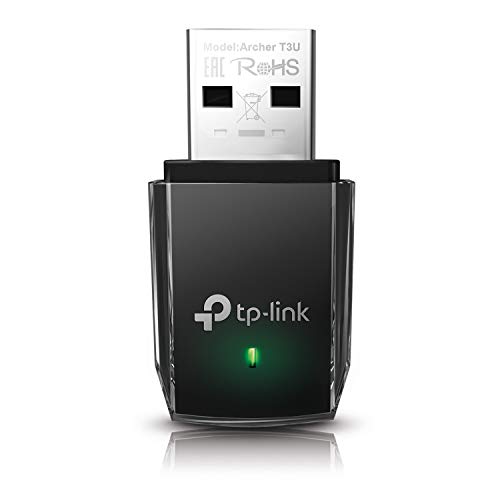
- Compact AC1300 dual-band design
- USB 3.0 interface for faster transfers
- MU-MIMO and beamforming support
Best For: Portable wireless upgrades in smaller form factors
Best Long-Range WiFi 6 Value

- AX1800 dual-band WiFi 6 speeds
- Two 5 dBi high-gain antennas
- Includes 3.3-foot USB 3.0 extension
Best For: Windows users needing flexible long-range placement
Best Value WiFi 6 Upgrade

- WiFi 6 with claimed AX900 performance
- 6dBi external antenna for improved reception
- Built-in driver for Windows 7, 10, and 11
Best For: Windows users wanting stronger reception and a simple WiFi 6 upgrade
Best Premium Pick

- Tri-band WiFi 6E with speeds up to 3 Gbps
- USB 3.0 interface for high-throughput connections
- Adjustable antenna with included positioning cradle
Best For: Windows 10/11 PCs using a WiFi 6E router
Best Budget Long-Range Option

- Dual-band speeds up to 1300Mbps
- Two 5dBi external antennas
- USB 3.0 with broad Windows support
Best For: Windows users seeking an affordable long-range adapter
Best Wi-Fi 6 Performance

- AX1800 dual-band Wi-Fi 6 speeds
- Two adjustable high-gain antennas
- USB 3.0 and WPA3 security
Best For: Windows users who need strong coverage for streaming, gaming, and video calls
Best Flexible Desktop Setup

- AX1800 dual-band Wi-Fi 6
- Includes a 1-meter USB 3.0 cable
- High-gain antenna with WPA3
Best For: Windows desktops needing flexible adapter placement and reliable Wi-Fi 6
Best Budget Compatibility

- Affordable AC600 dual-band connection
- Adjustable high-gain 5 dBi antenna
- Supports older Windows versions
Best For: Budget-minded users upgrading older PCs for everyday Wi-Fi
Best High-Gain Option – TP-Link Archer T3U Plus AC1300
The TP-Link Archer T3U Plus is one of the more flexible USB 3.0 wifi adapters for desktop PCs, combining AC1300 dual-band speeds with a large adjustable external antenna. It is a practical choice when reception and compatibility matter as much as raw throughput.
Best For: Desktop users who need stronger wireless reception, broad Windows compatibility, and adjustable antenna positioning.
Pros:
- AC1300 dual-band speeds up to 867 Mbps on 5 GHz and 400 Mbps on 2.4 GHz.
- High-gain, multidirectional antenna can be rotated toward the router.
- MU-MIMO helps improve network throughput and efficiency.
- Supports Windows 11 through XP and macOS 10.9–10.15.
Cons:
- The external antenna design is less compact than a mini dongle.
- Actual speeds depend on the connected router and network conditions.
Choose this model if you want a reception-focused adapter with unusually broad operating-system support. Its external antenna makes it especially suitable for desktops positioned farther from the router.
Best WiFi 6 Upgrade – NETGEAR Nighthawk A7500 AX1800
The NETGEAR Nighthawk A7500 is a high-speed USB 3.0 wifi adapter designed to upgrade older Windows PCs to WiFi 6. Its AX1800 dual-band performance and adjustable external antenna target busy homes with streaming, calls, and gaming demands.
Best For: Windows 10 and 11 desktop users seeking a modern WiFi 6 upgrade with strong dual-band performance.
Pros:
- AX1800 dual-band speeds reach up to 1.8 Gbps.
- USB 3.0 provides substantially higher data speed than USB 2.0.
- Flippable high-gain antenna helps find a stronger signal.
- Works with any WiFi router or mesh system and supports WPA3.
Cons:
- Compatibility is limited to Windows 10 and 11.
- The adapter is less suitable for users wanting macOS or Linux support.
This is the strongest fit for a newer Windows PC that needs a straightforward WiFi 6 upgrade. It offers more headroom than AC1300 models, though the maximum benefit requires a compatible network and USB 3.0 port.
Best Compact Pick – TP-Link Archer T3U AC1300
The TP-Link Archer T3U is a compact AC1300 USB 3.0 wifi adapter for desktops and laptops. It offers dual-band connectivity, MU-MIMO support, and a portable design for users who want a simple wireless upgrade without a large external antenna.
Best For: Users who want a small, portable dual-band adapter for compatible Windows or older macOS computers.
Pros:
- AC1300 dual-band connection supports 2.4 GHz and 5 GHz networks.
- Compact size is easy to carry between computers.
- USB 3.0 is specified to provide faster performance than USB 2.0.
- MU-MIMO and beamforming support can help deliver a smoother connection.
Cons:
- It lacks the external high-gain antenna found on larger adapters.
- macOS support is listed through version 10.14.
The Archer T3U makes sense when portability and low-profile design are more important than maximum range. It is a straightforward AC1300 option for compatible systems, especially when the PC is reasonably close to the router.
Best Long-Range WiFi 6 Value – BrosTrend AX1800 USB WiFi 6
The BrosTrend AX1800 is a desktop-style USB 3.0 wifi adapter built for stronger reception and flexible placement. Its two 5 dBi antennas, extension cable, and WiFi 6 features make it well suited to PCs located across rooms or through multiple walls.
Best For: Windows 10 and 11 users who need long-range reception and flexible adapter placement for streaming, gaming, or calls.
Pros:
- AX1800 speeds reach 1,201 Mbps on 5 GHz and 574 Mbps on 2.4 GHz.
- Two 5 dBi high-gain antennas are designed for stronger reception.
- Included 3.3-foot USB 3.0 cable allows placement where the signal is better.
- Supports OFDMA, MU-MIMO, beamforming, and WPA3.
Cons:
- Supports Windows 10 and 11 only; Linux is not supported.
- The desktop design is less portable than a mini USB dongle.
This adapter is a strong choice when signal placement is the main challenge. The extension cable and dual antennas give it practical range advantages, but buyers should confirm their computer runs Windows 10 or 11 before choosing it.
Best Value WiFi 6 Upgrade – Tenda AX900 U11 Pro
The Tenda U11 Pro is a practical choice for shoppers comparing USB 3.0 WiFi adapters, though its listed hardware interface is USB 2.0. It combines WiFi 6 performance, a 6dBi external antenna, and support for Windows 7, 10, and 11. Tenda rates it at up to AX900 speeds, making it suitable for everyday streaming, gaming, and video calls.
Best For: Windows desktop or laptop users who want stronger reception and a simple WiFi 6 upgrade.
Pros:
- WiFi 6 connectivity with claimed AX900 performance.
- 6dBi omnidirectional antenna is designed to improve reception and coverage.
- Built-in driver supports a straightforward setup on Windows 7, 10, and 11.
- AP mode can provide a 5GHz hotspot for up to eight devices.
Cons:
- The listed hardware interface is USB 2.0, not USB 3.0.
- Windows-only compatibility is listed.
- AP mode is specified for 5GHz only.
Choose this adapter when antenna reach and easy Windows setup matter more than having a USB 3.0 connection. Its external antenna and WiFi 6 features give it useful flexibility for a home or office PC.
Best Premium Pick – NETGEAR Nighthawk A8000
The NETGEAR Nighthawk A8000 is a premium option among USB 3.0 WiFi adapters, with tri-band WiFi 6E support and advertised speeds up to 3 Gbps. Its 6 GHz band can help reduce congestion when paired with a WiFi 6E router, while the adjustable antenna and included cradle help optimize reception.
Best For: Windows 10 or 11 users with a WiFi 6E router who want tri-band connectivity and low-latency performance.
Pros:
- USB 3.0 interface is designed for higher data throughput than USB 2.0.
- Tri-band WiFi 6E supports 2.4, 5, and 6 GHz connections.
- Advertised AXE3000 speeds reach up to 3 Gbps.
- Flippable high-gain antenna and cradle provide positioning flexibility.
Cons:
- The 6 GHz benefits require a compatible WiFi 6E router.
- Compatibility is limited to Windows 10 and 11.
- Drivers must be installed from the included USB drive.
This is the strongest fit for a modern Windows setup that can take advantage of WiFi 6E. If your router does not support 6 GHz, its most distinctive feature will not be available, but the adapter remains backward compatible with WiFi 6 and older networks.
Best Budget Long-Range Option – Nineplus AC1300
The Nineplus AC1300 is a budget-focused option for shoppers seeking USB 3.0 WiFi adapters with external antennas. It supports dual-band 2.4GHz and 5GHz WiFi, advertises combined speeds up to 1300Mbps, and uses two 5dBi antennas to improve signal reception for desktop or laptop computers.
Best For: Windows users who want an affordable dual-band adapter with external antennas and USB 3.0 support.
Pros:
- USB 3.0 connection is backward compatible with USB 2.0 ports.
- Dual-band speeds are listed at up to 867Mbps on 5GHz and 400Mbps on 2.4GHz.
- Two 5dBi high-gain antennas are designed for stronger, longer-range reception.
- Supports Windows 7, 8, 8.1, 10, and 11, with two-year support listed.
Cons:
- Does not support Mac OS, Chromebook, or Linux.
- Windows 7 may require manual driver installation.
- Some systems may require downloading drivers rather than using automatic detection.
For a Windows desktop with weak built-in WiFi, this adapter offers a useful combination of USB 3.0 connectivity, dual-band support, and adjustable external antennas. It is less suitable for non-Windows devices, so verify compatibility before buying.
Best Wi-Fi 6 Performance – TP-Link Archer TX30U Plus
For shoppers comparing usb 3.0 wifi adapters, the TP-Link Archer TX30U Plus is a high-performance Wi-Fi 6 option with AX1800 dual-band speeds, two high-gain antennas, and WPA3 security. It supports up to 1,201 Mbps on 5 GHz and 574 Mbps on 2.4 GHz, although real-world performance depends on the router, distance, and obstacles.
Best For: Windows 10 and 11 desktop or laptop users who want stronger Wi-Fi 6 connectivity for streaming, gaming, video calls, and multi-device networks.
Pros:
- Wi-Fi 6 AX1800 dual-band performance with up to 1,201 Mbps on 5 GHz.
- Two adjustable high-gain antennas and beamforming help improve reception and coverage.
- USB 3.0 connectivity, MU-MIMO, OFDMA, and WPA3 security.
- Preloaded internal driver and folding antennas simplify setup and storage.
Cons:
- Compatible only with Windows 10 and Windows 11.
- Performance depends on the connected router and surrounding conditions.
The Archer TX30U Plus is the most capable choice here for users upgrading an older wireless card and wanting modern Wi-Fi 6 features. Its Windows-only compatibility is the main limitation, but the high-gain antenna design and network-efficiency features make it a strong fit for demanding home or office use.
Best Flexible Desktop Setup – TP-Link Archer TX20U Plus
The TP-Link Archer TX20U Plus is a practical pick among usb 3.0 wifi adapters for desktop users who need flexible antenna placement. Its AX1800 Wi-Fi 6 connection supports dual-band speeds, while the included 1-meter USB 3.0 cable lets you position the adapter for better reception.
Best For: Windows 10 and 11 desktop or laptop users who want Wi-Fi 6 performance and more freedom to place the adapter away from the computer.
Pros:
- AX1800 dual-band Wi-Fi 6 supports up to 1,201 Mbps on 5 GHz and 574 Mbps on 2.4 GHz.
- Included 1-meter USB 3.0 cable supports flexible placement.
- High-gain antenna, MU-MIMO, OFDMA, and WPA3 support.
- Adjustable antennas help optimize reception in a desktop setup.
Cons:
- Only compatible with Windows 10 and Windows 11.
- Maximum speeds require suitable router capability and favorable conditions.
Choose the Archer TX20U Plus if placement flexibility matters as much as speed. It offers similar AX1800-class wireless performance to larger Wi-Fi 6 adapters, and its extension cable can make it easier to find a clearer signal around a desktop.
Best Budget Compatibility – TP-Link Archer T2U Plus AC600
The TP-Link Archer T2U Plus is a lower-cost alternative to newer usb 3.0 wifi adapters, offering AC600 dual-band wireless connectivity and a high-gain adjustable antenna. It supports up to 433 Mbps on 5 GHz and 200 Mbps on 2.4 GHz, making it suitable for everyday browsing, streaming, and general desktop or laptop use.
Best For: Windows users on older systems, including Windows 7, 8, 8.1, 10, and 11, who want an affordable dual-band Wi-Fi upgrade.
Pros:
- Affordable AC600 dual-band adapter with up to 433 Mbps on 5 GHz.
- High-gain 5 dBi antenna improves reception and transmission.
- Rotating antenna can be aimed toward the router for easier positioning.
- Supports a broad range of Windows versions and includes MacOS compatibility in the specifications.
Cons:
- Slower than the Wi-Fi 6 AX1800 models in this roundup.
- Uses older WPA/WPA2 security rather than WPA3.
- Driver download may be required for installation.
The Archer T2U Plus makes sense when price and older Windows support are priorities. It will not match the capacity of the Wi-Fi 6 options, but its dual-band operation and adjustable high-gain antenna provide a straightforward upgrade for basic connectivity needs.
How We Picked the Best USB 3.0 Wifi Adapters
We focused on adapters that offer a meaningful upgrade over basic USB wireless dongles. The selection considers wireless standard, advertised throughput, dual-band or tri-band support, antenna design, USB 3.0 connectivity, operating-system compatibility, and practical desktop placement.
Advertised speeds are theoretical maximums rather than guaranteed internet speeds. Actual performance depends on your router, service plan, distance, interference, USB port, computer hardware, and driver support. We also included options across several price and performance levels so you can match the adapter to your network.
Quick Comparison
| Type | Best For | Important Advantage |
|---|---|---|
| AC600 | Basic wireless upgrades | Low cost and simple setup |
| AC1300 | Everyday streaming and browsing | Balanced 2.4GHz and 5GHz performance |
| Wi-Fi 6 AX900 | Efficient modern networks | Current-generation connectivity in a compact format |
| Wi-Fi 6 AX1800 | Faster transfers and busy networks | Higher throughput and improved network efficiency |
| Wi-Fi 6E | Compatible 6GHz networks | Access to an additional, less congested band |
Key Buying Factors for USB 3.0 Wi-Fi Adapters
Wireless Standard and Speed
Choose Wi-Fi 5 for a cost-effective upgrade, or Wi-Fi 6 for better efficiency with newer routers and multiple connected devices. Wi-Fi 6E adds 6GHz support, but it requires a compatible router and operating system. Do not choose solely by the highest printed Mbps figure; consistent signal quality and compatibility matter more.
Band Support and Range
Dual-band adapters use 2.4GHz for longer range and 5GHz for faster local performance. A 6GHz-capable model can reduce congestion nearby, but its shorter range makes placement more important. External or high-gain antennas can help desktop users position the receiver for a stronger signal.
USB 3.0, Placement, and Drivers
USB 3.0 provides more bandwidth than USB 2.0 and is preferable for faster adapters. If the desktop sits under a desk or behind a metal case, a model with a cable, cradle, or adjustable antennas may perform better than a tiny dongle. Check Windows support and available drivers before buying, especially for older systems.
Who Should Buy Which USB 3.0 Wifi Adapters?
- For basic browsing or an older PC: Choose an affordable AC600 adapter if you only need dependable everyday connectivity.
- For streaming and general home use: An AC1300 dual-band model offers a practical balance of speed and cost.
- For newer routers and busy households: Choose a Wi-Fi 6 AX900 or AX1800 adapter for better efficiency and higher potential throughput.
- For weak desktop reception: Prioritize external, high-gain, or adjustable antennas and use a USB extension cable to improve placement.
- For advanced wireless networks: A Wi-Fi 6E adapter makes sense only when your router, PC, drivers, and nearby coverage all support the 6GHz band.