Choosing the right wireless video system can make a home studio easier to configure, especially when your camera, monitor, projector, or capture setup is spread across the room. The best video transmitters for home studios balance dependable signal quality with low latency, practical range, and connections that match your equipment.
This roundup includes compact HDMI systems, 4K-capable transmitters, multi-receiver kits, UVC models for live production, and professional-focused SDI options. Use the buying guide below to narrow the list by workflow, resolution, distance, and budget.
Best 10 Video Transmitters for Home Studios Picks for 2026
Best Overall
Hollyland Pyro H 4K Wireless HDMI System

- 4K30 transmission with HDMI input, output, and loopout
- Up to 1,300 feet of range with 60 ms latency
- Supports up to four receivers and UVC streaming
Best For: Multi-person monitoring and computer-based live streaming
Best for Legacy TV Distribution
Srliya Home TV Analog Transmitter

- Accepts HDMI and RCA/AV source connections
- Converts 1080p input to AV output
- Adjustable VHF/UHF and audio frequencies
Best For: Short-range analog TV distribution
Best All-in-One Monitoring
Wireless HDMI System with 7-Inch Monitor
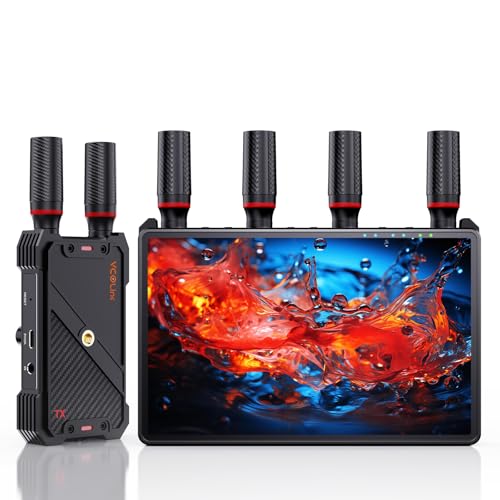
- Built-in 7-inch receiver monitor
- 1080p60 transmission up to 1,312 feet
- One transmitter supports up to five receivers
Best For: Portable camera monitoring and small production teams
Best for Simple Long-Range 4K Links

- Advertises 4K real-time lossless transmission
- 5.8 GHz operation with 0.06-second latency
- Listed range reaches up to 1,000 feet
Best For: DSLR-to-projector connections and long-range video links
Best for Camera Monitoring
Lemorele Wireless HDMI Transmitter Receiver

- 1080p at 60Hz with approximately 50ms latency
- HDMI loop-out supports local monitoring
- NP-F battery and USB-C power options
Best For: Home studios needing flexible wireless camera monitoring
Best for Live Streaming
Vrriis Wireless Video Transmitter Receiver
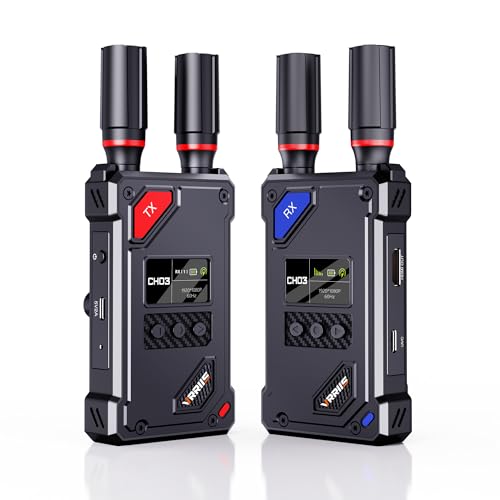
- UVC output works with computer streaming platforms
- 20 adjustable channels help manage interference
- Supports up to five receivers
Best For: Home streamers using OBS or similar software
Best for 4K Display Workflows

- Supports 4K decoding and 10-bit 4:2:2 processing
- Dual-band operation reaches up to 400 feet
- No Wi-Fi, app, or Bluetooth required
Best For: Home studios connecting sources to 4K displays
Professional 4K Pick

- 4K HDMI transmission up to 30 fps
- HDMI and 3G-SDI connectivity
- Up to four app-monitoring connections
Best For: 4K home studios with SDI equipment and multi-viewer monitoring
Long-Range UHD Pick
Vrriis WL095P Wireless HDMI System

- Plug-and-play pre-paired operation
- Supports 4K at 30 Hz
- Dual HDMI outputs on the receiver
Best For: HDMI studios needing UHD video across open spaces
1080p Monitoring Pick
Vrriis WL082 Wireless HDMI System

- 1080p at 60 Hz with 0.05-second delay
- Transmitter HDMI loop-out
- Dual HDMI outputs and IR support
Best For: Full HD studios needing local and remote monitoring
Best Overall – Hollyland Pyro H 4K Wireless HDMI System
For home studios that need flexible monitoring and live-streaming support, the Hollyland Pyro H is a strong choice among video transmitters for home studios. It supports HDMI input, output, and loopout, transmits up to 4K at 30 fps, and includes UVC functionality for computer-based streaming.
Best For: Multi-person monitoring, camera-to-monitor workflows, and home studios that also stream to a computer.
Pros:
- Supports 4K30 transmission and 1080p60 operation.
- Offers up to 1,300 feet of range and 60 ms latency under listed conditions.
- Can transmit to up to four receivers and supports the Hollyview app.
- Includes HDMI loopout and UVC live-streaming support.
Cons:
- The listed kit includes only one transmitter and one receiver, so additional receivers are separate additions.
- Its feature set may be more than needed for a simple single-monitor setup.
The Pyro H stands out for studios that expect to expand beyond one viewing point. Its combination of 4K support, long listed range, receiver scalability, and UVC connectivity makes it a versatile production hub.
Best for Legacy TV Distribution – Srliya Home TV Analog Transmitter
The Srliya Home TV Analog Transmitter is aimed at sending video to compatible televisions over a short distance. For shoppers comparing video transmitters for home studios, its main appeal is source flexibility, 1080p input conversion, and adjustable VHF/UHF transmission frequencies.
Best For: Basic home TV distribution and setups that need HDMI or RCA/AV input with analog transmission.
Pros:
- Accepts multiple source types, including HDMI and RCA/AV.
- Accepts 1080p HD input and converts it to AV output.
- Provides an advertised transmission range of 10 to 20 meters.
- Offers adjustable VHF and UHF frequencies, plus adjustable audio frequency.
Cons:
- Its analog output focus is less suited to modern low-latency production monitoring.
- The listed range is much shorter than the long-distance systems in this roundup.
- The notes do not specify advanced studio features such as multi-receiver monitoring or app control.
This transmitter is better viewed as a practical analog distribution tool than as a professional wireless camera link. It may fit a simple television-oriented installation, but production users should confirm that the AV conversion and frequency requirements match their equipment.
Best All-in-One Monitoring – Wireless HDMI System with 7-Inch Monitor
This wireless HDMI system combines transmission with a built-in 7-inch receiver monitor, making it a convenient option for video transmitters for home studios. It supports 1080p at 60 Hz, includes HDMI loopout, and can expand from one transmitter to as many as five receivers.
Best For: Camera operators and small production teams that want built-in monitoring without adding a separate receiver display.
Pros:
- Receiver includes a built-in 7-inch HD screen with brightness, volume, and sleep controls.
- Advertises 1080p60 transmission up to 1,312 feet with less than 0.05-second latency.
- Supports one transmitter to up to five receivers for shared monitoring.
- Offers HDMI loopout, IR remote control, and NP-F battery, power-bank, or USB-C power options.
Cons:
- The system is limited to 1080p rather than the 4K transmission offered by some alternatives.
- A Type-C-to-HDMI cable is required for smartphone or tablet compatibility.
- An HDMI cable for connecting the receiver to an external monitor is not included.
The built-in display is the main differentiator here. It reduces the need for a separate on-camera or receiver monitor, while the expandable receiver design makes the system useful when several people need to view the feed.
Best for Simple Long-Range 4K Links – SVBONY ST1 Wireless HDMI
The SVBONY ST1 is a straightforward wireless HDMI option for sending camera footage to a projector or other display. Among video transmitters for home studios, it emphasizes 4K capability, real-time transmission, and a listed 1,000-foot range over a 5.8 GHz band.
Best For: DSLR-to-projector connections and users who prioritize long-range, low-latency wireless video.
Pros:
- Advertises real-time lossless transmission.
- Supports 4K wireless video transmission.
- Uses a 5.8 GHz band with listed latency of 0.06 seconds.
- Provides an advertised range of up to 1,000 feet.
Cons:
- The supplied notes provide fewer connectivity and workflow details than the other systems.
- The notes do not specify multi-receiver support, loopout, or streaming connectivity.
- Its 5.8 GHz-only description may offer less band flexibility than dual-band systems.
The ST1 is appealing when the goal is a clean, long-distance connection between a DSLR and projector. Because the supplied specifications are limited, verify the included connectors and compatibility before choosing it for a more involved studio workflow.
Best for Camera Monitoring – Lemorele Wireless HDMI Transmitter Receiver
For creators comparing video transmitters for home studios, the Lemorele R5000 is a practical 1080p option with low-latency monitoring, HDMI loop-out, and flexible power. It can send footage from a DSLR or camcorder to an HDMI display while keeping a local monitor connected.
Best For: Home studios, camera operators, and creators who need wireless monitoring with a local HDMI preview.
Pros:
- Supports 1080p at 60Hz with approximately 50ms latency.
- HDMI loop-out enables simultaneous local monitoring and wireless transmission.
- Offers up to 656 feet of range in open, unobstructed spaces.
- Supports NP-F batteries or USB-C power for mobile and indoor setups.
Cons:
- Only one transmitter and one receiver are included.
- NP-F batteries are sold separately.
- Performance can vary with obstacles and interference.
The Lemorele is a well-rounded choice when dependable 1080p camera monitoring matters more than advanced streaming connectivity. Its loop-out port and dual-power design are especially useful in a compact home studio.
Best for Live Streaming – Vrriis Wireless Video Transmitter Receiver
The Vrriis WL087 stands out among video transmitters for home studios because its receiver includes UVC output for computer-based streaming. Along with 1080p transmission, manual channel selection, and HDMI loop-out, it is designed for creators who want a more adaptable live-production setup.
Best For: Home streamers and small production setups using OBS or another computer-based streaming platform.
Pros:
- UVC output can send received footage to a computer without a separate capture device.
- Offers 20 manually selectable channels with an LCD display for signal and interference information.
- Advertises up to 1,500 feet of line-of-sight range and 0.05-second latency in open conditions.
- Supports up to one transmitter and five receivers, with HDMI loop-out for local monitoring.
Cons:
- Walls, metal, brick, and glass can substantially reduce coverage.
- Adding more receivers may reduce transmission distance.
- NP-F batteries are not included.
Choose the Vrriis if direct computer streaming is central to your workflow. Its UVC output and channel controls provide useful flexibility, though the advertised range is most realistic in clear line-of-sight environments.
Best for 4K Display Workflows – Ogzvhypl Wireless HDMI System
For home studios that prioritize display quality and simple setup, the Ogzvhypl S4 combines wireless HDMI transmission with 4K decoding and dual-band 2.4G/5.8G operation. It is suited to sending video from computers, cameras, or set-top boxes to a monitor, projector, or television without relying on Wi-Fi, apps, or Bluetooth.
Best For: Home studios needing a straightforward wireless link to a 4K-capable display.
Pros:
- Supports 4K decoding and a stated 10-bit 4:2:2 color pipeline.
- Uses dual-band 2.4G and 5.8G transmission with up to 400 feet of range.
- Plug-and-play operation requires no app, Wi-Fi network, or Bluetooth connection.
- Supports mirroring and extended-screen modes.
Cons:
- The supplied notes specify 4K decoding rather than 4K source transmission details.
- Actual range and stability may vary with the studio environment.
- The system includes one transmitter and one receiver, limiting the initial setup to one display link.
The Ogzvhypl is appealing when clean installation and enhanced display support are priorities. It offers more ambitious video processing than a basic 1080p transmitter, while its no-network setup keeps configuration simple.
Professional 4K Pick – Hollyland Mars 4K
For home studios that need higher-resolution monitoring and flexible camera connectivity, the Hollyland Mars 4K is one of the more capable video transmitters for home studios. It supports 4K video over HDMI, plus HDMI and SDI connections for cameras, monitors, and production equipment.
Best For: Home studios using 4K cameras, SDI gear, and multi-person monitoring workflows.
Pros:
- Supports video input and output up to 4K at 24, 25, or 30 fps via HDMI.
- Offers both HDMI and 3G-SDI connectivity, including support for 23.98, 29.97, and 59.94 fps SDI output.
- Provides up to four app-monitoring connections when used without the receiver.
- Supports multiple power options, including DC power, NP-F batteries, and USB-C power.
Cons:
- The listed 450-foot range and 66 ms latency are based on interference-free laboratory conditions.
- QC/PD charging and 5V/2A charging are not supported through USB-C.
- Its professional SDI features may be more than a basic HDMI-only studio needs.
The Mars 4K stands out when a home studio needs 4K support, SDI compatibility, and several simultaneous viewing options. Its range and latency figures should be treated as ideal-condition estimates, but its interface selection makes it a versatile production-focused choice.
Long-Range UHD Pick – Vrriis WL095P Wireless HDMI System
The Vrriis WL095P is a straightforward option for home studios that want to send 4K HDMI video without installing software. As video transmitters for home studios go, its pre-paired design and dual HDMI receiver outputs make it practical for simple point-to-point monitoring.
Best For: HDMI-based studios that need UHD transmission and multiple receiver-side displays.
Pros:
- Pre-paired, plug-and-play setup requires no apps or drivers.
- Supports UHD 4K at 30 Hz with synchronized audio using H.265 encoding.
- Claims up to 1,150 feet of open-field transmission range.
- Supports one transmitter with up to four receivers, while the receiver includes dual HDMI outputs.
Cons:
- Walls, metal, brick, and glass can reduce the stated transmission range or cause signal loss.
- The system is HDMI-only, so it does not provide SDI connectivity.
- The listed latency is less than 0.1 seconds, which may not suit every highly time-sensitive workflow.
This system is a good fit for a studio built around HDMI cameras, computers, projectors, or televisions. Its long-range claim is most relevant in open spaces, while indoor layouts with obstructions may produce shorter coverage.
1080p Monitoring Pick – Vrriis WL082 Wireless HDMI System
For a Full HD studio setup, the Vrriis WL082 focuses on low-delay 1080p transmission, local monitoring, and remote source control. It is a practical choice among video transmitters for home studios when 4K is not required and flexible power options matter.
Best For: 1080p streaming and monitoring setups using cameras, laptops, or set-top boxes.
Pros:
- Supports 1080p at 60 Hz with a listed 0.05-second delay.
- Includes transmitter-side HDMI loop-out for a local monitor.
- Provides dual HDMI outputs on the receiver for two connected screens.
- Supports NP-F batteries, USB-C power, adapters, and portable 5V/2A power sources.
Cons:
- It supports Full HD rather than 4K video.
- The stated 1,300-foot range applies to open, interference-free conditions; building materials can reduce coverage.
- Batteries are not included.
The WL082 is well suited to creators who value convenient monitoring more than UHD resolution. The loop-out, dual receiver outputs, IR extension, and broad power compatibility give it useful flexibility for a compact 1080p studio.
How We Picked the Best Video Transmitters for Home Studios
We compared these systems by the features that matter most in a working studio: supported resolution and frame rates, advertised transmission distance, latency, wireless-band design, input and output types, receiver capacity, monitoring flexibility, and setup practicality. We also considered whether each model is better suited to casual HDMI distribution, camera-to-monitor monitoring, live streaming, or a more advanced SDI/HDMI production workflow.
Advertised range is measured under favorable conditions. Walls, neighboring Wi-Fi networks, metal equipment, and crowded 2.4GHz or 5GHz environments can reduce real-world performance, so treat range figures as a comparison point rather than a guarantee.
Quick Comparison
- Best for professional hybrid setups: Choose a system with both SDI and HDMI support, such as the Hollyland Mars 4K.
- Best for flexible multi-monitor use: Look for kits supporting several receivers or bundled monitor receivers.
- Best for 4K workflows: Prioritize confirmed 4K input or decoding specifications and verify the frame-rate limits.
- Best for streaming: A UVC output can simplify connection to a computer or live-production system.
- Best for basic HDMI distribution: A 1080p, low-latency kit may provide the simplest and most affordable setup.
Key Buying Factors for Video Transmitters for Home Studios
Resolution, Frame Rate, and Compatibility
Match the transmitter to your camera, switcher, display, and capture device. A product described as 4K may support 4K input, 4K decoding, or only specific frame rates. Check whether your workflow needs 4K at 30fps, 1080p at 60fps, HDR, or compatibility with 23.98, 29.97, and 59.94fps sources.
Latency and Signal Stability
Low latency matters for camera monitoring, live switching, and presenter confidence. For noninteractive viewing, a little delay may be acceptable. Dual-band operation, clear antennas, and manual channel selection can help in congested environments, but placement still matters. Keep transmitters and receivers elevated and away from routers, dense cables, and large metal objects.
Range, Outputs, and Receiver Count
Measure the actual path rather than the straight-line distance. Consider whether you need one display or several, and whether loop-out is useful for sending the source to a local monitor while transmitting it elsewhere. Multiple receivers can be valuable for director, confidence, and client monitoring.
HDMI, SDI, UVC, and Control Features
HDMI is common in home-studio cameras and displays, while SDI is generally more robust for longer cable runs and professional equipment. UVC output can reduce the need for a separate capture device when connecting to a computer. IR pass-through, remote control, and manual channel selection are useful extras when the transmitter sits away from the operator.
Who Should Buy Which Video Transmitters for Home Studios?
Choose a compact 1080p HDMI kit if you need affordable camera-to-monitor or source-to-TV transmission. Choose a 4K-capable system if your camera and display both use 4K and you want to preserve detail. Choose a multi-receiver kit for teaching, production teams, or studios with several viewing positions. Choose a UVC model when computer-based streaming is central to your workflow. Choose an SDI/HDMI system when you use professional cameras, switchers, or mixed studio infrastructure. Before buying, confirm connector types, power requirements, supported frame rates, and whether the stated range applies to your intended indoor layout.