A great gaming setup does not require a dedicated room. The best compact gaming desks fit smaller bedrooms, apartments, and multipurpose spaces while still providing room for a monitor, keyboard, and essential accessories.
These 10 picks range from narrow writing-style desks to L-shaped workstations with shelves, drawers, LED lighting, and built-in power. Use the guide below to match desk size and features to your setup.
Best 10 Compact Gaming Desks Picks for 2026
Best Compact Gaming Desk With LEDs
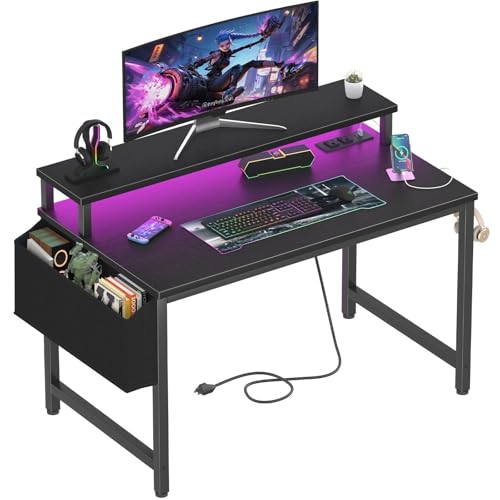
- Built-in outlets and USB charging ports
- Adjustable RGB LED lighting
- Raised monitor stand and removable hooks
Best For: Small gaming, study, and home-office setups
Best Sturdy Compact Gaming Desk
HLDIRECT 32-Inch Carbon Fiber Desk

- 200-pound stated load capacity
- Curved edge and rounded corners
- Steel dual-frame base with monitor-arm support
Best For: Gamers wanting a durable, accessory-ready desk
Best Corner Compact Gaming Desk

- Corner-friendly 42-inch footprint
- Reversible shelves for flexible placement
- LED lighting and integrated charging
Best For: Small rooms needing corner storage and flexibility
Best Storage Compact Gaming Desk

- Three drawers, shelf, and side hook
- Three AC outlets and two USB ports
- Reversible design with app-controlled RGB lighting
Best For: Organized gaming and streaming setups needing storage
Small-Space Organizer

- 27.5-inch footprint for tight spaces
- Three open tiers for storage
- Wood-and-steel frame supports up to 70 kg
Best For: Small bedrooms, dorms, corners, and organized gaming setups
Connected Setup Pick
Korfile 40-Inch LED Gaming Desk

- Three AC outlets and two USB ports
- App-controlled RGB light strip
- Reversible L-shaped configuration
Best For: Gamers wanting power, lighting, and accessories in one desk
Wide Surface Choice
BestOffice 47-Inch R-Shaped Gaming Desk

- 47-inch surface for multiple monitors
- Steel frame with MDF desktop
- Cup holder, headphone hook, and wire holes
Best For: Gaming and work setups needing extra surface area
Best All-in-One Pick

- RGB lighting with 22 dynamic modes
- AC, USB, and Type-C power hub
- Monitor stand, drawer, CPU shelf, and hooks
Best For: Gamers needing many built-in features in a small workspace
Best Adjustable-Storage Pick

- Monitor shelf installs at four heights
- Two drawers, shelf, and DIY pegboard
- Two AC outlets plus two USB ports
Best For: Compact setups needing flexible organization
Best Corner-Storage Pick
33.7-Inch L-Shaped Gaming Desk

- Reversible shelf suits different corner layouts
- Five storage tiers plus drawers and hooks
- Built-in AC and USB power with RGB lighting
Best For: Corner gaming stations needing vertical storage
Best Compact Gaming Desk With LEDs – Lufeiya 32-Inch Desk
The Lufeiya 32-inch desk combines a small footprint with built-in charging, LED lighting, and a raised monitor stand. At 19.7 inches deep, it is a practical choice when shopping for compact gaming desks for a bedroom, study area, or small home office.
Best For: Gamers, students, and home-office users who want integrated power and RGB lighting in a compact setup.
Pros:
- Built-in power strip provides two outlets and two USB charging ports.
- RGB LED strip offers adjustable colors, static options, and dynamic modes.
- Monitor stand helps raise a screen or laptop, while the removable hooks add organization.
- Scratch-resistant, water-resistant particleboard surface and metal frame.
Cons:
- The 31.5-inch width limits room for larger multi-monitor setups.
- It has only one drawer, so storage capacity is modest.
This desk is a feature-rich option for tight spaces, especially if you want lighting and device charging without adding separate accessories. Its compact dimensions make it easy to place, though larger gaming equipment may require careful arrangement.
Best Sturdy Compact Gaming Desk – HLDIRECT 32-Inch Carbon Fiber Desk
The HLDIRECT 32-inch gaming desk pairs a carbon-fiber-look surface with a reinforced steel base and curved front edge. Its compact 32-by-19.7-inch footprint suits buyers comparing compact gaming desks for bedrooms and other limited spaces.
Best For: Gamers who prioritize a sturdy frame, ergonomic edge, and generous weight capacity in a small desk.
Pros:
- Dual-frame, triangle-structure steel base supports up to 200 pounds.
- Curved tabletop and rounded corners are designed for a more comfortable playing position.
- Carbon fiber surface gives the desk a distinctive gaming appearance.
- Frame supports installation of a monitor arm bracket.
Cons:
- It does not list built-in outlets, USB ports, LED lighting, or dedicated storage.
- The fixed 29.1-inch height offers no height-adjustment range.
Choose this model when structural support and a gaming-focused surface matter more than integrated accessories. The compact top can accommodate a monitor, but users with extensive peripherals may need additional organization solutions.
Best Corner Compact Gaming Desk – Bestier 42-Inch L-Shaped Desk
The Bestier 42-inch L-shaped desk uses a corner-friendly layout to create a dedicated workstation without taking over the room. Reversible shelves, a monitor stand, LED lighting, and integrated charging make it a flexible choice among compact gaming desks.
Best For: Apartment residents, students, and gamers who need corner storage and a configurable layout.
Pros:
- Compact L-shaped design fits bedrooms, kids’ rooms, and apartment corners.
- Reversible shelves can be installed on either side to suit the room layout.
- Upper section can function as a monitor stand or display shelf.
- Built-in LED strip and power features support gaming, study, and work sessions.
Cons:
- The corner configuration may be less suitable for open-room placement.
- The supplied notes do not specify the desk’s maximum weight capacity.
This Bestier model is a strong space-planning choice when a straight desk would waste a corner. Its reversible storage and dual-purpose upper section let you adapt the arrangement, while the lighting and charging features reduce accessory clutter.
Best Storage Compact Gaming Desk – DUMOS 52-Inch L-Shaped Desk
The DUMOS 52-inch reversible L-shaped desk is the largest option here, but its corner design helps make efficient use of a small room. It adds three drawers, a shelf, a headphone or bag hook, RGB lighting, and a power hub for a more organized gaming workstation.
Best For: Gamers and streamers who need substantial storage, multiple connections, and a reversible corner layout.
Pros:
- Reversible left/right configuration adapts to different room layouts.
- Three fabric drawers, an open shelf, and a side hook organize accessories and equipment.
- Power hub includes three AC outlets and two USB ports.
- RGB lighting supports app or key control, music and microphone sync, timers, and dynamic modes.
Cons:
- At 52 inches, it requires more wall and floor space than the other desks listed.
- Its stated support capacity is 110 pounds, lower than the HLDIRECT model’s listed capacity.
This is the most storage-focused choice in the roundup and a good fit for buyers whose compact setup still needs room for controllers, cables, consoles, or a PC tower. Measure the corner carefully before buying, since the L-shaped footprint is substantially larger than a 32-inch desk.
Small-Space Organizer – Dripex 3-Tier Compact Desk
If you need compact gaming desks with built-in organization, the Dripex combines a 27.5-inch desktop with a top monitor shelf and bottom storage shelf. Its small footprint suits bedrooms, corners, dorms, and other space-conscious setups.
Best For: Gamers, students, and home-office users who need a compact desk with open shelving.
Pros:
- Three-tier design helps organize monitors, printers, and accessories.
- Solid wood and steel construction supports up to 70 kg.
- Suitable for work, study, and gaming in small rooms.
- Includes assembly instructions, hardware, and tools.
Cons:
- The 27.5-inch width limits available desktop space.
- Open shelving may not suit users who prefer concealed storage.
This is a practical choice when floor space and organization matter more than a large gaming surface. The monitor shelf can help free room on the main desktop, while the compact dimensions make placement flexible.
Connected Setup Pick – Korfile 40-Inch LED Gaming Desk
Among compact gaming desks, the Korfile stands out for combining a 40-inch surface with built-in power, charging, lighting, and accessories. Its reversible L-shaped design can adapt to different corners while keeping gaming essentials within reach.
Best For: Gamers who want integrated charging, RGB lighting, and a flexible corner configuration.
Pros:
- Includes three AC outlets and two USB charging ports.
- RGB light strip offers app-controlled gaming illumination.
- Reversible layout can be configured left or right.
- Monitor stand, cup holder, and headphone holder help clear the desktop.
Cons:
- The 40-inch configuration provides less room than a full-size gaming desk.
- Assembly is estimated to take up to 60 minutes.
The Korfile is a feature-focused option for a compact setup, especially if reducing cable clutter and adding atmosphere are priorities. Its double Z-shaped legs and adjustable pads are designed to provide stability on uneven floors.
Wide Surface Choice – BestOffice 47-Inch R-Shaped Gaming Desk
The BestOffice offers a broader surface than many compact gaming desks while retaining a space-conscious 47-inch format. Its R-shaped steel frame, carbon-fiber-style top, and built-in accessory holders support a tidy gaming or work setup.
Best For: Gamers and home-office users who need room for multiple monitors without moving to an oversized desk.
Pros:
- Wide desktop accommodates multiple monitors, keyboard, mouse, and essentials.
- Steel frame and MDF top provide a sturdy construction.
- Cup holder, headphone hook, and dual wire holes improve organization.
- Can function as a gaming, study, or office desk.
Cons:
- Its 47-inch width requires more room than the smaller desks in this roundup.
- The supplied warranty description is limited to 90 days.
This desk makes sense for users who want a roomy workstation but still need a relatively streamlined gaming table. The cable openings and dedicated holders help keep the larger surface organized.
Best All-in-One Pick – 33.5-Inch LED Gaming Desk
For shoppers comparing compact gaming desks, this 33.5-inch model packs useful features into a narrow 15.75-inch-deep footprint. It combines RGB lighting, built-in charging, a monitor stand, drawer, CPU shelf, and headphone hooks for a tidy bedroom, dorm, or home-office setup.
Best For: Gamers who want maximum built-in functionality in a small workspace.
Pros:
- Includes RGB lighting with 22 dynamic modes, adjustable colors, brightness, and speed.
- Built-in hub provides two AC outlets, USB, and Type-C charging ports.
- Monitor stand, fabric drawer, reversible CPU shelf, and headphone hooks improve organization.
- X-braced steel frame, adjustable feet, and stated 180-pound load capacity support stability.
Cons:
- The 33.5-inch width and 15.75-inch depth limit available gaming surface.
- The monitor stand and storage features may leave less room for larger peripherals.
This is a feature-dense choice for tight corners, especially if integrated power and storage matter as much as desktop space. Its compact dimensions make it more suitable for a focused single-monitor setup than a broad multi-monitor station.
Best Adjustable-Storage Pick – 31-Inch Desk with Pegboard
This 31-inch option is one of the more compact gaming desks for bedrooms and study areas, while still providing two drawers, a storage shelf, pegboard, LED lighting, and built-in charging. Its adjustable monitor shelf can be positioned at four heights to suit different setups.
Best For: Users who prioritize adaptable storage and a customizable monitor shelf.
Pros:
- Adjustable stand shelf offers four installation heights for monitor or storage use.
- Two drawers, a shelf, and DIY pegboard provide multiple organization options.
- Two power outlets and two USB ports support common gaming and work devices.
- Reinforced steel legs and adjustable feet are designed to reduce wobbling.
Cons:
- The 31-inch desktop is best suited to a compact, focused setup.
- The supplied dimensions list an unusually deep measurement, so shoppers should verify the actual footprint before ordering.
- Assembly is required.
The MUTUN stands out when vertical organization is more important than a large desktop. The adjustable shelf and pegboard make it flexible, but careful measurement is worthwhile because the listed dimensions are inconsistent with the stated 31-inch size.
Best Corner-Storage Pick – 33.7-Inch L-Shaped Gaming Desk
Among compact gaming desks, this 33.7-inch L-shaped design is geared toward corners and vertical storage. It combines app- or button-controlled RGB lighting with a built-in power strip, reversible shelving, two fabric drawers, a side organizer, hooks, and five tiers of storage.
Best For: Corner setups that need substantial vertical organization for gaming or home-office gear.
Pros:
- Reversible upper shelf can be installed on either side to fit different room layouts.
- Five tiers, two drawers, a side bag, and hooks provide extensive storage for its footprint.
- Built-in strip includes two AC outlets and two USB ports with a 6.6-foot cord.
- RGB lighting offers seven colors and 20 dynamic modes with app and button control.
Cons:
- The 43.35-inch height may not suit every chair, room, or monitor arrangement.
- The 15.75-inch depth and 33.66-inch width leave limited primary desktop space.
- Its many shelves and organizers require more assembly and setup planning.
This model is a strong fit when vertical storage and corner compatibility are priorities. Before buying, confirm that the tall shelving and L-shaped configuration work with your room layout and preferred seating position.
How We Picked These Compact Gaming Desks
We focused on desks designed for limited floor space, prioritizing practical dimensions, usable desktop depth, stability, storage, cable management, and setup-friendly features. Power outlets, USB charging, monitor shelves, CPU stands, drawers, pegboards, and LED lighting were considered useful extras—not substitutes for solid construction.
Because room layouts vary, the list includes desks from roughly 27.5 to 52 inches wide, including straight, corner, reversible L-shaped, and multi-tier designs. Before buying, confirm the assembled dimensions and the return policy, especially if your available space is tight.
Quick Comparison
| Best For | Look For | Typical Design |
|---|---|---|
| Very tight spaces | 27.5–33.5-inch width, monitor shelf | Narrow straight desk |
| Single-monitor gaming | 32–40-inch desktop, cable and power features | Compact gaming desk |
| Corner setups | Reversible L-shape, CPU clearance | Corner workstation |
| Dual-use work and gaming | Drawers, shelves, deeper desktop | Storage-focused desk |
| Multi-monitor setups | 42–52-inch width and high weight capacity | Large compact workstation |
Key Buying Factors for Compact Gaming Desks
Measure More Than the Width
Check width, depth, and height, then account for chair clearance, wall trim, outlets, and cable routing. A desk may fit along a wall but leave insufficient room to sit comfortably or open drawers.
Choose the Right Desktop Depth
A shallow desk saves space but can place a monitor too close to your eyes. If you use a large display, monitor arm, speakers, or a full-size keyboard, prioritize usable depth and verify that the monitor stand will not consume most of the surface.
Match Storage to Your Gear
Monitor shelves free up desktop space, while drawers and lower shelves help store controllers, notebooks, and accessories. A CPU stand can keep a tower off the floor, but confirm its width and ventilation needs before relying on it.
Treat Built-In Power as a Convenience
Outlets and USB ports reduce cable clutter, but they do not replace a quality surge protector. Check the outlet placement, cord length, charging specifications, and whether the power module can be safely reached after installation.
Prioritize Stability and Ergonomics
Look for reinforced frames, adjustable feet, a level desktop, and a stated weight capacity. Your chair should fit comfortably beneath the desk, and the monitor should sit at a height that limits neck strain. LED lighting is optional; stability is not.
Who Should Buy Which Compact Gaming Desks?
Choose a narrow 27.5- to 33.5-inch model if you need the smallest footprint for a bedroom, dorm, or shared office. A 32- to 40-inch desk is a practical middle ground for one monitor, speakers, and standard peripherals. Select a reversible L-shaped model when you want to use a corner or separate work and gaming zones.
For users with multiple monitors, a larger 42- to 52-inch option offers more usable surface, provided the room can accommodate its depth. If your setup includes a desktop tower and many accessories, favor drawers, shelves, and a CPU stand over decorative lighting. Finally, measure your space with the chair in position before ordering; that simple check is the best way to avoid an otherwise costly mismatch.