The right corner gaming desk can turn unused space into a focused, organized command center. These L-shaped options combine gaming-friendly features such as LED lighting and power outlets with practical storage for monitors, peripherals, and everyday gear.
We selected 10 desks across several sizes and configurations, from compact 42-inch models to expansive 66-inch setups. Use the guide below to compare the features that matter most before choosing one for your room and equipment.
Best 10 Corner Gaming Desks Picks for 2026
Storage-Rich Pick
SEDETA Reversible L-Shaped Gaming Desk

- Reversible corner, long-desk, and two-person layouts
- Five drawers, cabinet, pegboard, and hutch storage
- Four outlets, two USB ports, and app-controlled RGB lighting
Best For: Large gaming or home-office setups needing extensive storage
Small-Space Pick
Bestier 42-Inch L-Shaped Gaming Desk

- Compact 42-inch footprint for bedrooms and apartments
- Reversible shelves and convertible monitor/display stand
- LED strip plus headphone or backpack hook
Best For: Small rooms, student setups, and compact gaming corners
Organized Workhorse
AODK 61-Inch L-Shaped Gaming Desk
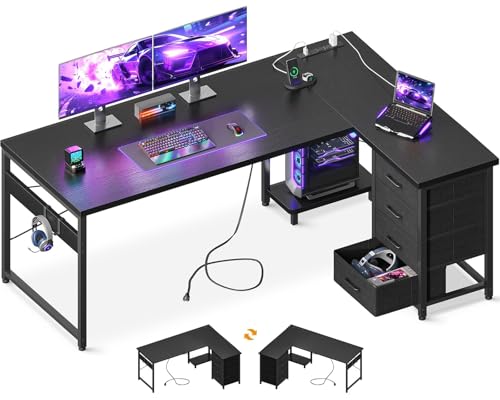
- Four drawers and two hooks help control clutter
- Three AC outlets and two USB charging ports
- Reversible layout with a dedicated host stand
Best For: Gaming, studying, and office setups needing drawer storage
Dual-Monitor Value
ODK 53-Inch L-Shaped Gaming Desk

- Reversible 53-inch layout supports compact setups
- Two shelves, CPU stand, hook, and tool bag
- Three outlets, two USB ports, cable channels, and RGB lighting
Best For: Dual-monitor gaming or workstations with organized storage
Flexible Corner Setup
AODK Reversible L-Shaped Gaming Desk

- 53-inch reversible L-shaped layout
- Three outlets and two USB ports
- Shelves, CPU stand, hook, and LED strip
Best For: Spacious gaming and home-office corner setups
Compact Storage Pick
MOTPK 43-Inch L-Shaped Gaming Desk
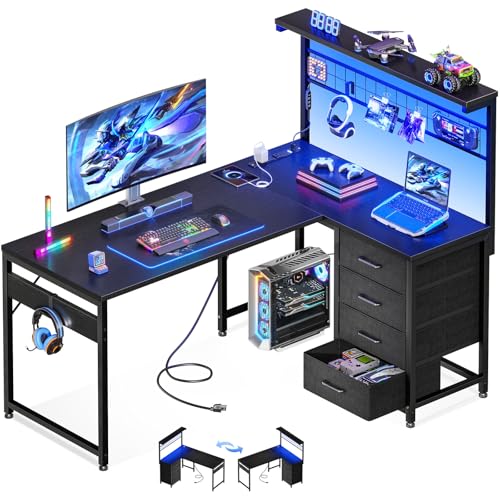
- Four drawers plus pegboard storage
- Reversible 43-inch corner layout
- Outlets, USB ports, shelf, and LEDs
Best For: Small gaming spaces needing organized storage
Accessory-Ready Design

- Reversible compact L-shaped design
- Three outlets and two USB ports
- Hooks, pegboard, mesh shelf, and cup holder
Best For: Compact setups with lots of gaming accessories
Best Reversible Setup
Aheaplus 59" L-Shaped Gaming Desk

- Reversible hutch and L-shaped layout
- 3 outlets, 2 USB ports, and LED lighting
- Four shelves plus headphone hook and storage bag
Best For: Flexible corner setups with built-in charging and storage
Best for Storage
Korfile 66" L-Shaped Gaming Desk

- Spacious 66-inch reversible design
- Two fabric drawers and sliding CPU shelf
- Long monitor riser with outlets, USB ports, and LEDs
Best For: Large gaming or work setups needing organized storage
Best Compact Option
ODK 48-Inch L-Shaped Gaming Desk

- Space-saving 48-inch corner design
- 3 outlets, 2 USB ports, and customizable LED modes
- Shelves, cabinet, and side storage bag included
Best For: Smaller rooms and compact gaming or office setups
Storage-Rich Pick – SEDETA Reversible L-Shaped Gaming Desk
For shoppers comparing corner gaming desks, the SEDETA stands out as a large, storage-focused workstation. Its reversible layout can serve as a 62-inch corner desk, an 87-inch long desk, or a two-person setup, while the hutch, cabinet, pegboard, drawers, and built-in charging features help organize a busy gaming or home-office area.
Best For: Gamers, remote workers, or shared workspaces that need substantial storage and flexible configurations.
Pros:
- Reversible layouts support corner, long-desk, and two-person configurations.
- Includes five fabric drawers, a display cabinet, pegboard, and hutch storage.
- Built-in power strip provides four outlets and two USB ports.
- RGB lighting offers app control, music synchronization, multiple colors, and flashing modes.
Cons:
- Its large footprint and 64.7-inch height may be too much for smaller rooms.
- The many storage components may make assembly more involved than a basic desk.
This is the most feature-heavy option in the group, particularly for buyers who want display space and concealed organization alongside a gaming surface. Measure carefully before choosing it, especially if you plan to use the hutch and corner configuration.
Small-Space Pick – Bestier 42-Inch L-Shaped Gaming Desk
Among compact corner gaming desks, this Bestier model is designed for bedrooms, apartments, kids’ rooms, and other tight areas. Its 42-inch footprint creates a dedicated workstation without overwhelming the room, while reversible shelves, a convertible monitor stand, LED lighting, and a side hook add flexibility.
Best For: Students, laptop users, and apartment dwellers who need a compact corner workstation.
Pros:
- Compact 42-inch design fits smaller rooms and unused corners.
- Reversible shelves can be installed on either side.
- Upper stand can function as a monitor riser or display shelf.
- Includes an LED strip and a hook for headphones, backpacks, or handbags.
Cons:
- The compact surface is less suitable for large multi-monitor or equipment-heavy setups.
- Storage is more limited than on the larger desks in this roundup.
The Bestier is a practical choice when room size is the main constraint. Its reversible parts make it easier to adapt to outlets and wall placement, but buyers with substantial desktop equipment should confirm the available surface will be sufficient.
Organized Workhorse – AODK 61-Inch L-Shaped Gaming Desk
The AODK combines a 61-inch L-shaped work surface with practical organization for gaming, studying, or office work. Four drawers, two iron hooks, a host stand, and built-in charging reduce desktop clutter, while the reversible corner layout lets you adapt the desk to the room.
Best For: Users who want a straightforward desk with drawers, PC placement, and convenient charging.
Pros:
- Four drawers provide dedicated space for documents, stationery, and personal items.
- Built-in power includes three AC outlets and two USB ports.
- Host stand helps position the computer tower and free space beneath the desk.
- Reversible layout and adjustable foot pads improve placement flexibility and stability.
Cons:
- It does not include integrated LED lighting.
- The 18.9-inch stated depth may feel limited for larger monitor arrangements.
This AODK is a sensible middle-ground option for buyers prioritizing drawers and power access over decorative gaming features. Its reversible design and tower stand are useful in corner rooms, though the relatively shallow depth is worth checking against your monitor and keyboard setup.
Dual-Monitor Value – ODK 53-Inch L-Shaped Gaming Desk
This ODK model is one of the more versatile corner gaming desks for users who want integrated storage without moving up to a very large workstation. The 53-inch reversible desk includes two shelves, a CPU stand, accessory hook, tool bag, cable-management channels, built-in power, and adjustable RGB lighting.
Best For: Dual-monitor users and compact gaming or work areas that benefit from shelves and cable organization.
Pros:
- Reversible side modules accommodate different room layouts.
- Two shelves, a CPU stand, hook, and tool bag provide varied storage.
- Three AC outlets and two USB ports centralize device charging.
- RGB lighting includes presets, brightness levels, dynamic modes, and memory.
Cons:
- The 18.9-inch depth may constrain larger accessories or deep monitor stands.
- Assembly is required, even though labeled parts and tools are included.
The ODK offers a balanced feature set for a compact setup, especially if you want dual-monitor capability, shelving, and lighting in one desk. Check the corner dimensions and equipment depth before buying, since the desk emphasizes efficient vertical and side storage.
Flexible Corner Setup – AODK Reversible L-Shaped Gaming Desk
This AODK desk is a practical option for corner gaming desks when you want a reversible layout, integrated charging, and plenty of open storage. Its 53-inch L-shaped surface is paired with shelves, a CPU stand, and gaming-focused accessories.
Best For: Gamers or home-office users who need a spacious, reversible corner workstation with built-in organization.
Pros:
- Reversible design lets you position the hutch on either side.
- Includes three power outlets and two USB charging ports.
- Offers two shelves, a CPU stand, headphone hook, and storage bag.
- LED lighting provides multiple colors, brightness levels, and dynamic modes.
Cons:
- The desk has no drawers for enclosed storage.
- At 53 inches wide, it may require more wall space than compact alternatives.
Choose this model if flexible placement and broad desktop space matter more than drawer storage. The reversible configuration and included accessories make it adaptable for gaming, studying, or working in a corner.
Compact Storage Pick – MOTPK 43-Inch L-Shaped Gaming Desk
The MOTPK is a compact choice among corner gaming desks, combining a 43-inch reversible layout with four drawers, a pegboard, and an upper shelf. Built-in outlets, USB ports, and LED strips help keep a smaller gaming or work area organized.
Best For: Users who want maximum built-in storage in a compact corner desk.
Pros:
- Four drawers provide enclosed storage for accessories and work supplies.
- Reversible design supports different room layouts.
- Includes a grid pegboard, shelf, and headphone hook.
- Features three power outlets, two USB ports, and adjustable LED lighting.
Cons:
- The 43-inch width offers less desktop space than larger L-shaped models.
- Its storage-focused design may feel more involved to assemble.
This desk stands out when organization is the priority. Four drawers and the pegboard can reduce desktop clutter, while the reversible corner configuration makes the compact footprint easier to place.
Accessory-Ready Design – Bestier 42-Inch L Gaming Desk
The Bestier combines a compact footprint with a reversible L-shaped configuration, an upper LED strip, and an integrated power strip. For corner gaming desks, its accessory hooks, cup holder, mesh storage, and pegboard add practical ways to keep gaming gear close at hand.
Best For: Gamers with compact or medium-sized rooms who want dedicated accessory organization and flexible placement.
Pros:
- Reversible main and secondary tabletops fit different room layouts.
- Integrated power strip includes three AC outlets and two USB ports.
- Includes headphone, cup, and accessory hooks plus four shelf magnets.
- Mesh pegboard and adjustable storage shelf help organize equipment.
Cons:
- The 42-inch surface is more compact than larger gaming desks.
- Its many accessories and adjustable parts may add assembly complexity.
This model is a strong fit for a tidy, gear-focused setup. The extended L-shaped top supports multiple devices, while the reversible layout and mesh storage make it easier to tailor the desk to a corner.
Best Reversible Setup – Aheaplus 59" L-Shaped Gaming Desk
For shoppers comparing corner gaming desks, the Aheaplus 59-inch model combines a reversible layout with integrated charging, LED lighting, and open storage. Its 45-inch desktop is designed to accommodate two monitors or laptops while the shelves and accessories help keep gaming or office equipment organized.
Best For: Users who want a configurable corner desk with built-in power, RGB-style lighting, and multiple storage options.
Pros:
- Reversible L-shaped configuration lets you position the hutch on either side.
- Built-in station includes 3 outlets and 2 USB ports, plus a 6.5-foot power cord.
- LED strip supports app control, more than 60,000 colors, music sync, and timer functionality.
- Includes four open shelves, a storage bag, and a headphone hook.
Cons:
- The 18.9-inch depth may feel limited for users who prefer a very deep gaming surface.
- Its listed 59.13-inch height may not suit every chair or monitor setup.
This is a practical choice when flexibility and built-in organization matter as much as the desktop itself. Confirm the height and corner dimensions before buying, especially if you plan to use large monitors or a bulky PC setup.
Best for Storage – Korfile 66" L-Shaped Gaming Desk
Among corner gaming desks, the Korfile 66-inch model stands out for its roomy footprint and storage-focused design. It pairs a reversible L-shaped layout with fabric drawers, a CPU shelf, headphone hooks, a long monitor riser, and an integrated power station.
Best For: Gamers, remote workers, and students who need a large corner workspace with dedicated accessory storage.
Pros:
- Large 66-inch design provides an extended work and gaming surface.
- Includes two fabric drawers, a sliding CPU shelf, two headphone hooks, and a monitor shelf.
- Integrated power station has 3 AC outlets and 2 USB ports.
- LED lighting offers 20 colors, 22 dynamic scenes, and five brightness settings.
Cons:
- Its 42.5-inch depth requires more floor space than compact corner desks.
- The fabric drawers may offer less rigid storage than hard-sided drawers.
The Korfile is a strong fit for buyers who want to spread out multiple devices and keep accessories off the desktop. Measure carefully before ordering, since its generous footprint is better suited to a larger office, bedroom, or game room.
Best Compact Option – ODK 48-Inch L-Shaped Gaming Desk
If you need corner gaming desks for a smaller room, the ODK 48-inch L-shaped desk offers a compact footprint with useful gaming and office features. It includes built-in charging, adjustable LED lighting, shelves, a side storage bag, and a metal-and-MDF frame designed for stable everyday use.
Best For: Small bedrooms, dorms, home offices, and gaming areas that need corner-friendly storage without a full-size desk.
Pros:
- Compact 48-inch L-shaped design helps make use of corner space.
- Includes 3 power outlets and 2 USB charging ports.
- LED system offers 10 static colors, six brightness levels, 10 dynamic modes, and memory function.
- Under-desk shelving, side storage bag, and a cabinet provide space for accessories and supplies.
Cons:
- It has no drawer, so smaller items rely on the shelves, bag, or cabinet.
- The compact surface may feel crowded with three monitors and larger peripherals.
The ODK makes the most sense when floor space is limited but you still want integrated charging and decorative lighting. Its storage supports a tidy setup, though users with extensive gaming gear may prefer a deeper or larger desk.
How We Picked These Corner Gaming Desks
We focused on the features that make an L-shaped desk useful for gaming rather than treating appearance as the main deciding factor. Our comparison considers overall footprint, usable desktop depth, storage, integrated outlets, LED lighting, assembly practicality, and flexibility for monitors and accessories. The selection includes compact desks for smaller rooms, larger work-and-play stations, and storage-heavy designs for users who want to keep equipment organized.
Because specifications and configurations can vary by listing, verify the current dimensions, orientation, weight capacity, outlet details, and included accessories before ordering.
Quick Comparison
- Best for maximum workspace: Choose a longer 59- or 66-inch model if you use multiple monitors, speakers, and a full-size PC setup.
- Best for smaller rooms: A 42- or 43-inch desk can provide an L-shaped layout without consuming as much floor space.
- Best for storage: Look for drawers, shelves, or a hutch if controllers, games, documents, and accessories need dedicated homes.
- Best for connected setups: Models with built-in power outlets reduce the need to reach behind the desk, though they do not replace a quality surge protector.
- Best for atmosphere: Integrated LED lighting adds customizable accent illumination, but check how it is powered and controlled.
Key Buying Factors for Corner Gaming Desks
Measure the Corner First
Record the width of both walls, available depth, nearby door clearance, and the position of outlets. Confirm whether the desk can be assembled with the longer side on your preferred left or right orientation.
Match the Surface to Your Equipment
Measure monitor stands, keyboard space, speakers, a mouse area, and any laptop or writing zone. A larger desktop is valuable only if the corner and room allow comfortable movement around it.
Check Storage and Cable Access
Drawers and shelves help reduce clutter, while grommets or open cable routes make routing easier. Built-in charging ports are convenient, but inspect the number and type of outlets and USB ports.
Consider Construction and Maintenance
Compare the frame, desktop material, leg design, and stated weight limit. LED strips and textured surfaces may require extra cable management and dusting, especially in a frequently used gaming area.
Who Should Buy Which Corner Gaming Desks?
Choose a compact corner desk if you are furnishing a bedroom, apartment, or secondary gaming station. Pick a mid-size option if you want room for two monitors and everyday accessories without taking over the room. Go with a 59- or 66-inch model if your setup includes several displays, a desktop tower, speakers, streaming equipment, or a separate work area. Storage-focused shoppers should prioritize drawers, shelves, or a hutch over decorative lighting, while users who already own cable-management accessories may prefer a simpler desk with the largest uninterrupted surface.