A great gaming desk should do more than hold your monitor and keyboard. The right layout can hide power cables, keep accessories within reach, and give your setup enough room to grow.
These 10 gaming desks with cable trays cover L-shaped workstations, electric standing desks, RGB-equipped models, and compact gaming tables, making it easier to match features to your room and routine.
Best 10 Gaming Desks with Cable Trays Picks for 2026
Flexible Corner Setup

- L-shaped surface for gaming and work
- Cable holes and clips organize wires
- Reversible keyboard tray
Best For: Corner gaming and home-office setups
Height-Adjustable RGB Pick

- Electric height range for sitting or standing
- Underdesk tray and magnetic cable slot
- RGB lighting with remote and app control
Best For: Gaming, streaming, and sit-stand workstations
Storage-Focused Corner Desk
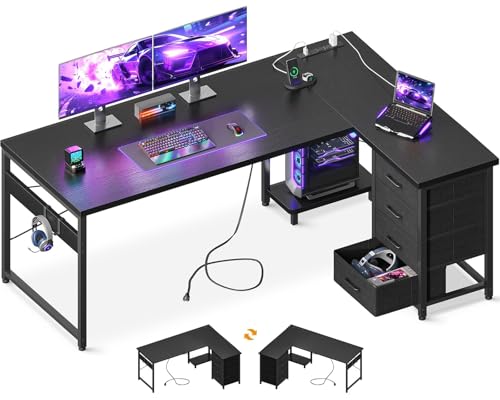
- Four drawers and two iron hooks
- Three AC outlets and two USB ports
- Reversible layout with host stand
Best For: Organized gaming rooms and home offices
Compact Cable-Managed Choice

- Oversized wire trough for cable routing
- 48-inch surface for dual monitors
- Full-surface 5 mm mouse pad
Best For: Compact gaming and home-office setups
Best Overall
Muvai 71" Reversible L-Shaped Standing Desk

- Reversible 71-inch L-shaped surface
- 176-pound capacity with quiet electric lift
- Large cable tray plus gaming accessories
Best For: Spacious corner gaming and home-office setups
Best RGB Setup
FLEXISPOT 55" RGB Magnetic Gaming Desk
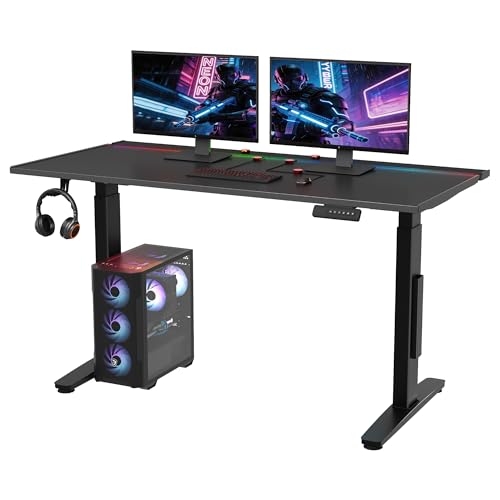
- 22 customizable RGB lighting modes
- Magnetic desktop with cable organizers
- Dual-motor lift and hidden cable storage
Best For: RGB-focused PC gaming stations
Best Compact Corner Pick
Muvai 59" Reversible L-Shaped Desk

- Space-conscious reversible L-shaped design
- 176-pound capacity and three presets
- Cable tray with hook, cup holder, and clips
Best For: Smaller corner gaming and work areas
Best Budget LED Pick
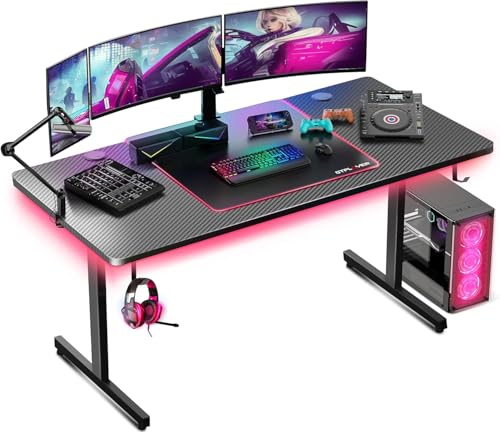
- 55-inch carbon-fiber-style surface
- Built-in LED lighting and mouse pad
- 300-pound recommended capacity
Best For: Gamers wanting a roomy desk with integrated accessories
Best Overall Cable Management
X-WIN 71-Inch Electric Standing Desk

- Flip-top cable tray hides power strips and wires
- Electric sit-stand height adjustment
- Four-leg frame supports multi-monitor setups
Best For: Large gaming, streaming, and workstations
Best Pneumatic Design
Tangkula Adjustable Gaming Desk

- Pneumatic sit-stand height adjustment
- Power-strip tray plus two cable holes
- 135-pound recommended capacity
Best For: Gamers wanting manual height adjustment and organized power cables
Flexible Corner Setup – RIF6 L-Shaped Gaming Desk
If you need gaming desks with cable trays but prefer a corner-friendly layout, the RIF6 L-shaped desk combines a broad work surface with cable management holes and clips. Its interchangeable keyboard tray can be installed on either side, helping you adapt the setup to your room.
Best For: Gamers who want an L-shaped workstation with a reversible keyboard tray and organized cable routing.
Pros:
- L-shaped design provides separate areas for gaming and work.
- Cable holes and clips help keep wires organized.
- Keyboard tray can be mounted on the left or right.
- Metal frame and scratch- and heat-resistant fiberboard support up to 150 pounds.
Cons:
- The 19.7-inch depth may feel limited for some larger setups.
- Full assembly is required, with an estimated assembly time of about 60 minutes.
This is a practical choice for corner setups that need flexibility and basic cable organization. The reversible tray is especially useful when room layout or handedness matters.
Height-Adjustable RGB Pick – 55-Inch Electric Gaming Desk
For shoppers comparing gaming desks with cable trays, this electric standing desk stands out with an underdesk management tray for plugs and routers, plus a magnetic cable slot. Its powered height range and integrated RGB lighting add flexibility for gaming, work, or streaming.
Best For: Gamers and streamers who want sit-stand adjustment, underdesk cable storage, and customizable lighting.
Pros:
- Electric height adjustment ranges from about 28.3 to 47.2 inches.
- Underdesk tray and magnetic cable slot help manage power and data lines.
- Enclosed host shelf moves with the desk during height adjustments.
- Offers RGB lighting with remote and app control.
Cons:
- The rectangular top is listed as 55 by 24 inches, which may not suit very large multi-monitor setups.
- Lighting and motorized features add complexity compared with a fixed desk.
This model is a strong match when ergonomic height changes and cable organization matter as much as gaming aesthetics. Its host shelf is a useful detail for users who want the PC to rise with the desktop.
Storage-Focused Corner Desk – AODK 61-Inch L-Shaped Desk
If your search for gaming desks with cable trays also includes storage and charging, the AODK L-shaped desk offers four drawers, two hooks, a host stand, and built-in power access. Its reversible corner layout can help accommodate different room configurations.
Best For: Gamers, students, and home-office users who need drawers, a PC stand, and integrated charging.
Pros:
- Four drawers provide dedicated storage for accessories and personal items.
- Built-in power section includes three AC outlets and two USB ports.
- Reversible corner design supports different room layouts.
- Host stand and iron hooks help free space on the desktop.
Cons:
- The 18.9-inch depth may constrain larger monitor or accessory arrangements.
- The notes emphasize power and storage organization rather than a dedicated cable tray.
- Assembly is required, even though a labeled tool kit and instructions are included.
This desk makes sense for buyers who value organization beyond cable routing. The drawers, charging ports, and host stand create a more complete workstation for gaming and everyday tasks.
Compact Cable-Managed Choice – Respawn 1048 Gaming Desk
Among gaming desks with cable trays, the Respawn 1048 is a compact option with an oversized wire trough for routing cables. Its 48-inch surface is designed for dual monitors or an ultrawide display, while the full-surface mouse pad keeps the play area ready to use.
Best For: Gamers and home-office users building a compact dual-monitor or ultrawide setup.
Pros:
- Oversized wire trough keeps cables organized beneath the desktop.
- 48-inch surface supports an ultrawide monitor or dual displays.
- Included 5 mm full-surface mouse pad covers the desktop.
- T-leg frame, adjustable glides, and a 175-pound capacity support a stable setup.
Cons:
- At 47.2 inches wide, it offers less surface area than the larger desks in this roundup.
- The included mouse-pad surface may be less flexible than a bare desktop for some users.
This is a focused pick for smaller rooms or streamlined gaming stations. Its dedicated wire trough and integrated mouse-pad top deliver useful gaming features without the footprint of an L-shaped desk.
Best Overall – Muvai 71" Reversible L-Shaped Standing Desk
If you want gaming desks with cable trays and plenty of room for multiple displays, this 71-inch Muvai model combines a reversible L-shaped layout with electric height adjustment. Its large under-desk tray helps keep power strips, adapters, and cords out of sight.
Best For: Gamers and home-office users who need a spacious corner workstation with sit-stand flexibility.
Pros:
- Reversible L-shaped design fits left- or right-sided room layouts.
- 176-pound capacity supports dual monitors and gaming equipment.
- Three memory presets and a quiet motor operating under 45 dB.
- Includes a cable tray, headphone hook, cup holder, and cable clips.
Cons:
- The three-piece desktop requires assembly by two people.
- Its L-shaped footprint may be too large for compact rooms.
This is a strong all-around pick when surface area and flexible placement matter most. The integrated tray and included accessories make it easier to build a clean, practical battle station.
Best RGB Setup – FLEXISPOT 55" RGB Magnetic Gaming Desk
For a more immersive setup, this FLEXISPOT is one of the gaming desks with cable trays that pairs built-in RGB lighting with a metal magnetic desktop. Magnetic cable organizers, a hidden flip panel, and the under-desk tray provide several ways to manage wires.
Best For: PC gamers who prioritize RGB effects, magnetic accessories, and a streamlined rectangular workstation.
Pros:
- Offers 22 customizable RGB modes, including sound-reactive effects.
- Magnetic metal desktop works with the included cable organizers.
- Hidden flip panel and large under-desk tray conceal cables.
- Dual motors adjust the desk from 28.9 to 46.4 inches.
Cons:
- The 55-inch surface provides less room than the larger L-shaped options.
- Its metal desktop may not suit shoppers seeking a traditional wood top.
This model stands out for gamers who want cable control to complement the visual design. The dual-motor lift and included five-year frame and motor coverage add practical value beyond the RGB lighting.
Best Compact Corner Pick – Muvai 59" Reversible L-Shaped Desk
This 59-inch Muvai is a practical choice among gaming desks with cable trays when you want an L-shaped workstation without the footprint of a larger 71-inch desk. It supports sit-stand use, reverses for either corner, and includes storage-focused accessories.
Best For: Corner gaming setups that need dual-monitor space and a somewhat more compact L-shaped layout.
Pros:
- Reversible configuration accommodates left- or right-sided corners.
- 176-pound maximum weight recommendation supports gaming gear.
- Three height presets span approximately 28 to 46.4 inches.
- Under-desk cable tray, clips, headphone hook, and cup holder are included.
Cons:
- The 59-inch layout offers less desktop area than the 71-inch version.
- Assembly is recommended for two people.
Choose this version when corner compatibility and cable organization are more important than maximum desktop width. It retains the key standing-desk features of the larger model in a more modest size.
Best Budget LED Pick – GTPLAYER 55-Inch Gaming Desk
If you want gaming desks with cable trays but also value a simple, feature-focused setup, the GTPLAYER 55-inch desk offers a roomy carbon-fiber-style surface, built-in lighting, and useful accessories. Its T-shaped frame is designed for gaming, studying, and home-office work.
Best For: Gamers and students who want a spacious desk with LED lighting, a built-in mouse pad, and a headphone hook.
Pros:
- 55-inch surface provides room for gaming gear, monitors, and work materials.
- Integrated LED lights offer adjustable ambiance for gaming or late-night work.
- Includes a built-in mouse pad and headphone hook.
- Rated for up to 300 pounds and backed by a one-year warranty.
Cons:
- The supplied specifications do not list a dedicated cable tray or cable-management system.
- Assembly is required, and tools are not included.
The GTPLAYER is a practical choice when surface space and gaming extras matter more than built-in wire storage. If a true cable tray is essential, consider one of the other options in this roundup.
Best Overall Cable Management – X-WIN 71-Inch Electric Standing Desk
Among gaming desks with cable trays, the X-WIN stands out for combining a spacious 71-inch workstation with electric height adjustment and a flip-top cable tray. Its four-leg design is intended to provide stability for multi-monitor gaming, streaming, and work setups.
Best For: Multi-monitor users, streamers, and home-office workers who need a large sit-stand desk with integrated cable storage.
Pros:
- Flip-top cable tray helps conceal cables, power strips, and accessories.
- Electric height adjustment supports switching between sitting and standing.
- Four-leg structure is designed for added stability with heavy setups.
- Includes a headphone hook, cup holder, cable clips, LED strip, and large mouse pad.
Cons:
- At 92.6 pounds, it may be more difficult to move and assemble than lighter desks.
- Assembly is recommended for two people.
The X-WIN is the strongest match for shoppers who specifically prioritize a cable tray, expansive workspace, and sit-stand flexibility. It is especially well suited to full gaming or streaming stations.
Best Pneumatic Design – Tangkula Adjustable Gaming Desk
The Tangkula is a useful alternative among gaming desks with cable trays, pairing pneumatic height adjustment with a power-strip tray and two cable-management holes. Its carbon-fiber tabletop and adjustable foot pads support a flexible gaming, study, or home-office setup.
Best For: Users who want manual sit-stand adjustment and dedicated storage for a power strip without choosing an electric desk.
Pros:
- Pneumatic handle makes it easy to raise or lower the desk for sitting or standing.
- Under-desk power-strip tray and two cable holes help organize wires.
- Carbon-fiber tabletop provides space for monitors, keyboards, and gaming equipment.
- Metal frame and adjustable foot pads support stability on uneven floors.
Cons:
- 135-pound maximum recommended load is lower than the GTPLAYER’s listed capacity.
- The pneumatic adjustment is manual rather than electric.
- The supplied dimensions list the desk as 23.5 inches wide, so buyers should verify the layout suits their equipment.
The Tangkula makes sense for buyers who want practical cable organization and height flexibility at a simpler specification level. Its power-strip tray is particularly useful for keeping charging and gaming cables off the floor.
How We Picked the Best Gaming Desks with Cable Trays
We focused on desks that provide a practical way to route or conceal cables while supporting common gaming and home-office equipment. Our comparison considers desktop size, shape, height adjustment, storage, power access, cable-tray design, materials, and setup flexibility. We also included a range of styles, from compact rectangular desks to reversible L-shaped and electric standing models.
Because desk dimensions and included accessories can vary by configuration, confirm the current specifications before ordering—especially the tray position, desktop depth, weight capacity, and whether lights, outlets, or a keyboard tray are included.
Quick Comparison
- Best for corner setups: L-shaped models such as the RIF6, AODK, and Muvai desks maximize usable surface area.
- Best for sit-stand flexibility: Electric models from FLEXISPOT, Muvai, and X-WIN offer powered height adjustment.
- Best for a gaming-focused appearance: RGB lighting, carbon-fiber finishes, and racing-inspired designs add visual flair.
- Best for organized accessories: Look for a dedicated cable tray plus shelves, drawers, outlets, or a keyboard tray.
Key Buying Factors for Gaming Desks with Cable Trays
Size, Shape, and Monitor Space
Measure the available wall and corner space before choosing a desk. A 55- or 61-inch surface may suit a single large monitor or dual-monitor setup, while 71-inch L-shaped desks provide room for a PC, speakers, work materials, and peripherals. Check the usable depth, not just the listed width.
Cable-Tray Design and Power Access
A tray is most useful when it is wide enough for a surge protector and easy to reach during installation. Flip-top trays can simplify access, while integrated outlets reduce visible cords but may not replace a high-quality power strip. Check cable cutouts, tray placement, and whether the design works with your wall outlet.
Height Adjustment and Stability
Electric standing desks are convenient for alternating between sitting and standing, but motor speed, height range, noise, and frame stability matter. Fixed-height desks may be simpler and more rigid. For heavier multi-monitor setups, verify the stated load rating and use a monitor arm only if the desktop and frame support it.
Storage, Lighting, and Included Accessories
Drawers, shelves, a mouse pad, keyboard tray, host shelf, and power outlets can reduce extra purchases. RGB lighting is primarily cosmetic, so prioritize construction, ergonomics, and cable routing first if your budget is limited.
Who Should Buy Which Gaming Desks with Cable Trays?
Choose an L-shaped desk if you need separate gaming and work zones or want to place the setup in a corner. Choose an electric standing desk if you regularly switch positions or use the desk for both gaming and work. Choose a compact rectangular model for a smaller room or straightforward single-monitor setup. Choose a storage-focused desk if drawers and shelves matter more than maximum legroom. For any model, prioritize a stable frame, adequate depth, and a cable tray that can accommodate your actual power and accessory cables.