A small room does not have to mean a compromised gaming setup. The right compact desk can create dedicated space for a monitor, keyboard, accessories, and charging without overwhelming your floor plan.
We compared 10 space-conscious gaming desks with features such as built-in outlets, LED lighting, monitor shelves, storage, and reversible layouts to help you choose a setup that fits both your room and your playing style.
Best 10 Gaming Desks for Small Rooms Picks for 2026
Best Corner-Space Pick
Compact Reversible L-Shaped Desk

- 40-inch reversible corner layout
- Two AC outlets, USB, and Type-C
- Two-tier open storage shelves
Best For: Small corner gaming and work setups
Best LED Storage Pick
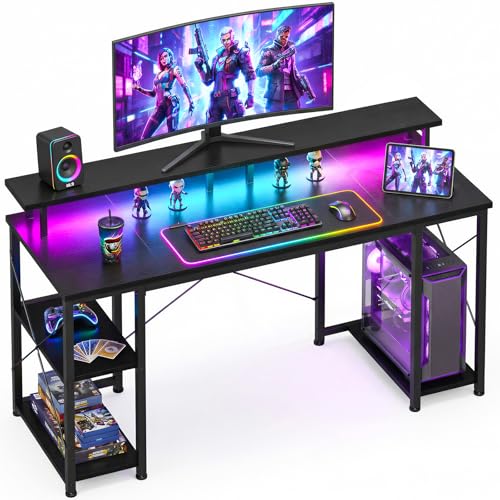
- Customizable LED lighting modes
- Raised monitor stand and CPU stand
- Reversible three-shelf storage
Best For: Compact gaming setups needing organized storage
Best Feature-Rich Corner Pick
Reversible L-Shaped Gaming Desk

- Three outlets and two USB ports
- Reversible hutch and L-shaped design
- LED strip, shelves, hook, and CPU stand
Best For: Feature-packed corner gaming stations
Best Ultra-Compact Pick

- 31.5-by-16.5-inch compact footprint
- Two-tier monitor and keyboard layout
- Charging station, Bluetooth LEDs, and four hooks
Best For: Very small rooms, dorms, and tight gaming corners
Compact Power Hub
Korfile 40-Inch LED Gaming Desk

- Reversible L-shaped layout for corner setups
- Three AC outlets and two USB charging ports
- Monitor stand and accessories save desk space
Best For: Small-room gamers needing flexible placement and built-in charging
Study-Ready Space Saver
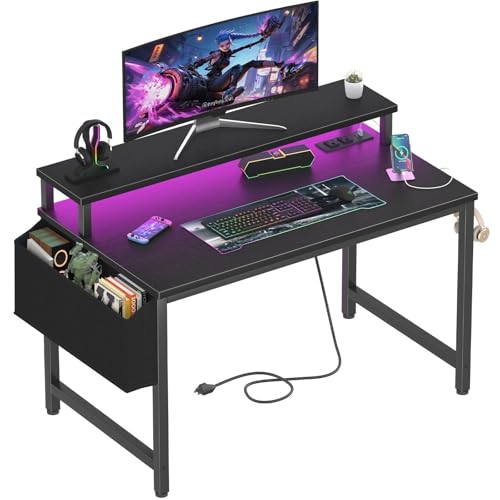
- Narrow 19.7-inch depth for tight spaces
- Two outlets and two USB charging ports
- Monitor stand and removable headphone hooks
Best For: Students and casual gamers with compact bedrooms or study areas
Storage-Focused Corner Setup

- Slim 18.9-inch depth conserves floor space
- Five shelves plus additional storage levels
- Three outlets, two USB ports, and RGB lighting
Best For: Gamers needing storage and a dual-monitor-friendly compact setup
Best with Extra Features
X-cosrack 33.5-Inch Gaming Desk

- 33.5-inch width suits tight corners
- Built-in outlets, USB, and Type-C charging
- Monitor stand, drawer, CPU shelf, and hooks
Best For: Very small bedrooms, dorms, and compact office corners
Best Storage Pick

- 47.2-inch desktop supports larger setups
- Five reversible fabric drawers
- Three AC outlets plus two USB ports
Best For: Small rooms that can fit a wider, storage-focused desk
Best Balanced Choice

- 39.4-inch width fits many bedrooms and dorms
- Two outlets and two USB charging ports
- Monitor stand, RGB lighting, hooks, and storage bag
Best For: Mixed gaming, studying, and home-office use in modest spaces
Best Corner-Space Pick – Compact Reversible L-Shaped Desk
For shoppers seeking gaming desks for small rooms, this 40-inch reversible L-shaped model makes practical use of a corner while adding built-in charging and open storage. Its compact footprint suits bedrooms, dorms, apartments, and home offices.
Best For: Corner setups that need flexible orientation, charging access, and basic shelf storage.
Pros:
- Built-in power setup includes two AC outlets, one USB port, and one Type-C port.
- Reversible design lets you place the smaller desktop section on either side.
- Two-tier open shelves help organize books, files, and gaming accessories.
- Metal framing and an X-frame structure are designed to reduce wobbling.
Cons:
- The 40-inch desktop may feel limited for larger multi-monitor setups.
- Open shelves provide storage but no enclosed cabinet space.
- Assembly is required.
Choose this desk when corner efficiency and built-in charging matter more than a large uninterrupted surface. The reversible layout makes it easier to adapt the workstation to different room arrangements.
Best LED Storage Pick – 48-Inch Gaming Desk
This 48-inch ODK desk is a strong option among gaming desks for small rooms when you want a straightforward rectangular workstation with integrated lighting and storage. Its compact width is intended for bedrooms, apartments, dorms, and other space-conscious areas.
Best For: Gamers who want customizable lighting, monitor elevation, and dedicated accessory storage.
Pros:
- LED system offers 10 static colors, eight brightness levels, and 10 dynamic modes.
- Raised monitor stand can improve viewing height while keeping the desktop organized.
- Reversible shelves and a dedicated CPU stand help keep equipment accessible.
- Reinforced steel, engineered wood, and an X-shaped crossbar support stability.
Cons:
- The 19.6-inch depth may be restrictive for bulky peripherals.
- Storage is open rather than enclosed.
- Assembly is required.
This is a practical pick for a compact gaming station that prioritizes atmosphere and organization. The lighting controls add customization, while the shelves and CPU stand help keep limited floor and desktop space orderly.
Best Feature-Rich Corner Pick – Reversible L-Shaped Gaming Desk
For gaming desks for small rooms that need more built-in features, this reversible L-shaped AODK model combines a corner-friendly layout with LED lighting, charging ports, shelves, and accessory holders. Its 53-inch width provides more workspace than a very compact desk while retaining a shallow 18.9-inch depth.
Best For: Corner users who want integrated charging, lighting, and dedicated gaming accessory storage.
Pros:
- Includes three power outlets and two USB charging ports.
- Reversible configuration allows the hutch to be installed on either side.
- LED strip provides 10 static colors, eight brightness levels, and 10 dynamic modes.
- Includes shelves, a CPU stand, headphone hook, and storage bag.
Cons:
- The 18.9-inch depth may limit room for large keyboards or deep monitors.
- It has no drawers for concealed storage.
- Assembly is required.
This desk makes sense when you want a consolidated gaming station rather than a bare tabletop. Its reversible storage arrangement and many built-in accessories can help maximize a corner without adding separate organizers.
Best Ultra-Compact Pick – 31.5-Inch Two-Tier Desk
This YATINEY model is one of the most compact choices for gaming desks for small rooms, measuring 31.5 inches wide by 16.5 inches deep. Its two-tier layout separates the monitor from the keyboard area, while charging and Bluetooth-controlled lighting add useful gaming features.
Best For: Dorms, bedrooms, and tight work areas that need a small gaming surface with vertical organization.
Pros:
- Very compact 31.5-by-16.5-inch footprint fits space-constrained rooms.
- Two-tier design provides separate monitor and keyboard areas.
- Power strip includes two AC outlets, one USB port, and one Type-C port.
- Four side hooks hold headphones and cables, while adjustable feet help level the desk.
Cons:
- The narrow surface is not suited to expansive gaming setups.
- Storage is limited to the two-tier design and side hooks.
- Its LED system and controls add features but also increase setup complexity.
Select this desk when minimizing floor and desktop space is the priority. The elevated monitor tier and side hooks make the small footprint more functional, though users with multiple large peripherals should consider a wider model.
Compact Power Hub – Korfile 40-Inch LED Gaming Desk
For shoppers comparing gaming desks for small rooms, this 40-inch Korfile model packs useful gaming features into a compact footprint. Its reversible L-shaped layout, monitor shelf, built-in outlets, and under-desk accessories help keep a small setup organized.
Best For: Small-room gamers who want flexible corner placement, charging access, and room for up to two 24-inch monitors.
Pros:
- Reversible L-shaped design can be configured for different corners.
- Includes three AC outlets, two USB ports, and RGB lighting with app control.
- Monitor stand, cup holder, headphone holder, and three shelves help conserve surface space.
- Double Z-shaped legs and adjustable leg pads support stability, with legs rated for up to 220 pounds.
Cons:
- The 25.6-inch depth may still require careful placement in especially tight rooms.
- Assembly may take up to about 60 minutes.
This is a feature-dense choice when you need a compact desk that functions as both a gaming station and a charging hub. The reversible layout is particularly useful when room corners or equipment placement are limiting factors.
Study-Ready Space Saver – Lufeiya 32-Inch LED Desk
If floor space is limited, the Lufeiya 32-inch desk is a straightforward option among gaming desks for small rooms. Its narrow 19.7-inch depth, monitor stand, built-in charging station, and removable accessories make it suitable for compact bedrooms, study areas, or home offices.
Best For: Teens, students, and casual gamers who need a compact desk for gaming, studying, or everyday computer work.
Pros:
- Compact 31.5-inch-wide design fits smaller bedrooms, offices, and study rooms.
- Built-in power strip provides two outlets and two USB charging ports.
- RGB lighting offers adjustable colors, dynamic modes, and static lighting types.
- Monitor stand helps raise a monitor or laptop and includes removable headphone hooks and a storage bag.
Cons:
- The smaller desktop is better suited to compact setups than multiple-monitor arrangements.
- Its 19.8-pound weight and engineered-wood construction may appeal less to shoppers seeking a heavier-duty desk.
Choose this model when compact dimensions and everyday versatility matter more than an expansive gaming surface. It works well as a hybrid study, work, and gaming desk with convenient lighting and charging built in.
Storage-Focused Corner Setup – Korfile 40-Inch LED Desk
This Korfile desk is a practical pick for gaming desks for small rooms when vertical organization is as important as width. The 40-inch design combines a slim 18.9-inch depth with multiple shelves, a monitor stand, reversible accessories, and built-in charging for a more organized corner setup.
Best For: Gamers who want substantial storage and a dual-monitor-friendly layout without using a deep desktop.
Pros:
- At 18.9 inches deep, it uses less front-to-back space than many gaming desks.
- Five shelves and two additional desktop storage levels provide room for books, electronics, and accessories.
- Three AC outlets, two USB ports, and RGB lighting can be controlled by remote or app.
- Monitor stand accommodates two computers, while reversible cup and headphone holders adapt to the setup.
Cons:
- The 35.3-inch height and monitor-hutch design may not suit every chair or monitor arrangement.
- Its storage-heavy structure may feel visually busy in very small rooms.
This model stands out when storage is the main constraint. Its slim depth helps preserve walking space, while the shelves and monitor area let you keep more equipment off the main work surface.
Best with Extra Features – X-cosrack 33.5-Inch Gaming Desk
For especially tight bedrooms, dorms, and home-office corners, the X-cosrack is one of the most space-conscious gaming desks for small rooms. Its 33.5-inch width combines a monitor stand, storage drawer, CPU shelf, headphone hooks, RGB lighting, and built-in charging in a compact footprint.
Best For: Gamers and remote workers who need maximum functionality in a very narrow space.
Pros:
- Compact 33.5-inch-wide design fits small corners and bedrooms.
- Includes two AC outlets, USB, and Type-C charging.
- Combines a monitor stand, drawer, reversible CPU shelf, and headphone hooks.
- RGB system offers multiple colors, modes, brightness levels, and speed controls.
Cons:
- The 15.75-inch depth provides limited room for larger keyboards or accessories.
- Its single drawer and compact surface offer less storage than wider desks.
The X-cosrack prioritizes organization and built-in features over expansive desktop space. It is a practical choice when floor area is the primary constraint, provided your setup can work comfortably on a compact surface.
Best Storage Pick – Korfile 47-Inch Gaming Desk
The Korfile offers more working and storage space than many gaming desks for small rooms while keeping a straightforward rectangular design. Its 47-inch desktop, five reversible fabric drawers, monitor stand, RGB lighting, and built-in charging make it useful for combined gaming, studying, and work setups.
Best For: Users who can accommodate a wider desk and want substantial flexible storage.
Pros:
- 47.2-inch width provides more room for monitors and peripherals.
- Five fabric drawers can be installed in multiple positions.
- Includes three AC outlets and two USB charging ports.
- Powder-coated steel frame, crossbar support, and adjustable legs promote stability.
Cons:
- At 47.2 inches wide and about 18.5 inches deep, it needs more floor space than the other options.
- The fabric drawers may provide less rigid storage than hard-sided drawers.
Choose the Korfile when storage and usable desktop area matter more than the smallest possible footprint. Its reversible drawer layout is particularly helpful when room configuration limits where the desk can go.
Best Balanced Choice – Lufeiya 40-Inch Gaming Desk
The Lufeiya strikes a middle ground for gaming desks for small rooms, offering a 39.4-inch width without the extremely narrow footprint of a compact corner desk. It adds a monitor stand, built-in power strip, RGB lighting, removable headphone hooks, and a storage bag for a practical bedroom, dorm, or home-office setup.
Best For: Students, teens, and gamers wanting a moderate-size desk with basic organization and charging features.
Pros:
- 39.4-inch width balances usable workspace with a relatively compact footprint.
- Built-in strip provides two outlets and two USB charging ports.
- Monitor stand can accommodate two monitors or laptops.
- Scratch-resistant, waterproof tabletop includes removable hooks and a storage bag.
Cons:
- There is no drawer; storage is limited to the included bag and tabletop space.
- Its RGB lighting has fewer listed controls than the X-cosrack.
The Lufeiya is a sensible compromise for buyers who need more surface area than a 33.5-inch desk but do not want a full 47-inch workstation. Consider it a versatile option for mixed gaming, schoolwork, and everyday computer use.
How We Picked the Best Gaming Desks for Small Rooms
We focused on desks that use limited floor space efficiently while still supporting a practical gaming or work-from-home setup. Our comparison considered desktop dimensions, layout flexibility, storage, monitor elevation, cable and power access, construction details, and how easily each desk could fit into a bedroom, apartment, dorm, or compact office.
We also looked for useful extras rather than treating lighting alone as a deciding feature. Built-in outlets, USB charging, CPU stands, shelves, drawers, and reversible corner configurations can make a meaningful difference when every inch matters.
Quick Comparison
| Desk type | Best for | Key advantage |
|---|---|---|
| Compact straight desk | Very tight rooms | Smallest footprint and simple placement |
| L-shaped desk | Corner setups | Uses otherwise wasted corner space |
| Desk with shelves | Accessories and consoles | Adds vertical storage without extra furniture |
| Desk with drawers | Organized workspaces | Hides controllers, cables, and small items |
| Power-equipped desk | Multi-device users | Keeps charging connections within reach |
Key Buying Factors for Gaming Desks for Small Rooms
Measure the Complete Footprint
Check the desk’s width, depth, and height, then account for chair clearance, door swings, baseboards, and nearby outlets. L-shaped models need special attention because both sides extend into the room. Confirm whether the corner configuration is reversible before ordering.
Prioritize Usable Desktop Depth
A narrow desk may fit better, but it still needs enough depth for your monitor stand, keyboard, mouse movement, and comfortable viewing distance. Monitor shelves can free up surface area, though they may limit monitor size or placement.
Choose Storage Based on Your Routine
Shelves work well for speakers, consoles, books, and display items. Drawers are better for keeping controllers and accessories out of sight. If you already have separate storage, a simpler desk may provide more legroom and a cleaner footprint.
Consider Power and Cable Management
Built-in outlets and USB ports can reduce cable clutter, but they do not replace a surge protector for every setup. Check the outlet layout, cord length, and whether the power module can reach your wall socket without crossing the walking path.
Check Stability and Assembly
Compact desks can feel crowded or top-heavy when loaded with multiple monitors. Look for a reinforced frame, adjustable feet, and a suitable monitor weight capacity. Review the assembly requirements and measure stairways or narrow doorways before delivery.
Who Should Buy Which Gaming Desks for Small Rooms?
Choose a compact straight desk if floor space is extremely limited or you want the simplest setup. An L-shaped model is better for a corner and can provide separate zones for gaming and studying. Pick a shelf-equipped desk if you need vertical organization without adding a bookcase, while a drawer model suits users who want a tidier appearance.
Desks with integrated outlets are especially useful for gamers running a monitor, console, laptop, phone, and accessories in one area. If ambient lighting matters, LED-equipped models add visual customization, but treat lighting as a bonus after confirming dimensions, stability, and comfortable desktop space.