A triple-monitor setup needs more than a wide tabletop. The best gaming desks for triple monitors provide enough usable depth, stable support, cable management, and room for your PC, peripherals, and speakers.
This roundup compares 10 desks and monitor-support options, from compact 60-inch designs to large L-shaped and U-shaped workstations. Use the guide below to match desk size, layout, features, and monitor-mount compatibility to your setup.
Best 10 Gaming Desks for Triple Monitors Picks for 2026
Best Adjustable Pick
X-Win 72" Standing Gaming Desk

- Electric height adjustment
- 72-inch wing-shaped desktop
- Three storage shelves and monitor riser
Best For: Streamers and gamers wanting an adjustable, organized workstation
Best L-Shaped Value

- Reversible corner configuration
- Three outlets and two USB ports
- Monitor stand, LEDs, and four shelves
Best For: Corner gaming setups needing charging and storage
Best PC Showcase Design
63" Gaming Desk with PC Display Stand

- Elevated stand for panoramic PC cases
- Three built-in storage drawers
- Reversible design with RGB lighting
Best For: Gamers showcasing a tempered-glass PC build
Best Storage-Heavy L-Shape
SEDETA 67" L-Shaped Gaming Desk

- Reversible 67- or 94.5-inch layout
- Hutch, pegboard, shelves, and CPU stand
- Four outlets, two USB ports, and app RGB
Best For: Small rooms needing flexible storage and charging
Best Mount for Ultrawide Arrays
VIVO Triple Monitor Desk Mount
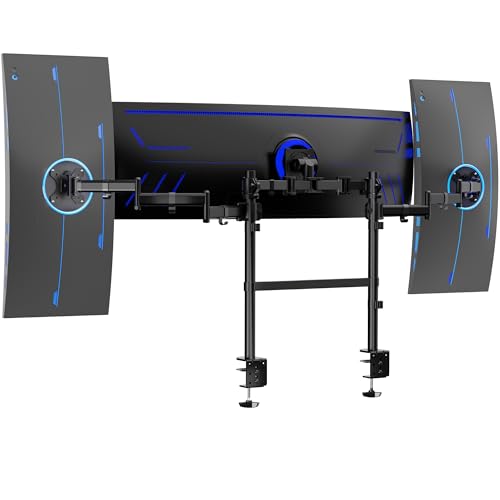
- Center bracket supports screens up to 49 inches
- Dual poles provide flexible height and positioning
- Clamps fit desktops up to 3.3 inches thick
Best For: Ultrawide-centered triple-monitor setups
Best All-in-One Gaming Station

- Wide workstation with a 55-inch desktop
- Three shelves support PC and gaming gear
- Includes RGB lighting and charging ports
Best For: Feature-rich setups needing storage and workspace
Best Stable Open Desktop
EUREKA ERGONOMIC 60-Inch Gaming Desk

- 60-by-27.56-inch desktop leaves room for gear
- Steel frame supports up to 500 pounds
- Full mouse pad and cable management included
Best For: Flexible triple-monitor setups using a separate stand
Best Showpiece Setup
AODK 63-Inch L-Shaped Gaming Desk

- Extra-deep desktop for multi-device layouts
- Display hutch, pegboard, and PC shelf
- Three outlets, two USB ports, and LED lighting
Best For: Organized corner gaming setups with displays and accessories
Best Overall Workspace
SEDETA 78.7-Inch L-Shaped Gaming Desk

- Desktop specified to hold three computers
- Large 78.7-by-47.2-inch work surface
- Four outlets, two USB ports, and storage
Best For: Large multi-computer gaming and workstations
Best U-Shaped Value
Pamray 71-Inch U-Shaped Gaming Desk

- Three connected desktop sections
- Four outlets and two USB charging ports
- Steel frame supports up to 150 pounds
Best For: Separate gaming, work, and writing zones
Best Adjustable Pick – X-Win 72" Standing Gaming Desk
For shoppers comparing gaming desks for triple monitors, the X-Win offers a wide 72-inch wing-shaped surface, electric sit-stand adjustment, and built-in organization. Its included monitor riser and keyboard tray help keep a gaming or content-creation setup orderly.
Best For: Streamers, creators, and gamers who want a spacious adjustable workstation with integrated storage.
Pros:
- Electric height adjustment supports sitting and standing.
- 72-inch desktop is designed for multi-monitor setups and peripherals.
- Includes a monitor riser, keyboard tray, cable management tray, cup holder, and headphone hook.
- Three shelves provide storage for a PC tower, consoles, speakers, or accessories.
Cons:
- At 86 pounds, it may require two people for assembly and placement.
- The wing-shaped design and 37-inch depth may need more floor space than a compact rectangular desk.
The X-Win is a versatile choice when adjustability and storage matter as much as monitor capacity. Its RGB lighting adds visual flair, while the broad surface provides a practical foundation for a triple-monitor workstation.
Best L-Shaped Value – ODK 66" L-Shaped Gaming Desk
The ODK combines a reversible L-shaped layout with a full monitor stand, charging ports, and storage. For gaming desks for triple monitors, its 66-inch footprint offers a flexible corner setup while leaving room for peripherals and accessories.
Best For: Gamers and home-office users who need a reversible corner desk with built-in charging and storage.
Pros:
- Reversible design can be configured for left- or right-sided placement.
- Three outlets and two USB ports provide convenient device charging.
- Full monitor stand elevates screens and creates additional equipment space.
- Includes four shelves, a computer tower stand, and LED lighting with multiple modes.
Cons:
- The 18.9-inch depth is relatively shallow for larger peripherals or deep monitor stands.
- Its L-shaped configuration is less suitable for users who prefer a straight desk.
This ODK model is a practical option for corner rooms and multi-purpose setups. Its reversible arrangement and built-in power features make it especially useful when flexibility and cable convenience are priorities.
Best PC Showcase Design – 63" Gaming Desk with PC Display Stand
This 63-inch gaming desk is built around showcasing a panoramic PC case while preserving usable workspace. Among gaming desks for triple monitors, its elevated PC stand, monitor shelf, RGB lighting, and drawers create a display-focused battlestation.
Best For: Gamers with a large tempered-glass “fish tank” PC case who want their hardware prominently displayed.
Pros:
- Elevated stand is designed for cases such as the Lian Li O11 and Hyte Y60.
- Three drawers help conceal cables, controllers, and accessories.
- Reversible layout and monitor stand support flexible setup planning.
- Integrated RGB lighting adds illumination beneath the monitor shelf.
Cons:
- The 19.7-inch depth may limit room for deep monitor bases and larger accessories.
- Its showcase-oriented design prioritizes PC display over extensive traditional storage.
This desk stands out for users who want the PC itself to be the centerpiece. The elevated display platform and drawers balance presentation with clutter control, making it a distinctive choice for a gaming setup.
Best Storage-Heavy L-Shape – SEDETA 67" L-Shaped Gaming Desk
The SEDETA is a flexible L-shaped workstation with a 67-inch configuration that can extend to 94.5 inches as a two-person desk. For gaming desks for triple monitors, it adds a keyboard tray, CPU stand, hutch, pegboard, shelves, and charging station.
Best For: Small-room gaming, study, and home-office setups needing extensive vertical and under-desk organization.
Pros:
- Reversible layout works as a 67-inch corner desk or 94.5-inch long desk.
- Supplied components include a hutch, pegboard, two shelves, keyboard tray, storage bag, and CPU stand.
- Four outlets and two USB ports can charge up to six devices simultaneously.
- RGB lighting offers app control, music synchronization, and numerous color and flash modes.
Cons:
- The 57-inch overall height may make the hutch and pegboard unsuitable for every room layout.
- The desk has no drawers, so smaller accessories rely on the included storage features.
SEDETA is a strong fit when organization and configuration options are more important than a minimalist profile. Its reversible design and abundant accessories make it adaptable for triple-monitor gaming, work, or shared use.
Best Mount for Ultrawide Arrays – VIVO Triple Monitor Desk Mount
For gaming desks for triple monitors, this VIVO clamp-on mount is designed around a center ultrawide and two side displays. Its dual-pole design, broad articulation, and heavy-duty clamps make it a practical choice when you want to keep multiple large screens organized without adding another tabletop.
Best For: Gamers and creators using a center ultrawide with two smaller side monitors on a straight or corner desk.
Pros:
- Supports a center screen up to 49 inches and side screens up to 38 inches.
- Offers tilt, swivel, rotation, and height adjustment for flexible positioning.
- Dual C-clamps fit desktops up to 3.3 inches thick and work with straight or corner desks.
- Low-profile poles can push large displays closer to the wall.
Cons:
- Three same-size screens will not align in a horizontal array.
- Side brackets support up to 17.6 pounds per monitor, so screen weight must be checked.
- It is a monitor mount rather than a complete gaming desk.
This is the most specialized option here for a true three-screen setup, especially when an ultrawide center display is part of the plan. Confirm your monitor sizes, weights, and VESA compatibility before buying.
Best All-in-One Gaming Station – SEDETA 70.8-Inch Gaming Desk
This SEDETA model is a roomy option among gaming desks for triple monitors, with a 70.8-inch overall width and a 55-inch desktop surface. Its integrated monitor shelf, storage, lighting, and charging ports help build a more complete gaming or work station, though monitor fit should be measured before committing to three displays.
Best For: Users who want a wide gaming workstation with storage, RGB lighting, and built-in device charging.
Pros:
- Wide design includes a 55-inch-long desktop that can hold two computers.
- Three shelves provide space for a PC tower, consoles, speakers, books, and accessories.
- Integrated monitor stand helps free desktop space and place screens at a comfortable height.
- RGB lighting, two outlets, and two USB ports add convenience to a gaming setup.
Cons:
- The supplied information does not confirm that three monitors will fit on the monitor shelf.
- At 21.6 inches deep, the desktop may feel limited for especially deep peripherals.
- The desk requires assembly.
Choose this desk when storage and built-in features matter as much as screen space. For triple monitors, verify the shelf dimensions and your display stands or mounts before ordering.
Best Stable Open Desktop – EUREKA ERGONOMIC 60-Inch Gaming Desk
The EUREKA ERGONOMIC desk offers a straightforward platform for gaming desks for triple monitors, with a 60-by-27.56-inch desktop and a reinforced steel frame. It does not include a dedicated triple-monitor stand, but the open surface leaves room for monitor stands, speakers, a keyboard, and other PC gear.
Best For: Gamers who prefer a stable, open desktop with cable management and a full-surface mouse pad.
Pros:
- The 60-by-27.56-inch surface provides room for multiple monitors and accessories.
- Reinforced steel construction supports up to 500 pounds.
- Full-surface mouse pad offers one continuous area for keyboard and mouse movement.
- Cable management, a controller rack, cup holder, and dual headset hook help organize gear.
Cons:
- The supplied details do not guarantee that three monitors will fit without a separate stand or mount.
- It lacks integrated storage shelves and RGB lighting.
- Assembly is required, with two people recommended.
This desk is a solid foundation for a triple-monitor setup when you plan to use a compatible monitor stand or arms. Its deep surface and high weight rating also leave flexibility for speakers, a PC, and gaming accessories.
Best Showpiece Setup – AODK 63-Inch L-Shaped Gaming Desk
For gamers comparing gaming desks for triple monitors, the AODK 63-inch L-shaped desk offers an extra-deep main surface and a corner-friendly layout. Its display hutch, PC tower shelf, pegboard, and built-in charging options help keep a multi-monitor station organized.
Best For: Gamers who want a storage-focused corner setup with display space and room for multi-device layouts.
Pros:
- Extra-deep 51.18-inch-wide main desktop supports large mouse pads and multi-device layouts.
- Display cabinet, pegboard, shelves, and PC tower shelf provide dedicated organization.
- Built-in power includes three AC outlets and two USB ports, plus LED lighting.
- Reversible layout and open legroom add setup flexibility.
Cons:
- The L-shaped design and 62.2-inch overall height require substantial room.
- The listed PC tower shelf is 10.24 inches wide, so case dimensions should be checked first.
Choose this AODK model if organization and presentation matter as much as desktop space. Its combination of hutch storage and charging features is particularly useful for a decorated gaming corner.
Best Overall Workspace – SEDETA 78.7-Inch L-Shaped Gaming Desk
The SEDETA 78.7-inch desk is a strong option for shoppers seeking gaming desks for triple monitors, with a listed 78.7-by-47.2-inch desktop that can hold three desktop computers. Its storage cabinet, drawers, and charging station help separate gaming, work, and accessory space.
Best For: Users who need a large corner workstation for multiple computers, displays, and stored gear.
Pros:
- Large desktop is specified to hold three desktop computers.
- Reversible display cabinet includes doors to help protect stored items from dust.
- Four outlets and two USB ports can charge up to six devices simultaneously.
- Two fabric drawers add lightweight storage for smaller items.
Cons:
- At 81 pounds, the desk may be difficult to move or assemble without assistance.
- The broad 78.7-by-47.2-inch footprint needs considerable floor space.
- Storage is concentrated in the cabinet and fabric drawers rather than a larger drawer system.
With its unusually wide surface and explicit three-computer capacity, the SEDETA is the most workstation-oriented choice in this group. It is a practical pick when monitor and equipment room take priority over a compact footprint.
Best U-Shaped Value – Pamray 71-Inch U-Shaped Gaming Desk
The Pamray 71-inch U-shaped desk gives shoppers considering gaming desks for triple monitors three connected desktop surfaces. The layout can divide gaming, work, and writing areas, while four outlets, two USB ports, a pegboard, and headphone hooks keep essentials close.
Best For: Gamers and home-office users who want separate activity zones within one corner-oriented workstation.
Pros:
- Three desktop sections provide flexible space for gaming, work, and writing.
- Four power outlets and two USB ports support connected devices.
- Three X-shaped back braces and a steel frame support up to 150 pounds.
- Adjustable leg pads help stabilize the desk on uneven floors.
Cons:
- The U-shaped configuration requires a suitable corner or large open area.
- The supplied details do not list enclosed storage such as drawers or cabinets.
- Its 71-inch size may provide less continuous desktop width than the SEDETA.
The Pamray stands out for users who prefer separated work zones rather than one uninterrupted desktop. Its integrated charging and reinforced frame make it a practical, relatively straightforward option for a multi-monitor room setup.
How We Picked the Best Gaming Desks for Triple Monitors
We focused on the features that matter most for a three-screen gaming or productivity station: usable desktop width and depth, frame stability, monitor-support options, cable management, storage, power access, and overall layout flexibility. The selection includes traditional rectangular desks, L-shaped workstations, a U-shaped design, a standing desk, and a dedicated clamp-on monitor mount.
Because listed dimensions and weight limits can vary by configuration, confirm the manufacturer’s specifications before buying—especially if you plan to use monitor arms, a large tower PC, or heavy speakers.
Quick Comparison
| Best For | Look For | Recommended Type |
|---|---|---|
| Maximum screen and workspace area | Wide or L-shaped surface | Large L-shaped or U-shaped desk |
| Flexible monitor positioning | Strong rear edge and mount clearance | Desk compatible with monitor arms |
| Integrated screen support | Included stand or riser | Desk with monitor shelf or stand |
| Clean, connected setup | Built-in outlets and cable routing | Power-equipped gaming desk |
| Changing posture during long sessions | Height-adjustable frame | Standing gaming desk |
Key Buying Factors for Gaming Desks for Triple Monitors
Width, Depth, and Layout
A 60-inch desk may fit three smaller displays, but a wider 66- to 72-inch surface gives you more spacing for a center screen, side monitors, speakers, and controls. L-shaped desks add valuable corner space, while U-shaped models suit users who want separate zones for gaming, streaming, and work.
Monitor Support and Stability
Check whether the desk includes a monitor stand, riser, or mounting system. If you use a clamp-on arm, verify that the rear edge is accessible and thick enough for the clamp. Confirm each arm’s screen-size and weight limits, including the monitor’s stand or adapter hardware.
Ergonomics and Cable Management
Position the center display directly in front of you and keep side screens angled inward. A suitable desk should leave enough depth for comfortable viewing distance and keyboard placement. Cable holes, trays, integrated outlets, and LED power controls can make a multi-screen setup easier to maintain.
Storage and Construction
Shelves, drawers, pegboards, and CPU holders help organize controllers, chargers, and accessories, but they also affect legroom. Prioritize a rigid frame and level feet if you use heavy displays or a monitor arm.
Who Should Buy Which Gaming Desks for Triple Monitors?
Choose a wide rectangular desk if you want a straightforward triple-monitor layout with generous front-to-back space. Pick an L-shaped model if you need dedicated work and gaming zones or want to place screens around a corner. A U-shaped desk is best for maximum surface area, though it requires more room. Choose a standing desk if alternating between sitting and standing is a priority. Finally, consider a dedicated triple-monitor mount when your existing desk is sturdy and you want precise screen alignment without replacing the entire workstation.