A good gaming desk does more than hold a monitor and keyboard. The right size, layout, power access, and storage can make your setup more comfortable without pushing your budget past $200.
This roundup compares 10 affordable gaming desks, including L-shaped designs, compact tables, reversible layouts, built-in outlets, LED lighting, drawers, and shelves for different rooms and play styles.
Best 10 Gaming Desks Under 200 Picks for 2026
Storage Powerhouse
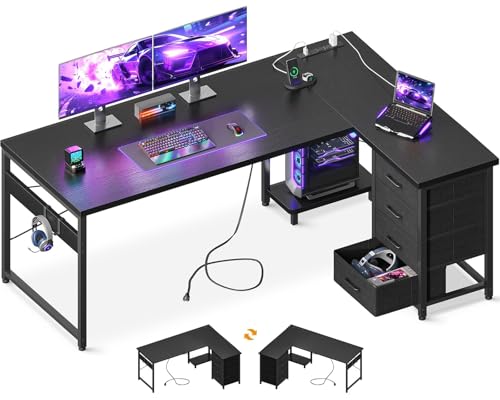
- Four drawers and two hooks
- Three AC outlets and two USB ports
- Reversible layout with PC stand
Best For: Organized gaming and home-office setups
Everyday Power Station

- Four AC, one USB, and one USB-C port
- 47.2-inch desktop for work or gaming
- Reinforced steel-tube construction
Best For: Simple multipurpose workstations
Compact RGB Corner Setup

- Two shelves and CPU stand
- Three AC outlets and two USB ports
- Reversible design with adjustable RGB lighting
Best For: Compact gaming rooms needing storage
Immersive Organized Battlestation
52" Reversible RGB Gaming Desk

- Reversible layout with RGB lighting
- Three drawers, shelf, and side hook
- Three AC outlets and two USB ports
Best For: Gaming and streaming setups with storage
Best All-Around Pick
PRAISUN 55-Inch LED Gaming Desk

- 4 AC outlets plus USB and USB-C charging
- RGB lighting with app control and 60,000+ colors
- Wide desktop with raised dual-monitor shelf
Best For: Gamers and remote workers wanting integrated power and lighting
Best Compact Option
DUMOS 32-Inch Small Computer Desk

- Space-saving 32-inch desktop
- X-brace and steel frame resist wobbling
- Stated weight capacity up to 265 pounds
Best For: Small bedrooms, study areas, and simple gaming setups
Best Storage-Focused Pick
Korfile 40-Inch LED Gaming Desk

- 3 AC outlets and 2 USB charging ports
- Multiple shelves plus monitor stand
- RGB lighting with remote and app control
Best For: Compact setups needing storage, charging, and accessories organization
Best Spacious Desk
63-Inch Rustic Brown Computer Desk

- Wide 63-inch desktop for gaming or office work
- Metal frame with reinforcement struts
- Versatile rustic brown-and-black design
Best For: Gamers and home-office users needing generous workspace
Best All-in-One Setup

- Built-in outlets and USB charging ports
- RGB lighting with 22 effects
- Five reversible fabric storage drawers
Best For: Compact gaming setups needing integrated power and storage
Best Compact Desk

- Compact 39.4-inch-wide footprint
- Two outlets and two USB charging ports
- Monitor stand, RGB lighting, and headphone hooks
Best For: Small rooms, dorms, and compact gaming setups
Storage Powerhouse – 61" L-Shaped Gaming Desk
If you need a spacious workstation with built-in organization, this AODK model is a strong option among gaming desks under 200. Its L-shaped layout provides room for gaming gear, office equipment, and accessories while keeping charging connections close at hand.
Best For: Gamers, remote workers, and teens who need drawers, a PC stand, and a corner-friendly layout.
Pros:
- Four drawers and two iron hooks help keep accessories and supplies organized.
- Built-in hub includes three AC outlets and two USB ports.
- Reversible L-shaped design includes a host stand and PC tower space.
- Adjustable foot pads and a metal frame support stability.
Cons:
- The 18.9-inch depth may feel limited for especially large setups.
- Assembly is required.
This desk stands out for combining substantial storage with integrated power in a compact corner configuration. Check the dimensions carefully if you plan to use multiple large peripherals or monitors.
Everyday Power Station – 47" Computer Gaming Desk
This PRAISUN desk keeps the setup straightforward for shoppers comparing gaming desks under 200. The 47.2-by-19.7-inch surface offers room for monitors, books, and gaming equipment, while the built-in charging station reduces the need for extra cable clutter.
Best For: Students, remote workers, and casual gamers who prefer a simple rectangular desk with integrated charging.
Pros:
- Charging station provides four AC outlets, one USB port, and one USB-C port.
- Spacious desktop supports monitors, books, planners, and décor.
- Particleboard top and reinforced steel-tube frame are designed for reliable support.
- Clear instructions, labeled parts, and included tools simplify assembly.
Cons:
- It lacks drawers, shelves, or a dedicated PC stand.
- The rectangular design does not provide an L-shaped corner workstation.
Choose this model when accessible power and a clean, adaptable surface matter more than built-in storage. Its neutral rustic-brown finish also works across office, study, and gaming spaces.
Compact RGB Corner Setup – 53" L-Shaped RGB Gaming Desk
For shoppers seeking gaming desks under 200 with storage and lighting, this ODK L-shaped desk packs several gaming-focused features into a compact footprint. Its reversible configuration, shelves, outlets, and RGB strip make it suitable for a streamlined battlestation or study area.
Best For: Gamers and students who want shelves, RGB lighting, and a reversible corner layout.
Pros:
- Two shelves, a CPU stand, accessory hook, and tool bag add practical storage.
- Three AC outlets and two USB ports centralize device charging.
- RGB lighting offers 10 color presets, eight brightness levels, and 10 dynamic modes.
- Reversible side modules accommodate different room layouts.
Cons:
- Assembly is required.
- The compact 18.9-inch depth may constrain larger equipment.
- Its tall storage configuration may not suit users seeking a minimal desk.
This is a feature-rich choice for smaller gaming rooms where vertical storage and lighting are useful. Confirm the listed dimensions and available wall space before assembling the reversible configuration.
Immersive Organized Battlestation – 52" Reversible RGB Gaming Desk
This DUMOS desk is aimed at shoppers comparing gaming desks under 200 that combine lighting, storage, and charging. Its reversible L-shaped setup includes fabric drawers, a shelf, a monitor stand, and a headphone or bag hook for a more organized gaming or streaming area.
Best For: Gamers, streamers, and home-office users who want integrated storage, monitor elevation, and RGB effects.
Pros:
- Reversible left/right configuration adapts to different room layouts.
- RGB lighting supports more than 60,000 colors, music or mic sync, timers, and dynamic modes.
- Three fabric drawers, an open shelf, and a side hook organize accessories.
- Three AC outlets and two USB ports provide built-in charging.
Cons:
- The supplied dimensions list an unusually narrow 3.7-inch width, so verify the measurements before ordering.
- Storage uses fabric drawers rather than rigid built-in drawers.
- Assembly details are not specified in the supplied notes.
With its monitor shelf and broad feature set, this model is designed for an immersive, organized setup rather than a bare tabletop. The unusual listed width makes measurement verification especially important before purchase.
Best All-Around Pick – PRAISUN 55-Inch LED Gaming Desk
For shoppers comparing gaming desks under 200, the PRAISUN offers a useful mix of workspace, built-in charging, and customizable lighting. Its 53.9-inch-wide desktop and raised monitor shelf suit dual-monitor gaming, work, or study setups.
Best For: Gamers and remote workers who want a full-size desk with integrated power and RGB lighting.
Pros:
- Includes 4 AC outlets, 2 USB ports, and 1 USB-C port for convenient device charging.
- RGB lighting supports 12 preset modes and more than 60,000 colors through the app.
- Raised monitor shelf helps free desktop space and can accommodate dual monitors.
- Steel frame and P2 engineered-wood top provide everyday stability.
Cons:
- The 19.7-inch depth may feel limited for especially large keyboards or deep setups.
- Its built-in lighting and power features require managing an additional cord.
The PRAISUN is a strong choice when convenience matters as much as gaming style. It gives you a comparatively generous work surface, organized charging, and a monitor riser without requiring separate accessories.
Best Compact Option – DUMOS 32-Inch Small Computer Desk
If you need gaming desks under 200 for a tight bedroom, office, or study area, the DUMOS 32-inch model keeps the footprint compact. Its scratch- and water-resistant tabletop and reinforced steel frame make it practical for gaming, writing, and everyday computer use.
Best For: Small-space setups, students, and buyers seeking a simple desk that can support heavier equipment.
Pros:
- Compact 32-inch size fits bedrooms, classrooms, offices, and other constrained spaces.
- X-shaped reinforcement is designed to reduce wobbling during typing or writing.
- Square-tube steel legs have a stated weight capacity of up to 265 pounds.
- Scratch-resistant, water-resistant surface is easy to wipe clean.
Cons:
- It has no drawers, shelves, or built-in storage.
- The compact top may not leave much room for multiple monitors and large peripherals.
- The supplied dimensions list a relatively thin 0.06-inch tabletop.
The DUMOS prioritizes stability and space efficiency over gaming extras. Choose it when a straightforward workstation is more important than RGB lighting, charging ports, or extensive storage.
Best Storage-Focused Pick – Korfile 40-Inch LED Gaming Desk
Among gaming desks under 200, the Korfile stands out for combining a compact 40-inch workstation with multiple storage levels. Its carbon-fiber-look surface, RGB lighting, power outlets, monitor stand, and reversible accessory placement make it adaptable for gaming or work.
Best For: Gamers who want organized storage and built-in charging in a smaller desk footprint.
Pros:
- Provides 3 AC outlets and 2 USB charging ports beneath the monitor stand.
- RGB lighting can be controlled by remote or app.
- Includes a full desktop monitor stand, two lower shelves, and additional upper storage levels.
- Reversible design includes switchable cup and headphone holders.
Cons:
- The 39.3-inch width and 18.9-inch depth limit available surface area.
- Multiple shelves may require more planning when arranging larger equipment.
- Assembly is required, despite included instructions and tools.
The Korfile is a practical fit for buyers who value organization in a modest space. Its storage and charging features help keep accessories nearby, while adjustable leg pads support stability on uneven floors.
Best Spacious Desk – 63-Inch Rustic Brown Computer Desk
For shoppers comparing gaming desks under 200, this 63-inch Huuger desk stands out for its roomy work surface and simple, adaptable design. The engineered-wood top and metal frame provide space for a computer, monitor, lamp, and everyday accessories, while the rustic brown-and-black finish suits office, study, or gaming setups.
Best For: Gamers and home-office users who need a wide desktop with generous legroom.
Pros:
- Large 63-inch-wide surface supports gaming and work equipment.
- Reinforcement struts and a thick steel-tube frame add stability.
- Available in multiple colors and sizes to fit different rooms.
Cons:
- Storage is listed, but the supplied details do not specify its exact configuration.
- Assembly is required.
- The 23.6-inch depth may be limiting for especially large setups.
This is a practical pick when desktop width matters more than built-in gaming extras. Its neutral styling and sturdy construction also make it easy to use beyond gaming.
Best All-in-One Setup – 47-Inch LED Gaming Desk
Among gaming desks under 200, the Korfile 47-inch desk packs several setup-focused features into a compact footprint. It combines RGB lighting, built-in power and USB ports, five reversible fabric drawers, and a raised monitor stand for a more organized gaming or work station.
Best For: Gamers who want built-in charging, lighting, monitor elevation, and flexible storage in a smaller desk.
Pros:
- Includes three AC outlets and two USB charging ports.
- RGB light strip offers 22 customizable lighting effects.
- Five drawers support multiple installation orientations.
- Monitor stand helps raise the screen for a more comfortable viewing position.
Cons:
- The 47.2-inch width provides less surface area than larger desks.
- Fabric drawers may offer less rigidity than hard-sided drawers.
- Assembly is required.
The Korfile is a feature-rich choice for smaller rooms or streamlined setups. Its integrated power, lighting, and storage reduce the need for separate accessories, though the compact top may not suit very large multi-monitor arrangements.
Best Compact Desk – 40-Inch LED Gaming Station
If you are looking at gaming desks under 200 for a dorm, bedroom, or small office, the Lufeiya 40-inch model offers useful gaming features in a compact format. Its carbon-fiber-style surface, built-in charging station, RGB lighting, monitor stand, storage bag, and removable headphone hooks help keep a smaller setup functional.
Best For: Small-space gamers and students who need a compact desk with charging and monitor support.
Pros:
- Built-in power strip provides two outlets and two USB ports.
- RGB system includes seven adjustable colors, four dynamic modes, and 16 static types.
- Monitor stand can accommodate two monitors or laptops.
- Scratch-resistant, anti-collision, and waterproof carbon-fiber surface is designed for everyday wear.
Cons:
- The 39.4-inch width limits available desktop space.
- Storage is limited to a bag and monitor stand rather than drawers.
- The compact design may not fit larger gaming equipment comfortably.
This desk makes the most sense when floor space is limited and integrated convenience matters. It delivers a useful set of gaming features without the footprint of a full-size workstation.
How We Picked the Best Gaming Desks Under 200
We focused on practical features that matter in everyday gaming and home-office use rather than decorative extras alone. The selection includes desks in several widths and configurations, from compact 32- and 40-inch models to larger 61- and 63-inch options. We also looked for useful additions such as integrated power outlets, USB charging, monitor shelves, drawers, storage shelves, reversible layouts, and LED lighting.
Because budget desks can vary in construction and included accessories, check the current product listing for exact dimensions, weight capacity, assembly requirements, outlet specifications, and available color or configuration choices before ordering.
Quick Comparison
| Best For | Desk Types to Consider | Useful Features |
|---|---|---|
| Small rooms | 32- or 40-inch desks | Compact footprint, charging access, LED lighting |
| Dual-monitor setups | 47- to 55-inch desks | Monitor stand, power outlets, cable-friendly layout |
| Maximum surface area | 61- to 63-inch or L-shaped desks | Corner fit, multiple work zones, shelves or drawers |
| Organized storage | Drawer or shelving models | Accessory storage, open shelves, reversible design |
Key Buying Factors for Gaming Desks Under $200
Size and Layout
Measure the available wall or corner space before choosing a desk. L-shaped models can provide more surface area while using a corner efficiently, but they need clearance on two sides. Straight desks are easier to position and may work better in bedrooms or shared rooms.
Power and Cable Management
Built-in outlets and USB ports can keep chargers within reach, but they do not replace a safe surge protector when one is needed. Look for an outlet location that will not interfere with your monitor, mouse, or keyboard cables, and confirm whether the power module includes USB-C or standard USB ports.
Storage and Comfort
Drawers and shelves help keep controllers, headphones, and paperwork off the desktop. A monitor shelf can improve screen height, although it may reduce usable surface space. Check the desk height and legroom, especially if you use a large chair or switch between gaming and office work.
Build and Assembly
Review the listed materials, frame construction, weight rating, and assembly instructions. Budget desks often require careful alignment during setup. A level floor, gradual tightening of screws, and a second person for larger tops can make installation easier.
Who Should Buy Which Gaming Desks Under 200?
Choose a compact DUMOS, Korfile, or Lufeiya model if you have limited space or need a simple workstation for one monitor. A PRAISUN or Korfile 47-inch desk suits gamers who want a moderate footprint with charging, lighting, or drawer storage. For larger setups, consider the 55-inch PRAISUN, 61-inch AODK, or 63-inch Huuger for more room to separate gaming and work equipment.
Gamers who prefer corner placement should prioritize the AODK or ODK L-shaped designs. If flexibility matters, the reversible DUMOS configuration can adapt to different room layouts. Before buying, match the desk’s dimensions and storage arrangement to your equipment—not just the advertised feature list.