A dual-monitor gaming setup needs more than a wide desktop. The right desk should provide enough usable depth, stable monitor placement, practical cable management, and room for your PC, accessories, and everyday tasks.
These 10 gaming desks for dual monitors include compact straight desks, reversible designs, and L-shaped models with shelves, drawers, LED lighting, and built-in power features. Use the guide below to match the desk style and features to your room and setup.
Best 10 Gaming Desks for Dual Monitors Picks for 2026
Storage-Focused Pick
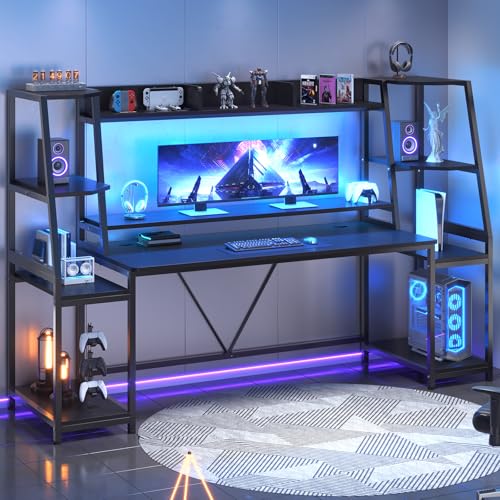
- Wide surface for dual-monitor and computer setups
- Two shelves, hutch, drawers, and CPU holder
- App-controlled RGB lighting with music sync
Best For: Dual-monitor users who need substantial storage
Showcase Build Pick

- Elevated stand showcases compatible glass PC cases
- Three drawers hide cables and gaming accessories
- Reversible design with RGB monitor-shelf lighting
Best For: RGB-focused panoramic PC builds
Connectivity Pick

- Wide surface supports two computers
- Three shelves organize gaming equipment
- Two outlets and two USB charging ports
Best For: Dual-monitor setups needing convenient charging
Compact Showcase Pick

- Compact footprint for bedrooms and dorms
- Elevated panoramic-PC stand with RGB lighting
- Three fabric drawers and a reversible layout
Best For: Small-space showcase gaming setups
Best for Easy Setup
SEDETA 64.5" Reversible L-Shaped Gaming Desk

- Reversible L-shaped design for dual monitors
- Five shelves and three fabric drawers
- Four outlets, two USB ports, and RGB lighting
Best For: Storage-heavy gaming or home-office setups in smaller rooms
Most Flexible Layout
PRAISUN 66" L-Shaped Gaming Desk
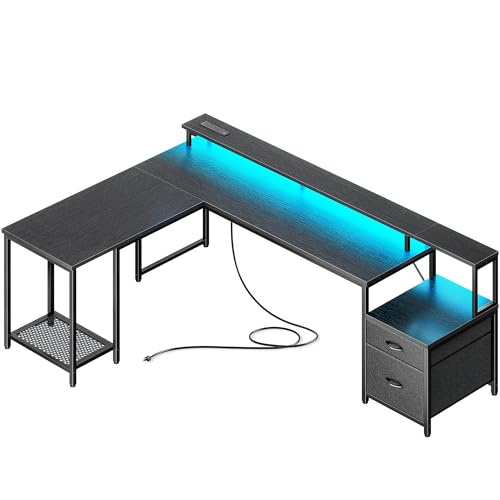
- Converts between L-shaped and straight layouts
- Four outlets plus USB-C and USB-A ports
- Monitor riser, printer stand, drawers, and CPU stand
Best For: Adaptable dual-monitor setups that may change rooms or layouts
Best Compact Straight Desk
Pamray 58" Gaming Computer Desk

- Monitor stand designed for two monitors or laptops
- Two drawers and two adjustable side shelves
- Power outlets, USB ports, and app-controlled LED lighting
Best For: Compact straight-desk gaming and study setups
Compact RGB Corner Pick
ODK 53-Inch L-Shaped Gaming Desk

- Reversible 53-inch layout for compact corners
- 3 AC outlets, 2 USB ports, and cable management
- Shelves, CPU stand, RGB lighting, and steel frame
Best For: Compact dual-monitor gaming and work setups
Drawer-Heavy Workstation Pick
AODK 61-Inch L-Shaped Gaming Desk
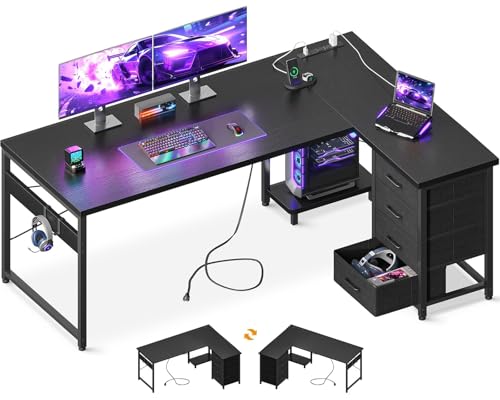
- Four drawers and two hooks maximize storage
- 3 AC outlets and 2 USB charging ports
- Reversible layout with host stand and metal frame
Best For: Dual-monitor users who prioritize organized storage
Roomy Ergonomic Lighting Pick
Korfile 66-Inch L-Shaped Gaming Desk

- Spacious 66-inch reversible workstation
- Extended monitor riser and RGB lighting controls
- Drawers, CPU shelf, hooks, and built-in power station
Best For: Larger dual-monitor gaming rooms with added ergonomics
Storage-Focused Pick – SEDETA 79-Inch Gaming Desk
For shoppers comparing gaming desks for dual monitors, the SEDETA 79-inch model offers a wide 78.8-inch frame, a monitor stand, and substantial vertical storage. Its 21.6-inch depth leaves room for keyboards and accessories, while the hutch and shelves help organize a larger gaming or work setup.
Best For: Dual-monitor users who want extensive storage, RGB lighting, and a large workstation.
Pros:
- Wide desktop can accommodate two computers and dual-monitor gear.
- Includes two large shelves, a hutch, two drawers, and a CPU holder.
- RGB lighting supports app control, music sync, multiple colors, and timer settings.
- Integrated monitor stand is designed to help position screens more comfortably.
Cons:
- The 88.7-pound desk and built-in storage may require significant assembly space.
- Its 21.6-inch depth may feel limited for especially deep peripherals.
This is a strong choice when organization matters as much as screen space. Choose it if you want a broad, storage-heavy station rather than a minimal desk.
Showcase Build Pick – 63-Inch Panoramic Gaming Desk
This 63-inch desk is designed for gaming setups where the PC itself is part of the display. For gaming desks for dual monitors, its elevated PC stand and monitor shelf can create a visually focused station, while three drawers keep controllers and cables out of sight.
Best For: Gamers with panoramic glass PC cases who want a clean, RGB-lit showcase setup.
Pros:
- Elevated stand is designed for panoramic cases such as the Lian Li O11 and Hyte Y60.
- Three built-in drawers provide concealed storage for accessories and cables.
- Integrated RGB lighting sits beneath the monitor shelf for ambient illumination.
- Reversible design and a side display shelf add setup flexibility.
Cons:
- At 63 inches wide and 19.7 inches deep, it offers less surface area than the largest desks here.
- The elevated PC display may prioritize showcasing the case over maximum desktop space.
Consider this model when presentation is central to your setup. It combines a dual-monitor-friendly format with dedicated PC display space and hidden clutter control.
Connectivity Pick – SEDETA 70.8-Inch Gaming Desk
The SEDETA 70.8-inch desk is a practical option among gaming desks for dual monitors, combining a broad desktop with a monitor stand and three storage shelves. Its built-in charging station is especially useful for keeping phones, tablets, and other devices powered without crowding the main work area.
Best For: Dual-monitor gaming or workstations that need integrated charging and accessible storage.
Pros:
- 70.8-inch desktop is designed to hold two computers and related accessories.
- Three shelves provide room for a PC tower, consoles, books, and gaming gear.
- Charging station includes two outlets and two USB ports for up to four devices.
- RGB lighting offers app control, music sync, numerous colors, and timer functionality.
Cons:
- The 21.6-inch depth may not suit setups requiring extensive front-to-back space.
- Built-in shelves and charging hardware create a more structured layout than a minimalist desk.
This model stands out for convenience rather than showcase styling. It is a sensible fit if charging access and organized storage are priorities for a busy dual-monitor station.
Compact Showcase Pick – AODK 59-Inch Reversible Desk
For smaller rooms, this 59.44-inch AODK desk offers a compact approach to gaming desks for dual monitors. It combines a reversible monitor stand with an elevated PC showcase, three drawers, RGB lighting, and a side shelf, making it suitable for a more organized setup without the footprint of a full-size desk.
Best For: Compact gaming rooms, dorms, or bedrooms with a showcase-style PC and dual-monitor arrangement.
Pros:
- Compact 59.44-inch width fits more easily in smaller spaces.
- Elevated stand is intended for panoramic PC cases and protects the chassis from floor dust.
- Three fabric drawers help conceal controllers, cables, and other clutter.
- Reversible layout, side display shelf, and RGB monitor-shelf lighting add flexibility.
Cons:
- The 19.69-inch depth provides less room for large keyboards and deep accessories.
- Its compact surface may require careful positioning for two monitors and a showcased PC.
- The drawers are fabric rather than rigid cabinet drawers.
This is the most space-conscious showcase option in the group. It makes sense when you want dual-monitor capability and dedicated PC display features but cannot accommodate a 70- or 79-inch desk.
Best for Easy Setup – SEDETA 64.5" Reversible L-Shaped Gaming Desk
For shoppers comparing gaming desks for dual monitors, the SEDETA 64.5-inch L-shaped model combines a corner-friendly layout with substantial storage. Its reversible design, five-tier shelving, three fabric drawers, CPU stand, and built-in charging station make it suited to setups that need more than a bare desktop.
Best For: Gamers or home-office users who need dual-monitor space, organized storage, and an L-shaped desk for a bedroom, living room, or office.
Pros:
- Reversible L-shaped layout with room for two monitors and additional computers.
- Five shelves and three drawers accommodate files, books, printers, and accessories.
- Four outlets and two USB ports can charge up to six devices simultaneously.
- App-controlled RGB lighting offers more than 60,000 colors and 29 modes.
Cons:
- The 19-inch depth may limit front-to-back room for larger monitor stands.
- Assembly is recommended for two people.
- The engineered-wood top may not suit shoppers seeking solid wood construction.
This is a strong choice when storage and corner efficiency matter as much as monitor capacity. Its compact depth and extensive shelving help make a full gaming or work setup more manageable in a smaller room.
Most Flexible Layout – PRAISUN 66" L-Shaped Gaming Desk
The PRAISUN 66-inch desk stands out among gaming desks for dual monitors because it can switch between an L-shaped arrangement and a long straight table. The spacious surface, monitor riser, charging station, printer stand, drawers, and CPU stand support gaming, creative work, or a home-office setup.
Best For: Users who want to change between a corner configuration and a wall-length desk while keeping dual monitors and multiple devices organized.
Pros:
- Converts from an L-shaped desk measuring 66.1 by 47.2 inches to a 94.9-inch straight layout.
- Built-in charging station includes four AC outlets, one USB-C port, and two USB-A ports.
- Monitor riser, printer stand, two drawers, and mesh CPU stand add functional organization.
- RGB lighting includes 12 modes, adjustable brightness and speed, and app-based color control.
Cons:
- The straight configuration requires nearly 95 inches of wall space.
- Its listed 34-inch height may be taller than some conventional desks.
- More components may make assembly more involved than a simple rectangular desk.
The PRAISUN is especially appealing for rooms that may be rearranged or for users who want one desk to serve different purposes. Verify the available floor and wall space before choosing the extended straight layout.
Best Compact Straight Desk – Pamray 58" Gaming Computer Desk
For shoppers seeking gaming desks for dual monitors without an L-shaped footprint, the Pamray 58-inch computer desk offers a relatively compact straight design. Its monitor stand is designed to hold two monitors or laptops, while two drawers, two adjustable side shelves, power ports, and app-controlled lighting add everyday convenience.
Best For: Gamers and students who want a straight desk with dual-monitor support, storage, and a modest 18.9-inch depth.
Pros:
- Monitor stand holds two monitors or laptops and frees space below for peripherals.
- Two drawers and two adjustable open shelves provide flexible storage.
- Built-in outlets and USB ports support simultaneous device charging.
- Steel frame, X-shaped braces, adjustable leg pads, and a stated 200-pound capacity support stability.
Cons:
- The 58.27-inch width may feel limiting for especially wide monitor arrangements.
- At 18.9 inches deep, the desktop offers less front-to-back space than deeper desks.
- Its 36.38-inch listed height may not suit every chair or user.
The Pamray prioritizes a compact footprint while still providing a dedicated dual-monitor riser and useful storage. It is a practical fit when floor space is limited, provided the monitor dimensions work with the 58-inch width.
Compact RGB Corner Pick – ODK 53-Inch L-Shaped Gaming Desk
If you need gaming desks for dual monitors without taking over a room, the ODK 53-inch L-shaped desk is a practical option. Its reversible layout, 53-inch workstation, integrated shelves, and cable-management channels help organize a compact gaming or work setup.
Best For: Compact rooms, dual-monitor setups, and buyers who want built-in charging and storage.
Pros:
- Reversible L-shaped configuration supports left- or right-side placement.
- Includes 3 AC outlets, 2 USB ports, cable-management channels, and RGB lighting.
- Provides two shelves, a CPU stand, accessory hook, and tool bag.
- Steel X-shaped frame and adjustable foot pads help improve stability.
Cons:
- The 53-inch desktop is more compact than the other desks in this roundup.
- Assembly is required.
The ODK is a strong fit when floor space is limited but you still want room for two monitors, accessories, and charging. Its reversible design adds flexibility for corner placement.
Drawer-Heavy Workstation Pick – AODK 61-Inch L-Shaped Gaming Desk
For shoppers comparing gaming desks for dual monitors, the AODK 61-inch L-shaped desk emphasizes storage and everyday convenience. Four drawers, a host stand, reversible placement, and built-in power access make it suitable for gaming, home office work, or study areas.
Best For: Users who need substantial drawer storage alongside a dual-monitor workstation.
Pros:
- Four drawers provide dedicated storage for documents, stationery, and accessories.
- Built-in power station includes 3 AC outlets and 2 USB ports.
- Reversible corner layout includes a host stand and two iron hooks.
- Water-resistant desktop boards, metal frame, and adjustable foot pads support everyday use.
Cons:
- The 0.5-inch tabletop is thinner than the ODK 53-inch model’s listed tabletop.
- Assembly is required.
The AODK stands out for organization rather than lighting features. Choose it if keeping gaming gear, office supplies, and personal items contained is a higher priority than RGB illumination.
Roomy Ergonomic Lighting Pick – Korfile 66-Inch L-Shaped Gaming Desk
The Korfile 66-inch desk is one of the roomier gaming desks for dual monitors, with a long monitor riser, reversible L-shaped design, and extensive RGB controls. Its drawers, CPU shelf, headphone hooks, and integrated power station help create an organized gaming or home office station.
Best For: Larger rooms and users who want an extended monitor shelf with customizable RGB lighting.
Pros:
- 66-inch layout offers a spacious workstation for multiple displays and accessories.
- Long monitor riser elevates screens and creates additional desktop space.
- RGB lighting offers 20 colors, 22 dynamic scenes, and 5 brightness settings.
- Includes two fabric drawers, a sliding CPU shelf, headphone hooks, 3 AC outlets, and 2 USB ports.
Cons:
- Its larger 42.5-inch depth may require more room than compact corner desks.
- Assembly is required.
The Korfile is the most feature-rich choice for buyers who have space for a larger corner desk. The monitor riser and extensive lighting controls are especially useful for a dedicated gaming setup.
How We Picked These Gaming Desks for Dual Monitors
We focused on desk designs that can accommodate two monitors while leaving usable space for a keyboard, mouse, speakers, and other peripherals. The selection includes widths from compact 53-inch models to larger 79-inch desks, along with L-shaped options that make better use of corners. We also considered features that affect everyday convenience, including monitor stands, reversible layouts, storage, RGB or LED lighting, and integrated outlets.
Because listed dimensions and configurations can vary by model or seller, confirm the current specifications, assembly requirements, weight capacity, and available desktop depth before ordering.
Quick Comparison
- Best for maximum surface area: The 79-inch SEDETA model offers a broad workspace with a hutch and storage shelving.
- Best for corner setups: The L-shaped SEDETA, PRAISUN, ODK, AODK, and Korfile desks use two connected surfaces efficiently.
- Best for flexible placement: Reversible desks let you position the return or storage section according to your room layout.
- Best for built-in organization: Choose a model with drawers, shelves, a hutch, or a PC display stand to keep equipment off the main work surface.
- Best for a coordinated gaming aesthetic: LED or RGB-equipped desks add lighting without requiring separate light strips.
Key Buying Factors for Gaming Desks for Dual Monitors
Width and Usable Depth
Measure both monitors, their stands or arms, and the space needed for your keyboard and mouse. A desk can be wide enough on paper but feel cramped if the desktop is shallow. If you use large stands, speakers, or a full-size PC case, prioritize a deeper surface or an L-shaped configuration.
Desk Shape and Room Layout
A straight desk is usually simpler to assemble and easier to place against a wall. L-shaped desks provide more surface area and can separate gaming, work, and storage zones, but they require a suitable corner and more careful measuring. Reversible models are useful when doorways, windows, or outlet locations limit placement.
Storage, Monitor Elevation, and PC Placement
Monitor shelves and risers can improve viewing height while freeing desktop space. Drawers and shelves help manage controllers, cables, and accessories. A PC stand or showcase area may keep the tower visible and protected, but check its dimensions and ventilation clearance before relying on it.
Power and Cable Management
Built-in outlets and USB ports can reduce cable clutter, though they do not replace a quality surge protector. Check the number and type of connections, cord routing, and outlet location. LED features are convenient for ambience, but confirm how they are powered and controlled.
Who Should Buy Which Gaming Desks for Dual Monitors?
Choose a large straight desk if you want one continuous surface for two monitors and have a wide wall available. Select an L-shaped model if you need maximum workspace in a corner or want distinct areas for gaming and work. A reversible desk is the safer choice for changing layouts or uncertain room placement. For smaller rooms, prioritize compact dimensions and vertical shelving over a large hutch. If organization matters most, look for drawers and shelves; if aesthetics are the priority, consider integrated LED or RGB lighting. Always compare the assembled dimensions with your room measurements before purchasing.