A gaming desk with a monitor shelf can make a setup feel more organized while freeing valuable surface space for keyboards, controllers, speakers, and everyday accessories. The right design can also add useful storage, integrated lighting, and easier access to power.
This roundup compares 10 gaming desks with monitor shelves in several sizes and layouts, including straight and L-shaped options. Use the buying guide below to narrow your choices by workspace, storage needs, room size, and setup style.
Best 10 Gaming Desks with Monitor Shelves Picks for 2026
Best Overall

- Wide desktop supports two computers
- Three shelves plus drawers and accessories
- RGB lighting and four-device charging
Best For: Gamers needing a roomy, feature-rich workstation
Best Compact Storage

- Monitor stand supports two monitors or laptops
- Two drawers and adjustable side shelves
- Power outlets, USB ports, and LED lighting
Best For: Organized gaming or study setups in moderate spaces
Best Display Storage
SEDETA 60-Inch Hutch Gaming Desk

- Hutch includes compartments and acrylic cabinets
- Separate monitor and printer stands
- Four outlets, two USB ports, and RGB lighting
Best For: Gamers displaying collectibles and organizing larger gear
Best for Corners
AODK Reversible L-Shaped Gaming Desk

- Reversible design fits left or right corners
- Upper rack works as shelf or monitor stand
- Outlets, USB ports, storage, and LED lighting
Best For: Compact corner gaming and workstations
Best Storage Setup
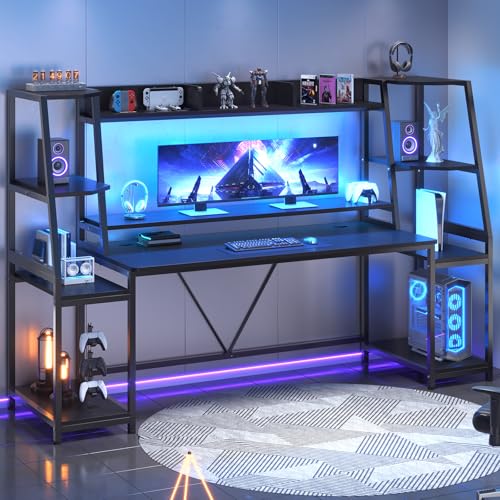
- Wide 78.8-inch workstation
- Hutch, shelves, drawers, and CPU holder
- RGB lighting with 60,000+ colors
Best For: Gamers who need extensive built-in storage and room for multiple computers
Best Open Desktop
Tribesigns 75-Inch Gaming Desk

- 75-by-30-inch desktop
- Steel frame with non-slip foot pads
- Monitor shelf, RGB lighting, and headphone hook
Best For: Gamers who prefer a spacious, open surface over built-in cabinets
Best Display Features

- Three-compartment hutch and acrylic display cabinets
- Four outlets and two USB ports
- Monitor shelf with lower storage shelves
Best For: Gamers who want display storage and built-in charging for multiple devices
Corner Setup Pick
ODK 48-Inch L-Shaped Gaming Desk

- L-shaped design with storage for corner setups
- Three outlets and two USB charging ports
- Customizable LED lighting with memory function
Best For: Corner gaming setups and home offices needing built-in charging
Full-Width Shelf Pick

- Full-length monitor shelf for a wide setup
- Reversible, height-adjustable storage shelf
- LED lighting with 10 colors and 10 dynamic modes
Best For: Gamers wanting broad monitor and accessory storage
Best Simple Pick
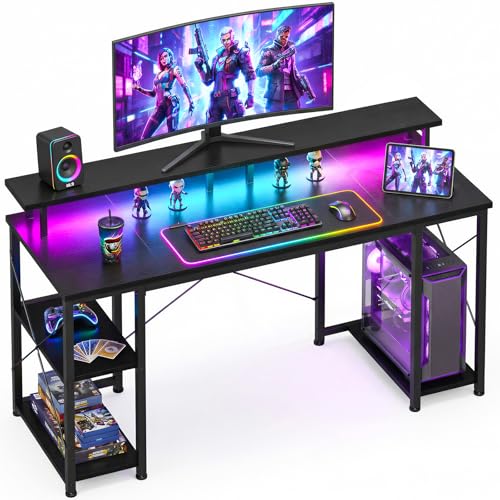
- Space-saving design for bedrooms and dorms
- Raised monitor stand with reversible storage shelves
- Dedicated CPU stand and customizable LED lighting
Best For: Small-space gaming and organized home-office setups
Best Overall – SEDETA 70.8-Inch Gaming Desk
If you want gaming desks with monitor shelves and plenty of room for multiple devices, the SEDETA 70.8-inch model is a spacious, feature-packed option. Its 55-inch desktop, integrated monitor stand, three storage shelves, drawers, LED lighting, and built-in charging station suit both gaming and home-office setups.
Best For: Gamers who need a wide workstation with substantial storage and space for two computers.
Pros:
- Large 70.8-inch desk with a 55-inch usable desktop that can accommodate two computers.
- Three open shelves, two drawers, a CPU holder, cup holder, and headphone hook support organized storage.
- RGB lighting offers over 60,000 colors, 29 modes, music synchronization, and a timer.
- Two AC outlets and two USB ports can charge up to four devices simultaneously.
Cons:
- The wide footprint may be too large for compact rooms.
- The numerous features can make assembly more involved than a basic desk.
The SEDETA stands out when desktop space and built-in accessories matter most. Its integrated monitor shelf helps free the main surface, while the storage and charging features create a capable all-in-one gaming station.
Best Compact Storage – Pamray 58-Inch Gaming Desk
The Pamray is a practical choice among gaming desks with monitor shelves for users who want organized storage without moving up to an extra-wide desktop. It combines a monitor stand for two monitors or laptops with two drawers, adjustable side shelves, LED lighting, and integrated power and USB ports.
Best For: Gamers, students, and home-office users who want a moderately sized desk with drawers and adjustable shelving.
Pros:
- Monitor stand can hold two monitors or laptops while leaving more room for keyboard and accessories.
- Two drawers and two adjustable open shelves provide flexible organization.
- Built-in outlets and USB ports support simultaneous device charging.
- Metal frame, X-shaped braces, adjustable leg pads, and a stated 200-pound capacity add stability.
Cons:
- At 58.27 inches wide, it offers less desktop room than the largest models in this roundup.
- Its 18.9-inch depth may limit front-to-back space for larger peripherals.
This Pamray model balances storage and footprint well. It is especially appealing if you prefer drawers for smaller items and need a monitor shelf that can support a dual-screen or laptop arrangement.
Best Display Storage – SEDETA 60-Inch Hutch Gaming Desk
For buyers seeking gaming desks with monitor shelves plus display space, this SEDETA model adds a full hutch, acrylic display cabinets, compartments, and a separate monitor stand. Its 60-inch desktop and dedicated printer stand make it suitable for a gaming room that also doubles as an office.
Best For: Collectors and gamers who want enclosed display storage alongside a monitor shelf and charging station.
Pros:
- Hutch includes three compartments and two acrylic display cabinets for controllers, headphones, and collectibles.
- Separate monitor and printer stands help keep the main desktop more open.
- Four power sockets, two USB ports, and a power switch provide extensive charging access.
- LED lighting offers 6,000 colors and 29 modes with music synchronization.
Cons:
- The 60.4-inch overall height requires sufficient vertical clearance.
- The hutch-heavy design may feel more substantial to assemble and move than a simple desk.
This is the strongest pick for display-oriented organization. The enclosed cabinets protect and showcase smaller gear, while the monitor shelf, printer stand, and charging station support a more complete gaming or work setup.
Best for Corners – AODK Reversible L-Shaped Gaming Desk
The AODK is a space-conscious alternative among gaming desks with monitor shelves, using a reversible L-shaped layout to fit a corner. Its upper rack can function as a display shelf or monitor stand, while the desk adds storage shelves, a CPU stand, headphone hook, storage bag, LED lighting, and charging ports.
Best For: Corner setups, compact rooms, and users who need a reversible layout for changing monitor or storage positions.
Pros:
- Reversible L-shaped design lets you position the hutch on the left or right.
- Two shelves can support storage or be configured as a monitor stand and display rack.
- Three outlets and two USB ports provide convenient charging for gaming devices.
- Includes a CPU stand, headphone hook, storage bag, and adjustable LED lighting modes.
Cons:
- Its 53-inch width and 18.9-inch depth provide less surface area than wider rectangular desks.
- There are no drawers for concealing smaller accessories.
The AODK makes the most sense when floor layout is the priority. Its reversible configuration gives corner users flexibility, and the upper rack can be adapted to either display items or elevate a monitor.
Best Storage Setup – SEDETA 79-Inch Gaming Desk
If you need gaming desks with monitor shelves and substantial built-in storage, the SEDETA 79-inch model is designed as a complete workstation. Its wide desktop, hutch, two shelves, CPU holder, and LED lighting support gaming, studying, or office work.
Best For: Gamers who want a wide, storage-focused desk for multiple computers and accessories.
Pros:
- Large 78.8-inch-wide design with a 55-inch desktop workspace.
- Includes a monitor stand, hutch, two storage shelves, CPU holder, and two drawers.
- RGB lighting offers more than 60,000 colors, 29 modes, music sync, and timer functionality.
- Monitor shelf helps raise screens while freeing desktop space.
Cons:
- At 21.6 inches deep, the desktop is less spacious front-to-back than some larger gaming tables.
- The 78.8-inch width and 60-inch height require considerable room.
- Assembly is required.
This is the strongest choice of the three for shoppers prioritizing storage and an expansive overall setup. Confirm your room dimensions before buying, especially because the hutch and full-width frame make it a substantial piece of furniture.
Best Open Desktop – Tribesigns 75-Inch Gaming Desk
The Tribesigns 75-inch model is a practical option among gaming desks with monitor shelves if you prefer a broad, open work surface. It combines a 75-inch desktop, raised monitor shelf, headphone hook, RGB lighting, and a steel frame for a straightforward gaming or home-office setup.
Best For: Gamers and students who want maximum desktop area without cabinets or a bulky hutch.
Pros:
- Generous 75-inch-long by approximately 30-inch-deep desktop.
- Monitor shelf creates room for screens while supporting a more upright posture.
- Heavy-duty steel frame, engineered-wood top, and non-slip foot pads are designed for stability.
- Includes RGB lighting and a convenient headphone hook.
Cons:
- Storage is limited to the monitor shelf and headphone hook.
- RGB lighting has 16 main colors and multiple modes, fewer stated options than the SEDETA desks.
- Assembly is recommended for two people.
Choose this desk when an open, deep desktop matters more than enclosed storage. Its simpler layout can work well in a bedroom, dormitory, living room, or office, provided you have enough space for its roughly 75-by-30-inch footprint.
Best Display Features – SEDETA 75-Inch Gaming Desk
For shoppers seeking gaming desks with monitor shelves plus dedicated display space, this 75-inch SEDETA model adds a hutch, acrylic display cabinets, storage shelves, and integrated charging. It is built to organize gaming equipment while keeping the main desktop relatively uncluttered.
Best For: Gamers who want to showcase collectibles and power several devices from the desk.
Pros:
- Includes a monitor stand, three hutch compartments, two acrylic display cabinets, and two lower storage shelves.
- Four power sockets and two USB ports support multiple connected devices.
- 75-inch-wide design can accommodate two computers according to the supplied details.
- Monitor shelf provides a more ergonomic screen position and frees desktop space.
Cons:
- The 21.6-inch desktop depth may feel compact for large peripherals.
- The hutch and cabinets make the desk 60.2 inches high, so placement options may be limited.
- Assembly is required.
This model stands out when organization, collectible display, and built-in power access are more important than a minimalist design. Measure carefully around windows, shelving, and outlets before committing to its tall hutch configuration.
Corner Setup Pick – ODK 48-Inch L-Shaped Gaming Desk
For shoppers seeking gaming desks with monitor shelves, this 48-inch ODK model stands out with an L-shaped design, a raised under-bookshelf, and storage shelves for organizing a corner workstation. It also includes built-in charging and customizable LED lighting.
Best For: Corner gaming setups, home offices, and users who need charging ports and flexible storage.
Pros:
- L-shaped design helps make efficient use of corner space.
- Three power outlets and two USB charging ports support gaming gear and mobile devices.
- LED lighting offers 10 static colors, six brightness levels, 10 dynamic modes, and memory function.
- Desk and storage areas can accommodate multiple monitors, a PC case, books, and accessories.
Cons:
- The main desktop is 48 inches wide, so larger multi-monitor setups may feel constrained.
- The L-shaped layout requires a suitable corner and more specific room placement.
- It has no drawer for enclosed personal-item storage.
This is a practical choice when corner efficiency and built-in power access matter more than a simple rectangular footprint. Its metal-and-MDF construction and adjustable foot pads add useful stability for everyday work or gaming.
Full-Width Shelf Pick – AODK 55-Inch Gaming Desk
This AODK desk is a strong option among gaming desks with monitor shelves if you want a broad, full-length shelf across the back of the workspace. Its reversible storage shelf, adjustable upper shelf, and carbon-fiber-style surface give the setup flexibility without requiring a corner layout.
Best For: Gamers who want a wide monitor shelf, configurable storage, and room for a larger desktop setup.
Pros:
- Full-length monitor shelf provides space for monitors and small decorative items.
- Storage shelf can be installed on either side, with two height settings for the upper shelf.
- LED strip offers 10 static colors and 10 dynamic modes for customizable ambiance.
- Carbon-fiber-textured tabletop is described as scratch-resistant, anti-collision, and waterproof.
Cons:
- Its 18.9-inch depth may provide less front-to-back room than a deeper desk.
- The listed maximum weight recommendation is 33 pounds, limiting heavier equipment.
- As a 55-inch rectangular desk, it needs more wall or floor width than compact models.
The AODK is best suited to users prioritizing a full-width monitor shelf and adaptable storage placement. Check your available width and equipment weight before choosing it for a particularly heavy gaming setup.
Best Simple Pick – ODK 48-Inch Gaming Desk
If you need gaming desks with monitor shelves for a bedroom, dorm, or apartment, this compact 48-inch ODK desk keeps the footprint manageable while adding a raised monitor stand, reversible shelves, and a dedicated CPU stand. Its LED system also lets you personalize the setup.
Best For: Small-space gaming, studying, and home-office setups that need organized accessory storage.
Pros:
- Compact 48-inch format suits bedrooms, apartments, dorms, and other small spaces.
- Raised monitor stand supports a more comfortable viewing angle and clears desktop space.
- Reversible shelves and a dedicated CPU stand help organize gaming equipment.
- Reinforced steel frame, engineered wood, and an X-shaped crossbar support stability.
Cons:
- The compact desktop may be less suitable for especially large monitor arrangements.
- Storage is open shelving rather than enclosed drawers or cabinets.
- The product details list a 0.75-inch tabletop but do not specify a weight capacity.
This model balances a small footprint with more organization than a basic table. It is a sensible pick for constrained rooms, particularly when a raised monitor stand and dedicated PC storage are more important than maximum desktop area.
How We Picked These Gaming Desks with Monitor Shelves
We focused on practical features that affect daily gaming and computer use: desktop width, monitor placement, storage capacity, frame layout, LED lighting, power outlets, and included accessories such as CPU stands or display cabinets. The selection includes compact desks for bedrooms and smaller rooms, larger straight desks for multi-monitor setups, and L-shaped models for corner workstations.
Because product configurations can vary, confirm the listed dimensions, shelf arrangement, outlet specifications, weight limits, and assembly requirements before ordering. A monitor shelf should support your equipment without making the usable desktop feel cramped.
Quick Comparison
| Best For | Look For |
|---|---|
| Compact rooms | 48- to 55-inch desks with vertical storage |
| Large gaming setups | 70- to 79-inch desktops and wide monitor shelves |
| Corner layouts | L-shaped designs with reversible or clearly defined orientation |
| Accessory-heavy setups | Hutches, drawers, cabinets, shelves, and CPU stands |
| Clean cable management | Built-in power outlets and accessible cable-routing space |
Key Buying Factors for Gaming Desks with Monitor Shelves
Size and Usable Surface
Measure the available wall and floor space, then leave room for your chair to move comfortably. Desk width alone does not show how much usable area remains after a monitor shelf, hutch, drawers, or storage cabinet is installed. For two monitors or a monitor plus laptop, prioritize a wider desktop.
Monitor Shelf Height and Depth
Check whether the shelf can hold your monitor base, speakers, and accessories without placing the screen too high. A shelf that is too shallow may not fit a large stand, while a fixed hutch can limit monitor-arm placement. If you use a monitor arm, verify that the desktop edge allows clamp access.
Storage and Organization
Open shelves are convenient for consoles, books, and decorations, while drawers and cabinets better hide cables and clutter. A CPU stand can keep the tower off the floor, but confirm its width and location before buying a larger PC case.
Lighting, Outlets, and Construction
LED lighting adds atmosphere but should not replace a dependable desk lamp or room lighting. Integrated outlets can reduce cable reach, though you should check the number and placement of ports. Also consider the desktop material, frame stability, leveling feet, and assembly time.
Who Should Buy Which Gaming Desks with Monitor Shelves?
Choose a compact 48- or 55-inch model if you have limited floor space or want a simple single-monitor setup. A 58- or 60-inch desk suits users who want a middle ground between workspace and storage. For wide multi-monitor arrangements, streaming equipment, or a large desktop PC setup, consider a 70-, 75-, or 79-inch option.
An L-shaped desk is best for corner placement, separate gaming and work zones, or users who need more surface area without occupying a long uninterrupted wall. Choose a hutch-heavy design if vertical organization matters most; choose a more open monitor shelf if you prefer a less enclosed feel and easier access to monitor arms.