The best USB-C hard drive docking stations make it easier to access bare SATA drives, clone disks, expand storage, and move large files without installing drives in an enclosure.
We selected 10 dual-bay and multi-bay options with different speeds, capacities, connection features, and cloning capabilities so you can choose a dock that fits your workflow.
Best 10 USB C Hard Drive Docking Stations Picks for 2026
Best Offline Cloner
SABRENT Dual-Bay USB-C SATA Dock

- Offline 1-to-1 cloning without a computer
- Two hot-swappable SATA drive bays
- Supports 2.5-inch and 3.5-inch drives
Best For: SATA drive cloning and two-drive file access
Best Hub Features
WAVLINK Dual-Bay USB-C HDD Dock
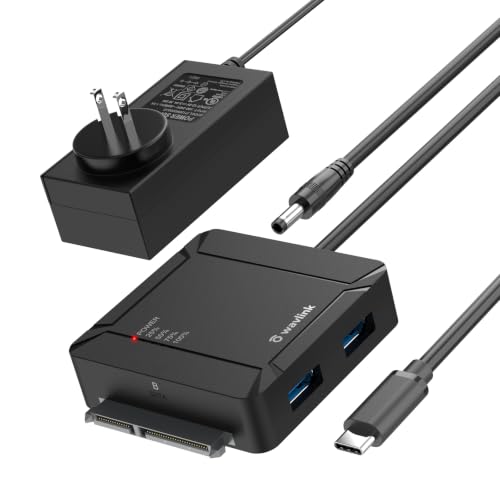
- Two SATA bays with 36TB total support
- Built-in dual USB 3.0 hub
- Offline A-to-B cloning and UASP/TRIM
Best For: Flexible storage setups with connected peripherals
Best Single-Bay Speed
SABRENT USB-C 10Gbps SATA Dock

- 10Gbps USB 3.2 Gen 2 interface
- Tool-free hot-swapping for one drive
- Includes USB-A and USB-C cables
Best For: Fast, routine access to a single SATA drive
Best Cooling Design

- Dual-bay offline cloning for SATA drives
- Supports up to 32TB per drive
- Cooling, dust cover, and anti-slip design
Best For: Protected dual-drive backups and cloning
Best Dual-Bay Cloner

- Dual-bay support for 2.5-inch and 3.5-inch SATA drives
- Offline cloning without a computer
- USB-C/USB-A connectivity with UASP and TRIM
Best For: Home backups and drive upgrades
Best Value Dual-Bay Dock

- Simultaneous access to two SATA drives
- One-button offline cloning
- Dedicated 12V/2.5A power and 18-month warranty
Best For: Simple backups and drive migration
Best High-Capacity Option

- Five bays for up to 100TB total capacity
- 1:4 offline drive duplication
- Aluminum vertical design with status indicators
Best For: Large storage setups and multi-drive duplication
Best Dual-Bay USB-C Dock

- Dual bays support 2.5-inch and 3.5-inch SATA drives
- Offline cloning works without a computer
- USB-A/USB-C cable and up to 22TB per bay
Best For: Dual-drive access and offline cloning
Best High-Capacity DAS

- Five bays support up to 100TB total
- 10Gbps USB-C connection with independent bay controllers
- Tray-less hot-swap design with PWM cooling
Best For: Multi-drive desktop storage expansion
Best Budget Dual-Bay Dock

- Dual bays fit 2.5-inch and 3.5-inch SATA drives
- Offline cloning and hot-swapping are supported
- Tool-free setup with standard USB mass storage
Best For: Simple drive access and cloning
Best Offline Cloner – SABRENT Dual-Bay USB-C SATA Dock
For shoppers comparing usb c hard drive docking stations, the SABRENT EC-CH2B stands out as a practical dual-bay option with offline cloning. It accepts bare 2.5-inch and 3.5-inch SATA HDDs and SSDs, mounts both drives separately over USB, and includes the required power adapter and USB-C cable.
Best For: Users who need dual-drive access and simple, computer-free SATA drive cloning.
Pros:
- Offline 1-to-1 cloning works without a computer.
- Reads and writes two SATA drives at once when connected to a computer.
- Tool-free, hot-swappable bays support both 2.5-inch and 3.5-inch SATA drives.
- Includes a USB-C cable and supports plug-and-play use on Windows and Mac.
Cons:
- Supports SATA drives only; it does not support IDE/PATA, M.2, or NVMe drives.
- Offline cloning runs at up to 60MBps and requires the target drive to be at least as large as the source.
- The included cable is USB-C on the dock end, so USB-A computers require a separate cable.
This is a focused choice for SATA backup and drive migration, especially when offline cloning matters more than top-end USB throughput.
Best Hub Features – WAVLINK Dual-Bay USB-C HDD Dock
The WAVLINK is one of the more versatile usb c hard drive docking stations for users who want drive access plus extra connectivity. Its dual SATA bays support simultaneous 2.5-inch or 3.5-inch drives, while two USB 3.0 ports add room for peripherals or additional storage devices.
Best For: Home and office users who want dual-drive cloning, UASP support, and built-in USB hub ports.
Pros:
- Supports offline A-to-B cloning without a computer.
- Dual bays support up to 18TB per drive, for 36TB total.
- Two USB 3.0 hub ports support peripherals and data transfers.
- Works with 2.5-inch and 3.5-inch SATA HDDs and SSDs, with hot-swap support.
Cons:
- Offline cloning works only from drive A to drive B, and the target must be at least as large.
- Requires the included 12V/3A power adapter for standard operation.
- The listed 5Gbps speed depends on the computer, drives, and UASP support.
The added USB hub makes this WAVLINK more flexible than a basic dock, while its 36TB stated capacity suits larger two-drive storage setups.
Best Single-Bay Speed – SABRENT USB-C 10Gbps SATA Dock
For a straightforward single-drive solution among usb c hard drive docking stations, the SABRENT DS-UC1B combines a tool-free bay with a 10Gbps USB 3.2 Gen 2 connection. It supports 2.5-inch and 3.5-inch SATA HDDs and SSDs, includes both USB-A and USB-C cables, and is designed for hot-swapping.
Best For: Users who regularly swap one SATA drive at a time and want a faster USB interface.
Pros:
- 10Gbps USB 3.2 Gen 2 connection maximizes the interface available to compatible SATA drives.
- Tool-less, hot-swappable design makes drive changes quick.
- Supports 2.5-inch and 3.5-inch SATA drives, including capacities of 20TB and larger.
- Includes both USB-A and USB-C to USB-C cables.
Cons:
- Only one drive can be installed at a time.
- It does not provide offline cloning.
- Actual transfer performance depends on the installed SATA drive and host connection.
This dock is a good fit when convenience and interface speed are priorities, particularly for users who do not need dual-bay copying.
Best Cooling Design – UGREEN Dual-Bay SATA Cloner
The UGREEN CM198 is a dual-bay choice for shoppers seeking usb c hard drive docking stations with offline cloning and added physical protection. It supports two 2.5-inch or 3.5-inch SATA drives, provides up to 5Gbps transfers, and includes surround cooling, a dust cover, and anti-slip pads.
Best For: Users who want a dual-drive SATA dock with offline cloning and a stability-focused design.
Pros:
- Offline cloning supports copying from drive A to drive B without a computer.
- Accepts two 2.5-inch or 3.5-inch SATA I, II, or III drives.
- Supports up to 32TB per drive according to the supplied specifications.
- Includes surround cooling, a dust cover, and anti-slip pads.
Cons:
- Uses a 5Gbps USB 3.0 interface rather than a 10Gbps connection.
- Cloning requires the target capacity to be at least as large as the source.
- Compatibility is listed for SATA drives and does not include M.2 or NVMe formats.
The CM198 balances high-capacity dual-drive support with practical protective features, making it suitable for routine backups, transfers, and cloning.
Best Dual-Bay Cloner – ORICO 2-Bay USB-C Dock
The ORICO 2-Bay USB-C dock is a practical choice among usb c hard drive docking stations for reading, transferring, or cloning 2.5-inch and 3.5-inch SATA HDDs and SSDs. Its USB-C/USB-A cable, UASP support, and offline cloning make it useful for home backups and drive upgrades.
Best For: Users who need a compact dual-bay dock with offline cloning and broad device compatibility.
Pros:
- Supports two 2.5-inch or 3.5-inch SATA drives and up to 22TB per drive.
- Offline clone function works without a computer, provided the target drive is larger than the source.
- Includes a USB-C and USB-A 2-in-1 cable, with support for Windows, Mac, Linux, iPadOS, and Android.
- UASP and TRIM support enable transfers up to 5Gbps.
Cons:
- Offline cloning requires the target disk to have greater capacity than the source.
- It uses a USB 3.0/3.1-class interface rather than a faster USB 3.2 Gen 2 connection.
With dual-drive support, automatic sleep, and LED monitoring, this ORICO model balances useful cloning features with a relatively small footprint. It is a sensible all-purpose option when two bays are enough.
Best Value Dual-Bay Dock – BENFEI USB-C HDD/SSD Dock
The BENFEI dual-bay dock is one of the more straightforward usb c hard drive docking stations for simultaneous drive access, backups, and system migration. It supports tool-free installation, USB 3.1 Gen 1 transfers, and one-button offline cloning.
Best For: Users wanting an easy-to-operate two-drive dock with a dedicated power supply and extended warranty.
Pros:
- Reads, writes, and transfers between two 2.5-inch or 3.5-inch HDDs or SSDs.
- One-button offline cloning works without connecting to a computer.
- UASP support and transfer speeds up to 5Gbps help reduce backup wait times.
- Includes a 12V/2.5A adapter, power switch, and an 18-month warranty.
Cons:
- The target drive must have capacity equal to or greater than the source for cloning.
- The USB 3.1 Gen 1 interface is limited to up to 5Gbps.
The BENFEI focuses on core docking and cloning tasks without adding extra bays or complicated controls. Its independently powered dual-bay design is especially practical when working with two desktop-sized 3.5-inch drives.
Best High-Capacity Option – ORICO 5-Bay USB-C Dock
The ORICO 5-Bay dock stands out among usb c hard drive docking stations for users managing several SATA drives at once. Its five bays support up to five 20TB drives, while the 1:4 offline duplicator can create four copies from one source without a computer.
Best For: Photographers, professionals, and storage-heavy users who need multiple bays and large-capacity expansion.
Pros:
- Five-bay design supports 2.5-inch and 3.5-inch SATA HDDs and SSDs.
- 1:4 offline duplication copies one source drive to four target drives.
- Supports up to five 20TB drives for a stated 100TB total capacity.
- Aluminum-alloy construction, vertical orientation, anti-vibration pads, and LED status indicators aid desk-side use.
Cons:
- Its larger five-bay design is more suited to stationary setups than minimal workspaces.
- Cloning overwrites target drives, so backups are recommended before starting.
- The USB 3.2 Gen 1 interface is rated for up to 5Gbps-class connectivity.
This ORICO dock is the strongest fit when capacity and multi-drive duplication matter more than portability. The aluminum enclosure and vertical layout add a more substantial, workstation-oriented feel to a high-capacity storage setup.
Best Dual-Bay USB-C Dock – RSHTECH RSH-DS01C
The RSHTECH RSH-DS01C is a practical choice among usb c hard drive docking stations for users who need to access or clone two SATA drives. Its dual-bay, tool-free design supports both 2.5-inch and 3.5-inch HDDs and SSDs, while the included USB-A/USB-C cable works with a range of host ports.
Best For: Home users and technicians who need dual-drive access, offline cloning, and broad USB host compatibility.
Pros:
- Supports two 2.5-inch or 3.5-inch SATA drives, with up to 22TB per bay.
- Includes USB-A and USB-C connectors for laptops, desktops, and compatible consoles.
- Offers offline cloning without connecting to a computer.
- Aluminum housing, semi-open cooling, and a 36W power adapter support stable operation.
Cons:
- Offline cloning requires compatible source and target drive capacities.
- UASP performance depends on support from the connected devices.
With two bays, offline cloning, and a detachable dual-connector cable, the RSHTECH is a flexible option for routine backups, drive upgrades, and basic disk management.
Best High-Capacity DAS – SABRENT 5-Bay USB-C Enclosure
The SABRENT DS-SC5B is built for users who need far more drive capacity than a typical two-bay dock. This five-bay USB-C DAS holds up to five 3.5-inch SATA HDDs or SSDs and connects over 10Gbps USB-C, but it is an enclosure rather than a RAID system or NAS.
Best For: Desktop users who need centralized access to several 3.5-inch drives over a direct USB-C connection.
Pros:
- Five tray-less bays support up to 100TB using five 20TB drives.
- Dedicated controller per bay provides independent drive connections.
- 10Gbps USB-C connectivity is backward compatible with USB 3.0 and USB 2.0.
- PWM-controlled 120mm cooling fan, per-bay switches, activity LEDs, and locking features add convenience.
Cons:
- Drives are not included.
- It is JBOD-style DAS, not hardware RAID or network-attached storage.
- The 10-pound enclosure is less portable than smaller docking stations.
The DS-SC5B makes sense when five-drive expansion and independent access matter more than portability or built-in RAID features. Its cooling and tool-free bays are useful for heavier desktop storage setups.
Best Budget Dual-Bay Dock – WAVLINK WL-ST334UA
The WAVLINK WL-ST334UA is a straightforward option among usb c hard drive docking stations for accessing two SATA drives without installing them in an enclosure. It supports 2.5-inch and 3.5-inch HDDs and SSDs, includes offline cloning, and uses standard USB mass-storage operation without requiring dock drivers.
Best For: Users who want an uncomplicated dual-bay dock for drive access, hot-swapping, and offline duplication.
Pros:
- Supports both 2.5-inch and 3.5-inch SATA I/II/III HDDs and SSDs.
- Provides offline cloning from a source disk to a target disk.
- Tool-free setup, hot-swapping, and no dock-specific drivers simplify use.
- Includes a built-in power switch and 12V/3A power supply.
Cons:
- Offline cloning requires the target drive to have equal or greater capacity than the source.
- It is not compatible with M1- or M2-based Macs according to the supplied notes.
- The listed maximum capacity is 16TB per drive.
The WAVLINK is a sensible pick for basic two-drive tasks and occasional cloning. Check Mac compatibility and drive capacities before buying, especially if you use a newer Apple system.
How We Picked the Best USB C Hard Drive Docking Stations
We focused on practical differences that affect everyday use: USB-C connection speed, SATA compatibility, number of bays, supported drive sizes, offline cloning, power delivery, construction, and ease of installation. The lineup includes compact dual-bay docks for occasional access and backup work, as well as five-bay models suited to larger desktop storage setups.
We also considered whether each dock supports both 2.5-inch and 3.5-inch SATA HDDs or SSDs, whether it offers UASP for improved USB storage performance, and how clearly its capacity and cloning limitations are defined. A USB-C connector alone does not guarantee maximum speed, so the host computer, cable, and installed drive must all support the advertised standard.
Quick Comparison
- Best for straightforward cloning: Choose a dual-bay dock with offline clone functionality and dedicated source-to-target controls.
- Best for speed: Look for a 10Gbps USB-C model, while remembering that SATA drives may remain the performance bottleneck.
- Best for several drives: Five-bay docks provide more simultaneous access and are better suited to archives, media libraries, and workstation storage.
- Best for occasional use: A tool-free dual-bay dock is simpler to store and usually costs less than a multi-bay enclosure.
Key Buying Factors for USB-C Hard Drive Docking Stations
Drive Compatibility
Confirm that the dock accepts the drive type and size you use. Most models here support SATA 2.5-inch and 3.5-inch drives, but M.2, IDE, SAS, and NVMe drives require different hardware. Check the maximum per-drive and total capacity before installing high-capacity disks.
Connection Speed and Host Ports
USB 3.0 or 5Gbps is sufficient for many hard drives. A 10Gbps USB-C dock can reduce transfer bottlenecks with SATA SSDs, but it will not make a mechanical HDD perform like an SSD. Verify that your computer has a matching USB port and use a suitable cable.
Cloning and Backup Features
Offline cloning can copy one drive to another without a computer, but the target drive generally needs to be the same size or larger, and the process may erase existing data. Always verify source and target positions before starting and keep a separate backup of important files.
Power and Cooling
3.5-inch hard drives need dedicated power, so a stable adapter is essential. For multi-drive docks, look for adequate ventilation, sturdy construction, and independent drive controls where available. Do not disconnect active drives during transfers.
Who Should Buy Which USB C Hard Drive Docking Stations?
Choose a compact dual-bay model if you need to inspect, migrate, or back up a few SATA drives. Pick a 10Gbps option if you regularly transfer large files to SATA SSDs and your computer supports the faster interface. An offline-clone model is the better choice for drive upgrades without relying on cloning software. If you manage several drives at once, a five-bay dock offers more convenient access, though it demands more desk space, power, and organization. For routine backups, pair any of these USB-C hard drive docking stations with a tested backup strategy rather than treating the dock itself as a backup.