The best external GPU enclosures with USB hubs let you add desktop-class graphics while keeping displays, storage, peripherals, and charging connected through one practical setup.
Our 2026 roundup covers Thunderbolt, USB4, and OCuLink options, from compact docks to high-wattage enclosures for demanding GPUs and workstation use.
Best 10 External GPU Enclosures with USB Hubs Picks for 2026
Premium Thunderbolt 5 Pick

- Supports up to four-slot NVIDIA and AMD desktop GPUs
- Thunderbolt 5 bandwidth up to 80 Gbps
- 140W USB-C power delivery
Best For: Windows 11 and USB4 users prioritizing GPU clearance and upgradeability
OCuLink Performance Dock
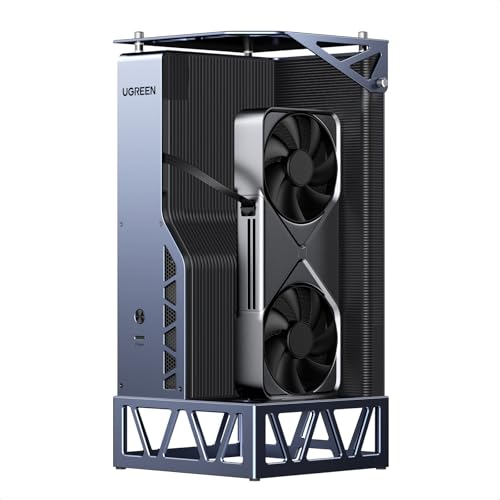
- Combines OCuLink 64Gbps with USB4 40Gbps
- Includes an 850W ATX 3.1 power supply
- Supports NVIDIA, AMD, and Intel GPUs
Best For: Gaming, creation, and AI workloads on compatible laptops, handhelds, and mini PCs
Best Built-In Hub

- Three 10Gbps USB-A ports and 5GbE Ethernet
- Supports triple-wide NVIDIA and AMD GPUs
- Includes an 850W power supply
Best For: Windows 11 workstations needing GPU acceleration, USB expansion, and wired networking
Most Versatile Dock

- Switches between OCuLink and Thunderbolt 5
- Adds M.2 storage, 2.5GbE, and USB 3.2 ports
- Accepts ATX or SFX power supplies
Best For: Mini PC users building a configurable eGPU and connectivity hub
Portable Complete Kit

- Includes 240W PSU, cables, and carrying case
- Supports compatible NVIDIA and AMD cards up to 205mm
- Offers 85W/15W PD and DisplayPort connectivity
Best For: Portable gaming, editing, and rendering with compatible laptops or handhelds
High-Power Upgrade Path
VK-Y900 Thunderbolt eGPU Enclosure

- Supports broad NVIDIA and AMD GPU families
- Accepts an ATX power supply and delivers 85W PD
- Includes dual Thunderbolt ports and DisplayPort
Best For: Flexible laptop and handheld GPU upgrades using an existing ATX PSU
Dual-Link Workstation Dock
MINISFORUM DEG2 USB4 V2 eGPU Dock

- Offers USB4 V2/TBT5 and OCuLink dual-link modes
- Adds an M.2 2280 NVMe storage slot
- Supports ATX/SFX power supplies and desktop GPUs
Best For: High-bandwidth AI, rendering, and expandable desktop workflows
Open-Frame Power Pick

- Supports listed NVIDIA and AMD GPUs
- Open frame accommodates unlimited card length
- 85W PD plus dual Thunderbolt ports
Best For: High-airflow desktop-style eGPU setups
Compact Hub Choice

- Adds a 10Gbps USB-A hub port
- Supports ATX, SFX, FLEX, or DC power
- 85W PD suits compatible handhelds
Best For: Compact laptop, mini-PC, and handheld setups
Flexible DIY Dock

- Supports daisy chaining and hub expansion
- Accepts several PSU form factors
- Provides up to 85W PD charging
Best For: DIY builders with their own GPU and power supply
Premium Thunderbolt 5 Pick – Razer Core X V2
The Razer Core X V2 is a strong choice for shoppers seeking external gpu enclosures with usb hubs, although its connectivity is limited to a single USB port. It supports desktop NVIDIA and AMD graphics cards up to four slots wide, with PCIe 4.0 support and up to 80 Gbps Thunderbolt 5 bandwidth.
Best For: Windows 11 laptop and USB4 handheld users who want a spacious, upgradeable eGPU enclosure with high-power USB-C charging.
Pros:
- Fits PCIe desktop GPUs up to four slots wide.
- Supports Thunderbolt 5, Thunderbolt 4, and USB4 devices.
- Provides up to 140W power delivery via USB-C.
- Tool-free GPU and ATX PSU installation with active cooling.
Cons:
- GPU and power supply are sold separately.
- Only one USB port is listed, so it is not a full-featured USB hub.
- Mac devices with M1 or later chipsets do not support eGPUs.
Choose this enclosure when card clearance, upgrade flexibility, and Thunderbolt 5 performance matter more than extensive hub connectivity.
OCuLink Performance Dock – UGREEN LinkStation eGPU Dock
The UGREEN LinkStation is aimed at buyers comparing external gpu enclosures with usb hubs who want both OCuLink and USB4 connectivity. It is designed to connect a full-size desktop GPU to laptops, handhelds, and mini PCs, and includes an 850W ATX 3.1 power supply.
Best For: Gamers, creators, and AI users seeking a high-power eGPU dock for compatible laptops, gaming handhelds, or mini PCs.
Pros:
- Offers OCuLink 64Gbps and USB4 40Gbps connections.
- Supports NVIDIA, AMD, and Intel GPUs.
- Includes an 850W ATX 3.1 power supply.
- Designed for gaming, rendering, content creation, and local AI workloads.
Cons:
- The supplied notes do not specify the number or type of USB hub ports.
- Its 11.2-pound weight and desktop-style dimensions reduce portability.
- Performance depends on host-device compatibility and connection type.
This is a practical performance-first option if you already have a compatible host and want built-in high-wattage power rather than a compact travel enclosure.
Best Built-In Hub – Sonnet Breakaway Box 850 T5
The Sonnet Breakaway Box 850 T5 stands out among external gpu enclosures with usb hubs because it combines an eGPU enclosure with useful desktop connectivity. Its built-in dock includes three 10Gbps USB-A ports, a Thunderbolt 5 peripheral port, and 5GbE Ethernet.
Best For: Windows 11 laptop users who want accelerated graphics plus wired networking and multiple high-speed USB-A connections.
Pros:
- Provides up to 80 Gbps Thunderbolt 5 bandwidth.
- Supports triple-wide NVIDIA and AMD graphics cards.
- Includes three 10Gbps USB-A ports and 5GbE Ethernet.
- Built-in 850W power supply supports demanding GPUs.
Cons:
- Designed for Windows 11 systems; broader compatibility should be verified.
- The large, 14.1-pound enclosure is not especially portable.
- GPU installation is required because the graphics card is not included in the supplied notes.
For a workstation-style setup, this is one of the more complete choices: it adds graphics acceleration without requiring a separate USB hub or wired network adapter.
Most Versatile Dock – MINISFORUM DEG2 eGPU Dock
The MINISFORUM DEG2 is a flexible pick for shoppers evaluating external gpu enclosures with usb hubs, especially those using OCuLink or newer USB4 and Thunderbolt 5 systems. It supports selectable OCuLink and Thunderbolt 5 modes, plus storage, networking, and USB expansion.
Best For: Mini PC users who want a configurable eGPU dock with M.2 storage, 2.5GbE networking, multiple host interfaces, and ATX/SFX PSU support.
Pros:
- Switches between OCuLink and Thunderbolt 5 with a physical toggle.
- Offers 2.5GbE, USB 3.2 ports, and an M.2 2280 slot.
- Supports both ATX and SFX power supplies.
- Provides automatic power synchronization and one-cable USB4 V2 expansion.
Cons:
- GPU, ATX power supply, and SFX power supply are not included.
- Compatibility is centered on mini PCs and should be checked for the specific host.
- The supplied notes list only two USB 3.2 ports, so expansion is more limited than a large desktop hub.
Its mode switch and component flexibility make the DEG2 a compelling choice for users building a customized desktop-GPU setup around a mini PC.
Portable Complete Kit – Compact Thunderbolt eGPU Dock
This compact option is a practical choice among external gpu enclosures with usb hubs if you want a ready-to-use graphics upgrade for a Thunderbolt 3, Thunderbolt 4, or USB4 laptop, NUC, or handheld. It includes a 240W power supply, cables, and a carrying case, though the graphics card itself is not included.
Best For: Portable gaming, editing, and rendering setups using compatible NVIDIA or AMD cards within the enclosure’s size limits.
Pros:
- Includes a 240W PSU, Thunderbolt 4 cable, PCIe power cable, and carrying case.
- Supports compatible NVIDIA and AMD graphics cards up to 205mm long.
- Provides two Thunderbolt ports, 85W and 15W PD charging, plus DisplayPort.
- Lightweight anodized aluminum enclosure is suited to portable use.
Cons:
- The host device must support Thunderbolt 3, Thunderbolt 4, or USB4; a standard USB-C port is not sufficient.
- The graphics card is not included.
- PCIe 3.0 x16 and the listed 240W power supply may limit some higher-power builds.
Its included accessories and custom case make this a convenient all-in-one solution, especially for users who value portability and straightforward setup. Check your GPU dimensions and host-port specifications before buying.
High-Power Upgrade Path – VK-Y900 Thunderbolt eGPU Enclosure
This VK-Y900 enclosure is aimed at users building a more flexible graphics setup around an existing ATX power supply. It supports Thunderbolt 3, Thunderbolt 4, and USB4 hosts, provides 85W pass-through charging, and is designed for NVIDIA and AMD cards ranging from older professional models to newer RTX and Radeon families.
Best For: Laptop, NUC, and handheld users who want broad GPU support, ATX power-supply flexibility, and 85W charging.
Pros:
- Supports a wide range of NVIDIA and AMD graphics cards, including RTX and Radeon families listed by the manufacturer.
- Uses an official Intel JHL7440/7450 controller for stable Thunderbolt data transfer.
- Provides dual Thunderbolt ports with 15W and 85W PD, plus DisplayPort.
- Compatible with ATX power supplies and includes a one-year warranty.
Cons:
- An ATX power supply is required but is not listed as included.
- The product details list only one USB port, so it is less hub-oriented than some alternatives.
- Its Apple Silicon Mac AI feature is intended for deep-learning development, not gaming or 3D rendering.
The VK-Y900 makes sense when GPU compatibility and reusable desktop power hardware matter more than having many USB hub ports. Confirm your power-supply arrangement and intended operating system before choosing it.
Dual-Link Workstation Dock – MINISFORUM DEG2 USB4 V2 eGPU Dock
The MINISFORUM DEG2 is a performance-focused choice among external gpu enclosures with usb hubs, combining USB4 V2 compatibility with OCuLink connectivity. Its dual-link design supports up to 80Gbps through TB5-compatible USB4 V2 or 64Gbps through OCuLink, while an integrated M.2 slot adds local storage for project files and AI models.
Best For: High-bandwidth AI, rendering, and desktop-style workflows that benefit from OCuLink, USB4 V2, expandable storage, and a replaceable power supply.
Pros:
- Supports USB4 V2/TBT5-compatible and OCuLink connections with a selectable operating mode.
- Includes an M.2 2280 NVMe slot for AI models and project files.
- Accepts standard ATX and SFX power supplies and supports desktop graphics cards.
- Built-in signal boosting is designed to improve stability during demanding transfers.
Cons:
- The notes do not list an included power supply or graphics card.
- Its advanced interfaces require a compatible host system and appropriate cables.
- The supplied specifications do not identify a broad USB hub-port count.
Choose the DEG2 when maximum connection bandwidth, storage expansion, and power-supply flexibility are priorities. It is more specialized than a simple plug-and-play enclosure, so verify whether your computer supports USB4 V2, Thunderbolt 5 compatibility, or OCuLink.
Open-Frame Power Pick – MK-L18 eGPU Enclosure
If you want external gpu enclosures with usb hubs and room for a full-size graphics card, the MK-L18 combines Thunderbolt 3/4 or USB4 connectivity with an open-frame aluminum design. It supports PCIe 4.0 x16 mode, 85W power delivery, and NVIDIA or AMD graphics cards, but your host device must have a compatible Thunderbolt or USB4 port.
Best For: Desktop-style eGPU setups, high-airflow builds, and users connecting compatible laptops, NUCs, or handhelds.
Pros:
- Supports NVIDIA and AMD cards, including listed RTX 50-series and RX 7000-series models.
- Open-frame design places no stated limit on graphics card length and promotes airflow.
- 85W PD can support charging and ROG Ally X 30W Turbo Mode through one cable.
- Certified controllers and PCIe 4.0 x16 mode provide a strong performance foundation.
Cons:
- Non-Thunderbolt and non-USB4 Type-C ports are not supported.
- The open-frame format offers less enclosure-style protection than a closed case.
- AI support on Apple Silicon Macs is limited to specified deep-learning use cases, not gaming or 3D rendering.
The MK-L18 is a capable choice when expandability, airflow, and broad GPU compatibility matter more than a compact, enclosed footprint. Confirm your host port and power-supply setup before buying.
Compact Hub Choice – ANQ-L336 Mini eGPU Enclosure
The ANQ-L336 is a practical option among external gpu enclosures with usb hubs, pairing a mini eGPU dock with a 10Gbps USB-A port and two Thunderbolt 4 ports. It connects to compatible Thunderbolt 3/4 or USB4 laptops, mini PCs, NUCs, and handhelds, while supporting flexible ATX, SFX, FLEX, or DC 12V power supplies.
Best For: USB4 handhelds such as the ROG Ally X or MSI Claw 8, plus compact laptop and mini-PC gaming setups.
Pros:
- Officially certified JHL7440 controller supports 32Gbps transfer over PCIe 4.0 x4.
- Works with NVIDIA and AMD GPUs, with stated strong support for AMD’s latest 9000 series.
- Includes a 10Gbps USB-A port and two Thunderbolt 4 ports for hub functionality.
- 85W PD can enable ROG Ally X 30W Turbo Mode while connected to the eGPU.
Cons:
- Power supply is not included.
- NVIDIA RTX 50-series support is described as limited.
- Compatibility requires a Thunderbolt 3/4 or USB4 interface.
Choose the ANQ-L336 if you want a relatively compact dock with useful expansion ports and flexible PSU support. Its handheld-focused charging feature adds convenience, while GPU compatibility should be checked carefully for newer NVIDIA cards.
Flexible DIY Dock – ORARA External GPU Dock
For buyers comparing external gpu enclosures with usb hubs, the ORARA External GPU Dock offers a modular approach with Thunderbolt 3/4 or USB4 connectivity, an included 10Gbps USB-A port, and support for ATX, SFX, FLEX, or DC 12V power supplies. It is a dock rather than a complete GPU system, so both the graphics card and power supply must be provided separately.
Best For: DIY builders who want daisy-chain support and flexibility in choosing the power supply.
Pros:
- Certified JHL7440 controller supports 32Gbps transfer through PCIe 3.0 x4.
- Supports daisy chaining through its dedicated port.
- Functions as a hub with a 10Gbps USB-A port and an additional TB4 port.
- Offers up to 85W PD charging for compatible host devices.
Cons:
- Graphics card, ATX power supply, and DC 12V adapter are not included.
- Only compatible with Thunderbolt 3/4 or USB4 ports; standard USB-C is not supported.
- The supplied notes require Windows 11 for detection and warn that insufficient PSU power can affect operation.
The ORARA dock makes sense for hands-on users who already have suitable components and need daisy chaining in addition to basic hub expansion. Its strict port and power requirements make compatibility checks especially important.
How We Picked the Best External GPU Enclosures with USB Hubs
We focused on compatibility, connection bandwidth, power delivery, expansion, and day-to-day usability. The selection includes Thunderbolt 3, Thunderbolt 4, Thunderbolt 5-compatible, USB4, and OCuLink designs, since laptops and mini PCs vary widely in available ports.
We also considered GPU support, power-supply requirements, operating-system compatibility, port selection, upgrade flexibility, and whether the enclosure works as a genuine hub or primarily as a graphics dock. Product listings can differ by cable, adapter, and power-supply configuration, so verify the exact package before ordering.
Quick Comparison
| Connection | Best For | Main Advantage | Potential Limitation |
|---|---|---|---|
| Thunderbolt 3/4 | Broad laptop compatibility | Mature ecosystem and simple setup | Bandwidth is shared with other traffic |
| USB4 | Newer laptops and compact PCs | Fast connectivity with flexible device support | Capabilities vary by host port |
| Thunderbolt 5-compatible | New-generation systems | More headroom for high-speed peripherals | Full benefits require compatible hardware |
| OCuLink | Maximum direct GPU performance | Low overhead and strong graphics bandwidth | Usually lacks the convenience of a full hub |
Key Buying Factors for External GPU Enclosures with USB Hubs
Host Connection and Real-World Bandwidth
Check the laptop or mini PC’s exact port specification rather than relying on a USB-C shape. Thunderbolt and USB4 support can differ in display output, PCIe tunneling, charging, and data speed. OCuLink can provide excellent GPU performance, but it normally requires a dedicated host port and separate connectivity for peripherals.
Power Supply and GPU Clearance
Match the enclosure’s power capacity to the graphics card’s total board power, transient demands, and connector requirements. Confirm four-slot or oversized-card clearance where necessary, along with cooling airflow and the enclosure’s power-cable arrangement. Some docks require an ATX or SFX supply, while others include an integrated unit.
Hub Ports and Charging
Count the ports you actually need: USB-A, USB-C, Ethernet, storage, audio, and display outputs. USB hub speed may be lower than the headline connection speed, and power delivery is not guaranteed on every model. If you want one-cable laptop use, verify the stated PD wattage and whether it is sufficient for your computer under load.
Operating System and Expansion Support
Windows compatibility is common, but Linux and macOS support can be more limited, especially for GPU drivers and hot-plug behavior. If you plan to add an M.2 drive or PCIe card, confirm that the enclosure supports the intended device without reducing GPU connectivity or requiring unusual drivers.
Who Should Buy Which External GPU Enclosures with USB Hubs?
- For broad compatibility: Choose a Thunderbolt 3 or Thunderbolt 4 enclosure with clear Windows support and integrated power.
- For newer laptops: Consider USB4 or Thunderbolt 5-compatible models, but confirm the host system’s actual capabilities.
- For maximum graphics performance: An OCuLink dock is appealing when your mini PC or laptop includes the required port.
- For a clean desk setup: Prioritize a model with USB ports, charging, display support, and enough GPU clearance to replace several separate accessories.
- For compact gaming devices: Look for a small enclosure with reliable 40Gbps connectivity, manageable power requirements, and confirmed compatibility with your handheld or mini PC.