The best wireless mechanical keyboards combine satisfying key feel with the freedom to switch between devices, desks, and gaming setups. This roundup compares compact 75% boards, full-size layouts, productivity-focused models, and customizable gaming keyboards.
We selected options with different layouts, connection methods, switch styles, battery capacities, and feature sets so you can find a keyboard that fits your workflow rather than paying for features you will not use.
Best 10 Wireless Mechanical Keyboards Picks for 2026
Best Customizable 75% Pick

- Tri-mode connectivity with up to five devices
- Hot-swappable 3-pin and 5-pin switch support
- 75% layout with RGB and multifunction knob
Best For: Compact gaming and work setups that value customization
Best Low-Profile Office Pick

- Quiet tactile switches with low-profile keys
- Full-size layout with smart backlighting
- Connects to up to three devices
Best For: Quiet office productivity and multi-device work
Best Battery-Life Gaming Pick
- Large 8000mAh battery for extended runtime
- Tri-mode wireless and USB-C connectivity
- 100-key gasket design with hot-swappable switches
Best For: Gaming setups prioritizing battery life and cushioned typing
Best Compact Number-Pad Pick

- 96% layout keeps the number area
- Tri-mode connectivity for up to five devices
- 8000mAh battery and hot-swappable switches
Best For: Compact work and gaming setups needing a number pad
Full-Size Wireless Powerhouse

- 108-key layout with four programmable hotkeys
- USB-C, Bluetooth, and 2.4GHz connectivity
- Gasket mount with hot-swappable switch support
Best For: Full-size gaming and multitasking setups
Compact Thocky Workhorse
Kisnt KN85 75% Wireless Keyboard

- Space-saving 85-key 75% layout
- Tri-mode connectivity with 4000mAh battery
- Gasket mount and hot-swappable linear switches
Best For: Small desks and multi-device typing
Retro Clicky Classic
Redragon K710 Typewriter Keyboard

- 104-key retro layout with round keycaps
- Clicky blue switches and metal panel
- Tri-mode connectivity with rechargeable 4000mAh battery
Best For: Retro-style typing and audible click enthusiasts
Compact Custom Pick
AULA F75 75% Wireless Mechanical Keyboard

- 75% layout preserves arrow keys while saving desk space
- Tri-mode connectivity supports up to five devices
- Hot-swappable switches and 4000mAh battery
Best For: Gamers and beginners seeking a customizable compact keyboard
Full-Size Stability Pick
Redragon K556 PRO Wireless Mechanical Keyboard

- 104-key layout includes a dedicated number pad
- Aluminum frame and plate provide a steady typing platform
- Tri-mode wireless and hot-swappable switch support
Best For: Users who prefer a sturdy, traditional full-size keyboard
Feature-Rich 81-Key Pick
Redragon K671KS Wireless Mechanical Keyboard
- Tri-mode connection supports up to five devices
- PBT keycaps and metal panel add durability
- Hot-swappable switches with included spares
Best For: Gamers and office users wanting compact customization
Best Customizable 75% Pick – AULA F75 Pro
The AULA F75 Pro is a versatile choice among wireless mechanical keyboards for shoppers who want a compact layout, flexible connectivity, and an easy path to customization. Its 75% design retains arrow keys, while tri-mode connection, hot-swappable sockets, and a control knob suit both gaming and everyday work.
Best For: Users seeking a compact, customizable keyboard for gaming, work, and multi-device setups.
Pros:
- Supports Bluetooth 5.0, 2.4GHz wireless, and USB-C wired connections.
- Hot-swappable PCB accepts 3-pin and 5-pin switches without soldering.
- 4000mAh battery, RGB lighting, PBT keycaps, and a multifunction knob.
- Five-layer dampening and pre-lubed components are designed for a softer, quieter feel.
Cons:
- The 75% layout omits the dedicated number pad.
- Advanced lighting and macro customization require the driver for full control.
The F75 Pro balances compactness and customization particularly well. It is a strong fit if you want a feature-rich wireless mechanical keyboard without moving to a full-size board.
Best Low-Profile Office Pick – Logitech MX Mechanical
The Logitech MX Mechanical is a practical option among wireless mechanical keyboards for office users who prefer a full-size, low-profile design. Its tactile quiet switches provide noticeable feedback with less noise, while smart illumination and multi-device pairing support a streamlined desk setup.
Best For: Office and productivity users who want a quiet, full-size keyboard with comfortable low-profile keys.
Pros:
- Tactile quiet switches provide feedback while reducing typing noise.
- Full-size low-profile layout offers a familiar arrangement and dedicated number pad.
- Pairs with up to three devices through Bluetooth Low Energy or the Logi Bolt receiver.
- USB-C charging provides up to 15 days of battery life with lighting enabled.
Cons:
- It uses single-color backlighting rather than RGB.
- Its low-profile, full-size design is less compact than 75% or 96% alternatives.
The MX Mechanical emphasizes quiet productivity and dependable multi-device use rather than gaming-oriented customization. Choose it when ergonomics, familiar full-size spacing, and smart backlighting matter most.
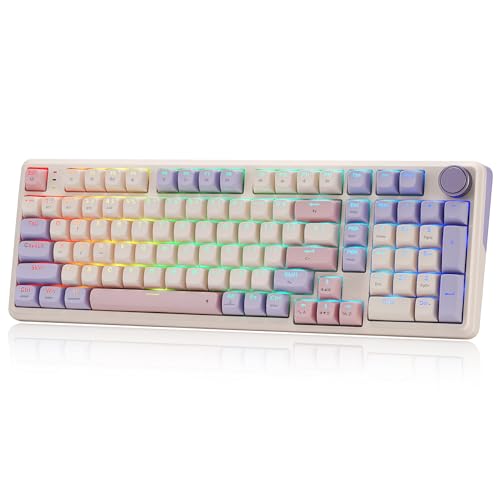
Best Battery-Life Gaming Pick – Redragon K768 PRO
The Redragon K768 PRO stands out among wireless mechanical keyboards for its practical 100-key layout, large battery, and cushioned gasket construction. Tri-mode connectivity, a control knob, hot-swappable sockets, and RGB lighting give it a flexible feature set for gaming and general use.
Best For: Gamers who want extended wireless runtime, a near-full-size layout, and a soft gasket typing feel.
Pros:
- 8000mAh battery is designed for longer runtime between charges.
- Tri-mode USB-C, Bluetooth, and 2.4GHz connectivity supports flexible device use.
- Hot-swappable socket accepts most 3-pin and 5-pin switches.
- PBT keycaps, adjustable RGB, and a multifunction knob add useful customization.
Cons:
- The 100-key format is larger than compact layouts.
- Customization features may require software setup.
The K768 PRO is a sensible choice when battery capacity is a priority but you still want wireless flexibility and switch customization. Its 100-key format preserves more functionality than smaller gaming boards while remaining more compact than a traditional full-size model.
Best Compact Number-Pad Pick – AULA F99
The AULA F99 is a strong option among wireless mechanical keyboards for shoppers who want a space-saving footprint without giving up the number area. Its 96% layout, tri-mode connectivity, hot-swappable switches, and 8000mAh battery make it suitable for both gaming and productivity.
Best For: Users who need arrow keys and a number area in a compact, customizable keyboard.
Pros:
- 96% 99-key layout retains a number area while saving desk space.
- Supports Bluetooth 5.0, 2.4GHz wireless, and USB-C wired modes.
- Hot-swappable PCB accepts 3-pin and 5-pin switches without soldering.
- 8000mAh battery, RGB lighting, PBT keycaps, and macro support add versatility.
Cons:
- The compact 96% arrangement may take adjustment compared with a standard full-size layout.
- Macro and advanced lighting customization depend on the included driver.
The F99 is particularly appealing for buyers who find a 75% keyboard too limiting but do not want a full-size board. It combines a practical number area with the connectivity and customization expected from a modern wireless mechanical keyboard.
Full-Size Wireless Powerhouse – Redragon K745 PRO
The Redragon K745 PRO is a practical choice among wireless mechanical keyboards if you want a full-size layout without giving up flexible connectivity. Its 108-key design includes four dedicated shortcut keys, tri-mode wireless support, gasket cushioning, hot-swappable compatibility, and RGB lighting.
Best For: Gamers and multitaskers who need a full-size keyboard, quick device switching, and dedicated shortcuts.
Pros:
- Tri-mode USB-C, Bluetooth, and 2.4GHz connectivity supports PC, laptop, and tablet use.
- Gasket mounting and five-layer dampening provide a softer, quieter typing feel.
- Hot-swappable sockets accept many 3-pin and 5-pin switches.
- Four programmable hotkeys and translucent PBT keycaps add useful customization.
Cons:
- The full-size 108-key layout takes up more desk space than compact alternatives.
- Its gaming-focused design may be more keyboard than some basic office users need.
Choose the K745 PRO when a number pad, shortcut controls, and a cushioned typing experience matter more than a compact footprint. It is especially versatile for users who move between several devices.
Compact Thocky Workhorse – Kisnt KN85 75% Wireless Keyboard
The Kisnt KN85 is one of the more space-conscious wireless mechanical keyboards, using a 75% layout that keeps the function row, arrows, and shortcuts while removing the number pad. Tri-mode connectivity, a 4000mAh battery, gasket mounting, and hot-swappable switches make it suited to both work and gaming.
Best For: Small desks, laptop setups, hybrid workers, and users who want a compact keyboard with a softer, mellow sound.
Pros:
- Compact 85-key layout preserves essential navigation and function keys while saving desk space.
- USB-C, 2.4GHz, and Bluetooth 5.0 support multiple devices and operating environments.
- Gasket construction and pre-lubed linear switches are designed for a cushioned, thocky typing feel.
- Hot-swappable 3-pin and 5-pin support allows solder-free switch changes.
Cons:
- There is no dedicated number pad for frequent data entry.
- The companion driver is limited to Windows and wired or 2.4GHz modes.
- Animated RGB effects can reduce battery life.
The KN85 is a strong fit when desk space and multi-device flexibility are priorities. Its compact layout and customizable switch system also give enthusiasts room to refine the sound and feel over time.
Retro Clicky Classic – Redragon K710 Typewriter Keyboard
The Redragon K710 stands out among wireless mechanical keyboards with its typewriter-inspired round keycaps, clicky blue switches, and solid metal panel. It offers a full 104-key layout, rechargeable 4000mAh power, tri-mode connectivity, and programmable RGB lighting for a more distinctive desk setup.
Best For: Users who enjoy audible clicky feedback, retro styling, and a sturdy full-size keyboard for gaming or everyday typing.
Pros:
- Clicky blue switches provide tactile feedback and an audible typing response.
- Tri-mode USB, Bluetooth, and 2.4GHz connectivity supports several device types.
- Solid metal panel and steel plate provide a substantial, stable construction.
- RGB lighting, macros, and programmable effects offer extensive customization.
Cons:
- Clicky switches can be noisy in shared workspaces.
- The full-size 104-key design requires more desk room than compact layouts.
- Some software features are oriented toward Windows 10 and Windows systems.
The K710 is a style-forward choice for buyers who want their keyboard to feel and sound different from a conventional office model. Its clicky switches and metal construction suit enthusiasts, while tri-mode connectivity keeps it flexible.
Compact Custom Pick – AULA F75 75% Wireless Mechanical Keyboard
The AULA F75 is a space-saving choice for shoppers comparing wireless mechanical keyboards. Its 75% layout keeps arrow keys while freeing desk space, and tri-mode connectivity supports Bluetooth 5.0, 2.4GHz wireless, and USB-C wired use.
Best For: Gamers and keyboard beginners who want a compact, customizable board with a creamy typing feel.
Pros:
- Hot-swappable 3-pin and 5-pin switch support requires no soldering.
- Tri-mode connectivity can connect with up to five devices.
- Pre-lubricated linear switches, stabilizers, and five-layer sound dampening support a smoother, quieter feel.
- 4000mAh battery, RGB lighting, macro programming, and a multifunction knob add flexibility.
Cons:
- The 75% layout has fewer keys than a full-size keyboard.
- Advanced macro and lighting customization requires the F75 driver.
Choose the F75 if you value compact dimensions and easy switch experimentation without giving up wireless flexibility. Its feature set is particularly appealing for users who want one keyboard for gaming, work, and multiple devices.
Full-Size Stability Pick – Redragon K556 PRO Wireless Mechanical Keyboard
The Redragon K556 PRO is a full-size option among wireless mechanical keyboards, giving you 104 keys in a sturdy aluminum-framed design. It combines USB-C, Bluetooth, and 2.4GHz connectivity with quiet linear switches and hot-swapping for straightforward customization.
Best For: Users who want a traditional full-size layout with a rigid aluminum build and customizable lighting.
Pros:
- Brushed aluminum construction and an aluminum plate help keep the board steady.
- Tri-mode connectivity offers USB-C, Bluetooth, and 2.4GHz wireless modes.
- Hot-swappable sockets support many 3-pin and 5-pin switches without soldering.
- Twenty onboard RGB modes and software-based macros provide customization.
Cons:
- The full-size 104-key layout occupies more desk space than compact designs.
- The supplied switch type is linear, which may not suit shoppers seeking tactile or clicky feedback.
The K556 PRO makes sense when dedicated navigation, function, and number-pad keys matter more than a compact footprint. Its aluminum construction and switch-swapping support also give it a practical edge for users planning gradual customization.
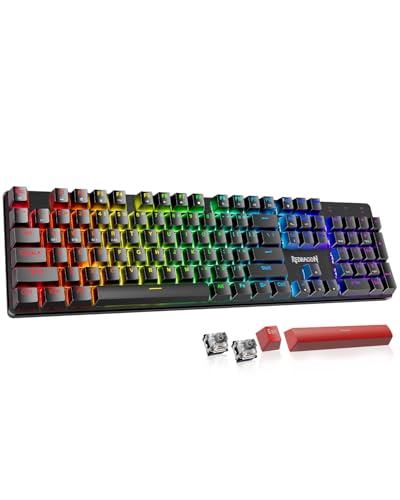
Feature-Rich 81-Key Pick – Redragon K671KS Wireless Mechanical Keyboard
The Redragon K671KS is an 81-key choice for shoppers comparing wireless mechanical keyboards for gaming and office use. It offers USB-C, Bluetooth, and 2.4GHz modes, along with PBT keycaps, hot-swappable linear switches, and programmable RGB controls.
Best For: Users who want a compact-to-mid-size keyboard with durable keycaps, device switching, and extensive remapping options.
Pros:
- Tri-mode connectivity supports up to five devices and switches through a physical control.
- Double-injection PBT keycaps are designed for clear lighting and accurate typing.
- Hot-swappable design includes eight spare switches and two extra red keycaps.
- Macro editing, key remapping, and per-key RGB adjustment support detailed customization.
Cons:
- The 81-key layout is not a full-size design with a dedicated number pad.
- Some listed operating-system compatibility is specified for Windows, including Windows 11.
The K671KS is a strong middle ground for buyers who want more keys than a compact 75% board but less bulk than a 104-key model. Its included replacement parts and programmable controls make it especially suitable for users who expect to personalize their setup.
How We Picked the Best Wireless Mechanical Keyboards
We evaluated these Wireless Mechanical Keyboards by looking at layout, connectivity, switch and customization options, battery capacity, build features, and everyday usability. Tri-mode models that support Bluetooth, 2.4GHz wireless, and USB-C wired operation offer the most flexibility, while Bluetooth-only designs may be sufficient for office and tablet use.
We also considered whether each keyboard includes hot-swappable switches, RGB lighting, a rotary knob, a number pad, gasket-style construction, or dedicated shortcut keys. These features can improve the experience, but they also affect size, weight, price, and power consumption.
Quick Comparison
| Feature | What to look for | Best suited to |
|---|---|---|
| 75% layout | Compact footprint with arrow keys and a function row | Desks with limited space and general use |
| Full-size layout | Dedicated number pad and navigation cluster | Spreadsheets, data entry, and office work |
| Tri-mode wireless | Bluetooth, 2.4GHz, and USB-C connectivity | Multi-device users and gaming |
| Hot-swappable switches | Switch replacement without soldering | Keyboard enthusiasts and sound tuning |
| Large battery | Higher-capacity internal battery | Frequent wireless use and RGB lighting |
Key Buying Factors for Wireless Mechanical Keyboards
Layout and Desk Space
A 75% keyboard removes the number pad and some navigation keys while keeping the most important controls. It is a strong compromise for gaming and everyday typing. Choose a 96% or full-size board if you regularly enter numbers or rely on dedicated navigation keys.
Connection and Compatibility
Bluetooth is convenient for laptops, tablets, and multiple saved devices. A 2.4GHz receiver generally provides lower latency and a more consistent gaming connection. USB-C wired mode is useful for charging, troubleshooting, or eliminating wireless delay altogether. Check operating-system support and whether the receiver can be stored in the keyboard.
Switches and Customization
Linear switches feel smooth and consistent, while tactile switches provide a noticeable bump without the pronounced click of many clicky switches. Hot-swappable sockets make it easier to change the typing feel later. Pre-lubed switches and stabilizers can reduce scratchiness and rattle, although results vary by model.
Battery, Lighting, and Controls
RGB lighting can improve visibility and appearance but usually reduces battery life. Look for a battery indicator, convenient charging, adjustable lighting, and a rotary knob or shortcut controls if you frequently change volume or brightness.
Who Should Buy Which Wireless Mechanical Keyboards?
Choose a compact 75% model if you want more mouse room, a portable setup, or a balanced gaming and productivity layout. Choose a full-size or near-full-size model for accounting, spreadsheets, programming workflows that depend on navigation keys, or heavy number entry.
Choose tri-mode Wireless Mechanical Keyboards if you switch between a desktop, laptop, tablet, and phone. Choose a hot-swappable board if you expect to experiment with switches or customize sound and feel. For office-focused typing, prioritize comfortable tactile switches, quiet operation, and reliable Bluetooth. For gaming, prioritize a stable 2.4GHz connection, low-latency performance, anti-ghosting, and the layout you can use without reaching awkwardly.