The right video switcher can make multi-camera streaming faster, cleaner, and more professional. These 10 picks cover compact HDMI mixers, touchscreen production systems, and higher-end switchers with encoding, recording, PTZ control, or SDI support.
Whether you stream games, classes, events, interviews, or live shows, use the guide below to match your cameras, workflow, resolution, and budget with the right setup.
Best 10 Video Switcher for Streamers Picks for 2026
Best All-Around Choice

- Four HDMI inputs with multiview
- Built-in streaming, recording, and audio mixing
- Transitions and keyers for polished productions
Best For: Multicamera streams, classes, presentations, and esports
Best Portable Monitoring

- Built-in four-inch multiview screen
- Four HDMI inputs and 30 transition effects
- PTZ control, keying, PIP, and AUX routing
Best For: Portable streams, classes, events, OBS, and Zoom
Best for Larger Setups
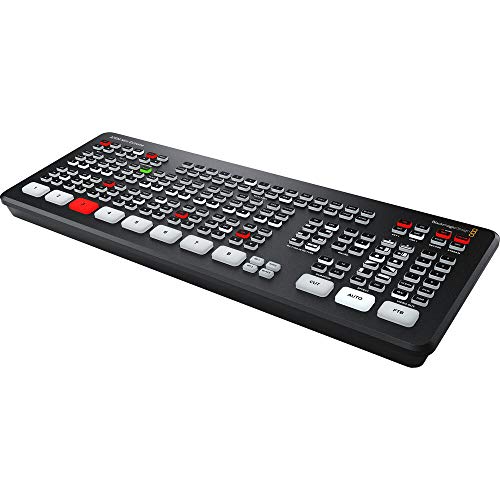
- Eight HDMI inputs for expanded productions
- Input re-sync on all HDMI inputs
- Frame-rate and format conversion on every input
Best For: Larger multicamera streams with up to eight HDMI sources
Best Integrated Production Deck

- Four HDMI inputs with two HDMI outputs
- Streams to three platforms via Ethernet
- Built-in audio controls, recording, playback, and overlays
Best For: Podcasts, events, worship, conferences, and multi-platform streaming
Best All-in-One Pick

- Standalone switching, encoding, recording, and streaming
- HDMI, USB, and multiple IP source support
- 7-inch AMOLED display with advanced scene tools
Best For: Mobile and multi-source production without an external PC
Best Compact 4K Option

- Four HDMI inputs with dual HDMI outputs
- UVC webcam mode for computer streaming
- Optional recording, chroma key, and PTZ features
Best For: Entry-level multi-camera creators wanting compact hardware
Best Simple Webcam-Style Switcher

- Four HDMI inputs with 2K support
- USB 3.0 output works as a webcam
- Picture-in-picture layouts and transition effects
Best For: Solo creators streaming through OBS, vMix, or social platforms
Best All-Around Feature Set

- Four HDMI inputs plus AUX connectivity
- Dual RTMPS streaming and PTZ control
- PIP, keying, recording, and portrait output
Best For: Creative multi-camera livestreams with varied output formats
Best for HDMI and Audio Control

- 4K60 input with 1080p60 output
- Four-channel PTZ control with presets
- XLR audio, phantom power, EQ, and monitoring
Best For: Live productions requiring strong audio and hands-on control
Best Hybrid HDMI/SDI Switcher

- Four HDMI and four SDI inputs
- NDI|HX3, SRT, RTMP, and RTSP support
- Dual recording and advanced PTZ control
Best For: Professional hybrid-camera productions and event streaming
Best All-Around Choice – ATEM Mini Pro
The Blackmagic Design ATEM Mini Pro is a practical video switcher for streamers who need four-camera HDMI production, built-in streaming, recording, and multiview monitoring. Its transition controls, keyers, and audio mixer provide useful production flexibility without requiring a separate switcher and mixer.
Best For: Multicamera livestreams, online education, business presentations, and esports events.
Pros:
- Four HDMI inputs with multiview output
- Built-in six-input, two-channel audio mixer
- Supports multiple transitions, upstream keys, and a downstream keyer
- Includes Ethernet, USB-C, HDMI, and analog audio connectivity
Cons:
- Has fewer video inputs than larger eight-input switchers
- Its listed USB-C output is intended for webcam output, panel connection, or external-drive recording rather than a general HDMI output
This is a strong fit for streamers who want a compact, feature-rich production hub with familiar HDMI connectivity and built-in audio tools.
Best Portable Monitoring – Mixer Plus Compact Switcher
The Mixer Plus is a video switcher for streamers who want a portable four-input HDMI setup with its own built-in display. The four-inch screen provides multiview monitoring, while customizable transitions, scene presets, keying, and AUX routing support more involved live productions.
Best For: Mobile multicamera streaming, online classes, events, YouTube, OBS, and Zoom productions.
Pros:
- Built-in four-inch screen for real-time multiview monitoring
- Four HDMI inputs with zero-latency switching and 30 transition effects
- Includes chroma key, luma key, PIP, DSK, and logo overlay tools
- VISCA-over-IP PTZ control supports up to four cameras
Cons:
- Its four-inch display is convenient but relatively small for detailed monitoring
- The supplied notes emphasize HDMI connectivity and do not list built-in streaming or recording
The built-in monitor makes this a convenient choice when a separate multiview screen is impractical, while the AUX output and production tools add flexibility for event-style setups.
Best for Larger Setups – ATEM Mini Extreme
The Blackmagic Design ATEM Mini Extreme is a video switcher for streamers managing more cameras and HDMI sources. With eight HDMI inputs, input re-sync, and frame-rate and format conversion on every input, it is designed for larger live production setups than four-input models.
Best For: Streamers and producers who need up to eight HDMI cameras or sources.
Pros:
- Eight HDMI video inputs for larger multicamera productions
- 10-bit HD switchable video inputs with two-channel embedded audio
- Input re-sync is provided on all eight HDMI inputs
- Frame-rate and format converters are available on every input
Cons:
- Its larger capacity may be unnecessary for simple two- or four-camera streams
- The supplied notes provide fewer specific connectivity details than the ATEM Mini Pro listing
Choose the ATEM Mini Extreme when expanding beyond four HDMI sources is a priority. Its input processing features can also simplify mixed-source production workflows.
Best Integrated Production Deck – GoStream Deck
The Osee GoStream Deck is a video switcher for streamers who want hands-on control, audio management, recording, playback, and direct streaming in one unit. Its four HDMI inputs, dual HDMI outputs, Ethernet streaming, USB-C connectivity, and control surface support a broad range of live production workflows.
Best For: Podcasts, worship, conferences, weddings, education, panel discussions, and multi-platform streams.
Pros:
- Four HDMI inputs, two HDMI outputs, and multiview support
- Can stream to three platforms simultaneously through Ethernet
- Records to SD card or USB SSD and supports MP4 playback
- Includes T-bar, PVW/PGM buses, macros, audio controls, and graphics overlays
Cons:
- Its broad feature set may require more setup than a basic HDMI switcher
- Simultaneous three-platform streaming depends on the Ethernet workflow and supported platforms
- Its listed HDMI input count is limited to four
The GoStream Deck is especially compelling for creators who want a standalone control panel and integrated media tools rather than relying entirely on a computer and OBS or vMix.
Best All-in-One Pick – Magewell Director One
The Magewell Director One is a powerful video switcher for streamers who want switching, encoding, recording, monitoring, and streaming in one standalone unit. It supports HDMI, USB, and IP sources while adding scene tools and a built-in 7-inch AMOLED touchscreen for hands-on control.
Best For: Streamers and mobile production teams needing an all-in-one workflow without an external PC or separate HDMI switcher.
Pros:
- Combines switching, encoding, recording, monitoring, and streaming in one device.
- Accepts up to two HDMI, two USB-A, and three simultaneous IP sources.
- Supports scenes with graphics, media, webpages, chroma key, timers, and overlays.
- Offers Ethernet, Wi-Fi, 4G modem support, and dual hot-swappable battery slots.
Cons:
- Its extensive production features may be more than a simple single-camera streamer needs.
- 4G service is not included.
Choose the Director One when flexibility and standalone operation matter more than keeping the setup minimal. Its direct HDMI output, recording options, and mobile power support make it especially adaptable for field or multi-source broadcasts.
Best Compact 4K Option – RGBlink Mini V3
The RGBlink Mini V3 is a compact video switcher for streamers building a multi-camera setup around four HDMI sources. It combines 4K input support, dual HDMI outputs, UVC webcam connectivity, a touchscreen, and physical T-bar control in a portable design.
Best For: Entry-level creators and multi-camera streamers who want compact hardware with optional advanced features.
Pros:
- Provides four HDMI inputs, dual 1080p HDMI outputs, and a 2.1-inch touchscreen.
- UVC webcam mode enables recognition by YouTube, Facebook, and other platforms.
- Supports PIP layouts, chroma key, logo overlays, and 15 transition effects.
- Can record to USB drives up to 2TB and includes PTZ-control options through TAO Cloud.
Cons:
- Recording and selected advanced features require optional TAO Cloud activation.
- A 35W or higher USB-C power adapter is recommended for stable performance.
- Setup requires current firmware, internet access, and TAO Cloud binding for activation.
The Mini V3 suits streamers who want a small hardware switcher with room to expand. Check the TAO Cloud licensing requirements before buying if recording, chroma key, overlays, or PTZ control are essential to your workflow.
Best Simple Webcam-Style Switcher – RGBlink Mini
The RGBlink Mini is a straightforward video switcher for streamers using up to four HDMI cameras or sources. Its USB 3.0 output presents the device as a webcam to a computer, making it practical for streaming through OBS, vMix, and social platforms.
Best For: Solo streamers who want simple multi-camera switching with computer-based streaming software.
Pros:
- Supports four HDMI inputs with 2K input and output capability.
- USB 3.0 webcam output works with streaming software and social platforms.
- Includes 14 transition effects and nine picture-in-picture layouts.
- Offers remote control through a LAN connection without additional software.
Cons:
- Onboard recording is not available; the notes direct buyers to Mini-Pro or higher models.
- It relies on a computer for USB-based streaming workflows.
- The supplied information identifies the unit as the mini v2 model, so buyers should confirm the exact version.
This RGBlink Mini keeps the switching workflow approachable while still supporting multi-camera layouts and transitions. It is a sensible fit when you already plan to stream through a computer and do not need built-in recording.
Best All-Around Feature Set – CINETREAK Stream 1
The CINETREAK Stream 1 is a versatile video switcher for streamers who want multi-camera HDMI production, built-in streaming, recording, and creative video effects in one unit. It accepts up to four HDMI sources plus an AUX channel, supports dual RTMPS streaming, and can handle both landscape and portrait broadcasts.
Best For: Streamers and small production teams needing PTZ control, recording, chroma keying, PIP, and flexible portrait-orientation output.
Pros:
- Four HDMI inputs plus an AUX channel, with PGM and AUX outputs.
- Supports simultaneous RTMPS streaming to two destinations.
- Includes VISCA PTZ control for up to four cameras.
- Offers recording, playback, PIP, chroma/luma keying, and 9:16 switching.
Cons:
- Only HDMI inputs are specified, so it may be less suitable for SDI-based setups.
- 4K input is supported on HDMI 1 and HDMI 2 rather than all inputs.
Choose this model if creative layouts and flexible streaming formats matter as much as straightforward source switching. Its combination of remote control, recording, effects, and portrait support makes it a capable fit for varied online productions.
Best for HDMI and Audio Control – FoMaKo KC602 4K HDMI Mixer
The FoMaKo KC602 is a video switcher for streamers who want a hands-on control surface, a built-in 5.5-inch display, and extensive audio connectivity. It accepts four HDMI inputs, supports 4K60 input with 1080p60 output, and combines streaming, recording, PTZ control, and audio mixing.
Best For: Streamers, churches, studios, and event producers who need integrated HDMI switching and professional microphone mixing.
Pros:
- Supports 4K60 input, 4K loop-through, and 1080p60 output.
- Built-in 5.5-inch display, 31 buttons, knobs, and T-bar support direct operation.
- Controls up to four PTZ cameras and stores nine presets.
- Offers XLR/TRS inputs, 48V phantom power, EQ, monitoring, and dual AUX mixing.
Cons:
- Output is limited to 1080p60 even though the unit accepts 4K60 input.
- The feature-rich audio and control layout may be more than a basic streamer needs.
The KC602 stands out when audio quality and physical production control are priorities. Its display and dedicated controls can simplify live operation, while UVC, IP streaming, recording, and multi-platform support cover common streaming workflows.
Best Hybrid HDMI/SDI Switcher – Tenveo PC500 4K60 Mixer
The Tenveo PC500 is a video switcher for streamers and production teams working with both HDMI and SDI cameras. It combines four HDMI inputs, four SDI inputs, NDI|HX3 support, PTZ control, recording, and multiple streaming protocols in a 5.5-inch-screen workflow.
Best For: Professional livestreams, events, studios, and venues that need hybrid HDMI/SDI connectivity, network video, and advanced PTZ production.
Pros:
- Provides four HDMI and four SDI inputs, plus USB and NDI|HX3 support.
- Supports 4K60 and 1080p60 input with 1080p60 output.
- Streams through UVC, SRT, RTMP, RTSP, and NDI|HX3, with support for two platforms simultaneously.
- Includes dual recording, web-browser control, and PTZ presets with camera adjustments.
Cons:
- Its professional connectivity and control features may be excessive for simple HDMI-only setups.
- Output is specified at 1080p60 rather than 4K output.
This is the strongest fit for a growing or professional production system that mixes camera standards and network sources. The hybrid inputs, browser control, recording options, and extensive streaming protocols provide room for more complex live workflows.
How We Picked the Best Video Switcher for Streamers
We evaluated these switchers by looking at the features that matter most during real live productions: input types and count, supported resolutions and frame rates, switching responsiveness, preview and program monitoring, audio handling, streaming options, recording, control layout, portability, and setup complexity. We also considered whether each model suits a beginner, a mobile creator, or a more demanding multi-camera production.
Specifications can vary by firmware, source device, and output mode, so confirm compatibility with your cameras, computer, capture workflow, and streaming platform before buying.
Quick Comparison
Compact HDMI models are usually the simplest choice for webcams, mirrorless cameras, gaming consoles, and online presentations. Systems with built-in screens make it easier to monitor sources without a separate multiview display. More advanced units may add hardware encoding, recording, chroma keying, PTZ control, dual streaming, or support for both HDMI and SDI—but they typically require more planning and a larger budget.
Key Buying Factors for a Video Switcher for Streamers
Inputs and Connectivity
Count your current sources and leave room for expansion. HDMI is common for consumer cameras and computers, while SDI is better suited to longer cable runs and professional installations. Check whether the switcher accepts the exact resolution and frame rate your cameras output.
Resolution and Frame Rate
Some switchers accept 4K signals but output or stream at 1080p. That can be perfectly suitable for live platforms, but verify the difference between input, pass-through, recording, and streaming resolutions. Matching all sources can prevent unexpected black screens or conversion issues.
Streaming, Recording, and Audio
Built-in encoding can remove the need for a computer, while USB webcam output is useful when streaming through software such as OBS. Look for the recording media and file format you prefer. Also check microphone inputs, embedded audio support, mixing controls, and headphone monitoring if sound is central to your production.
Controls and Monitoring
Physical buttons are quick during live switching; touchscreens and software control can provide deeper access to scenes, overlays, and settings. Multiview output or a built-in display helps you preview sources before taking them live.
Who Should Buy Which Video Switcher for Streamers?
Beginners and solo streamers: Choose a compact HDMI switcher with straightforward controls, USB output, and enough inputs for your cameras and computer.
Multi-camera creators: Look for four or more inputs, reliable multiview, audio mixing, transitions, and flexible output options for interviews, classes, and events.
Mobile producers: A portable unit with an integrated screen, hardware streaming, and recording can reduce the amount of equipment you need to carry.
Advanced operators and venues: Prioritize PTZ control, keying, scene management, dual streaming, recording, or combined SDI and HDMI connectivity. These features cost more but can simplify larger, repeatable productions.