Choosing among DMX controllers can be difficult when your setup includes moving heads, dimmers, fog machines, or wireless fixtures. The right console should match your fixture count, programming style, and experience level.
We selected 10 options spanning simple hands-on boards, standalone controllers, wireless consoles, and software-focused systems so you can find a practical fit for your lighting rig.
Best 10 Dmx Controllers Picks for 2026
Best for Complex Setups

- 192 DMX channels for up to 12 fixtures
- Stores up to 240 scenes
- Includes chase, fog, strobe, and MIDI controls
Best For: DJs and venues with complex lighting rigs
Best Wireless Value

- 384 channels control up to 12 fixtures
- Offers wired and optional 2.4G wireless modes
- Includes 240-scene and six-chase memory
Best For: Live events using fader-based control
Best Standalone Workflow

- Standalone controller with 37 backlit buttons
- Uses four rotary encoders
- Supports up to four universes and outputs
Best For: Operators wanting compact multi-universe hardware
Best for DJ Software Integration

- Controls SoundSwitch across two DMX universes
- Works with compatible Engine DJ devices
- Adds touch, pad, encoder, and BPM-synced controls
Best For: DJs creating synchronized software-based light shows
Best App-Based Pick
ADJ MyDMX Go Wireless DMX Controller

- 256-channel tablet-based app control
- 15,000+ fixture library
- 50 presets and 21 automatic effects
Best For: Tablet-based control of varied stage and DJ lighting systems
Best Traditional Console
192-Channel DMX512 Lighting Controller
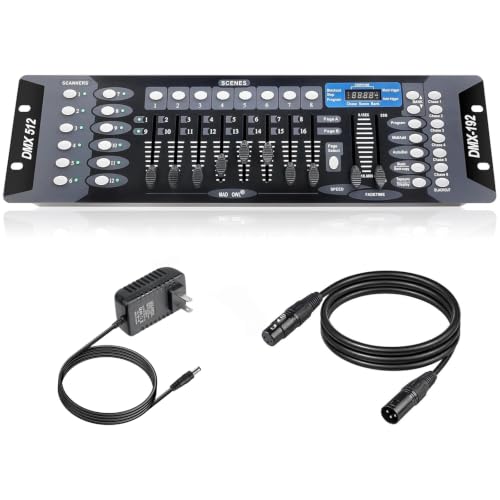
- 192-channel physical control
- 23 banks of programmable scenes
- Six programmable chases
Best For: Hands-on scene and chase control for stages and clubs
Best Compact Option
MAD OWL 12-Channel DMX Dimmer Controller

- Controls up to 12 DMX512 channels
- Compact aluminum portable design
- Standard 3-pin XLR output
Best For: Small stages and simple low-channel DMX lighting rigs
Best Wireless DMX Controller

- 512 channels with six banks and eight scenes
- 2.4G wireless and 3-pin wired operation
- LCD control, fade timing, and blackout button
Best For: Mobile DJs and events using compatible wireless fixtures
Best Voice-Controlled DMX Controller

- Controls up to 12 fixtures and 240 scenes
- Voice control for hands-free scene changes
- Programmable scene steps and transition timing
Best For: DJs and event venues wanting organized, voice-assisted control
Best Beginner DMX Controller

- Controls 12 fixtures across 192 channels
- Eight sliders for manual channel adjustment
- Supports scenes, chases, speed, and fade control
Best For: Beginners and small events using 3-pin stage equipment
Best for Complex Setups – CHAUVET DJ OBEY40
The CHAUVET DJ OBEY40 is one of the more capable DMX controllers for performers managing several intelligent fixtures. Its 192-channel capacity, scene storage, chase programming, and dedicated fog and strobe controls make it suited to organized, expandable lighting systems.
Best For: DJs, venues, and operators running up to 12 fixtures with detailed scene and chase control.
Pros:
- Controls up to 12 fixtures with up to 16 channels each.
- Stores up to 240 scenes across 30 banks.
- Includes six chase sets, fog and strobe controls, MIDI compatibility, and reversible sliders.
Cons:
- Its broader feature set may be more than needed for simple lighting rigs.
- Weighs 6.7 pounds, making it less portable than smaller controllers.
The OBEY40 stands out when you need substantial onboard programming and hands-on control. It is a practical choice for more complex DMX installations rather than minimal, quick-start setups.
Best Wireless Value – 384Ch DMX512 Controller
This 384-channel DMX controller combines wired and optional 2.4G wireless operation with physical faders for live lighting control. It also adds MIDI input, music and auto modes, and substantial scene and chase memory for concerts, weddings, and DJ events.
Best For: Live event operators who want fader-based control, wireless compatibility, and automatic lighting modes.
Pros:
- Controls 12 intelligent fixtures across 384 DMX channels.
- Supports standard 3-pin XLR wiring and 2.4G wireless fixtures with receivers.
- Stores 240 scenes and supports six chases with up to 240 steps.
Cons:
- Wireless operation requires compatible fixtures with 2.4G receivers.
- Requires a 9V battery according to the supplied specifications.
With 16 physical faders, dedicated speed and fade controls, and a blackout button, this controller is designed around hands-on event operation. Its wireless capability is useful, but only when the rest of the lighting system supports it.
Best Standalone Workflow – ADJ WMX1 Mk2
The ADJ WMX1 Mk2 is a compact standalone option among DMX controllers, built around 37 backlit silicone buttons and four rotary encoders. Its four output sockets and support for up to four universes make it worth considering for operators who want a dedicated hardware interface.
Best For: Lighting operators seeking a compact standalone controller with multiple universe outputs.
Pros:
- Standalone DMX lighting control without a computer-based workflow.
- Provides 37 backlit buttons and four rotary encoders.
- Supports up to four universes and has four output sockets.
Cons:
- The supplied notes do not specify scene, chase, or channel-storage capacity.
- Its feature set may require checking compatibility with your particular fixtures and setup.
The WMX1 Mk2 focuses on dedicated physical controls and multi-universe connectivity in a relatively compact package. It is a sensible fit when those core requirements matter more than documented onboard memory details.
Best for DJ Software Integration – SoundSwitch Control One
The SoundSwitch Control One is designed for software-driven lighting performance, offering direct control of SoundSwitch plus two DMX universes. Its touch strip, encoders, RGB pads, Engine DJ compatibility, and live audio BPM detection make it especially useful for DJs building synchronized light shows.
Best For: DJs using SoundSwitch, Engine DJ devices, or compatible AlphaTheta setups for live lighting control.
Pros:
- Provides 1:1 control for SoundSwitch software and two DMX universes.
- Works directly with compatible Denon DJ and Numark Engine DJ devices.
- Offers touch-strip control, RGB performance pads, encoders, and live audio BPM detection.
Cons:
- Many advanced functions depend on SoundSwitch software or compatible DJ hardware.
- AlphaTheta PRO DJ LINK Bridge use requires a laptop running SoundSwitch.
Control One is less of a traditional standalone console and more of a tactile performance surface for a software-centered lighting workflow. It is compelling for DJs who want hands-on effects and synchronization rather than a generic fixture programmer.
Best App-Based Pick – ADJ MyDMX Go Wireless DMX Controller
For users who want flexible, low-programming control, the ADJ MyDMX Go is one of the more approachable dmx controllers. Its tablet-based app supports up to 256 channels, works over Wi-Fi or USB, and offers a broad fixture library for mixed lighting setups.
Best For: Tablet-based control of varied stage and DJ lighting systems.
Pros:
- Controls up to 256 DMX channels through an iPad or Android tablet.
- Includes a library of more than 15,000 fixtures.
- Offers 50 user presets and 21 automatic effects without traditional programming.
- Compact interface includes mounting brackets and supports two lighting universes.
Cons:
- Requires an iPad or Android tablet for app-based operation.
- Advanced upgrades are available separately.
The MyDMX Go is a strong choice when convenience and fixture compatibility matter more than hands-on fader control. Its presets and automatic effects can simplify show setup for smaller productions and mobile lighting systems.
Best Traditional Console – 192-Channel DMX512 Lighting Controller
This 192-channel DMX controller suits operators who prefer physical faders and buttons for live adjustments. It can control up to 12 fixtures with 16 channels or fewer, while its banks, scenes, and chases support programmed stage and DJ lighting shows.
Best For: Stages, clubs, and performance venues needing hands-on scene and chase control.
Pros:
- Provides 192 channels for controlling multiple compatible fixtures.
- Supports 23 banks of eight programmable scenes.
- Stores 240-step scenes in six programmable chases.
- Includes a 6.6-foot DMX cable.
Cons:
- Supports fixtures with 16 channels or fewer.
- Its 22.44-inch-wide console is less compact than mini controllers.
Choose this model if direct, tactile operation is more important than app connectivity. Its extensive scene and chase capacity provides useful control for programmed shows, though fixture channel requirements should be checked before purchase.
Best Compact Option – MAD OWL 12-Channel DMX Dimmer Controller
The MAD OWL 12-channel model is a compact choice among dmx controllers for simple DMX512 setups. Its six sub-control faders and master fader provide straightforward adjustment for compatible fixtures with 12 channels or fewer.
Best For: Small stages and portable lighting systems using low-channel-count DMX fixtures.
Pros:
- Provides simple control for up to 12 DMX512 channels.
- Compact aluminum housing is suited to travel and quick installation.
- Uses a standard 3-pin XLR DMX output.
- Lightweight faders and a blackout function support quick operation.
Cons:
- Cannot be used with stage lighting equipment requiring more than 12 channels.
- Requires a compatible DMX-controlled dimming power supply for a permanent dimming system.
This controller makes sense for basic dimming tasks where portability and simplicity are priorities. It is not intended for complex fixtures, but its small footprint and direct fader layout can work well for modest lighting rigs.
Best Wireless DMX Controller – Compact 512-Channel Console
This compact DMX controller combines wired DMX512 operation with 2.4G wireless control, giving mobile DJs and event lighting operators more flexibility when compatible fixtures support wireless receivers. Its 512 channels, LCD display, programmable scenes, and dedicated blackout control make it suited to more involved lighting setups.
Best For: Live concerts, weddings, and mobile DJ rigs using compatible wired or 2.4G wireless fixtures.
Pros:
- Offers 512 channels, six banks, and eight scenes for larger programming needs.
- Supports both standard 3-pin wired DMX and 2.4G wireless control.
- LCD feedback, channel-page and value wheels, fade-time adjustment, and one-key blackout simplify operation.
Cons:
- Wireless operation requires fixtures equipped with compatible 2.4G receivers.
- Programming features may take time for beginners to learn.
Choose this model when wireless flexibility and higher channel capacity matter more than the simplest possible interface. Its metal construction and compact 2.4-pound body also make it practical for portable event setups.
Best Voice-Controlled DMX Controller – 192-Channel Stage Console
This 192-channel DMX controller is designed for users who want organized controls and voice-assisted scene changes. It can operate up to 12 intelligent lights with 16 channels each, while its scene and chase programming support gives DJs, venues, and event operators room to build customized shows.
Best For: DJs, nightclubs, weddings, church gatherings, and other small-to-medium lighting applications needing voice control.
Pros:
- Controls up to 12 fixtures and supports up to 240 scenes.
- Voice control can switch among lighting scenes without manual input.
- Supports up to 40 steps per scene with adjustable pause and fade speeds.
- Organized control sections and a 3-pin DMX512 output help new users get started.
Cons:
- Its 192-channel capacity is lower than higher-capacity consoles.
- Voice-control usefulness depends on the setup and operating environment.
This is a practical choice for users who want traditional hands-on controls alongside voice-assisted scene selection. The programmable timing options make it more capable than a basic manual DMX board without moving into a larger professional console.
Best Beginner DMX Controller – 192-Channel Programming Panel
This 192-channel DMX controller offers a straightforward layout for editing lighting programs at parties, concerts, festivals, and seasonal events. It controls up to 12 devices with 16 channels each and includes programmable scenes, chases, sliders, and automatic speed and fade controls.
Best For: Beginners and small-event users building programs for moving heads, PAR lights, fog machines, and similar 3-pin equipment.
Pros:
- Controls 12 fixtures across 192 channels and supports up to 240 scenes.
- Eight sliders provide direct manual channel control.
- Separated control areas and LED display make the console approachable for beginners.
- Includes a 3-pin cable and supports automatic speed and fade adjustments.
Cons:
- It is limited to 192 channels and 12 fixtures.
- The supplied notes list differing service periods, so warranty coverage should be confirmed before purchase.
For buyers learning DMX programming, this controller focuses on the core controls without the added complexity of wireless operation. Its scene, chase, and slider functions provide a useful foundation for small lighting shows and home or party setups.
How We Picked These Dmx Controllers
We evaluated these Dmx Controllers by looking at channel capacity, fixture compatibility, programming workflow, portability, wireless support, and suitability for different types of users. We also considered whether each controller is better suited to basic scene playback, live DJ operation, moving-head programming, or more advanced show control.
Because product specifications and included accessories can vary, verify the listing before purchase. Check the exact number of DMX channels, connector type, software or app requirements, and whether cables, power supplies, or wireless receivers are included.
Quick Comparison
| Controller type | Best suited to | What to prioritize |
|---|---|---|
| Compact manual controller | Small parties and basic fixtures | Simple faders, scenes, and compatibility |
| 192-channel console | Entry-level stage and DJ rigs | Fixture access, chase programming, and channel layout |
| 384-channel or wireless console | Larger or flexible setups | Wireless reliability, fixture control, and memory capacity |
| Standalone controller | Repeatable shows and mobile production | Scene storage, playback controls, and portability |
| App or software controller | Computer- or tablet-based operation | Device compatibility, interface quality, and licensing |
Key Buying Factors for Dmx Controllers
Channel and Fixture Capacity
Count the DMX channels required by every fixture, not just the number of lights. A moving head may use many channels in an advanced mode, while a simple dimmer may use only one or a few. Leave room for future expansion rather than buying a controller that is already at its limit.
Programming and Live Control
Faders and dedicated buttons are useful for fast manual adjustments, while scene and chase memory helps automate recurring shows. If you regularly control moving heads, look for features that make pan, tilt, color, gobos, and effects easier to organize.
Wireless Operation
Wireless DMX can reduce cable runs and speed setup, but compatibility matters. Confirm that the controller works with your receivers or fixtures and consider whether a wired DMX connection is available as a backup.
Software, App, and MIDI Support
App-based systems can provide a flexible interface and easier fixture management, but they depend on a compatible phone, tablet, computer, or MIDI setup. Confirm operating-system requirements and whether important features require a subscription or separate hardware.
Build, Portability, and Connections
For mobile DJs and event crews, a compact, durable console with clearly labeled controls can be more valuable than a feature-heavy unit. Check DMX connector style, power requirements, mounting or case compatibility, and the length of included cables.
Who Should Buy Which Dmx Controllers?
- Beginners: Choose a straightforward 192-channel or compact controller with accessible faders and scene controls.
- Small-stage operators: A dedicated dimming or standalone controller may provide the right balance of simplicity and repeatability.
- Mobile DJs: Look for portable controls, quick scene access, and wireless capability if your fixtures support it.
- Moving-head users: Prioritize sufficient channel capacity, fixture-specific programming, and easy pan-and-tilt control.
- Software-oriented creators: Consider an app or computer-based controller when visual programming, MIDI integration, and flexible fixture libraries matter most.
Before ordering, make a fixture list and note each unit’s DMX address, operating mode, and channel count. That simple check will help you choose a controller that works immediately and leaves room for the next upgrade.