The best USB-C Wi-Fi adapters offer a simple way to add modern wireless connectivity to a desktop, upgrade an older laptop, or replace an unreliable built-in network card. The right model can improve speed, range, latency, and compatibility without opening your computer.
This roundup compares 10 options across Wi-Fi 5, Wi-Fi 6, Wi-Fi 6E, and Wi-Fi 7, including compact nano adapters, long-range designs, and dual-interface models with USB-C and USB-A support.
Best 10 USB C Wifi Adapters Picks for 2026
Best Compact WiFi 7 Upgrade

- Tri-band WiFi 7 with 6GHz support
- Built-in driver for plug-and-play setup
- Compact design with WPA3 security
Best For: Windows users who want a tiny, travel-friendly WiFi 7 adapter
Best Flexible WiFi 7 Performance
TP-Link BE3600 USB WiFi 7 Adapter

- Up to 3.6 Gbps dual-band WiFi 7
- USB-C and USB-A connectivity
- Designed for gaming, streaming, and busy networks
Best For: Windows users switching between modern laptops and desktop PCs
Best WiFi 6E Tri-Band Option
TP-Link Archer TXE70U WiFi 6E Adapter

- Tri-band WiFi 6E with 6GHz support
- USB-C and USB-A connectivity
- Built-in driver and WPA3 security
Best For: Windows users upgrading to 6GHz WiFi without internal installation
Best Long-Range Antenna Setup
ALFA AWUS036ACH AC1200 WiFi 5 Adapter

- Two detachable high-gain antennas
- USB-C connection with included cable
- Supports Windows and Linux systems
Best For: Desktop users prioritizing antenna range and Linux compatibility
Best Wi-Fi 7 Upgrade
TP-Link BE6500 USB Wi-Fi 7 Adapter

- Tri-band Wi-Fi 7 with up to 6.5 Gbps combined bandwidth
- USB-C and USB-A support for newer and older computers
- Windows 10/11 only; best with a Wi-Fi 7 router
Best For: Windows users seeking a high-performance Wi-Fi 7 upgrade
Best Budget Dual-Band Pick
TP-Link AC600 USB Wi-Fi Adapter

- Dual-band 2.4GHz and 5GHz connectivity
- Adjustable 5dBi high-gain antenna
- Supports Windows versions from XP through 11
Best For: Older PCs needing affordable, flexible Wi-Fi connectivity
Best Wi-Fi 6 Range Option
TP-Link AX1800 USB Wi-Fi 6 Adapter

- Wi-Fi 6 dual-band speeds up to 1,801 Mbps combined
- High-gain antenna with Beamforming for improved reception
- Includes a one-meter USB 3.0 cable for flexible placement
Best For: Windows users upgrading a desktop to Wi-Fi 6
Best Performance Pick
TP-Link Archer T3U AC1300 USB WiFi Adapter
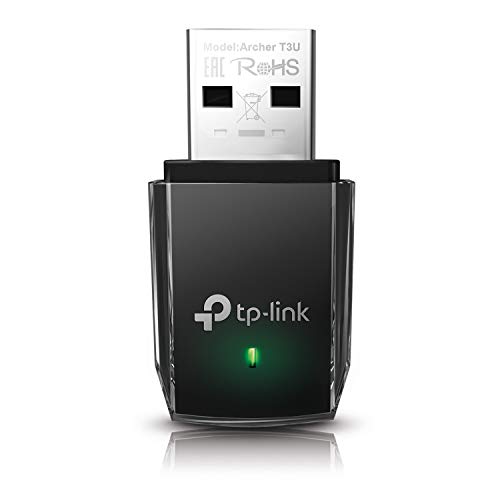
- AC1300 dual-band Wi-Fi
- USB 3.0 connectivity
- MU-MIMO and beamforming support
Best For: Users prioritizing faster USB connectivity and higher-rated wireless performance
Best Nano Travel Pick
TP-Link Archer T2U Nano AC600 Adapter

- Tiny plug-in design
- Dual-band AC600 Wi-Fi
- Two-year warranty and 24/7 support
Best For: Travelers wanting a discreet adapter for USB-A laptops and desktops
Best Compact WiFi 7 Upgrade – ASUS USB-BE93 Mini
The ASUS USB-BE93 Mini is a compact choice among USB C wifi adapters for Windows users who want a simple WiFi 7 upgrade. Its Type-C connection, built-in driver, tri-band support, and WPA3 security make it practical for laptops and desktops with compatible USB-C ports.
Best For: Windows 10 or 11 users seeking a tiny, plug-and-play tri-band adapter for low-latency streaming and everyday wireless upgrades.
Pros:
- Supports 2.4GHz, 5GHz, and 6GHz WiFi 7 bands.
- Built-in driver enables straightforward plug-and-play setup.
- Very compact 4.54-gram design with WPA3 security.
Cons:
- Compatible operating systems are limited to Windows 10 and Windows 11.
- Requires a USB-C port and a compatible WiFi 7 router to realize its full potential.
Choose this model if portability and easy setup matter more than added antennas or broader operating-system support. Its three-year warranty is another useful advantage for a small adapter intended for regular travel or desk use.
Best Flexible WiFi 7 Performance – TP-Link BE3600 USB WiFi 7 Adapter
The TP-Link BE3600 is a versatile option among USB C wifi adapters, combining WiFi 7 performance with both USB-C and USB-A connectivity. It is designed for Windows 10 and 11 desktops or laptops and targets demanding uses such as gaming, 4K streaming, and video conferencing.
Best For: Windows users who need one adapter for USB-C laptops and USB-A desktops, particularly on busy networks.
Pros:
- Advertised dual-band WiFi 7 speeds up to 3.6 Gbps.
- 2-in-1 USB-C and USB-A design improves device compatibility.
- Supports MLO, beamforming, OFDMA, and MU-MIMO with a compatible WiFi 7 router.
Cons:
- Does not support the 6GHz band because it is a dual-band model.
- Compatible with Windows 10 and 11, but not macOS.
- Actual speeds depend on the router, environment, and physical obstructions.
This is a strong fit when flexibility is as important as speed. The dual-connector design avoids separate dongles, while cooling vents and network-management features support sustained use; however, buyers specifically seeking 6GHz connectivity should choose a tri-band alternative.
Best WiFi 6E Tri-Band Option – TP-Link Archer TXE70U WiFi 6E Adapter
The TP-Link Archer TXE70U is a practical choice among USB C wifi adapters for adding tri-band WiFi 6E without opening a desktop or replacing laptop hardware. It connects through USB-C or USB-A and includes a built-in driver, making installation straightforward on supported Windows systems.
Best For: Windows 10 and 11 users with a WiFi 6E or newer router who want access to the less-congested 6GHz band.
Pros:
- Tri-band operation includes 2.4GHz, 5GHz, and 6GHz.
- Advertised combined speeds reach up to 5.4 Gbps.
- Includes USB-C/USB-A flexibility, WPA3 security, and a USB 3.0 cradle.
Cons:
- Supports Windows 10 and 11 only.
- Full 6GHz benefits require a compatible WiFi 6E or newer router.
- Performance varies with distance, obstacles, and surrounding conditions.
The Archer TXE70U makes sense for users who want the extra capacity of 6GHz without installing an internal card. It is a well-rounded desktop or laptop upgrade, especially when plug-and-play setup and flexible USB connections are priorities.
Best Long-Range Antenna Setup – ALFA AWUS036ACH AC1200 WiFi 5 Adapter
The ALFA AWUS036ACH is a useful alternative among USB C wifi adapters for desktop users who value detachable, high-gain antennas over the newest wireless standard. It supports dual-band WiFi 5, connects through USB-C with the included cable, and works with selected Windows and Linux systems.
Best For: Desktop users who need a dual-band adapter with two detachable high-gain antennas and Linux support.
Pros:
- Dual-band speeds are rated up to 867 Mbps on 5GHz and 300 Mbps on 2.4GHz.
- Two detachable dual-band high-gain antennas support the long-range design.
- Supports Windows, Linux kernel 4.19 or later, and older macOS versions.
Cons:
- Does not support macOS versions beyond 10.15 or Apple M1/M2 chipsets.
- Uses WiFi 5 rather than WiFi 6E or WiFi 7.
- The larger antenna-based design is less compact than mini adapters.
Select the ALFA when antenna reach and Linux compatibility are more important than the latest wireless generation. Its USB-C interface and included cable add flexibility, but careful operating-system checking is essential before purchase.
Best Wi-Fi 7 Upgrade – TP-Link BE6500 USB Wi-Fi 7 Adapter
If you want one of the most advanced USB c wifi adapters for a Windows desktop or laptop, this TP-Link model brings tri-band Wi-Fi 7 connectivity in a compact 2-in-1 design. It supports USB-C directly and includes a USB-A adapter for older computers, while its advertised speeds are best realized with a compatible Wi-Fi 7 router.
Best For: Windows 10 and 11 users upgrading to Wi-Fi 7 for high-bandwidth streaming, gaming, downloads, or busy multi-device networks.
Pros:
- Wi-Fi 7 tri-band performance with up to 6.5 Gbps combined bandwidth.
- 2-in-1 USB-C and USB-A connectivity works with newer laptops and traditional desktops.
- Beamforming, internal antennas, MLO, OFDMA, and MU-MIMO are designed to improve coverage and reduce congestion.
- Compact design includes cooling vents and USB 3.0 connectivity.
Cons:
- Compatible only with Windows 10 and 11; it is not compatible with macOS.
- Requires a Wi-Fi 7 router to take full advantage of its capabilities.
This is the forward-looking choice in the group, especially if your network already uses Wi-Fi 7 or you plan to upgrade soon. Just confirm Windows compatibility and your router’s capabilities before buying.
Best Budget Dual-Band Pick – TP-Link AC600 USB Wi-Fi Adapter
This TP-Link AC600 is a straightforward option among usb c wifi adapters if you need to add dual-band wireless to a desktop or laptop without chasing the latest Wi-Fi standard. Its 2.4GHz and 5GHz support, high-gain adjustable antenna, and broad Windows compatibility make it practical for everyday browsing, streaming, and light gaming.
Best For: Users who want an affordable dual-band adapter with an adjustable high-gain antenna and support for older Windows versions.
Pros:
- Dual-band speeds of up to 200 Mbps on 2.4GHz and 433 Mbps on 5GHz.
- 5dBi high-gain, multi-directional antenna can be rotated toward the router.
- Supports Windows 11, 10, 8.1, 8, 7, and XP.
- Compact design and simple driver-based installation.
Cons:
- Uses older 802.11ac technology rather than Wi-Fi 6 or Wi-Fi 7.
- The supplied notes do not indicate native USB-C connectivity.
- Performance depends on distance, obstacles, and network conditions.
Choose this model when compatibility and basic dual-band connectivity matter more than peak speed. It is a sensible fit for older PCs, provided you do not specifically need a USB-C plug or the newer Wi-Fi standards.
Best Wi-Fi 6 Range Option – TP-Link AX1800 USB Wi-Fi 6 Adapter
The TP-Link AX1800 is a strong middle ground for shoppers comparing usb c wifi adapters and looking for newer Wi-Fi 6 performance without moving to Wi-Fi 7. It combines dual-band AX1800 speeds with a high-gain antenna, a one-meter USB 3.0 cable, and flexible placement for desktop use.
Best For: Windows 10 and 11 desktop or laptop users who want Wi-Fi 6 speeds, improved range, and flexible antenna positioning.
Pros:
- Wi-Fi 6 AX1800 speeds reach up to 1,201 Mbps on 5GHz and 574 Mbps on 2.4GHz.
- High-gain antenna and Beamforming are designed to improve range and signal quality.
- MU-MIMO and OFDMA help reduce congestion on compatible networks.
- One-meter USB 3.0 cable allows more flexible placement away from the computer.
Cons:
- Compatible only with Windows 10 and 11; it is not compatible with macOS or Linux.
- Full performance requires a Wi-Fi 6 or newer router.
- The supplied notes do not indicate native USB-C connectivity.
This adapter makes sense for a modern Windows setup that needs better throughput and range than Wi-Fi 5 but does not require Wi-Fi 7. Its cabled placement and adjustable antenna are particularly useful for desktop PCs.
Best Compact 600Mbps Pick – Szyafei 600Mbps USB WiFi Bluetooth Adapter
If you need a compact option among USB C WiFi adapters, this Szyafei model combines dual-band Wi-Fi with Bluetooth and includes a USB-A to USB-C connector. Its internal antenna keeps the design small while supporting 2.4GHz and 5GHz connections.
Best For: Desktop and laptop users who want a compact dual-band adapter with Bluetooth and USB-C connection flexibility.
Pros:
- Supports up to 600Mbps across 2.4GHz and 5GHz bands.
- Includes a USB-A to USB-C connector for broader port compatibility.
- Internal antenna saves space and is easy to carry.
- Includes one year of warranty support.
Cons:
- Uses a USB 2.0 interface.
- Operating-system support details should be checked before purchase, especially for macOS.
This is a practical choice when size, Bluetooth support, and flexible USB connectivity matter more than the higher transfer rate offered by some USB 3.0 adapters.
Best Performance Pick – TP-Link Archer T3U AC1300 USB WiFi Adapter
For buyers comparing USB C WiFi adapters with faster USB connectivity, the TP-Link Archer T3U offers AC1300 dual-band Wi-Fi through USB 3.0. MU-MIMO and beamforming are designed to support a stronger, smoother connection for compatible setups.
Best For: Desktop and laptop users who want a higher-rated dual-band adapter with USB 3.0 and broad Windows compatibility.
Pros:
- AC1300 dual-band speeds support 2.4GHz and 5GHz networks.
- USB 3.0 is rated up to 10 times faster than USB 2.0.
- MU-MIMO and beamforming support a more consistent connection.
- Includes a two-year manufacturer warranty.
Cons:
- Its listed hardware interface is Micro USB 3.0 Type-B rather than USB-C.
- Mac support is listed only through macOS X 10.14.
The Archer T3U is the strongest performance-oriented option in this group, particularly for a desktop with a USB 3.0 port. Verify your computer’s port and operating system before ordering.
Best Nano Travel Pick – TP-Link Archer T2U Nano AC600 Adapter
The TP-Link Archer T2U Nano is a simple, low-profile choice for shoppers browsing USB C WiFi adapters but using a USB-A port. Its tiny plug-in design can stay connected to a laptop or desktop, while dual-band AC600 Wi-Fi supports both 2.4GHz and 5GHz networks.
Best For: Travelers and laptop users who want a discreet adapter that can remain plugged in with minimal bulk.
Pros:
- Small nano design measures about 0.73 by 0.59 by 0.28 inches.
- Supports dual-band AC600 Wi-Fi on 2.4GHz and 5GHz.
- Two-year warranty and free 24/7 technical support are included.
- Supports a wide range of older Windows versions and macOS releases.
Cons:
- Uses USB 2.0 Type-A, not USB-C.
- Driver installation may be required.
- Its AC600 rating is lower than the Archer T3U’s AC1300 rating.
Choose this model when portability and a nearly flush fit are more important than maximum throughput. Check the available drivers and confirm that your computer has a USB-A port.
How We Picked the Best USB C Wifi Adapters
We focused on the features that matter most in everyday networking: wireless standard, advertised throughput, supported bands, connector type, antenna design, security, operating-system compatibility, and overall practicality. The selection includes newer Wi-Fi 7 and Wi-Fi 6E adapters for high-speed networks, as well as affordable Wi-Fi 5 and Wi-Fi 6 models for basic upgrades.
Advertised speeds are theoretical maximums. Real-world performance depends on your router, internet plan, distance, interference, computer hardware, drivers, and network congestion. A USB adapter cannot exceed the capabilities of the network it connects to.
Quick Comparison
- Best for cutting-edge performance: Wi-Fi 7 adapters with compatible Wi-Fi 7 routers.
- Best for 6GHz access: Tri-band Wi-Fi 6E models, provided your computer and router support the 6GHz band.
- Best value for most upgrades: Dual-band Wi-Fi 6 adapters offer a strong balance of speed, range, and cost.
- Best for older equipment: Wi-Fi 5 AC600 or AC1300 adapters are affordable and broadly compatible.
- Best for portability: Nano-style adapters are easy to leave connected or carry between devices.
Key Buying Factors for USB-C Wi-Fi Adapters
Wireless Standard and Speed
Wi-Fi 7 is the most future-ready choice, but it only shows its full potential with a Wi-Fi 7 router and a compatible operating system. Wi-Fi 6 is often the practical sweet spot for busy homes and offices, while Wi-Fi 5 remains suitable for browsing, streaming, and standard downloads.
Band Support
Dual-band adapters use 2.4GHz and 5GHz. Tri-band models add 6GHz, which can provide cleaner channels and lower congestion at short to medium range. The 6GHz band has shorter range and may require newer security and router settings.
USB-C, USB-A, and Compatibility
Check whether the adapter plugs directly into USB-C or includes a USB-A option. Some models use a USB-C connector but may require specific drivers. Confirm support for your version of Windows or other operating system before buying, particularly for newer Wi-Fi 7 hardware.
Antennas, Range, and Placement
External or adjustable antennas generally offer better positioning and potentially stronger reception than ultra-compact designs. A short extension cable can also help move the adapter away from a crowded desktop or the back of a metal PC case.
Security and Drivers
Look for WPA3 support when available, especially for newer routers. Keep drivers updated, and download them from the manufacturer when automatic installation does not work. Features such as Bluetooth support, beamforming, and MU-MIMO can also affect convenience and network efficiency.
Who Should Buy Which USB C Wifi Adapters?
Choose a Wi-Fi 7 adapter if you already own a fast Wi-Fi 7 router, transfer large files over the local network, stream high-resolution media, or want the longest upgrade runway.
Choose a Wi-Fi 6E model if you need access to the less crowded 6GHz band and have a compatible tri-band router. It is particularly useful in apartments, offices, and other congested wireless environments.
Choose a Wi-Fi 6 adapter for a balanced upgrade to an older desktop or laptop. It is usually the best fit for ordinary broadband plans, gaming, video calls, and multiple connected devices.
Choose a Wi-Fi 5 or compact AC adapter when price, portability, or basic connectivity matters more than peak speed. These models can be a sensible fix for an older computer or a temporary wireless connection, but they provide less headroom for future network upgrades.