Choosing the right cooling fan can help reduce heat buildup, improve airflow, and keep laptops, PCs, servers, and electronics running more reliably. The best option depends on your device, available power source, noise tolerance, and how much control you need over fan speed.
We’ve gathered 10 computer cooling fans under $100, including laptop cooling pads, USB fans, AC-powered axial fans, and multi-fan ventilation kits. Use the guide below to compare the main differences and find the best fit for your setup.
Best 10 Computer Cooling Fans Under 100 Picks for 2026
Portable Laptop Cooling

- Three quiet USB-powered fans
- Slim design with two height settings
- Extra USB port and power switch
Best For: Portable cooling for 15.6- to 17-inch laptops
Adjustable AC Cooling

- Stepless 3V-to-12V speed control
- Up to 95 CFM airflow
- Includes grilles and mounting hardware
Best For: DIY cooling for electronics and component enclosures
RGB Gaming Laptop Cooling

- Eight fans with selectable cooling modes
- Six height settings and LCD fan display
- Ten RGB lighting modes and two USB ports
Best For: Feature-focused cooling for 15- to 17.3-inch gaming laptops
Multi-Device AC Cooling
Easy Cloud 120mm Variable-Speed Fan

- 700-to-2800 RPM adjustable speed
- Up to 95.8 CFM airflow
- AC-powered with dual ball bearings
Best For: PC, console, server, router, and cabinet ventilation
Laptop Cooling Pick
ChillCore A21 RGB 9-Fan Cooling Pad

- Nine fans with adjustable cooling modes
- Eight height settings for ergonomic positioning
- LCD controls, RGB lighting, and two USB ports
Best For: Gaming laptops from 15.6 to 19.3 inches
High-Airflow Pick
360mm Adjustable PC Ventilation Fan
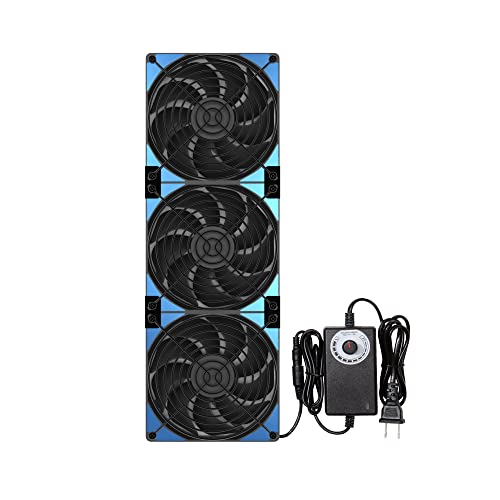
- Three 120mm fans in a 360mm assembly
- Stepless 1,000–3,000 RPM speed control
- Magnetic or screw-lock mounting options
Best For: DIY ventilation, cabinets, servers, and larger cooling projects
Compact USB Pick

- USB-powered 240mm external cooling fan
- Three speeds with up to 77 CFM airflow
- Flat or upright placement with non-slip feet
Best For: Routers, consoles, mini PCs, servers, and AV equipment
High-Airflow Triple-Fan Kit
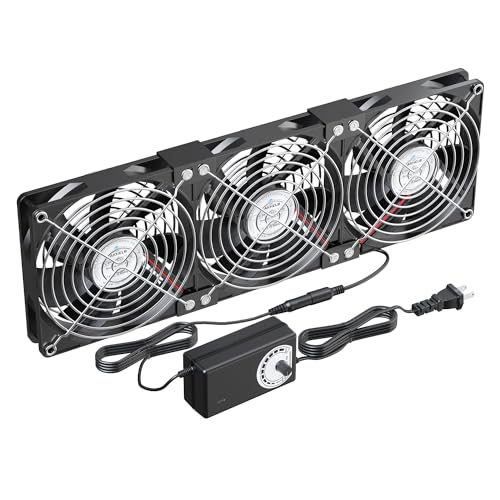
- Three 120mm fans rated up to 107 CFM each
- Adjustable 12V speed controller
- Protective grilles and flexible rubber feet
Best For: Large enclosures, server cabinets, and DIY ventilation
Portable USB Cooling Pick
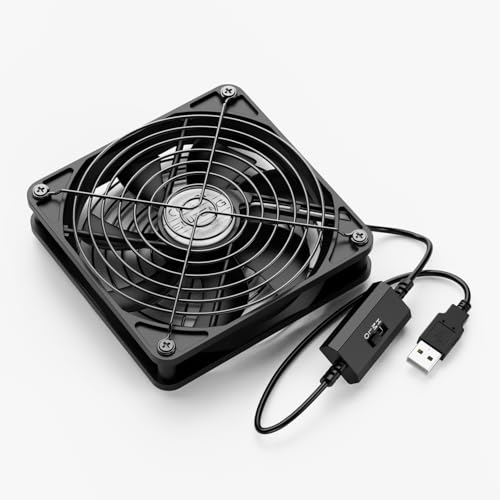
- USB-powered for simple plug-and-play use
- Three speed settings with up to 56 CFM airflow
- Works flat or upright beside electronics
Best For: Consoles, routers, AV equipment, and portable setups
Four-Fan Cooling Pad
Adjustable Console and Electronics Cooler

- Four 120mm fans for concentrated cooling
- Variable AC speed controller
- Dust filters, grilles, and non-slip feet
Best For: Consoles, laptops, routers, and AV electronics
Portable Laptop Cooling – havit HV-F2056 Cooling Pad
For shoppers comparing computer cooling fans under 100, the havit HV-F2056 is a straightforward laptop cooling pad for 15.6- to 17-inch models. Its three USB-powered fans, slim design, metal mesh surface, and two height settings make it practical for everyday desk use or travel.
Best For: Laptop users who want portable cooling and a more comfortable viewing or typing angle.
Pros:
- Three ultra-quiet fans circulate air beneath the laptop.
- Slim, lightweight design is easy to carry.
- Two adjustable height settings provide ergonomic positioning.
- Includes an extra USB port and power switch.
Cons:
- Designed for laptops rather than desktop cases or standalone electronics.
- USB-to-USB cable is included; Type-C devices require an adapter.
- Limited to two height settings.
This is a sensible choice when portability, quiet operation, and basic laptop ergonomics matter more than extensive controls or lighting features.
Adjustable AC Cooling – 120mm Variable-Speed Fan
Among computer cooling fans under 100, this 120mm AC-powered model suits DIY cooling projects that need adjustable airflow without custom wiring. It includes a US plug adapter, stepless 3V-to-12V speed control, protective grilles, mounting hardware, and rubber feet.
Best For: Cooling routers, NAS devices, amplifiers, consoles, DVRs, and other electronics in custom setups.
Pros:
- Stepless speed control helps balance airflow and noise.
- Standard 120mm size supports flat, embedded, or external installation.
- Includes grilles, screws, rubber feet, and a US plug adapter.
- Dual ball bearing design supports long-term operation.
Cons:
- Its 37 dB noise rating may be noticeable in quiet spaces.
- Designed for DIY or component cooling rather than direct laptop use.
- Installation may still require choosing the appropriate mounting method.
With up to 95 CFM airflow and a plug-and-play AC setup, this fan is a flexible option for electronics cooling where variable speed is useful.
RGB Gaming Laptop Cooling – ICE COOREL K10 Eight-Fan Pad
For gaming laptop owners browsing computer cooling fans under 100, the ICE COOREL K10 combines eight fans with adjustable positioning and RGB lighting. It supports 15- to 17.3-inch laptops and adds an LCD display, touch controls, two USB ports, and a phone stand.
Best For: Gamers who want high fan-count laptop cooling, multiple height adjustments, and customizable RGB effects.
Pros:
- Eight fans provide multiple cooling modes.
- Six height settings help improve viewing and typing comfort.
- LCD display shows fan speed, with touch controls for settings.
- Offers ten RGB lighting modes, two USB ports, and a phone stand.
Cons:
- At 1.12 kg, it is less travel-friendly than slimmer cooling pads.
- The feature-rich design may be more than needed for basic office use.
- Its listed dimensions are relatively large for a laptop stand.
The K10 is a feature-focused laptop cooler for users who value adjustability and gaming aesthetics alongside active airflow.
Multi-Device AC Cooling – Easy Cloud 120mm Variable-Speed Fan
This Easy Cloud model is a versatile option among computer cooling fans under 100, using an AC outlet and a 3V-to-12V controller to power a 120mm fan. Its 95.8 CFM airflow and 700-to-2800 RPM range make it suitable for PCs, consoles, servers, routers, DVRs, and other equipment.
Best For: Users who need adjustable ventilation for electronics, cabinets, or replacement cooling applications.
Pros:
- Speed controller allows adjustment for cooling or quieter operation.
- Dual ball bearings are rated for a 50,000-hour lifespan.
- Provides up to 95.8 CFM airflow in a standard 120mm format.
- AC plug makes outlet-powered operation convenient.
Cons:
- Listed noise level is under 41 dB, so it is not completely silent.
- Uses a 2-pin connector and may require planning for device-specific installation.
- Its 120mm form factor may not fit smaller equipment.
With broad device compatibility and variable speed control, this fan is a practical pick for flexible cooling projects rather than a simple drop-in desktop case replacement.
Laptop Cooling Pick – ChillCore A21 RGB 9-Fan Cooling Pad
If you need computer cooling fans under 100 for a gaming laptop, the ChillCore A21 combines nine fans with adjustable airflow, RGB lighting, and an ergonomic stand. It fits laptops from 15.6 to 19.3 inches and includes eight height settings.
Best For: Gaming laptop users who want adjustable cooling, lighting, and viewing angles in one stand.
Pros:
- Nine fans provide adjustable cooling with top- and bottom-case air vents.
- Eight height settings can help improve viewing comfort and reduce neck and back fatigue.
- LCD controls show fan speed, while touch controls manage airflow and RGB lighting.
- Designed for quiet operation, with 10 RGB lighting modes and two USB ports.
Cons:
- Its 16.1-by-11.9-inch footprint may be larger than needed for smaller laptops.
- The cooling pad is intended for laptops rather than desktop cases or general room ventilation.
The A21 is a feature-rich laptop stand and cooler for users who value multiple fan settings and gaming-focused RGB effects. Its size and laptop-specific design make it less suitable as a general-purpose computer fan.
High-Airflow Pick – 360mm Adjustable PC Ventilation Fan
For computer cooling fans under 100 that prioritize strong ventilation, this 120mmx3 setup delivers a combined 360mm fan assembly with a stepless speed controller. It can be mounted to metal surfaces magnetically or secured with screws for a more permanent installation.
Best For: DIY cooling projects, cabinets, servers, mining rigs, and other spaces needing high airflow.
Pros:
- Adjustable speed ranges from 1,000 to 3,000 RPM.
- Rated airflow reaches 93 CFM per fan at full speed.
- Dual-ball bearings are designed for extended service life.
- Magnetic and screw-lock mounting options support flexible installation.
Cons:
- At 39.8 dB, it may be more noticeable than a low-speed desktop fan.
- It requires a 12V DC power connection and is less plug-and-play than a USB fan.
- The 360mm assembly is intended for larger or purpose-built ventilation setups.
This is the strongest fit of the three for users who need substantial airflow and flexible mounting rather than a compact personal cooling solution. The included speed controller helps balance airflow and noise for different applications.
Compact USB Pick – 240mm Multi-Speed PC Cooler
This 240mm USB computer cooler is a practical option among computer cooling fans under 100 for routers, modems, consoles, servers, and other compact equipment. Its square design supports flat or upright placement, while the controller lets you choose between multiple speed settings.
Best For: Quiet cooling for network equipment, entertainment centers, mini PCs, and home or RV setups.
Pros:
- USB power makes it convenient for compatible devices and workspaces.
- Three-speed control allows adjustment between airflow and noise.
- 77 CFM airflow supports cooling for routers, consoles, receivers, and servers.
- Non-slip feet and a low-profile design help position it close to the device.
Cons:
- Its 5V USB design may provide less cooling power than the 12V ventilation fan.
- The 9.64-by-4.72-inch form factor may not suit very small devices or tight spaces.
- It is an external cooling fan rather than a replacement for an internal PC case fan.
The 240mm cooler is a convenient choice when simple USB power, flexible placement, and controlled noise matter most. It is especially useful for targeted cooling around networking and entertainment equipment.
High-Airflow Triple-Fan Kit – Adjustable 120mm Cooling Set
For shoppers comparing computer cooling fans under 100, this three-fan 120mm kit stands out for its high airflow and adjustable AC speed controller. It is designed for PC cases, server cabinets, industrial enclosures, and other spaces where sustained ventilation matters.
Best For: Cooling larger enclosures, server cabinets, DIY ventilation projects, and electronics that need substantial airflow.
Pros:
- Three 120mm fans provide up to 107 CFM each at 3,000 RPM.
- Variable controller adjusts operation from lower-speed, quieter cooling to maximum airflow.
- Dual ball bearings, protective grilles, adjustable rubber feet, and included mounting hardware support flexible installation.
Cons:
- The three-fan assembly is relatively large at 14.17 by 4.71 by 1 inch.
- Maximum operation can reach up to 38 dBA per fan.
- Its 12V DC design and controller may be less convenient for users seeking a simple USB fan.
This is a strong choice when cooling capacity and placement flexibility matter more than compactness. The included controller makes it easier to balance airflow and noise for different setups.
Portable USB Cooling Pick – 120mm Three-Speed Case Fan
Among computer cooling fans under 100, this 120mm USB-powered model is a convenient option for electronics that lack room for internal cooling upgrades. Its compact frame can sit flat or upright beside devices such as consoles, routers, receivers, and laptops.
Best For: Portable cooling for game consoles, routers, AV equipment, tablets, DVRs, and other USB-compatible electronics.
Pros:
- USB power makes setup simple and suitable for many desktop electronics.
- Three speed settings let you adjust airflow for different situations.
- Dual ball bearings are rated for a 45,000-hour lifespan, while dual aluminum grilles add protection.
- Compact 4.72-inch square design can be placed horizontally or vertically.
Cons:
- Its 1,500 RPM maximum speed and 56 CFM airflow are lower than larger multi-fan cooling systems.
- It is a single fan rather than a multi-fan cooling pad.
- The stated low-speed noise is 23 dB, while the listed product noise level is 29 dB.
This fan is best when you want straightforward, portable cooling without installation. It offers useful speed control and broad device compatibility, though it is better suited to targeted airflow than high-capacity enclosure ventilation.
Four-Fan Cooling Pad – Adjustable Console and Electronics Cooler
For computer cooling fans under 100 that can cool a device from beneath, this four-fan pad combines concentrated airflow with tool-free setup. Place compatible electronics on top, connect the AC power, and use the variable controller to choose a quieter or stronger cooling mode.
Best For: Game consoles, laptops, routers, network cabinets, AV equipment, and other heat-producing electronics that can rest on a cooling base.
Pros:
- Four 120mm dual-ball-bearing fans provide strong airflow for heat-prone devices.
- Variable speed control supports quieter low-speed use or higher airflow when needed.
- Protective grilles, dual-sided dust filters, and non-slip rubber feet improve everyday usability.
- Tool-free design works with a broad range of consoles and electronics.
Cons:
- The cooling pad requires an AC power connection rather than USB power.
- Its four-fan platform may take more desk space than a single portable fan.
- The supplied notes do not specify an airflow rating.
This model makes sense for users who want broad, adjustable cooling without modifying their equipment. Its filtered, guarded design is particularly practical for long-running home or office electronics.
How We Picked the Best Computer Cooling Fans Under 100
We selected products across the main cooling categories rather than treating every fan as interchangeable. The roundup includes laptop cooling pads for portable computers, USB-powered fans for low-voltage convenience, AC-powered models for stronger continuous airflow, and multi-fan systems for cases, cabinets, consoles, routers, and other equipment.
Our comparison focused on fan coverage, compatibility, power connection, speed adjustment, portability, installation flexibility, and practical value. Features such as adjustable stands, RGB lighting, USB pass-through, controllers, and multiple fan sizes were considered useful when they supported a specific use case rather than simply adding complexity.
Quick Comparison
| Best For | Recommended Type | What to Look For |
|---|---|---|
| Laptops | Cooling pad | Device-size compatibility, adjustable height, USB power, and stable support |
| PC cases and servers | 120mm fan or multi-fan kit | Airflow direction, mounting space, voltage, and speed control |
| Routers and small electronics | USB-powered fan | Low power draw, compact size, and simple speed adjustment |
| Workshops and equipment cabinets | AC-powered fan | Continuous operation, controller access, and suitable plug or voltage |
| Consoles and network equipment | Adjustable multi-fan platform | Coverage area, positioning options, and noise level |
Key Buying Factors for Computer Cooling Fans Under 100
Power and Voltage
Check whether the fan uses USB, a 12V connection, or AC power before buying. USB models are convenient for laptops, power banks, routers, and small electronics, while AC-powered fans are better suited to fixed installations. Confirm the listed voltage and plug requirements, especially for server, industrial, or international setups.
Size, Coverage, and Airflow
A larger fan or several fans can move air across a wider area, but only if the airflow reaches the hot components. For laptop pads, match the supported screen or chassis size. For cases and cabinets, measure the available mounting area and consider both intake and exhaust placement.
Speed Control and Noise
Variable-speed controllers let you balance cooling performance against noise and power use. Maximum speed can be useful during heavy workloads, but a lower setting may be preferable for bedrooms, offices, recording spaces, or always-on equipment.
Build and Convenience Features
Look for stable stands, adjustable height, accessible controls, protective grilles, cable length, and easy cleaning. RGB lighting is mainly an appearance feature; prioritize airflow, compatibility, and reliable power connections first.
Who Should Buy Which Computer Cooling Fans Under 100?
Laptop users should start with a cooling pad that fits the computer and provides a stable, adjustable platform. Models with several fans can be useful for gaming laptops, but a simpler pad may be quieter and easier to carry.
Desktop, server, and cabinet users should choose a 120mm or multi-fan solution after confirming mounting dimensions, airflow direction, voltage, and controller compatibility. Router, console, and small-electronics owners will generally benefit from compact USB-powered fans that are easy to reposition and inexpensive to run.
For workshops, network closets, or equipment that operates continuously, prioritize an AC-powered model with appropriate voltage and a usable speed controller. Whatever you choose, keep vents clear, avoid blocking the fan grille, and periodically remove dust so the cooling system can maintain its rated airflow.