Workstations generate sustained heat, especially during rendering, gaming, data processing, and other demanding workloads. The right cooling fan can improve airflow around components, external enclosures, routers, receivers, and compact equipment.
This roundup compares 10 computer cooling fans for workstations by power source, size, noise control, airflow, installation flexibility, and ease of use, so you can choose a practical match for your setup.
Best 10 Computer Cooling Fans for Workstations Picks for 2026
High-Airflow Workstation Cooling

- Up to 169 CFM airflow
- Adjustable from off to full speed
- Dual-ball bearing design
Best For: High-airflow DIY workstation and server cooling
Quiet Electronics Cooling
AC Infinity MULTIFAN S5 Dual 80mm

- 18 dBA total noise rating
- 52 CFM total airflow
- USB power and speed control
Best For: Quiet cooling for electronics, cabinets, and consoles
Triple-Fan Rack Cooling

- 255 CFM combined airflow rating
- Adjustable AC speed controller
- Protective guards for intake or exhaust use
Best For: Server racks, cabinets, and large workstation enclosures
Compact USB Workstation Cooling

- Up to 56.7 CFM airflow
- Simple 5V USB connection
- Includes guard and mounting hardware
Best For: Targeted cooling for mini PCs, routers, consoles, and electronics
Plug-In Versatility
120mm AC Speed-Controlled Cooling Fan
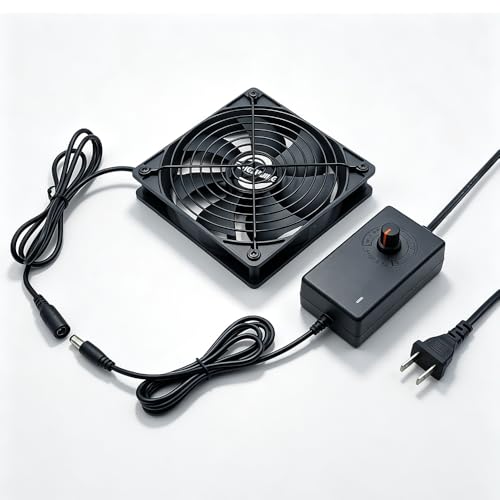
- Direct wall-outlet power with a 5-foot cord
- Adjustable speed for airflow control
- IP54 motor and flexible mounting options
Best For: Workstations and equipment cabinets needing independent, adjustable ventilation
Simple USB Cooling

- Two 120mm fans for broad external airflow
- USB-A powered with inline on/off switch
- 28 dB low-noise indoor operation
Best For: Indoor desks and electronics needing easy supplemental cooling
Compact Case Cooling
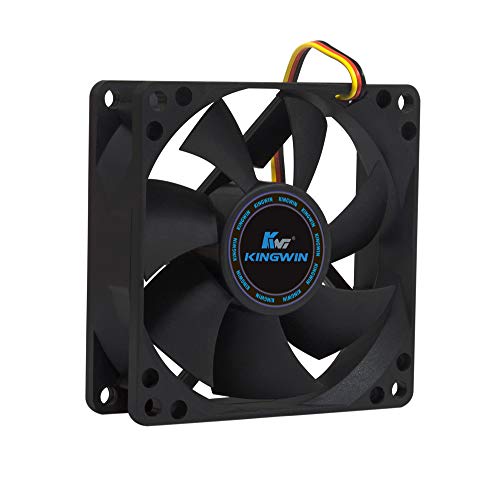
- Standard 80mm fit for cases and coolers
- 25 dB rated low-noise operation
- 30 CFM airflow with long-life bearing
Best For: Quiet desktops, home servers, and systems with 80mm mounts
Flexible USB Cooling
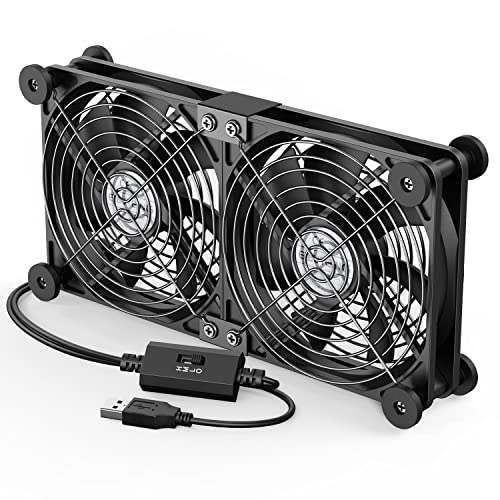
- Dual 120mm fans for broader external airflow
- Three adjustable speeds up to 1500 RPM per fan
- USB-powered with grilles and rubber shock absorbers
Best For: Quiet, adjustable cooling for USB-equipped workstation gear
High-Airflow AC Cooling
Easy Cloud 120mm Variable-Speed Fan

- Up to 95.8 CFM of rated airflow
- 700–2800 RPM variable speed range
- AC plug and dual-ball bearings rated for 50,000 hours
Best For: Standalone ventilation for cabinets and equipment near an outlet
Whisper-Quiet Desk Cooling

- 18 dB stated noise level for quiet workspaces
- 55.8 CFM airflow from a nine-blade 120mm fan
- Built-in 530mm USB cable and shock-absorbing pads
Best For: Low-noise external cooling for desks and compact electronics
High-Airflow Workstation Cooling – 120mm Variable-Speed AC Fan
For demanding computer cooling fans for workstations setups, this 120mm AC-powered model prioritizes high airflow and adjustable speed. It reaches up to 169 CFM at 4,100 RPM and includes protective grills and a separate controller.
Best For: Workstations, server cabinets, mining rigs, GPU setups, and DIY electronics cooling where maximum airflow and AC operation are useful.
Pros:
- High airflow rating of 169 CFM at full speed.
- Variable control from off through full blast using the included controller.
- Dual-ball bearings support flat or upright installation and a stated six-year life.
- Protective grills are included on both sides.
Cons:
- At 50 dB, it is less suited to noise-sensitive work areas.
- Its 120mm x 38mm format is thicker than many standard case fans.
- AC power and the separate controller may require more setup than a typical motherboard fan.
This is a strong option when cooling capacity matters more than quiet operation or compact installation. The adjustable controller helps you reduce airflow when full speed is unnecessary.
Quiet Electronics Cooling – AC Infinity MULTIFAN S5 Dual 80mm
The AC Infinity MULTIFAN S5 is a practical choice among computer cooling fans for workstations when low noise and flexible placement are priorities. Its two USB-powered 80mm fans deliver 52 CFM total airflow with an included multi-speed controller.
Best For: Quiet workstation accessories, AV receivers, game consoles, cabinets, and other electronics with available USB power.
Pros:
- Quiet 18 dBA operation for noise-sensitive spaces.
- Two 80mm fans provide 52 CFM total airflow.
- Multi-speed controller lets you balance noise and cooling.
- Dual-ball bearings support flat or upright positioning and a stated 67,000-hour lifespan.
Cons:
- Its total airflow is lower than larger, high-output workstation fans.
- USB power may not suit installations without a nearby USB port.
- The compact 80mm fan size may require more targeted placement.
Choose this model for steady, unobtrusive cooling rather than maximum exhaust capacity. USB connectivity and flexible positioning make it convenient for electronics cabinets and desk-side equipment.
Triple-Fan Rack Cooling – 3 x 120mm AC-Controlled Fan
This three-fan assembly is designed for computer cooling fans for workstations that need broad cabinet or rack ventilation. The 120mm fans provide a combined 255 CFM rating, while the AC speed controller adjusts output from 3V to 12V and can switch the fans off.
Best For: Server racks, workstation cabinets, mining rigs, chassis, studios, grow tents, and other spaces needing intake or exhaust ventilation.
Pros:
- Three 120mm fans provide 85 CFM each, or 255 CFM total.
- Included AC controller offers adjustable speed and an off position.
- Metal protective guards support vertical or horizontal installation.
- Dual-ball bearings are rated for a stated 50,000-hour lifespan.
Cons:
- The combined 14.17-inch length needs substantial mounting space.
- At up to 35 dB, it may be audible in quiet workspaces.
- Its AC controller-based design is less plug-and-play than a motherboard-connected fan set.
This assembly makes sense when a workstation enclosure or cabinet needs distributed airflow instead of a single fan. Confirm the available mounting area and airflow direction before installation.
Compact USB Workstation Cooling – 120mm 5V USB Cooling Fan
This 120mm USB model is a straightforward option for computer cooling fans for workstations when you need easy installation in a tight space. It runs from a 5V USB connection, produces up to 56.7 CFM, and includes a protective net and mounting hardware.
Best For: Routers, mini PCs, computer cases, AV equipment, game consoles, and enclosed work areas with a convenient USB port.
Pros:
- USB connection simplifies setup and power delivery.
- 56.7 CFM airflow supports cooling for compact electronics and enclosures.
- 23 dBA noise rating is suitable for relatively quiet spaces.
- Includes a protective net, foot columns, screws, and nuts.
Cons:
- The sleeve bearing is less robust than a dual-ball bearing design.
- It has a single-fan layout rather than the broader coverage of a multi-fan assembly.
- USB power limits it to compatible 5V setups.
This fan is a convenient fit for targeted cooling where AC wiring or motherboard connections would be excessive. Its included hardware also helps with freestanding or simple enclosure installations.
Plug-In Versatility – 120mm AC Speed-Controlled Cooling Fan
For workstations, AV cabinets, and other setups without a spare PC header, this 120mm AC fan provides plug-and-play airflow from a standard wall outlet. Its included speed controller lets you balance cooling performance and noise, while the slim design and protective guard simplify flexible placement.
Best For: Workstations, AV receivers, amplifier cabinets, greenhouse ventilation, and DIY enclosures that need wall-powered cooling.
Pros:
- Plugs directly into 110V-240V outlets with a 5-foot cord.
- Adjustable speed control supports quieter or higher-airflow operation.
- 120mm format, metal finger guard, and IP54 moisture-resistant motor support varied mounting environments.
Cons:
- Its 44 dB rated noise level may be more noticeable than quieter low-voltage options.
- Uses a wall outlet rather than a standard internal PC fan header.
This is a practical choice when workstation cooling requires independent power and flexible installation. It is especially useful for ventilating enclosed equipment spaces, though users seeking a conventional motherboard-connected case fan may prefer another format.
Simple USB Cooling – Dual 120mm USB PC Fan
This dual-fan USB unit is a convenient option for computer cooling fans for workstations when you want external airflow without hardwiring. Two 120mm fans connect through USB-A, include an inline on/off switch, and can be placed around compatible electronics using the supplied cable and anti-slip features.
Best For: Indoor workstations, laptops, entertainment equipment, and electronics that can benefit from simple external airflow.
Pros:
- Dual 120mm fans provide broad cooling coverage.
- USB-A power works with compatible chargers, computers, laptops, and power banks.
- Rated at 28 dB and includes an inline on/off switch for convenient control.
Cons:
- Offers only one power level and does not include speed adjustment.
- Designed for indoor use.
- Requires a compatible USB-A power source.
Choose this model for straightforward, low-noise supplemental cooling rather than internal case integration. Its dual-fan layout and USB operation make placement easy around a desk, but the fixed speed limits fine-tuning.
Compact Case Cooling – Kingwin 80mm Silent PC Fan
For a conventional PC build, this 80mm 12V fan is designed for standard case mounts and compatible CPU coolers. Its 3-pin connector, 30 CFM airflow rating, and 25 dB noise rating make it a compact option for computer cooling fans for workstations, home servers, and other desktop systems.
Best For: Quiet office desktops, home servers, PC cases, CPU coolers, water-cooling radiators, and mining rigs with standard 80mm mounts.
Pros:
- Standard 80mm form factor fits compatible case and cooler mounts.
- 25 dB rated operation suits quieter PC builds and office environments.
- Long-life bearing and 30 CFM airflow support ongoing ventilation.
Cons:
- 80mm coverage is smaller than 120mm alternatives.
- Uses a 3-pin 12V connector, so compatibility with the available header should be checked.
- Speed control is not listed in the supplied specifications.
This fan is a sensible replacement or supplemental option when a workstation has an 80mm mounting position. It prioritizes compact compatibility and quiet operation, but it is not the right choice for systems built around larger fan mounts.
Flexible USB Cooling – ELUTENG Dual 120mm USB Fan
For workstations and nearby electronics that need straightforward supplemental airflow, the ELUTENG dual USB fan combines two 120mm fans in one compact unit. USB power, three speed settings, and horizontal or vertical placement make it a practical option for cooling computer cabinets, routers, hard-drive enclosures, and other USB-equipped devices.
Best For: Quiet, adjustable cooling for desks, computer cabinets, routers, consoles, and other USB-powered equipment.
Pros:
- Dual 120mm fans provide combined airflow and can be positioned flat or upright.
- Three speed settings range from 900 to 1500 RPM per fan.
- USB plug-and-play operation with protective metal grilles and removable rubber feet.
- Hydraulic bearings and a stated noise range of 25.6 to 32.5 dB.
Cons:
- It requires an available USB port and is not a direct replacement for a standard internally mounted case fan.
- The dual-fan design may take more desk or cabinet space than a single fan.
- Its listed airflow is lower than some higher-speed AC-powered options.
This is a versatile choice when you want movable airflow without rewiring a workstation. Its adjustable speeds and stable feet suit quiet office or study environments, while the two-fan layout adds cooling coverage for external equipment.
High-Airflow AC Cooling – Easy Cloud 120mm Variable-Speed Fan
The Easy Cloud 120mm fan is suited to workstation cooling setups that need stronger airflow and a convenient wall-powered connection. Its AC plug, included speed controller, and broad 700-to-2800 RPM range make it useful for cabinets, servers, DVRs, routers, and other equipment where ventilation matters.
Best For: High-airflow cooling in workstation cabinets, server enclosures, electronics racks, and other setups near an AC outlet.
Pros:
- Rated airflow reaches 95.8 CFM for substantial ventilation.
- Variable speed control supports quieter or more aggressive cooling.
- Dual-ball bearings are rated for a 50,000-hour lifespan.
- AC-plug operation avoids relying on a computer or device USB port.
Cons:
- Its stated noise level is under 41 dB, so it may be more noticeable than ultra-quiet USB models.
- The 120V/AC-plug setup is less convenient where no outlet is nearby.
- At 120mm, it may not fit compact equipment designed for smaller fans.
Choose this model when airflow capacity is more important than the smallest, quietest setup. The controller adds useful flexibility, while the AC connection makes it a practical standalone ventilator for larger workstation or equipment enclosures.
Whisper-Quiet Desk Cooling – X1 120mm USB Cooling Fan
The X1 USB cooling fan is designed for workstation environments where noise and cable clutter matter. Its 120mm nine-blade fan delivers 55.8 CFM while operating at a stated 18 dB, and the built-in USB cable lets you power it from a laptop, charger, power bank, or other USB source.
Best For: Quiet home-office, media-center, router, mini-PC, and gaming-console cooling where a compact standalone fan is preferred.
Pros:
- Stated 18 dB noise level is well suited to quiet offices and living spaces.
- 55.8 CFM airflow from a 120mm nine-blade fan supports external device cooling.
- Integrated 530mm USB cable simplifies setup and reduces loose wiring.
- Shock-absorbing pads help protect surfaces from scratches and vibration.
Cons:
- It is USB-powered, so it is intended for external supplemental cooling rather than direct internal case installation.
- Its 850 RPM operating speed is lower than the Easy Cloud fan’s maximum speed.
- The 5.12-inch square housing may be too large for very tight spaces.
For noise-sensitive workstation areas, the X1 offers a tidy and unobtrusive way to move air around warm electronics. Its built-in cable, low noise rating, and flat-or-upright placement make it especially convenient for desks, entertainment centers, and compact equipment shelves.
How We Picked These Computer Cooling Fans for Workstations
We focused on fan size, power method, control options, stated noise characteristics, installation flexibility, and likely workstation use. The selection includes USB-powered fans for portable or low-voltage cooling, AC-powered axial fans for stronger continuous airflow, and compact case fans for targeted ventilation.
Because specifications vary across products and configurations, check the listing carefully for voltage, connector type, dimensions, speed range, and included controller before buying. A fan designed for a server enclosure may not be suitable for direct motherboard connection, while a USB model may be better for external cooling than internal case installation.
Quick Comparison
| Fan type | Best suited to | Main advantage | Potential trade-off |
|---|---|---|---|
| USB 80mm or 120mm | Routers, receivers, compact work areas | Simple low-voltage setup | Usually less powerful than AC models |
| AC-powered 120mm | Servers, equipment racks, hot enclosures | Strong continuous airflow | Requires safe access to an outlet |
| Dual-fan USB | Wide equipment surfaces | Broader cooling coverage | Uses more desk or enclosure space |
| 80mm internal case fan | Computer cases and compact builds | Easy placement in tight spaces | Smaller fans may need higher speed |
Key Buying Factors for Computer Cooling Fans for Workstations
Size and Mounting
Measure the available opening before ordering. A 120mm fan generally moves more air at lower rotational speeds than an 80mm model, but it needs more clearance. Also confirm whether the fan is intended for screws, brackets, magnets, or free-standing placement.
Power and Compatibility
USB fans are convenient for laptops, power banks, monitors, and external equipment. AC models can deliver dependable airflow for larger enclosures but must match the available mains voltage. Never connect an AC fan to a motherboard header or use an adapter without verifying its ratings.
Airflow, Noise, and Control
High airflow helps remove heat, but noise may matter in an office or recording environment. Variable-speed controllers, on/off switches, and multiple speed settings make it easier to balance cooling with comfort. Ball bearings can also be useful when long operating periods are expected.
Placement and Safety
Use fans to move hot air away from equipment rather than simply blowing air into a confined space. Keep grilles clear, secure loose cables, and avoid blocking vents. For rack or enclosure use, confirm that the fan can operate continuously and that its cable length is adequate.
Who Should Buy Which Computer Cooling Fans for Workstations?
- Choose a dual USB fan for simple, adjustable cooling across a receiver, router, DVR, or other broad surface.
- Choose a 120mm AC fan when you need stronger sustained airflow for a server, rack, mining setup, or hot equipment enclosure.
- Choose an 80mm fan for compact computer cases, CPU coolers, or installations with limited clearance.
- Choose a quiet USB model for office workstations, media centers, and locations where fan noise is distracting.
- Choose variable speed control when workloads and ambient temperatures change throughout the day.
Before purchasing, prioritize correct voltage, physical fit, connector compatibility, and safe airflow direction. Those details matter more than maximum speed alone when selecting Computer Cooling Fans for Workstations.