A NAS enclosure with 10GbE can transform file transfers, backups, media workflows, and shared storage—provided the rest of your network can keep up. The models in this roundup range from compact all-SSD systems to high-capacity desktop units with advanced expansion options.
Use the comparisons below to match drive bays, CPU performance, memory, networking, and upgrade potential to the way you actually work.
Best 10 Nas Enclosure with 10gbe Picks for 2026
Best Enterprise-Ready Pick

- 10GBASE-T plus dual 2.5GbE
- 32GB DDR4, expandable to 64GB
- Nine-bay storage enclosure
Best For: Small businesses and advanced home labs
Best Compact All-SSD Design
TerraMaster F8 SSD Plus 8-Bay NAS

- Eight M.2 NVMe SSD bays
- 10Gbps Ethernet and 16GB DDR5
- Compact, quiet tabletop design
Best For: Quiet home labs and fast media workflows
Best Value 10GbE Expansion

- 10GbE SFP+ and dual 2.5GbE
- PCIe slot for future expansion
- Six-bay metal tabletop chassis
Best For: Home offices and small businesses
Best Dual-10GbE Connectivity

- Two 10GbE ports with link aggregation
- Eight 3.5-inch SATA drive bays
- 8GB DDR4 and M.2 NVMe caching
Best For: Businesses with high-speed multi-user networks
Best Overall 8-Bay 10GbE NAS

- 8-core Intel Atom processor with expandable DDR4 memory
- 10GBASE-T plus dual 2.5GbE networking
- Eight bays with NVMe and PCIe expansion
Best For: Teams and power users building an expandable 10GbE storage system
Best for Creators and Virtualization
Asustor Lockerstor 4 Gen3 AS6804T

- Ryzen quad-core processor and 16GB ECC DDR5
- Four M.2 NVMe slots for fast storage
- Dual 5GbE and 10GbE connectivity
Best For: Creators and enthusiasts running editing, virtualization, or container workloads
Best High-Capacity Value Option

- Eight SATA bays for substantial storage capacity
- Dual 10GbE SFP+ and dual 2.5GbE ports
- Expandable DDR4 memory up to 16GB
Best For: Home offices and small teams prioritizing capacity and dual 10GbE
Best High-Capacity Pick

- Ultra 9 CPU and 32GB LPDDR5X RAM
- Dual 10GbE ports and two M.2 slots
- Eight SATA bays with RAID support
Best For: High-speed media, business, and expandable storage
Best Upgradeable Option
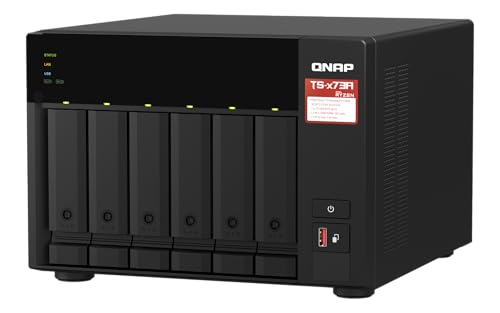
- Dual 2.5GbE ports with port trunking
- PCIe slots can add 10GbE later
- Two M.2 slots for caching or Qtier
Best For: Upgradeable home-office and small-business storage
Best Quiet SSD Design

- Eight M.2 NVMe bays and up to 64TB
- 10Gbps Ethernet up to 1024MB/s
- Compact design with standby noise below 19dB
Best For: Quiet, compact all-SSD home and business storage
Best Enterprise-Ready Pick – QNAP TS-h973AX-32G 9-Bay NAS
For buyers seeking a capable NAS enclosure with 10GbE, the QNAP TS-h973AX-32G combines a nine-bay design with a 10GBASE-T port, dual 2.5GbE connectivity, and substantial memory. Its Ryzen Embedded processor and QuTS hero platform make it a strong fit for demanding desktop or server storage setups.
Best For: Small businesses, advanced home labs, and users needing multiple drive bays plus fast wired networking.
Pros:
- Includes one 10GBASE-T port and two 2.5GbE LAN ports.
- 32GB of DDR4 RAM is installed, with expansion up to 64GB.
- Nine-bay chassis offers room for a substantial storage array.
- Ryzen Embedded V1500B provides four cores and eight threads.
Cons:
- Drive storage is not specified in the supplied details.
- Its larger nine-bay design may be more than casual users need.
This is a well-equipped choice when both expansion capacity and fast Ethernet matter. The included 32GB memory and 10GbE interface give it a strong out-of-box specification for heavier workloads.
Best Compact All-SSD Design – TerraMaster F8 SSD Plus 8-Bay NAS
The TerraMaster F8 SSD Plus is a compact NAS enclosure with 10GbE built around eight M.2 2280 NVMe SSD slots. With a Core i3-N305 processor, 16GB of DDR5 memory, and a 10Gbps Ethernet port, it targets users who want fast, quiet, desktop-friendly network storage.
Best For: Home users, small businesses, media workflows, virtualization, and database tasks that benefit from all-SSD storage.
Pros:
- Eight M.2 NVMe bays support up to 64TB total capacity according to the supplied details.
- 10Gbps Ethernet is rated for transfer speeds up to 1024MB/s.
- Core i3-N305 offers eight cores and eight threads.
- Compact design and noise levels below 19dB in standby suit quiet spaces.
Cons:
- It is diskless, so SSDs must be purchased separately.
- M.2 NVMe storage may cost more than equivalent hard-drive capacity.
Among these options, this is the most space-conscious and quietest-looking design on paper. Its all-SSD layout favors responsiveness and low noise, while the included 16GB DDR5 and 10Gbps port provide a strong starting platform.
Best Value 10GbE Expansion – QNAP TS-632X-4G-US 6-Bay NAS
The QNAP TS-632X-4G-US is a practical NAS enclosure with 10GbE for users who want six drive bays without moving to a larger chassis. It pairs a 10GbE SFP+ port with dual 2.5GbE ports and includes a PCIe slot for future networking or M.2 expansion.
Best For: Home offices and small businesses that need fast backups, flexible networking, and moderate storage expansion.
Pros:
- Single-port 10GbE SFP+ connectivity supports intensive data transfers.
- Dual 2.5GbE ports provide additional bandwidth and access options.
- PCIe Gen 3 x4 slot can add networking or M.2 SSD functionality.
- Dual USB 3.2 Gen 1 ports include One Touch Copy support.
Cons:
- Only 4GB of non-ECC RAM is installed initially.
- Its 10GbE interface is SFP+, so buyers should verify transceiver or cabling compatibility.
- The Alpine AL524 processor is less powerful on paper than the x86 CPUs in some alternatives.
This model stands out for providing a useful mix of current connectivity and upgrade potential. It is especially appealing if an SFP+ network is already available and six bays meet your capacity needs.
Best Dual-10GbE Connectivity – Asustor Lockerstor 8 AS6508T
The Asustor Lockerstor 8 AS6508T is an eight-bay NAS enclosure with 10GbE designed for users who want especially flexible high-speed networking. It provides two 10GbE interfaces for up to 20Gbps with link aggregation, along with dual 2.5GbE ports and support for M.2 NVMe SSD caching.
Best For: Business users and storage enthusiasts with multiple high-speed network connections or link-aggregation plans.
Pros:
- Two 10GbE interfaces can deliver up to 20Gbps with link aggregation.
- Dual 2.5GbE ports add further networking flexibility.
- Supports eight 3.5-inch SATA hard drives.
- Includes 8GB DDR4 memory and supports M.2 NVMe SSD caching.
Cons:
- The product is diskless, so drives are an additional expense.
- Its 2.1GHz quad-core Atom processor is older than the newer CPUs in some alternatives.
- Link aggregation requires compatible network equipment and configuration.
Choose this enclosure when dual 10GbE ports are more important than having the newest processor. Its eight-bay layout, SATA drive support, and NVMe caching option make it a versatile platform for business storage and multi-user access.
Best Overall 8-Bay 10GbE NAS – QNAP TS-855X-8G-US
If you need a capable nas enclosure with 10gbe for team file sharing, virtualization, or expanding storage, the QNAP TS-855X-8G-US combines eight drive bays with an 8-core Intel Atom processor and versatile networking. It is diskless, so you can choose the storage drives that fit your workload.
Best For: Teams and power users needing an expandable 8-bay desktop NAS with built-in 10GbE.
Pros:
- 8-core Intel Atom C5125 processor with 8GB DDR4 RAM, expandable up to 128GB with ECC support.
- Built-in 10GBASE-T supports 10G, 5G, 2.5G, 1G, and 100M connections, plus two 2.5GbE ports.
- Two M.2 NVMe slots and two PCIe Gen 3 x4 slots support caching, SSD pools, and expansion cards.
- Supports Google Workspace and Microsoft 365 backup through Boxafe.
Cons:
- It is diskless, so drives must be purchased separately.
- Its larger feature set may be more than basic home storage needs.
The TS-855X-8G-US is a strong all-around choice when you want high-capacity storage, multi-gigabit connectivity, and room for future upgrades in one tabletop enclosure.
Best for Creators and Virtualization – Asustor Lockerstor 4 Gen3 AS6804T
The Asustor Lockerstor 4 Gen3 is a compact nas enclosure with 10gbe aimed at demanding workloads. Its AMD Ryzen Embedded processor, 16GB of ECC DDR5 memory, four M.2 NVMe slots, and dual 5GbE plus 10GbE connectivity make it suited to creators, virtualization users, and small business environments.
Best For: Video editors, virtualization users, and enthusiasts who want fast networking in a four-bay desktop NAS.
Pros:
- AMD Ryzen Embedded V3C14 quad-core processor running at 3.8GHz.
- 16GB of DDR5-4800 ECC memory is included.
- Four M.2 NVMe slots support fast storage configurations.
- Provides dual 5GbE and 10GbE ports for high-speed network connectivity.
Cons:
- Four bays provide less raw drive capacity than the 8-bay alternatives.
- It is diskless, requiring separate storage drives.
With workstation-oriented hardware and multiple NVMe slots, the AS6804T is a focused option for users who prioritize responsive editing, containers, virtualization, and enterprise-style backup tasks over maximum bay count.
Best High-Capacity Value Option – QNAP TS-832PX-4G
For buyers who want a high-capacity nas enclosure with 10gbe without moving to a smaller four-bay design, the QNAP TS-832PX-4G offers eight SATA bays and two 10GbE ports. Its dual 2.5GbE ports add flexibility for mixed-speed networks, while the diskless design lets you select compatible drives.
Best For: Home offices and small teams needing eight bays and dual 10GbE SFP+ connectivity.
Pros:
- Eight 3.5-inch SATA drive bays provide substantial expansion capacity.
- Two 10GbE ports use SFP+ connectivity.
- Two additional 2.5GbE ports support 2.5G, 1G, and 100M networks.
- 4GB DDR4 memory can be expanded to 16GB.
Cons:
- The ARM-based Alpine AL324 processor is less powerful on paper than the Intel and AMD systems listed here.
- It is diskless, so storage drives are not included.
- SFP+ networking may require compatible transceivers, cables, or switches.
The TS-832PX-4G emphasizes bay count and network flexibility. It is a practical fit when bulk storage and dual 10GbE connections matter more than workstation-class processing power.
Best High-Capacity Pick – Thdeukoty 8-Bay 10GbE NAS
If you need a powerful NAS enclosure with 10GbE for demanding storage and networking tasks, the Thdeukoty 8-bay model stands out with an Ultra 9 processor, 32GB of LPDDR5X memory, dual 10GbE ports, and two M.2 NVMe slots. Its eight SATA bays also provide substantial room for large media libraries, backups, and business files.
Best For: Video editing, creative teams, virtualization, AI workloads, and users who need expandable high-speed storage.
Pros:
- Dual 10GbE ports support LACP/SLB aggregation and speeds up to 2500MB/s.
- Eight SATA bays and two M.2 NVMe slots support several RAID configurations.
- Ultra 9 285H CPU, 32GB LPDDR5X RAM, PCIe 4.0 x8, USB 4, HDMI, and DisplayPort provide strong expansion potential.
Cons:
- Diskless design requires purchasing compatible SATA and NVMe drives separately.
- Its large desktop enclosure may be more hardware than basic home users need.
This is the most performance-oriented option in the group, combining extensive drive capacity with dual 10GbE connectivity and unusually broad expansion. It is a strong fit when fast shared storage and future upgrades matter more than a compact footprint.
Best Upgradeable Option – QNAP TS-673A 6-Bay NAS
The QNAP TS-673A is a practical starting point for shoppers seeking a NAS enclosure with 10GbE upgrade potential rather than built-in 10GbE. It includes dual 2.5GbE ports, two PCIe Gen3 slots for adding a 10GbE card, and two M.2 NVMe slots for SSD caching or Qtier storage optimization.
Best For: Home offices and small businesses that want a capable six-bay NAS with room to add faster networking and other expansion cards.
Pros:
- Two 2.5GbE ports can reach up to 5Gbps through port trunking.
- Two PCIe Gen3 slots support optional 10GbE, SSD caching, USB, wireless, or Fibre Channel cards.
- Two M.2 NVMe slots support Qtier technology and SSD caching.
Cons:
- 10GbE is not included and requires a separate PCIe card.
- It has six drive bays, fewer than the eight-bay alternatives in this roundup.
The TS-673A makes sense for buyers who prefer a flexible platform and want to choose their own upgrade path. Its built-in 2.5GbE connectivity is useful today, while the PCIe slots leave room for a future 10GbE installation.
Best Quiet SSD Design – TerraMaster F8 SSD 10GbE NAS
For buyers who prioritize quiet operation and compact storage, the TerraMaster F8 SSD is a distinctive NAS enclosure with 10GbE. It accepts eight M.2 2280 NVMe SSDs, includes a 10Gbps Ethernet port with claimed transfer speeds up to 1024MB/s, and uses a compact, tool-free design suitable for desks and smaller spaces.
Best For: Quiet home setups, compact offices, SSD-based file storage, and small businesses needing integrated backup features.
Pros:
- Eight M.2 NVMe bays support up to 64TB total capacity based on the supplied specifications.
- 10Gbps Ethernet supports transfer speeds up to 1024MB/s.
- Compact, tool-free design and noise levels below 19dB in standby suit quiet environments.
Cons:
- It uses M.2 SSDs rather than standard 3.5-inch or 2.5-inch SATA drives.
- Diskless configuration requires buying all storage separately.
- The N95 processor and 8GB of RAM are less substantial than the hardware in the Thdeukoty model.
The F8 SSD is best viewed as a compact, quiet all-flash NAS rather than a conventional high-capacity hard-drive enclosure. Its integrated 10Gbps port, low-noise cooling, and business backup suite make it appealing for users who value responsiveness and unobtrusive operation.
How We Picked the Best Nas Enclosure with 10gbe
We selected systems that offer built-in 10GbE connectivity or a clear high-speed networking focus, then compared their storage capacity, processor class, memory, drive-bay layout, NVMe support, expansion options, and likely use cases. We also considered whether each enclosure is better suited to home backups, media serving, virtualization, creative workloads, or small-business file sharing.
Because some models are diskless, the enclosure price is only part of the total cost. Budget for compatible hard drives or SSDs, and verify drive-support lists before purchasing.
Quick Comparison
| Best For | What to Prioritize | Recommended Type |
|---|---|---|
| Large media libraries | Six to nine bays, RAID flexibility, upgradeable networking | High-bay QNAP or Asustor enclosure |
| Quiet, fast desktop storage | All-SSD design, NVMe slots, efficient CPU | TERRAMASTER F8 SSD models |
| Virtual machines and demanding apps | Strong CPU, plentiful RAM, NVMe caching | Ryzen, Core i3, or higher-performance systems |
| Small offices | Reliable software, backups, snapshots, and expansion | Business-focused QNAP or Asustor model |
Key Buying Factors for a Nas Enclosure with 10gbe
Network Compatibility
10GbE is useful only when your computer, switch, cabling, and network adapter support the same standard. Check whether the enclosure uses 10GBASE-T copper or SFP+; copper is simpler for many homes, while SFP+ can reduce heat and power use. A 2.5GbE or 5GbE fallback connection is also helpful.
Drive Bays and RAID
More bays provide greater capacity and better RAID choices, but they increase cost, noise, and power consumption. Six- to nine-bay systems are strong choices for growing libraries or business storage. All-SSD enclosures prioritize low latency and quiet operation rather than maximum economical capacity.
CPU, Memory, and Expansion
Basic file serving needs less processing power than virtualization, containers, surveillance, or real-time transcoding. Look for upgradeable memory when possible, plus M.2 slots for caching or storage pools. PCIe expansion can add networking, storage, or other functionality later.
Software and Backup Features
Evaluate snapshots, synchronization, cloud backup, permissions, encryption, remote access, and mobile apps—not just hardware specifications. A capable NAS should support a tested backup strategy, including an external or off-site copy. RAID improves availability but is not a backup.
Who Should Buy Which Nas Enclosure with 10gbe?
Choose a high-bay QNAP or Asustor model if you need expandable business storage, multiple RAID options, or a mature NAS software ecosystem. Choose a TERRAMASTER F8 SSD system when quiet operation, compact all-flash storage, and responsive local transfers matter most. Consider the newer high-performance options if you run demanding applications and value powerful processors, abundant memory, and modern expansion interfaces.
For a general home or small-office setup, prioritize dependable software, easy backups, and a suitable number of bays over headline CPU specifications. Finally, confirm 10GbE switch and adapter compatibility before buying so the enclosure can deliver the speed you expect.