The best desktop computers for multitasking make it easier to switch between office apps, browser tabs, creative software, communications, and entertainment without slowdowns. This roundup covers compact mini PCs, space-saving desktops, business systems, and high-performance towers.
We focused on useful memory and storage configurations, current processor performance, upgrade potential, display support, connectivity, and overall fit for different workloads. Use the guide below to narrow the list to the system that matches your desk, budget, and daily routine.
Best 10 Desktop Computers for Multitasking Picks for 2026
Balanced Business Performer

- 32GB DDR5 supports busy multitasking workflows
- Up to four FHD or two 4K displays
- Tool-less access aids future upgrades
Best For: Business, education, multimedia, and multi-monitor productivity
Versatile Everyday Powerhouse

- 32GB DDR5 and Ryzen 7 processing
- 1TB PCIe Gen4 NVMe SSD
- Radeon 780M graphics and wireless accessories
Best For: Home productivity, multimedia, and light gaming
Compact Multitasking Specialist
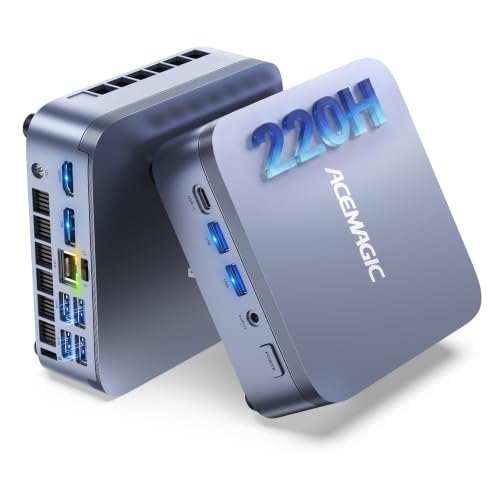
- 12-core processor for sustained heavy workloads
- Triple 4K display support in a tiny chassis
- Windows 11 Pro and expandable dual-SSD storage
Best For: Compact professional workstations, coding, trading, and virtual machines
Creator and Gaming Powerhouse

- 20-core processor with 32GB DDR5 memory
- Dedicated RTX 5060 with 8GB GDDR7
- 1TB NVMe SSD and Windows 11 Pro
Best For: Gaming, video editing, content creation, and demanding multitasking
Best Compact AI-Ready Pick

- Intel Core Ultra 5-225 with built-in AI
- Supports up to four FHD monitors
- Slim design with tool-less access
Best For: Compact home offices and flexible multi-monitor productivity
Best Storage and Connectivity Value
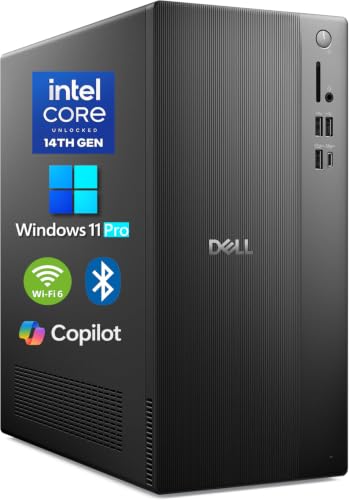
- 16GB DDR5 RAM and 1TB PCIe SSD
- Supports four FHD or two 4K displays
- Windows 11 Pro with Wi-Fi 6
Best For: Business and developer multitasking with ample storage
Best SFF Office Workstation

- 32GB RAM and 1TB SSD configuration
- Supports dual 4K displays
- Compact chassis with Windows 11 Pro
Best For: Space-saving office and remote-work setups
Best Value Multitasker

- 8-core i7-9700 processor
- 32GB RAM and 1TB NVMe SSD
- Dual-display support with Wi-Fi 6E
Best For: Home offices and everyday business multitasking
Top-Tier Powerhouse

- 16-core, 24-thread i9 processor
- 32GB DDR5 and 1TB PCIe SSD
- Dual 4K display and USB-C support
Best For: Demanding business, creation, and data workflows
Balanced Performance Pick

- 12-core, 20-thread processor
- 32GB DDR5 and 1TB PCIe SSD
- Dual 4K monitors and USB-C connectivity
Best For: Professional multitasking and modern office workflows
Balanced Business Performer – Dell Core Ultra 7 Tower
The Dell Tower Desktop is a practical choice among desktop computers for multitasking, pairing an Intel Core Ultra 7 processor with 32GB of DDR5 memory for business, education, multimedia, and everyday workloads. Its tower design also makes future component access straightforward.
Best For: Home offices, business users, students, and anyone who needs several displays and dependable everyday performance.
Pros:
- 32GB DDR5 memory supports running multiple applications and browser tabs.
- Supports up to four FHD monitors or two 4K displays through its video outputs.
- Tool-less access and a removable side panel simplify upgrades.
- Includes TPM security hardware and one year of onsite service after remote diagnosis.
Cons:
- Uses integrated Intel UHD graphics rather than a dedicated graphics card.
- Windows 11 Home may offer fewer business-management features than Windows 11 Pro.
This Dell is best viewed as a flexible productivity tower rather than a gaming or workstation system. Its memory capacity, multi-monitor support, upgrade-friendly chassis, and security features make it a sensible fit for demanding office setups.
Versatile Everyday Powerhouse – HP OmniDesk Ryzen 7 Desktop
The HP OmniDesk is a strong all-around option for desktop computers for multitasking, with an AMD Ryzen 7 8700G, 32GB of DDR5 memory, and a 1TB PCIe Gen4 NVMe SSD. Integrated Radeon 780M graphics add flexibility for everyday creative and gaming use.
Best For: Users who want a responsive home or gaming desktop with generous memory, fast storage, and included wireless peripherals.
Pros:
- Ryzen 7 8700G processor and 32GB DDR5 memory are well suited to concurrent applications.
- Fast 1TB NVMe SSD provides substantial space for software and files.
- Radeon 780M graphics support compatible gaming and multimedia workloads.
- Includes a full-size wireless keyboard and mouse.
Cons:
- Graphics are integrated rather than provided by a separate dedicated card.
- Only one HDMI port is listed, which may limit simple multi-monitor setups.
- Windows 11 Home is less business-focused than a Pro edition.
With four memory slots and support for up to 64GB of RAM, the OmniDesk leaves room for expansion. It is a balanced pick for multitasking, entertainment, and light gaming, provided you do not need high-end dedicated graphics.
Compact Multitasking Specialist – ACEMAGIC M5 Mini PC
The ACEMAGIC M5 delivers desktop-style multitasking performance in a book-sized chassis. Its Intel Core 5 220H, 24GB LPDDR5 memory, Windows 11 Pro, and triple-4K display support make it a space-conscious option among desktop computers for multitasking.
Best For: Home offices, trading desks, coding, virtual machines, and professional setups where desk space is limited.
Pros:
- 12-core, 16-thread processor is designed for sustained concurrent workloads.
- 24GB LPDDR5-5200 memory supports heavy tab, spreadsheet, and application use.
- Dual M.2 slots allow storage expansion up to 4TB total, according to the notes.
- Supports three 4K displays and includes Wi-Fi 6, multiple USB ports, and VESA mounting.
Cons:
- Onboard LPDDR5 memory is soldered and cannot be upgraded.
- Its compact design uses integrated graphics, so it is not aimed at demanding discrete-GPU workloads.
- Storage expansion may require installing additional SSDs.
The M5 stands out when a clean, compact workstation matters as much as performance. Windows 11 Pro, broad connectivity, and sustained 45W operation make it particularly appealing for professional multitasking and small-office deployments.
Creator and Gaming Powerhouse – Dell RTX 5060 Tower
The Dell Tower pairs an Intel Core Ultra 7 265F processor with 32GB of DDR5 memory, a 1TB NVMe SSD, and dedicated GeForce RTX 5060 graphics. That combination makes it a high-performance choice among desktop computers for multitasking, content creation, gaming, and demanding everyday work.
Best For: Creators, gamers, professionals, and power users who need dedicated graphics acceleration alongside strong application multitasking.
Pros:
- 20-core Intel processor and 32GB DDR5 memory support demanding concurrent workloads.
- RTX 5060 with 8GB GDDR7 dedicated graphics can accelerate supported creative and gaming applications.
- 1TB PCIe NVMe SSD offers fast boot and application loading.
- Windows 11 Pro, Wi-Fi 6, Bluetooth 5.4, and 4K display outputs suit versatile setups.
Cons:
- Dedicated graphics and tower hardware may be more than basic office users need.
- The listed memory maximum is 64GB, limiting future RAM expansion compared with some larger systems.
- One-year manufacturer warranty is shorter than some extended-service options.
This is the most graphics-capable option in the group. Its dedicated RTX hardware gives multitaskers extra headroom for editing, gaming, streaming, and other GPU-accelerated work, while the 32GB memory and fast SSD keep general workflows responsive.
Best Compact AI-Ready Pick – Dell Slim Desktop
The Dell Slim Desktop is a practical choice among desktop computers for multitasking, pairing an Intel Core Ultra 5-225 processor with a 512GB SSD and Windows 11 Home. Its slim, recycled-material design fits smaller workspaces, while support for multiple displays helps organize demanding workflows.
Best For: Home offices, everyday productivity, education, and users who want a compact desktop with flexible monitor support.
Pros:
- Intel Core Ultra processor includes built-in AI capabilities for productivity and creative tasks.
- Supports up to four FHD monitors or two 4K displays through HDMI and DisplayPort connections.
- Tool-less access and a removable side panel simplify future upgrades.
- Includes TPM security, a lock slot or padlock loop, and one year of onsite service.
Cons:
- Windows 11 Home may offer fewer business-management features than Windows 11 Pro.
- Integrated Intel UHD Graphics 730 is intended for general computing rather than demanding graphics workloads.
- The listed configuration has 512GB of SSD storage.
Choose this model if desk space, display flexibility, and easy maintenance matter more than dedicated graphics performance. Its compact chassis and built-in security features make it especially suitable for organized home or office setups.
Best Storage and Connectivity Value – Dell Tower Desktop
With 16GB of DDR5 RAM, a 1TB PCIe SSD, and Windows 11 Pro, this Dell tower is built for desktop computers for multitasking in business and everyday work environments. Its 14th-generation Core i3 processor and broad port selection support a responsive, adaptable workstation.
Best For: Business users, developers, analysts, and home-office buyers who need generous storage and a multi-display setup.
Pros:
- Intel Core i3-14100 provides four cores, eight threads, and speeds up to 4.7GHz.
- 16GB DDR5 memory and a 1TB PCIe SSD support multiple applications and fast file access.
- Integrated graphics support up to four FHD monitors or two 4K displays.
- Windows 11 Pro, Wi-Fi 6, Bluetooth, USB-C, HDMI, DisplayPort, and Ethernet provide strong connectivity.
Cons:
- Integrated Intel UHD 730 graphics are not designed for advanced gaming or demanding GPU work.
- The Core i3 platform is positioned below higher-tier processors for intensive workloads.
- The tower is larger than a slim-form-factor desktop.
This is a well-rounded productivity tower for users who value storage capacity, modern memory, and connection options. It is a particularly sensible fit for multi-monitor office workflows that do not require dedicated graphics.
Best SFF Office Workstation – HP ProDesk SFF
The HP ProDesk SFF offers 32GB of RAM and a 1TB SSD in a compact chassis, making it a space-conscious option among desktop computers for multitasking. Windows 11 Pro, dual-display support, and included keyboard and mouse suit practical office and home-workstation needs.
Best For: Office workers, remote employees, classrooms, and home users who prioritize memory capacity and a small footprint.
Pros:
- 32GB DDR4 RAM supports substantial everyday multitasking.
- 1TB SSD provides fast boot times and room for files and applications.
- HDMI and DisplayPort enable a dual-4K display setup.
- Compact SFF chassis, Wi-Fi, Bluetooth, USB, and included keyboard and mouse support a ready-to-use workstation.
Cons:
- Intel Pentium Gold G5905 is an older, lower-tier processor with a maximum speed of 3.5GHz.
- Integrated Intel UHD Graphics 610 is suited to basic visuals rather than demanding creative or 3D workloads.
- DDR4 memory is older than the DDR5 used in some newer desktops.
The HP ProDesk makes the most sense when generous memory and compact dimensions are more important than processor headroom. It can handle office applications and dual-screen productivity, but demanding users may prefer a newer, faster CPU platform.
Best Value Multitasker – Dell OptiPlex 7070 SFF i7
For shoppers seeking desktop computers for multitasking without moving to a newer high-end platform, this renewed Dell OptiPlex 7070 combines an 8-core Intel Core i7-9700, 32GB of DDR4 RAM, and a 1TB NVMe SSD. Its compact business-oriented design also includes Windows 11 Pro, Wi-Fi 6E, and support for two displays.
Best For: Home offices, business productivity, and users who need many applications and browser tabs open at once.
Pros:
- 8-core i7-9700 processor reaches up to 4.7GHz.
- 32GB RAM and a fast 1TB NVMe SSD support responsive multitasking.
- Supports two displays and includes abundant USB connectivity.
- Includes Windows 11 Pro plus a wireless keyboard and mouse.
Cons:
- Integrated Intel UHD Graphics 630 is not intended for demanding dedicated-GPU workloads.
- As a renewed computer, it has a 90-day warranty.
- The small-form-factor chassis may offer less expansion room than a full tower.
This OptiPlex is a practical choice when office performance, storage speed, and compact dimensions matter more than having the newest processor generation. Its dual-display support and included accessories make it easy to deploy as a ready-to-use workstation.
Top-Tier Powerhouse – Dell Desktop Tower i9-12900K
This Dell tower is built for demanding desktop computers for multitasking workloads, pairing a 16-core, 24-thread Intel Core i9-12900K with 32GB of DDR5 memory and a 1TB PCIe SSD. It also supports dual 4K monitors and provides a broad selection of wired and wireless connections.
Best For: Advanced business applications, content creation, data processing, and users who regularly run intensive applications together.
Pros:
- 16 cores and 24 threads deliver substantial multitasking headroom.
- Processor reaches up to 5.2GHz and includes 30MB of cache.
- DDR5 memory, PCIe SSD storage, and dual 4K monitor support suit productive workflows.
- Includes USB-C, Wi-Fi, Bluetooth, TPM security, and Windows 11 Pro.
Cons:
- Integrated Intel UHD Graphics 770 may not replace a dedicated graphics card for specialized graphics work.
- The supplied configuration has 32GB RAM and 1TB storage, despite configurable capacities being mentioned.
- It includes a wired rather than wireless keyboard and mouse.
Among these options, this is the strongest fit for users prioritizing CPU resources and modern DDR5 performance. Its 1-year seller warranty and business-focused security features add practical reassurance for a demanding workstation setup.
Balanced Performance Pick – Dell Desktop Tower i7-12700K
For desktop computers for multitasking that balance modern performance with a lower-tier Core i7 platform, this Dell tower offers 12 cores, 20 threads, 32GB of DDR5 RAM, and a 1TB PCIe SSD. It supports two 4K monitors and includes Windows 11 Pro, Wi-Fi, Bluetooth, and USB-C.
Best For: Professionals who need fast business productivity, content creation, and everyday multitasking without stepping up to the i9 model.
Pros:
- 12 cores and 20 threads provide strong multitasking capability.
- Up to 5.0GHz speeds, DDR5 memory, and PCIe storage support responsive operation.
- Dual 4K monitor support and extensive USB connectivity improve workstation flexibility.
- Includes TPM security, Windows 11 Pro, Wi-Fi, Bluetooth, and a wired keyboard and mouse.
Cons:
- Integrated Intel UHD Graphics 770 is less suitable for workloads requiring dedicated graphics.
- The supplied configuration provides 32GB RAM and 1TB storage.
- The keyboard and mouse are wired.
This model is a sensible middle ground: it offers the newer DDR5 platform and strong 12-core processing while avoiding the i9’s higher performance tier. It is well suited to productive office setups with multiple displays and demanding applications.
How We Picked the Best Desktop Computers for Multitasking
We compared these systems by looking at the hardware that most affects multitasking: processor core and thread counts, memory capacity, storage speed, graphics capability, display support, and upgrade flexibility. Models with 32GB of RAM are especially well suited to running many applications simultaneously, while 16GB systems may be sufficient for lighter office use and everyday browsing.
We also considered form factor. Tower desktops generally offer more room for cooling, expansion, and dedicated graphics cards. Slim and small-form-factor systems are easier to place in compact workspaces, while mini PCs prioritize portability and low desk clutter.
Quick Comparison
- Best for demanding workloads: Choose a Core i9 or comparable high-end tower with 32GB of RAM and fast SSD storage.
- Best for office productivity: A business-oriented desktop with 32GB of memory, dual-display support, and upgradeable storage offers a practical balance.
- Best compact option: A mini PC or slim desktop can handle browsing, documents, video calls, and streaming while using less desk space.
- Best for graphics-heavy work: A tower with a dedicated GeForce RTX graphics card is better suited to gaming, video editing, and GPU-accelerated applications.
- Best value configuration: Look for at least 16GB of RAM, a 1TB SSD, and a modern six- or eight-core processor.
Key Buying Factors for Desktop Computers for Multitasking
Processor Performance
More cores and threads help when you are compiling code, exporting media, running virtual machines, or using several demanding programs at once. For general productivity, a modern midrange processor is usually enough; heavier workloads justify a higher-end Core i7, Core i9, or Ryzen 7-class chip.
Memory and Storage
RAM determines how many active applications your computer can keep readily available. Choose 32GB if multitasking is central to your work, particularly with large spreadsheets, creative tools, or many browser tabs. An NVMe SSD improves boot times, application launches, and file transfers compared with older hard drives.
Graphics and Displays
Integrated graphics are adequate for office work, streaming, and standard productivity displays. A dedicated GPU is worthwhile for gaming, 3D work, advanced video editing, or multiple high-resolution monitors. Confirm the available HDMI, DisplayPort, or USB-C outputs before buying.
Expansion and Connectivity
Check whether the case provides accessible RAM, storage, and PCIe slots. Wi-Fi 6 or newer and Bluetooth are useful for modern wireless accessories, while extra USB ports and wired Ethernet improve flexibility at a busy workstation.
Who Should Buy Which Desktop Computers for Multitasking?
Home and office users should prioritize a quiet, compact system with 16GB or 32GB of RAM, a 1TB SSD, and reliable dual-monitor support. Professionals and power users should choose a tower with 32GB or more, a stronger multi-core processor, and clear upgrade paths. Creators and gamers will benefit most from a dedicated graphics card, robust cooling, and a larger tower chassis. Small-space buyers should consider a mini PC or slim desktop, provided its memory and storage meet current needs and its upgrade limitations are acceptable.