Engineering software demands more than a basic school computer. CAD assemblies, finite element analysis, programming tools, and technical simulations can benefit from a fast processor, ample memory, capable graphics, and quick storage.
These 10 desktop computers cover a range of budgets and workloads, including workstation-focused systems, modern tower PCs, and compact business desktops. Use the guide below to match specifications with your coursework and future projects.
Best 10 Desktop Computer for Engineering Students Picks for 2026
Best Workstation Power

- 16-core Core i7-13700 processor
- 64GB DDR5 RAM and 2TB NVMe SSD
- Dedicated Quadro graphics for CAD and 3D work
Best For: Engineering students handling demanding CAD, modeling, and simulation workloads
Best Affordable Multitasker

- 32GB DDR5 RAM for smooth multitasking
- 1TB PCIe NVMe SSD
- Dual 4K monitor support
Best For: Programming, research, data analysis, and lighter engineering applications
Best Renewed CAD Value
Dell Precision 3431 Workstation

- Dedicated Quadro P620 graphics
- Six-core Core i5-9500 processor
- 1TB SSD with keyboard and mouse included
Best For: Budget-minded students needing CAD and basic 3D capability
Best Modern General-Purpose Option

- Core Ultra 7-265 processor with AI features
- 32GB DDR5 RAM and 1TB SSD
- Supports up to two 4K displays
Best For: Programming, coursework, productivity, and multi-monitor study setups
Best Multitasker
Dell Pro Tower i7-14700 Desktop
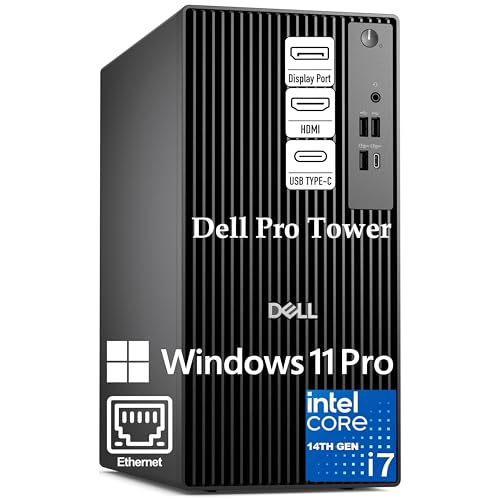
- 20-core i7 processor handles demanding multitasking
- 16GB DDR5 and 1TB PCIe SSD
- Supports dual 4K monitors; no built-in Wi-Fi
Best For: Engineering students running development tools, virtual machines, and data-analysis workloads
Best Ready-to-Use Value

- 32GB RAM for smooth multitasking
- 1TB SSD plus included keyboard and mouse
- Wi-Fi 6, Bluetooth, and eight USB ports
Best For: Students wanting an accessible, complete desktop for coursework and everyday productivity
Best for 3D and Simulation

- RTX 4060 dedicated GPU with 8GB GDDR6
- 64GB DDR5 RAM and 2TB NVMe SSD
- Wi-Fi 6, Windows 11 Pro, and three PCIe slots
Best For: Engineering students handling 3D design, visualization, and demanding GPU-enabled workloads
Budget Multitasker

- 8-core Intel Core i7-11700F processor
- 16GB RAM and 1TB PCIe SSD
- Keyboard, mouse, Wi-Fi 6, and Bluetooth included
Best For: Students needing strong everyday multitasking and ample storage
Performance Pick

- 12-core, 20-thread Intel Core i7 processor
- 32GB DDR5 RAM and 1TB PCIe SSD
- Dual 4K display support with HDMI and DisplayPort
Best For: CPU-focused engineering work and demanding multitasking
Compact Essentials
HP ProDesk SFF Business Desktop

- Space-saving small-form-factor design
- 32GB RAM and 1TB SSD
- Dual 4K display support with Windows 11 Pro
Best For: Basic coursework and productivity in a compact workspace
Best Workstation Power – Dell Precision 3660 Tower
For engineering students working with CAD, 3D models, simulations, and demanding multitasking, the Dell Precision 3660 is a desktop computer for engineering students built around workstation-class hardware. Its Core i7 processor, 64GB of DDR5 memory, 2TB NVMe SSD, and dedicated NVIDIA Quadro graphics provide substantial headroom for technical software and large project files.
Best For: Engineering students who need strong workstation performance for CAD, 3D design, rendering, and data-heavy coursework.
Pros:
- 16-core Intel Core i7-13700 processor with speeds up to 5.2GHz.
- 64GB DDR5 RAM and a spacious 2TB NVMe SSD.
- Dedicated NVIDIA Quadro T1000 graphics with 8GB GDDR6 memory.
- Windows 11 Pro, Wi-Fi, Bluetooth, and multiple display outputs.
Cons:
- The tower is larger than compact desktop designs.
- The listing contains conflicting graphics details, identifying both a Quadro T1000 and RTX A4000 in different areas.
This is the most capable option in the group for students whose engineering workloads extend beyond basic coursework. Verify the exact graphics card before ordering, but the processor, memory, and storage configuration make it a particularly strong long-term workstation choice.
Best Affordable Multitasker – Dell 14th Gen Tower Desktop
The Dell 14th Gen Tower is a practical desktop computer for engineering students who prioritize memory, fast storage, and a compact footprint over dedicated graphics. Its Core i3-14100 processor, 32GB of DDR5 RAM, and 1TB PCIe NVMe SSD suit programming, technical documents, web research, and lighter engineering applications.
Best For: Students focused on programming, office work, data analysis, and entry-level engineering software.
Pros:
- 32GB DDR5 memory supports substantial multitasking.
- 1TB PCIe NVMe SSD provides fast storage and room for projects.
- Supports dual 4K monitors through HDMI 2.1 and DisplayPort 1.4a.
- Compact tower with Wi-Fi 6, Bluetooth, USB-C, and Windows 11 Pro.
Cons:
- Integrated Intel UHD Graphics 730 is less suitable for demanding 3D workloads.
- The four-core processor is less powerful than the workstation-class options here.
This configuration offers a balanced setup for general engineering study and productivity, especially when dual displays are useful. Students working regularly with advanced CAD, rendering, or GPU-accelerated simulation should consider a computer with dedicated graphics instead.
Best Renewed CAD Value – Dell Precision 3431 Workstation
The renewed Dell Precision 3431 is a budget-conscious desktop computer for engineering students who need dedicated graphics for CAD and visual workloads. Its six-core Intel Core i5-9500, 16GB DDR4 RAM, 1TB SSD, and NVIDIA Quadro P620 create a capable foundation for coursework, technical drawings, and multi-display productivity.
Best For: Students seeking an affordable workstation for CAD, basic 3D modeling, education, and office tasks.
Pros:
- Dedicated NVIDIA Quadro P620 graphics with 2GB VRAM.
- Six-core Intel Core i5-9500 processor.
- 1TB SSD and included wired keyboard and mouse.
- Wi-Fi 6, Bluetooth, Windows 11 Pro, and DisplayPort outputs.
Cons:
- Older ninth-generation platform with 16GB DDR4 memory.
- The 2GB graphics memory limits demanding modern 3D projects.
- Listed with only a 30-day warranty.
This Precision workstation can be a sensible entry point for students who need professional graphics without paying for a newer system. Because it is renewed and uses older hardware, confirm the condition, warranty, and software requirements before relying on it for advanced workloads.
Best Modern General-Purpose Option – Dell Core Ultra 7 Tower
The Dell Core Ultra 7 Tower is a modern desktop computer for engineering students who want responsive everyday performance, current connectivity, and easy component access. With 32GB of DDR5 RAM, integrated Intel graphics, multiple-monitor support, and a 1TB SSD, it is well suited to coding, documentation, research, and general academic productivity.
Best For: Engineering students needing a modern everyday desktop for programming, coursework, productivity, and multi-monitor study setups.
Pros:
- Intel Core Ultra 7-265 processor with built-in AI capabilities.
- 32GB DDR5 RAM and a 1TB SSD.
- Supports up to four FHD monitors or two 4K displays.
- Tool-less access, TPM security, Wi-Fi, Bluetooth, keyboard, and mouse included.
Cons:
- Integrated Intel UHD graphics are not intended for demanding 3D engineering workloads.
- Windows 11 Home offers fewer business-oriented features than Windows 11 Pro.
- Display configuration and capabilities should be checked against specific engineering software needs.
This Dell is attractive for students who value a current platform, easy upgrades, and a clean multi-display workspace. Choose a dedicated-GPU workstation instead if your program regularly requires advanced CAD, rendering, or GPU-intensive simulation.
Best Multitasker – Dell Pro Tower i7-14700 Desktop
For students seeking a desktop computer for engineering students, this Dell tower emphasizes processor-heavy multitasking. Its 20-core Intel Core i7-14700, 16GB of DDR5 RAM, and 1TB PCIe SSD are suited to juggling development tools, virtual machines, Docker containers, and large codebases.
Best For: Engineering students who prioritize compiling, development workloads, data analysis, and multitasking across multiple applications.
Pros:
- 20-core, 28-thread Intel Core i7-14700 supports demanding multitasking.
- 16GB DDR5 RAM and a 1TB PCIe SSD provide a responsive everyday setup.
- Windows 11 Pro, USB-C, HDMI, and DisplayPort support professional workflows and dual 4K monitors.
Cons:
- Integrated Intel UHD Graphics 770 is less suited to graphics-intensive engineering or 3D work than a dedicated GPU.
- Built-in Wi-Fi is not included, so wired Ethernet or an adapter may be needed.
This is a strong choice when CPU performance and professional connectivity matter more than dedicated graphics. Confirm that integrated graphics meet your engineering software requirements before buying.
Best Ready-to-Use Value – HP Pavilion i7 Desktop
This HP Pavilion is a practical desktop computer for engineering students who want a complete setup with strong memory capacity. The Intel Core i7-11700F, 32GB of DDR4 RAM, 1TB SSD, keyboard, mouse, Wi-Fi 6, and Bluetooth cover everyday study and productivity needs.
Best For: Students who need ample RAM, wireless connectivity, included peripherals, and a straightforward Windows desktop for coursework and general applications.
Pros:
- 32GB RAM supports multiple applications and demanding multitasking.
- 1TB PCIe SSD offers fast boot and file access with useful storage capacity.
- Includes Wi-Fi 6, Bluetooth, HDMI, eight USB ports, keyboard, and mouse.
Cons:
- The older eight-core i7-11700F is less powerful on paper than the newer processors in the other options.
- GeForce GT 610 graphics are better suited to basic multimedia and casual use than advanced 3D workloads.
The Pavilion offers convenient connectivity and generous memory without requiring extra setup purchases. It is a sensible value pick for general engineering coursework, though students using demanding 3D or GPU-accelerated software should consider a stronger graphics card.
Best for 3D and Simulation – Dell Tower Ultra 7 RTX 4060
For engineering students who need substantial headroom, this Dell Tower combines a 20-core Intel Core Ultra 7-265F with 64GB of DDR5 RAM, a 2TB NVMe SSD, and an NVIDIA GeForce RTX 4060. That combination makes it the most graphics-capable option here for engineering software, content creation, and other demanding workloads.
Best For: Students working with 3D design, visualization, GPU-accelerated applications, large projects, and intensive multitasking.
Pros:
- RTX 4060 with 8GB GDDR6 provides dedicated graphics performance with ray tracing and DLSS 3 support.
- 64GB DDR5 RAM and a 2TB NVMe SSD offer substantial capacity for large projects and applications.
- Wi-Fi 6, eight USB ports, Windows 11 Pro, and three PCIe expansion slots support a flexible workstation setup.
Cons:
- Its higher-end hardware may be more than needed for basic coursework and office applications.
- The listing specifies one HDMI output, so review your monitor connection needs before purchase.
This is the strongest all-around option when dedicated graphics, memory, and storage are priorities. It also includes a wired keyboard and mouse, making it a capable workstation-style starting point for demanding engineering projects.
Budget Multitasker – HP Pavilion i7 Student Tower
For students seeking a practical desktop computer for engineering students, this HP tower combines an eight-core Intel Core i7 processor, 16GB of RAM, and a 1TB PCIe SSD. It is well suited to coursework, research, programming, office applications, and general productivity, with a keyboard and mouse included.
Best For: Students and home users who need strong everyday multitasking and generous fast storage at a budget-conscious price.
Pros:
- Eight-core Intel Core i7-11700F supports demanding multitasking.
- 16GB DDR4 RAM and a 1TB PCIe SSD provide responsive performance and useful storage capacity.
- Includes keyboard and mouse, plus Wi-Fi 6, Bluetooth, HDMI, and Ethernet connectivity.
Cons:
- GeForce GT 610 graphics are aimed at basic visuals, casual entertainment, and light gaming rather than graphics-intensive engineering workloads.
- Windows 11 Home may offer fewer business-oriented controls than Windows 11 Pro.
This HP is a sensible all-around choice when engineering coursework centers on productivity, coding, research, and lighter graphical tasks. Buyers needing advanced 3D modeling or GPU-intensive simulation should verify software requirements before choosing it.
Performance Pick – Dell i7-12700K DDR5 Tower
This Dell tower is a strong candidate for a desktop computer for engineering students who regularly multitask across technical applications, data processing, content creation, and research. Its 12-core, 20-thread Intel Core i7-12700K processor is paired with 32GB of DDR5 memory and a 1TB PCIe SSD.
Best For: Engineering students and professionals who prioritize processor performance, memory capacity, and multi-monitor productivity.
Pros:
- 12 cores and 20 threads with speeds up to 5.0GHz support demanding multitasking.
- 32GB DDR5 RAM and a 1TB PCIe SSD provide fast, responsive system performance.
- Supports dual 4K displays and offers HDMI, DisplayPort, USB-C, Wi-Fi, and Bluetooth connectivity.
Cons:
- Uses integrated Intel UHD Graphics 770, so it may not suit GPU-intensive 3D or visualization workloads.
- The listed configuration has a 32GB maximum memory specification, limiting expansion compared with the advertised configurable options.
With its newer processor platform, DDR5 memory, and dual-4K display support, this Dell is the most performance-oriented option in the group for CPU-focused engineering work. Confirm that the integrated graphics meet the requirements of your specific CAD, simulation, or rendering software.
Compact Essentials – HP ProDesk SFF Business Desktop
For shoppers who need a compact desktop computer for engineering students focused on office work, online learning, coding, and everyday productivity, this HP ProDesk offers 32GB of RAM, a 1TB SSD, Windows 11 Pro, and a space-saving small-form-factor chassis. It also supports dual 4K displays.
Best For: Students with limited desk space who primarily use productivity, education, web, and business applications.
Pros:
- Compact SFF design fits classrooms, offices, and smaller home workstations.
- 32GB DDR4 RAM and a 1TB SSD support smooth multitasking and fast boot times.
- HDMI and DisplayPort enable dual-display setups, with Wi-Fi, Bluetooth, USB, and Ethernet included.
Cons:
- Intel Pentium Gold G5905 is considerably less capable than the Core i7 processors in the other listed systems.
- Integrated Intel UHD Graphics 610 is intended for basic visuals and may be unsuitable for demanding CAD, 3D, or simulation workloads.
This ProDesk makes the most sense when compact size, dual-display support, and dependable everyday computing matter more than high-end processing power. Engineering students working with demanding technical software should compare the software’s CPU and graphics requirements carefully.
How We Picked the Best Desktop Computer for Engineering Students
We evaluated these desktops by focusing on the components that matter most for engineering coursework: processor performance, memory capacity, storage speed, graphics capability, upgrade potential, display support, and overall practicality. We also considered how each configuration fits common workloads such as CAD, 3D modeling, coding, data analysis, rendering, and simulation.
Specifications can vary by configuration or seller, so verify the exact processor generation, graphics card, operating system, ports, warranty, and included accessories before ordering.
Quick Comparison
| Best For | Recommended Configuration |
|---|---|
| CAD and 3D modeling | Modern Core i7 or Core Ultra 7, 32GB RAM, dedicated graphics |
| Simulation and demanding multitasking | 16 or more CPU cores, 64GB RAM, fast NVMe storage |
| Programming and general coursework | Core i5 or i7, 16GB to 32GB RAM, 1TB SSD |
| Budget-conscious study use | 16GB RAM, 1TB SSD, upgradeable tower design |
| Dual-monitor workflows | Dedicated or integrated graphics with two compatible video outputs |
Key Buying Factors for a Desktop Computer for Engineering Students
Processor
Prioritize a current-generation Core i7, Core Ultra 7, or comparable processor when using complex assemblies, compiling code, or running several applications simultaneously. Higher core counts help with heavily threaded simulations and rendering, while strong single-core performance benefits many CAD applications.
Memory
16GB is workable for basic coursework, but 32GB is a better long-term target. Choose 64GB if you expect large CAD files, virtual machines, engineering simulations, or frequent multitasking. A desktop with accessible memory slots can be upgraded later.
Graphics and Displays
Integrated graphics may be sufficient for programming and light 2D CAD. For 3D modeling, visualization, and GPU-accelerated applications, a dedicated GPU such as a Quadro or GeForce RTX model is a safer choice. Check the available outputs if you plan to use two 4K monitors.
Storage and Expansion
A 1TB SSD provides a useful starting point for software, projects, and course files; a 2TB NVMe SSD offers more breathing room. Tower desktops generally provide better upgrade access than small-form-factor systems, but confirm available drive bays, power-supply capacity, and graphics-card clearance.
Who Should Buy Which Desktop Computer for Engineering Students?
Choose a workstation-oriented desktop if your program relies on professional CAD, engineering visualization, or certified graphics drivers. Choose a high-core-count tower with 32GB or 64GB RAM for simulation, rendering, and demanding multitasking. Choose a modern Core i7 or Core Ultra 7 desktop with 32GB RAM for a balanced option that can handle most engineering coursework for several years.
Choose a 16GB system if your needs are mainly programming, office work, web research, and introductory CAD, especially when the memory can be expanded. A compact business desktop is suitable when desk space and quiet operation matter more than maximum graphics performance.