The right memory card reader can make the difference between a smooth photo workflow and a frustrating transfer session. We compared 10 versatile options for photographers using SD, microSD, CompactFlash, Memory Stick, and other card formats.
Whether you need fast USB-C transfers, broad format support, simultaneous read/write capability, or a compact reader for travel, this roundup highlights practical choices for cameras, laptops, tablets, and phones.
Best 10 Memory Card Readers for Photographers Picks for 2026
Best Multi-Format Speed
Lexar 3-in-1 SD/MicroSD/CF Reader

- Supports SD, microSD, and CompactFlash cards
- Up to 312MB/s for SD and microSD
- Includes USB-C/A cable with two-year warranty
Best For: Photographers using multiple common card formats
Best for Simultaneous Access
UGREEN USB-C 4-in-1 Card Reader

- Reads SD, microSD, CF, and Memory Stick cards
- Four cards can work simultaneously
- Up to 5Gbps with plug-and-play support
Best For: USB-C users managing several card formats
Best All-Device Connectivity
Rocketek 7-in-3 Card Reader Hub
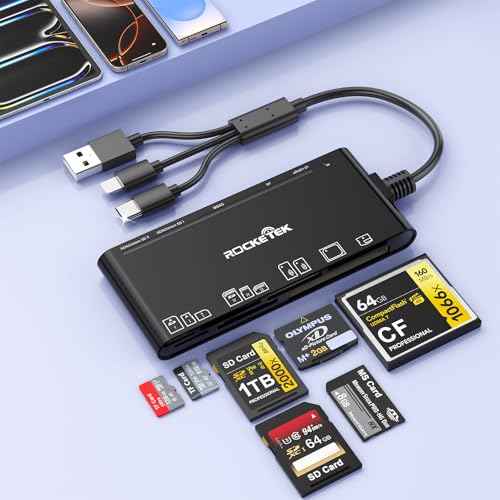
- Supports CF, SD, microSD, XD, and MS cards
- Includes USB-C, USB-A, and Lightning connections
- Reads and writes up to five cards simultaneously
Best For: Photographers and videographers using mixed devices
Best Basic Dual-Connector Option
RRSITIAU 4-in-1 CF/SD/TF/MS Reader

- Supports CF, SD, microSD, and Memory Stick
- Includes USB-C and detachable USB adapter
- Plug-and-play transfer of photos and RAW files
Best For: Simple transfers across USB-C and USB devices
Most Versatile

- Seven slots support SD, CF, microSD, MS, MMC, and xD cards
- Reads and writes multiple cards simultaneously
- Includes USB-A and USB-C cables with 5Gbps transfer support
Best For: Photographers using a mix of current and legacy memory card formats
Best Compact Dual-Slot Pick

- Supports simultaneous SD and microSD card transfers
- Provides USB-A and USB-C connectivity at up to 5Gbps
- Lightweight aluminum design weighs just 15 grams
Best For: Traveling photographers who primarily use SD and microSD cards
Best for Legacy Sony Cards

- Includes Memory Stick Pro Duo, SD, microSD, CF, and xD slots
- Reads up to five cards simultaneously
- USB-C transfers reach up to 5Gbps with LED activity indicators
Best For: Photographers combining Memory Stick Pro Duo with modern card formats
Best Dual-Slot Pick
uni USB-C/USB 3.0 SD Card Reader

- Dual SD and microSD slots
- USB-C and USB 3.0 connectivity
- Simultaneous card access
Best For: Photographers using SD and microSD cards
Best Four-Format Option

- Supports four major card formats
- Reads four cards simultaneously
- USB-C and USB 3.0 connections
Best For: Photographers managing SD, microSD, MS, and CF cards
Best Multi-Format Speed – Lexar 3-in-1 SD/MicroSD/CF Reader
For photographers who need a dependable memory card reader for photographers, the Lexar 3-in-1 reader combines SD, microSD, and CompactFlash support with fast USB 3.1 transfers. It includes both USB-C and USB-A connectivity and remains backward compatible with USB 2.0 and UHS-I cards.
Best For: Photographers working across SD, microSD, and CompactFlash media who want a compact reader with strong transfer speeds.
Pros:
- Supports SD, microSD, and CompactFlash cards.
- Transfers at up to 312MB/s for SD and microSD, and up to 160MB/s for CompactFlash.
- Includes USB-C/A cable and supports USB 3.1 and USB 2.0 ports.
- Backed by a two-year limited warranty.
Cons:
- Has three card slots rather than four simultaneous card slots.
- Its listed operating-system compatibility is focused on Windows and Mac OS X.
The Lexar is a practical choice for photographers who use several common card formats and prioritize quick transfers without needing a larger multi-device hub.
Best for Simultaneous Access – UGREEN USB-C 4-in-1 Card Reader
The UGREEN 4-in-1 is a flexible memory card reader for photographers who manage several card types or devices. Its USB-C connection supports SD, microSD, CompactFlash, and Memory Stick cards, while all four slots can be accessed simultaneously.
Best For: USB-C laptop, tablet, phone, and trail-camera users who need to browse or transfer files from multiple cards at once.
Pros:
- Supports SD, microSD, CompactFlash, and Memory Stick formats.
- Allows all four connected cards to work simultaneously.
- Offers transfer speeds up to 5Gbps.
- Works with Windows, Mac OS, Linux, Android, and Chrome OS without extra drivers.
Cons:
- Uses USB-C as its primary connector.
- It is a broader multi-device reader rather than a compact single-format solution.
With simultaneous four-card access and broad USB-C compatibility, this UGREEN reader is well suited to photographers who regularly sort, copy, and compare files from several media cards.
Best All-Device Connectivity – Rocketek 7-in-3 Card Reader Hub
The Rocketek 7-in-3 hub is a versatile memory card reader for photographers and videographers who move files between cameras, computers, tablets, and phones. It combines USB-C, USB-A, and Lightning connectivity with support for CF, SD, microSD, XD, and MS cards.
Best For: Creators who need one portable reader for mixed card formats and USB-C, USB-A, or Lightning devices.
Pros:
- Provides seven card slots, including CF, dual SD, TF, microSD, XD, and MS.
- Supports reading and writing up to five cards simultaneously.
- Offers up to 5Gbps transfer speeds and supports cards up to 2TB.
- Plug-and-play compatibility across Windows, Mac, Linux, Android, and Chrome OS.
Cons:
- Its feature-rich design may be more than needed for photographers using only SD cards.
- The supplied warranty information lists one year.
This Rocketek model stands out when workflow flexibility matters most. Its three connector options and unusually broad card support make it useful for travel, tether-free transfers, and mixed-device editing setups.
Best Basic Dual-Connector Option – RRSITIAU 4-in-1 CF/SD/TF/MS Reader
The RRSITIAU 4-in-1 is a straightforward memory card reader for photographers who need to transfer files from CF, SD, microSD, or Memory Stick cards to USB-C and USB devices. Its detachable USB-C-to-USB adapter helps it work with newer phones and computers as well as older USB ports.
Best For: Photographers seeking a simple plug-and-play reader for USB-C phones, tablets, laptops, and standard USB computers.
Pros:
- Supports CompactFlash, SD, microSD, and Memory Stick cards.
- Works with USB-C devices and includes a detachable USB adapter.
- Supports transfers of photos, RAW files, and common HD video formats.
- Requires no additional driver, software, or network connection.
Cons:
- Listed transfer rate is up to 480Mbps, slower than the 5Gbps models here.
- Does not support Wi-Fi SD cards.
- Supplied warranty information lists one year.
This reader favors broad everyday compatibility over maximum speed. It is a sensible pick for photographers who want to move files between camera cards and both USB-C and conventional USB devices without installing software.
Most Versatile – Kxable 7-in-1 Card Reader
For photographers who work with several camera formats, this Kxable model is one of the more versatile memory card readers for photographers. It supports SD, microSD, CF, MMC, MS, and xD cards, offers simultaneous reading and writing, and includes both USB-A and USB-C cables.
Best For: Photographers managing multiple card formats, including older cameras and CF-based equipment.
Pros:
- Seven slots cover SD, microSD, CF, MMC, MS, and xD formats.
- Supports simultaneous card reading and writing.
- Offers USB 3.0 transfer speeds up to 5Gbps.
- Includes both USB-A and USB-C connection cables.
Cons:
- Requires a separate cable rather than using a built-in USB connector.
- Its broad card support may be more than needed for photographers using only SD cards.
The durable metal housing and compact 45-gram design make it practical for a camera bag, while plug-and-play support works across Windows, macOS, Linux, and Chrome OS. It is a strong choice when format flexibility matters more than having the smallest possible reader.
Best Compact Dual-Slot Pick – Acer USB-C SD Card Reader
The Acer dual-slot reader is a streamlined option among memory card readers for photographers who primarily use SD and microSD cards. Its USB-A and USB-C design, simultaneous dual-card support, and compact aluminum body make it convenient for laptops, tablets, and compatible phones.
Best For: Photographers who mainly use SD or microSD cards and want a lightweight reader for travel.
Pros:
- Reads and writes SD and microSD cards simultaneously.
- Supports USB 3.0 speeds up to 5Gbps.
- Works with both USB-A and USB-C devices.
- Compact 15-gram design includes protective port covers.
Cons:
- Does not support CF, CFexpress, XQD, MS, or Memory Stick cards.
- Thick device cases may interfere with full insertion.
- Not compatible with Lightning-port devices.
Plug-and-play compatibility with Windows, macOS, Android, Linux, and Chrome OS keeps setup simple. With only two supported card types, it is less flexible than a multi-format reader, but its small size and dual-interface design are well suited to everyday SD workflows.
Best for Legacy Sony Cards – Yeemie Pro 7-in-1 Reader
Photographers with Memory Stick Pro Duo cards and other legacy formats may find this Yeemie Pro model especially useful. It combines SD, microSD, CF, xD, and Memory Stick slots with USB-C connectivity, making it a flexible addition to a modern laptop, tablet, or phone kit.
Best For: Photographers who need Memory Stick Pro Duo support alongside SD, CF, xD, and microSD access.
Pros:
- Seven slots support SD, microSD, CF, xD, and Memory Stick formats.
- Can read up to five cards at the same time.
- USB-C interface supports transfer speeds up to 5Gbps.
- Independent LED indicators show card activity.
Cons:
- USB-C connectivity may require an adapter for USB-A-only computers.
- The supplied specifications list a larger physical size than the other readers here.
Plug-and-play operation avoids extra software, and compatibility extends across USB-C iPhone 15 models, iPads, Macs, Android devices, and Windows systems. Its two-year warranty and reinforced aluminum construction add reassurance, while the format range is the main reason to choose it over a simpler SD reader.
Best Dual-Slot Pick – uni USB-C/USB 3.0 SD Card Reader
Photographers looking for memory card readers for photographers will appreciate this uni model’s dual-slot design, USB-C and USB 3.0 connectivity, and compact, travel-friendly build. It supports SD and microSD formats and offers transfer speeds up to 5 Gbps when paired with compatible hardware.
Best For: Photographers who regularly work with SD and microSD cards and want to access both card types without repeatedly swapping connections.
Pros:
- USB-C and USB 3.0 interfaces support data transfer speeds up to 5 Gbps.
- SD and microSD slots can be read and written simultaneously.
- Plug-and-play operation works with compatible Windows, Mac, Android, and other USB devices.
- Protective covers, a slim profile, and an attached cord suit camera-bag use.
Cons:
- It does not support CFexpress, XQD, MS, or Memory Stick cards.
- It cannot connect directly to a camera and is not compatible with Lightning ports.
This is a practical choice for photographers using SD and microSD media, especially when simultaneous card access can streamline downloads or file management. Check your device ports and card formats before buying.
Best Legacy-Format Hub – Clickfish 8-in-1 USB-C Card Reader
For photographers who use a mix of newer and legacy media, this 8-in-1 reader combines SD, microSD, Memory Stick, CF, and xD card support with three additional USB ports. Its USB-C connector is designed for compatible phones, tablets, laptops, and other devices.
Best For: Photographers, studios, and file-transfer setups that still use Memory Stick, xD, CF, SD, and microSD cards.
Pros:
- Supports SD, microSD, CF, Memory Stick, and xD Picture Card formats.
- Includes three extra USB ports for peripherals or storage devices.
- USB-C plug-and-play design supports OTG devices without drivers or Wi-Fi.
- Compact design measures approximately 3.93 by 2.24 inches.
Cons:
- Its listed transfer rate is 480 Mbps, slower than USB 3.0-focused readers.
- The supplied details list compatibility primarily for USB-C devices and Mac or Windows systems.
This reader stands out when broad media-format coverage matters more than maximum transfer speed. It is particularly useful for photographers managing older cards alongside SD and microSD media.
Best Four-Format Option – BENFEI 4-in-1 Card Reader
This BENFEI adapter is a versatile option for photographers who need one reader for SD, microSD, Memory Stick, and CF cards. Its integrated USB-C and USB 3.0 design works with compatible computers and devices, while four cards can be read simultaneously.
Best For: Photographers who use several common card types and want simultaneous access through USB-C or USB 3.0.
Pros:
- Supports SD, microSD, Memory Stick, and CF formats.
- Can read four cards at the same time.
- USB-C and USB 3.0 connectivity provides broad device compatibility.
- Supports UHS-I transfer rates up to 160 MB/s with compatible cards and ports.
Cons:
- It is incompatible with standard Memory Stick, Memory Stick Micro (M2), and CF Type I cards according to the supplied compatibility notes.
- Actual transfer speed depends on the memory card and connected USB port.
- Older versions of Windows and Mac OS may not support exFAT-formatted SDXC cards.
BENFEI offers a strong balance of format coverage and simultaneous access for photographers managing several card types. Confirm the exact card standards and host-device compatibility, particularly for older operating systems.
How We Picked the Best Memory Card Readers for Photographers
We focused on the features that matter most during real-world photo transfers: supported card formats, connection type, stated transfer speed, device compatibility, portability, and ease of use. The selection includes simple single-format adapters as well as multi-card readers for photographers who work with several cameras or legacy media formats.
Because advertised speeds depend on the card, host device, file size, and connection standard, treat performance claims as a ceiling rather than a guarantee. A USB 3.x reader paired with a fast card and compatible computer will generally outperform an older USB 2.0 setup.
Quick Comparison
| Best For | Look For | Recommended Type |
|---|---|---|
| Everyday SD transfers | USB 3.0 or USB-C | Compact SD or SD/microSD reader |
| Multiple camera formats | SD, microSD, CF, MS, or XD support | Multi-card reader |
| Modern laptops and tablets | Native USB-C connection | USB-C card reader or hub |
| Phones and iPads | USB-C or Lightning compatibility | Mobile-ready multi-interface reader |
| High-volume photo work | Fast USB 3.x interface and reliable build | Performance-focused reader |
Key Buying Factors for Memory Card Readers for Photographers
Card Format Compatibility
Check the exact cards used by your cameras before buying. SD and microSD are common, but professional and older equipment may require CompactFlash, Memory Stick, XD, or MMC support. A multi-format reader is worthwhile if you regularly switch between camera systems.
Connection and Transfer Speed
USB-C is convenient for current computers, tablets, and phones, while USB-A remains useful with older desktops and laptops. USB 3.0, USB 3.1, and USB 3.2 readers can provide much faster transfers than USB 2.0, but the slowest component in the setup determines actual performance.
Workflow and Port Design
Dedicated slots are easier to use than readers requiring card swapping, and simultaneous read/write support can be useful when managing several cards. However, avoid inserting multiple cards at once unless the manufacturer explicitly supports simultaneous operation.
Portability and Durability
Travel photographers should prioritize a compact body, protected slots, a short integrated cable, or a secure USB-C plug. Desktop users may prefer a larger hub with a longer cable and easier access to multiple ports.
Who Should Buy Which Memory Card Readers for Photographers?
Choose a compact USB-C SD or microSD reader if you mainly transfer files from one modern camera to a laptop, tablet, or phone. Choose a multi-format model if you use several camera systems, older media, or specialty cards. Photographers working with large RAW batches should favor a USB 3.x reader with strong stated throughput and a direct connection rather than an unpowered hub.
If you need broad device compatibility, select a reader offering USB-C plus USB-A, or one specifically designed for iPhone, iPad, and computer use. Finally, confirm that the reader supports your operating system and card capacity before purchasing; format support and connector compatibility are more important than headline speed alone.