The best USB extension cables for data transfer make it easier to position webcams, keyboards, game controllers, storage devices, and other USB peripherals without sacrificing speed or convenience.
We compared 10 USB 3.0 Type-A male-to-female options across cable length, advertised transfer rates, construction, versatility, and value to help you choose the right fit for your setup.
Best 10 USB Extension Cables for Data Transfer Picks for 2026
Reliable Long-Reach Pick
Amazon Basics USB 3.0 Extension Cable
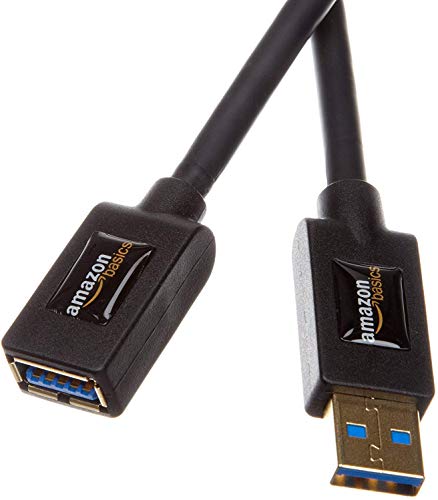
- 9.8-foot USB 3.0 Type-A extension
- Up to 4.8 Gbps data transfer
- Gold-plated connectors and shielding
Best For: Longer desktop peripheral connections
Durable 10-Foot Choice
Cable Matters 5Gbps USB 3.0 Extension

- 10-foot USB 3.0 extension cable
- Up to 5 Gbps transfer speeds
- Shielding and molded strain relief
Best For: Long-distance storage, printing, and VR connections
Flexible Everyday Extender
UGREEN USB 3.0 Extension Cable

- 6-foot USB 3.0 male-to-female cable
- Up to 5 Gbps transfer speeds
- Shielding and 15,000+ bend tests
Best For: General home, office, and gaming peripherals
Braided Long-Length Pick

- 10-foot USB 3.0 extension
- Up to 5 Gbps data transfer
- Nylon braid and reinforced construction
Best For: Gaming, TV, and extended workspace setups
Durable Twin Pack
AINOPE 6.6-Foot USB 3.0 Extension Cables
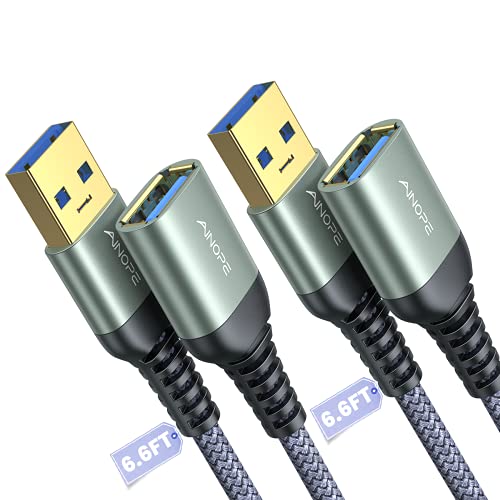
- Two 6.6-foot USB 3.0 cables
- Up to 5Gbps data transfer
- Braided design with cable buckles
Best For: Organized multi-peripheral setups needing two USB-A extensions
Long-Reach Pick
20-Foot USB 3.0 Extension Cable

- 20-foot reach for distant peripherals
- 5Gbps USB 3.0 data transfer
- 36-month warranty and braided build
Best For: Across-room USB-A connections for cameras, printers, and desks
Flexible 10-Foot Option
AINOPE Braided USB 3.0 Extension Cable

- 10-foot USB-A extension reach
- Up to 5Gbps USB 3.0 transfer
- Braided cable with reinforced joints
Best For: Gaming, home office, webcams, and USB-A surveillance cameras
Best with Extra Features
15-Foot USB 3.0 Extension Cable

- 15-foot USB-A male-to-female design
- Up to 5Gbps data transfer
- Shielded, reinforced construction
Best For: Long-distance indoor connections for USB-A peripherals
Everyday Peripheral Pick
Braided 3.3-Foot USB 3.0 Extension

- Compact 3.3-foot extension length
- Up to 5Gbps transfer and 2A charging
- Braided cable rated for 20,000+ bends
Best For: Short extensions for desks, gaming, and peripherals
Shielded Long-Cable Option
XBOHJOE 15-Foot USB 3.0 Extender
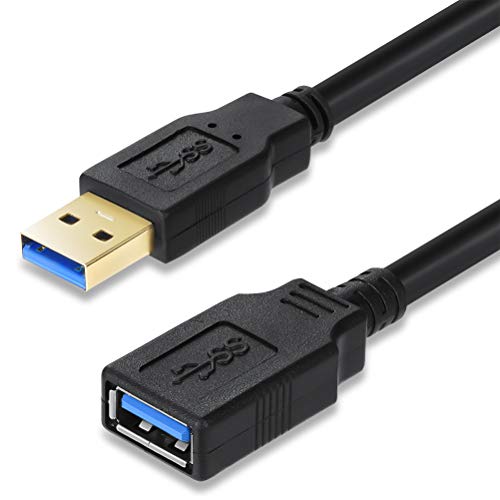
- 15-foot USB-A extension cable
- Up to 5Gbps USB 3.0 transfer
- Double-layer interference shielding
Best For: Long-distance connections for computers and peripherals
Reliable Long-Reach Pick – Amazon Basics USB 3.0 Extension Cable
For shoppers comparing usb extension cables for data transfer, this 9.8-foot Amazon Basics model offers a practical reach for connecting computers to printers, cameras, mice, and other USB peripherals. Its USB 3.0 design supports data rates up to 4.8 Gbps and is backward compatible with USB 2.0 devices.
Best For: Extending desktop USB connections where shielding and a nearly 10-foot length are useful.
Pros:
- Supports USB 3.0 data transfer up to 4.8 Gbps.
- Gold-plated connectors are designed to resist corrosion.
- Shielding helps minimize interference.
- Works with common peripherals such as printers, cameras, and mice.
Cons:
- Uses USB Type-A male-to-female connectors, so it is not a USB-C cable.
- The supplied specifications are geared toward indoor use.
This is a straightforward choice when you need a long Type-A extension cable with signal-focused construction. Its feature set suits everyday peripheral connections rather than newer connector standards.
Durable 10-Foot Choice – Cable Matters 5Gbps USB 3.0 Extension
This Cable Matters model is a strong option among usb extension cables for data transfer when you need a full 10 feet of reach. It supports USB 3.0 speeds up to 5 Gbps, remains compatible with USB 2.0 and 1.x devices, and is designed for peripherals ranging from hard drives and hubs to printers and VR headsets.
Best For: Extending USB connections to demanding peripherals, including storage devices and supported VR headsets.
Pros:
- Offers data transfer rates up to 5 Gbps.
- 10-foot length provides generous placement flexibility.
- Foil and braid shielding, bare copper conductors, and gold-plated connectors support signal performance.
- Molded strain relief and grip treads improve everyday handling.
Cons:
- Uses USB Type-A male-to-female connectors rather than USB-C.
- Its length may be excessive for compact desk setups.
With its combination of reach, SuperSpeed support, and reinforced connector design, this cable is well suited to setups where a peripheral needs to sit farther from the computer. It also preserves compatibility with older USB devices.
Flexible Everyday Extender – UGREEN USB 3.0 Extension Cable
UGREEN’s 6-foot USB extender provides a convenient middle ground for usb extension cables for data transfer. It supports up to 5 Gbps, works with USB 3.0, 2.0, 1.1, and 1.0 devices, and is listed for peripherals such as game controllers, webcams, drives, printers, cameras, hubs, and card readers.
Best For: Home and office users who want a flexible 6-foot extension for varied USB peripherals.
Pros:
- Supports data transfer up to 5 Gbps.
- Backward compatible with USB 2.0, 1.1, and 1.0 devices.
- Gold-plated connectors, reinforced joints, and multilayer shielding support durability and signal stability.
- Designed with more than 15,000 bend tests and plug-and-play operation.
Cons:
- The listed maximum charging current is 2A.
- Uses USB Type-A male-to-female connectors, not USB-C.
This cable balances useful length with broad peripheral compatibility and durability features. It is a sensible general-purpose extender for users who want easier access to devices without moving a computer or display.
Braided Long-Length Pick – 10FT USB 3.0 Extension Cable
This 10-foot braided cable is built for shoppers seeking usb extension cables for data transfer with extra reach and a more rugged exterior. Its USB 3.0 connection supports up to 5 Gbps and remains compatible with USB 2.0, 1.1, and 1.0 peripherals, including keyboards, consoles, printers, cameras, drives, and card readers.
Best For: Extending connections across a desk, entertainment area, or gaming setup where a braided jacket is desirable.
Pros:
- Provides up to 5 Gbps data transfer.
- 10-foot length helps position peripherals farther away.
- Nylon-braided jacket, reinforced joints, and an aluminum alloy case support durability.
- Rated for more than 10,000 bend tests.
Cons:
- Uses nickel-plated rather than gold-plated connectors.
- USB Type-A connectors limit it to compatible Type-A ports or adapters.
The braided construction and long reach make this a practical choice for gaming, television, and workspace setups. It emphasizes physical durability while retaining the speed and backward compatibility expected from USB 3.0.
Durable Twin Pack – AINOPE 6.6-Foot USB 3.0 Extension Cables
For shoppers comparing usb extension cables for data transfer, this two-pack offers a practical USB-A male-to-female setup for adding reach to computers and common peripherals. Its 6.6-foot length, 5Gbps-rated USB 3.0 performance, braided exterior, and included cable buckles suit organized indoor setups.
Best For: Extending keyboards, mice, printers, hubs, flash drives, card readers, and other USB-A accessories when you need two cables.
Pros:
- Two 6.6-foot USB 3.0 extension cables provide useful extra reach.
- Supports stated data transfer speeds up to 5Gbps and is backward compatible with USB 2.0 and USB 1.1.
- Nylon braiding, reinforced joints, and an all-metal aluminum-alloy connector design add physical durability.
- Included sticky buckles help manage excess cable and reduce tangling.
Cons:
- Uses USB Type-A connectors, so it is not a direct solution for USB-C-only devices.
- The 6.6-foot length may be limiting for across-room installations.
This is a sensible choice when you want a pair of moderately long USB 3.0 extensions with durable construction and simple cable management. It is particularly convenient for households or workspaces that need to extend more than one peripheral.
Long-Reach Pick – 20-Foot USB 3.0 Extension Cable
If you need usb extension cables for data transfer across a larger workspace, this 20-foot USB-A male-to-female cable prioritizes reach. It supports stated 5Gbps USB 3.0 transfer, has a braided exterior and reinforced connectors, and is designed for peripherals such as printers, webcams, storage devices, and controllers.
Best For: Extending USB connections across rooms or around desks to reach cameras, webcams, printers, hubs, and other USB-A peripherals.
Pros:
- 20-foot length helps overcome short cable and inconvenient port-placement limitations.
- Designed for USB 3.0 data transfer up to 5Gbps, with backward compatibility for USB 2.0 and USB 1.1.
- Nylon braiding, reinforced joints, metal shells, aluminum-alloy connectors, and gold-plated contacts support durability and signal clarity.
- Includes a stated 36-month warranty and cable organizer.
Cons:
- The manufacturer recommends connecting it directly to a rear motherboard USB port rather than through a hub because voltage can attenuate over the extended length.
- A 20-foot cable can be excessive for compact desk setups and may require more cable management.
This model stands out when distance is the main challenge. For the most reliable operation, follow the supplied connection guidance and use it with compatible USB-A devices, especially over longer runs.
Flexible 10-Foot Option – AINOPE Braided USB 3.0 Extension Cable
For a balanced reach, this 10-foot USB-A male-to-female cable is a practical option among usb extension cables for data transfer. It combines USB 3.0 performance rated up to 5Gbps with a braided exterior, reinforced joints, shielding, and gold-plated connectors for everyday peripheral and surveillance-camera extensions.
Best For: Gaming, sofa-distance device use, webcams, USB-A surveillance cameras, keyboards, flash drives, hard drives, and printers.
Pros:
- 10-foot length adds reach without the full excess of a 20-foot cable.
- Supports stated USB 3.0 transfer speeds up to 5Gbps and backward compatibility with USB 2.0 and USB 1.1.
- Braided nylon material and tested reinforced joints help protect the cable during regular handling.
- Shielding, gold-plated connectors, and an all-metal aluminum-alloy connector design are intended to support signal clarity and durability.
Cons:
- It is a single cable rather than a multi-pack.
- Compatibility is centered on USB Type-A connections, not USB-C ports.
- The listed maximum current is 900mA, so charging performance may not match higher-current charging cables.
This cable offers a useful middle ground for users who need more flexibility than a short extension provides. Its 10-foot reach and protective construction make it well suited to home entertainment, gaming, desk, and surveillance applications.
Best with Extra Features – 15-Foot USB 3.0 Extension Cable
For shoppers comparing usb extension cables for data transfer, this 15-foot USB-A male-to-female cable is designed for reaching devices positioned away from a computer, TV, or other host. It supports USB 3.0 speeds up to 5Gbps and works with USB 2.0 and 1.1 devices, with performance limited by the connected hardware.
Best For: Extending printers, security cameras, flash drives, webcams, and other USB-A peripherals across a room or around a desk.
Pros:
- Extra-long 15-foot length helps connect devices in hard-to-reach locations.
- USB 3.0 supports data transfer speeds up to 5Gbps and backward compatibility.
- Multilayer shielding, a flexible PVC jacket, and nickel-plated connectors support durability and connection stability.
Cons:
- The cable supports a maximum current of 1A, which may be limiting for some charging needs.
- Its long length may be more cable than needed for close-range setups.
This is a practical pick when reach and port accessibility matter most. Its USB-A design and 15-foot span suit stationary indoor peripherals, while the 5Gbps rating makes it useful for compatible data-transfer tasks.
Everyday Peripheral Pick – Braided 3.3-Foot USB 3.0 Extension
This 3.3-foot USB-A male-to-female cable is a compact option for usb extension cables for data transfer when a short reach is enough. It supports transfer speeds up to 5Gbps and is designed for peripherals such as gamepads, printers, webcams, keyboards, flash drives, and hard drives.
Best For: Adding modest length to desktop accessories, gaming setups, cameras, and other USB peripherals without managing a long cable.
Pros:
- USB 3.0 supports data transfer up to 5Gbps and charging up to 2A.
- Nylon braiding is rated to withstand more than 20,000 bends.
- Gold-plated connectors, metal housing, and multilayer shielding help reduce interference and support longevity.
Cons:
- The 3.3-foot length is intended for short extensions rather than across-room connections.
- It uses USB-A connectors, so devices with other port types require suitable adapters.
Choose this model for everyday setups where a little extra reach is useful and cable flexibility matters. Its braided exterior and broad peripheral compatibility make it particularly suited to frequently handled desk or gaming accessories.
Shielded Long-Cable Option – XBOHJOE 15-Foot USB 3.0 Extender
For buyers seeking usb extension cables for data transfer over a longer distance, this 15-foot USB-A male-to-female extender provides extra reach for computers and peripherals. Its USB 3.0 design supports up to 5Gbps when used with compatible equipment and remains backward compatible with older USB standards.
Best For: Extending connections to printers, mobile hard drives, card readers, mice, keyboards, and other USB devices positioned away from the host port.
Pros:
- 15-foot length helps connect peripherals without reaching behind a TV or desktop.
- Supports USB 3.0 transfer rates up to 5Gbps and works with USB 2.0, 1.1, and 1.0 devices.
- Aluminum foil and metal-braided shielding help isolate electromagnetic interference.
Cons:
- USB 3.0 speeds depend on the host, device, and USB bus.
- The long, 15-foot format may be unnecessary for nearby peripherals.
This cable is a sensible choice when you need substantial reach while retaining USB 3.0 capability. Its double-layer shielding and plug-and-play design make it well suited to extending common indoor computer peripherals.
How We Picked the Best USB Extension Cables for Data Transfer
We focused on USB 3.0 Type-A male-to-female cables designed to extend an existing connection while supporting high-speed data transfer. The selection includes short desk-friendly leads, longer options for roomier setups, multipacks, and cables marketed for peripherals such as webcams, game controllers, keyboards, mice, flash drives, and external storage.
We also considered advertised bandwidth, connector design, shielding, build quality, length, compatibility, and overall practicality. A longer cable can be useful, but it may be less convenient to route and more sensitive to signal limitations, so intended use matters as much as the headline speed.
Quick Comparison
| Use case | Recommended length | What to prioritize |
|---|---|---|
| Desktop peripherals | 3.3–6.6 feet | Compact routing and flexible connectors |
| Webcams or console accessories | 6–10 feet | Stable USB 3.0 performance and durable construction |
| Across a room or behind furniture | 15–20 feet | Reach, careful cable routing, and realistic speed expectations |
| Multiple devices | Two-pack or spare cable | Value and consistent connector quality |
Key Buying Factors for USB Extension Cables for Data Transfer
Speed and USB Standard
Look for USB 3.0 or USB 3.2 Gen 1 labeling when you need faster transfers than USB 2.0. Many products advertise up to 5Gbps, but actual performance depends on the connected devices, host port, storage hardware, and operating system. An extension cable cannot make a USB 2.0 device operate at USB 3.0 speeds.
Length and Signal Reliability
Choose the shortest cable that comfortably reaches your equipment. Six to 10 feet is often a practical range for desks, entertainment centers, and webcams. Fifteen- and 20-foot cables offer more flexibility, but they require better routing and may be less suitable for demanding high-speed storage use. Avoid combining several extension cables unless the manufacturer specifically supports that setup.
Connector Type and Compatibility
These products generally use USB Type-A male and female connectors. Confirm that your computer, hub, console, or peripheral has the correct port. They are useful for extending compatible USB-A devices, but they do not convert USB-A to USB-C, Micro-USB, or Lightning.
Construction and Shielding
Gold-plated contacts, braided jackets, strain relief, and shielding can improve durability and help reduce interference, though they do not guarantee maximum speed. For frequent plugging and unplugging, prioritize reinforced connectors and a flexible jacket that will not kink easily.
Who Should Buy Which USB Extension Cables for Data Transfer?
For a standard desk setup: Choose a 3.3- to 6.6-foot cable for a keyboard, mouse, controller, or nearby flash drive.
For webcams and gaming setups: A 6- to 10-foot USB 3.0 extension usually balances reach and reliable performance.
For wide-room placement: Consider a 15- or 20-foot model when reach is the priority, but test the connection with your specific device before relying on it for sustained storage transfers.
For households or workstations with several accessories: A two-pack offers a convenient spare and can be more economical than buying cables separately. Whatever you choose, verify the cable’s USB standard, connector type, and length before ordering.