A dependable wireless connection can make a major difference when you game on a desktop PC away from the router. The right adapter can improve speed, range, and consistency while reducing the need for a long Ethernet cable.
We compared 10 USB WiFi adapters across WiFi generations, wireless bands, advertised speeds, antenna designs, and practical PC compatibility to help you choose a better fit for your setup.
Best 10 Wifi Adapters for Gaming Picks for 2026
Best Wi-Fi 7 Upgrade

- Wi-Fi 7 tri-band speeds up to 6.5 Gbps
- 6 GHz support for responsive connectivity
- External antenna with adjustable cradle
Best For: Windows 11 gamers upgrading to Wi-Fi 7
Best Antenna Coverage
WAVLINK BE6500 Wi-Fi 7 Adapter

- Four adjustable 5 dBi antennas
- Tri-band Wi-Fi 7 with 6 GHz support
- Built-in driver for Windows 10/11
Best For: Desktop gaming setups needing flexible signal positioning
Best Windows 10/11 Compatibility

- Wi-Fi 6E tri-band speeds up to 3 Gbps
- Works with Windows 10 and 11
- Adjustable antenna and included cradle
Best For: Gamers using Windows 10 or 11 with a Wi-Fi 6E router
Best Long-Range Placement

- Wi-Fi 7 speeds up to 6,200 Mbps
- Two high-gain antennas with beamforming
- Detachable 3.9-foot USB cradle cable
Best For: Gamers needing flexible adapter placement away from the PC
Best Long-Range WiFi 6 Pick

- WiFi 6 dual-band speeds up to 1,800Mbps
- Two 5dBi antennas improve reception
- Includes a 3.3-foot USB 3.0 extension cable
Best For: Windows 10/11 gaming PCs needing extra range
Best Tri-Band Gaming Upgrade
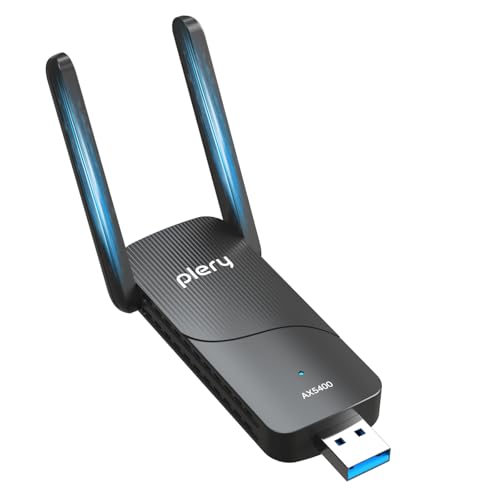
- Tri-band speeds up to 5,400Mbps
- Adds access to the 6GHz band
- Supports Windows 10/11 and Linux
Best For: Windows 11 gaming PCs with WiFi 6E/7 routers
Best Budget Dual-Band Option

- Dual-band speeds up to 1,300Mbps
- Two 5dBi antennas support longer-range reception
- Compatible with Windows 7 through 11
Best For: Budget Windows gaming PCs and older systems
Best Overall
TP-Link Archer TX30U Plus Wi-Fi 6 Adapter

- Wi-Fi 6 speeds up to 1,800 Mbps combined
- Two high-gain antennas with beamforming
- Windows 10/11, USB 3.0, and WPA3 support
Best For: Windows users seeking fast gaming and streaming connectivity
Best High-Gain Value
Tenda U11Pro AX900 Wi-Fi Adapter

- 6 dBi omnidirectional high-gain antenna
- Wi-Fi 6, MU-MIMO, and 5 GHz AP mode
- Built-in driver for Windows 7, 10, and 11
Best For: Windows users prioritizing signal reception and easy setup
Best Budget Pick
TP-Link Archer T2U Plus AC600 Adapter

- AC600 dual-band speeds up to 433 Mbps
- Adjustable 5 dBi high-gain antenna
- Broad Windows support plus listed macOS compatibility
Best For: Older PCs needing an affordable dual-band upgrade
Best Wi-Fi 7 Upgrade – NETGEAR Nighthawk A9000
For gamers choosing among wifi adapters for gaming, the NETGEAR Nighthawk A9000 is a high-end USB upgrade for Windows 11 PCs. Its Wi-Fi 7 tri-band design supports up to 6.5 Gbps, while the external antenna and cradle help optimize reception.
Best For: Windows 11 gamers who want Wi-Fi 7, 6 GHz access, and a flexible antenna setup.
Pros:
- Wi-Fi 7 tri-band connectivity with speeds up to 6.5 Gbps.
- Supports the 6 GHz band for potentially lower-latency connections.
- Flippable high-gain antenna and included cradle help improve signal placement.
- USB 3.0 connection and included driver USB simplify setup.
Cons:
- Requires Windows 11 or newer.
- Wi-Fi 7 performance depends on the router and internet plan.
The A9000 is a strong choice for a modern Windows 11 gaming setup, especially when paired with a compatible Wi-Fi 7 router. Its main limitation is the lack of Windows 10 support.
Best Antenna Coverage – WAVLINK BE6500 Wi-Fi 7 Adapter
The WAVLINK BE6500 stands out among wifi adapters for gaming with four adjustable high-gain antennas and tri-band Wi-Fi 7 support. It is designed for Windows 10 and 11 PCs and includes a built-in driver for a straightforward installation.
Best For: Desktop gamers who need flexible antenna positioning and broad signal coverage.
Pros:
- Tri-band Wi-Fi 7 supports up to 688 Mbps on 2.4 GHz, 2,882 Mbps on 5 GHz, and 2,882 Mbps on 6 GHz.
- Four foldable 5 dBi antennas can be adjusted for reception.
- Supports MLO and Multi-RU for improved latency and stability on supported networks.
- Includes receive and hotspot modes plus a USB 3.0 interface.
Cons:
- Compatible with Windows 10 and 11 only.
- Wi-Fi 7 features require compatible network equipment to deliver their potential.
With four antennas, ventilation, and flexible operating modes, the WAVLINK is appealing for desktop setups where placement and coverage matter. Its performance remains dependent on the connected router and environment.
Best Windows 10/11 Compatibility – NETGEAR Nighthawk A8000
The NETGEAR Nighthawk A8000 is a practical pick among wifi adapters for gaming when you want Wi-Fi 6E without moving to Windows 11. It supports Windows 10 and 11, offers tri-band speeds up to 3 Gbps, and adds a 6 GHz option when paired with a Wi-Fi 6E router.
Best For: Windows 10 or 11 gamers seeking a reputable Wi-Fi 6E USB upgrade.
Pros:
- Wi-Fi 6E tri-band connectivity with speeds up to 3 Gbps.
- Supports Windows 10 and 11 and works with older Wi-Fi 6, Wi-Fi 5, and compatible routers.
- 6 GHz band can provide a more responsive connection with a Wi-Fi 6E router.
- Flippable high-gain antenna and cradle allow reception adjustments.
Cons:
- 6 GHz use requires a Wi-Fi 6E router.
- Actual speeds vary with the router, connected devices, and internet plan.
The A8000 is a balanced choice for gamers who want 6 GHz capability while keeping Windows 10 compatibility. It is particularly sensible for systems paired with a Wi-Fi 6E router.
Best Long-Range Placement – TP-Link Archer TBE401UH
The TP-Link Archer TBE401UH is one of the more flexible wifi adapters for gaming, combining Wi-Fi 7 tri-band support with two high-gain antennas and a detachable USB cradle. Its 3.9-foot cable can help position the adapter for a stronger connection away from the PC.
Best For: Windows 10/11 gamers who need flexible placement and long-distance reception.
Pros:
- Wi-Fi 7 tri-band speeds up to 6,200 Mbps across the three bands.
- Two high-gain antennas, beamforming, and a detachable cradle support reception optimization.
- USB 3.0 provides faster data transfer than USB 2.0.
- Includes WPA3 security and a preloaded driver for plug-and-play setup.
Cons:
- Compatible with Windows 10 and 11 only.
- Maximum performance requires a compatible Wi-Fi 7 router.
The Archer TBE401UH is a compelling option when the computer cannot sit close to the router or when antenna placement is important. Its included cradle and cable add flexibility without requiring an internal network-card installation.
Best Long-Range WiFi 6 Pick – BrosTrend AX1800 USB Adapter
For gamers looking to upgrade a Windows desktop or laptop, the BrosTrend AX1800 is a practical choice among wifi adapters for gaming. Its WiFi 6 dual-band connection, external antennas, and flexible USB 3.0 placement are designed to support responsive online play and reliable everyday connectivity.
Best For: Windows 10 or 11 users who need stronger range through multiple walls and a simple USB installation.
Pros:
- WiFi 6 speeds up to 1,201Mbps on 5GHz and 574Mbps on 2.4GHz.
- Two 5dBi high-gain antennas and beamforming help improve signal reception.
- Included 3.3-foot USB 3.0 extension cable allows flexible adapter placement.
- Pre-loaded driver and WPA3 support simplify setup and security.
Cons:
- Supports Windows 10 and 11 only; Linux is not supported.
- Requires a compatible WiFi 6 router to take full advantage of WiFi 6 features.
The BrosTrend adapter balances useful speed, range, and placement flexibility. It is especially appealing when the gaming PC is located away from the router, provided you are using a supported Windows system.
Best Tri-Band Gaming Upgrade – AX5400 WiFi 6E USB Adapter
This AX5400 adapter is built for gamers who want access to the newer 6GHz band. As one of the more advanced wifi adapters for gaming in this roundup, it combines tri-band connectivity, dual high-gain antennas, and USB 3.0 performance for compatible Windows systems.
Best For: Windows 11 users with a WiFi 6E or WiFi 7 router who want to use the less congested 6GHz band.
Pros:
- Tri-band AX5400 speeds reach up to 2,402Mbps on both 6GHz and 5GHz.
- 6GHz support can help reduce congestion on compatible networks.
- Dual adjustable high-gain antennas support longer-range connectivity.
- Supports WPA3, OFDMA, MU-MIMO, and pre-loaded driver setup.
Cons:
- 6GHz access requires Windows 11 and a WiFi 6E or WiFi 7 router.
- Windows 10 supports only the 5GHz and 2.4GHz connections.
- The adapter is more feature-rich than necessary for users with older routers.
The AX5400 is the strongest fit here for a modern gaming setup that can take advantage of 6GHz. Its headline speeds depend on compatible hardware, but the added band and external antennas make it a compelling upgrade for newer networks.
Best Budget Dual-Band Option – Nineplus AC1300 USB Adapter
The Nineplus AC1300 is a straightforward, budget-friendly option for replacing weak built-in wireless or adding WiFi to a desktop. Its dual-band connection and two external antennas make it a practical entry among wifi adapters for gaming, especially for users with older Windows PCs.
Best For: Budget-conscious Windows users who want dual-band gaming connectivity and broad support for older operating systems.
Pros:
- Dual-band speeds reach up to 867Mbps on 5GHz and 400Mbps on 2.4GHz.
- Two 5dBi antennas help improve reception over longer distances.
- USB 3.0 supports the adapter’s high-speed connection and is backward compatible with USB 2.0.
- Works with Windows 7, 8, 8.1, 10, and 11, with two-year support.
Cons:
- Does not support Mac OS, Chromebook, or Linux.
- Windows 7 may require manual driver installation.
- Its AC1300 standard is slower than newer WiFi 6 and WiFi 6E options.
The Nineplus makes the most sense when affordability and older Windows compatibility matter more than the latest wireless standard. It offers useful 5GHz performance and antenna-based range without requiring an internal card installation.
Best Overall – TP-Link Archer TX30U Plus Wi-Fi 6 Adapter
For shoppers comparing wifi adapters for gaming, the TP-Link Archer TX30U Plus stands out with Wi-Fi 6, dual-band connectivity, high-gain antennas, and USB 3.0 support. Its 5 GHz band is rated up to 1,201 Mbps, while 2.4 GHz reaches up to 574 Mbps; actual performance depends on distance, obstacles, and network conditions.
Best For: Windows 10 and 11 desktop or laptop users who want a fast, modern adapter for gaming, streaming, and multi-device homes.
Pros:
- Wi-Fi 6 dual-band speeds up to 1,800 Mbps combined.
- Two adjustable high-gain antennas and beamforming help improve reception and coverage.
- USB 3.0, MU-MIMO, OFDMA, and WPA3 support.
- Preloaded driver and compact folding design simplify setup and storage.
Cons:
- Supports Windows 10 and 11 only.
- Performance can vary with walls, distance, and other wireless interference.
The TX30U Plus is the strongest all-around choice here for compatible Windows systems. Its Wi-Fi 6 features and antenna design make it especially appealing when gaming performance and dependable coverage matter more than the smallest possible dongle.
Best High-Gain Value – Tenda U11Pro AX900 Wi-Fi Adapter
The Tenda U11Pro is a practical pick among wifi adapters for gaming if your priority is stronger reception from a desktop or laptop. It uses a 6 dBi omnidirectional antenna and Wi-Fi 6 connectivity, with claimed AX900 speeds designed for gaming, streaming, and video calls.
Best For: Windows 7, 10, or 11 users who need an external high-gain antenna and straightforward plug-and-play setup.
Pros:
- 6 dBi omnidirectional antenna is designed to improve signal reception.
- Supports Wi-Fi 6, MU-MIMO, and AP mode for creating a hotspot for up to eight devices on 5 GHz.
- Built-in driver supports Windows 7, 10, and 11 systems.
- Coverage and stability features are intended for homes and offices with interference.
Cons:
- Uses a USB 2.0 interface.
- Windows compatibility is specified; macOS support is not listed in the supplied details.
- Its large external antenna design is less compact than a small travel dongle.
The U11Pro makes the most sense when reception is the main concern. Its high-gain antenna and broad Windows compatibility offer useful flexibility, although the USB 2.0 connection and larger form factor may matter to some buyers.
Best Budget Pick – TP-Link Archer T2U Plus AC600 Adapter
The TP-Link Archer T2U Plus is a sensible budget option for shoppers looking for wifi adapters for gaming without moving to Wi-Fi 6. Its dual-band AC600 design delivers up to 433 Mbps on 5 GHz and 200 Mbps on 2.4 GHz, while the adjustable 5 dBi antenna helps position the adapter toward the router.
Best For: Older Windows PCs and laptops that need an affordable dual-band upgrade for everyday gaming, streaming, and web use.
Pros:
- Affordable AC600 dual-band upgrade over older wireless N hardware.
- Adjustable, high-gain 5 dBi antenna can be rotated toward the router.
- Supports a wide range of Windows versions, including Windows XP through Windows 11.
- Also lists macOS compatibility.
Cons:
- Lower rated speeds than the two Wi-Fi 6 adapters.
- Driver download is required for installation.
- Does not list Wi-Fi 6, MU-MIMO, OFDMA, or WPA3 support.
The Archer T2U Plus is best viewed as a low-cost modernization choice rather than a maximum-speed gaming adapter. It is particularly useful for older systems, broad Windows compatibility, and situations where an adjustable antenna can improve reception.
How We Picked These Wifi Adapters for Gaming
We focused on USB adapters designed for Windows desktop PCs and laptops, then compared their wireless standards, advertised throughput, band support, antenna configuration, connection interface, and overall use case. The selection includes current WiFi 7 and WiFi 6E models, mainstream WiFi 6 options, and lower-cost AC600 and AC1300-class adapters.
Advertised speeds are theoretical maximums, not guaranteed gaming performance. Real-world results depend on your router, internet plan, distance, walls, interference, USB port, drivers, and local network traffic. For gaming, stable latency and reliable range generally matter more than the largest headline number.
Quick Comparison
| Adapter class | Best suited to | What to expect |
|---|---|---|
| WiFi 7 | Newer routers and high-speed networks | Highest potential throughput and modern features |
| WiFi 6E | Congested environments with a 6GHz router | Cleaner 6GHz spectrum and strong short-range performance |
| WiFi 6 | Most current gaming PCs | Good efficiency, range, and value |
| WiFi 5 or older | Budget upgrades and basic broadband | Affordable, but less future-proof |
Key Buying Factors for Wifi Adapters for Gaming
Wireless Standard and Router Compatibility
Match the adapter to your router where possible. A WiFi 7 adapter can connect to older networks, but it will not deliver WiFi 7 benefits without a compatible router. WiFi 6 remains a practical choice for many households, while WiFi 6E is most useful when both the router and adapter support the 6GHz band.
Range, Antennas, and Placement
External or high-gain antennas can help a desktop located far from the router or behind several walls. A USB extension cable can also improve results by moving the adapter away from the metal PC case and positioning it more openly.
USB Connection and Drivers
USB 3.0 is preferable for higher-speed adapters because older USB ports may limit throughput. Check Windows version support and driver availability before buying, especially for older systems or newly released WiFi 7 hardware.
Latency and Network Conditions
No wireless adapter can eliminate congestion or poor router placement. For competitive gaming, use the clearest available band, keep the adapter unobstructed, and prioritize a stable signal over maximum download speed.
Who Should Buy Which Wifi Adapters for Gaming?
Choose a WiFi 7 adapter if you already own—or plan to buy—a WiFi 7 router and want the most future-ready option for fast local transfers, downloads, and multiple connected devices.
Choose WiFi 6E if your router supports 6GHz and your gaming PC is relatively close to it. The extra band can reduce interference, though 6GHz usually loses range more quickly through walls.
Choose WiFi 6 for the best balance of performance, compatibility, and price for most modern gaming setups. Models with external antennas are particularly attractive for distant desktop PCs.
Choose an AC600 or similar budget adapter for basic online gaming, modest internet plans, or an older PC that needs a simple wireless upgrade. If your connection is fast or your router is far away, spending more on WiFi 6 is usually worthwhile.