The right equalizer can make spoken audio clearer, reduce distracting bass or harshness, and help your podcast sound more consistent across microphones and listening devices. The best choice depends on your signal chain, recording setup, and how much hands-on control you want.
We’ve gathered 10 options ranging from compact tone-control units and headphone preamps to USB mixers and full rack-mount graphic equalizers. Use the guide below to match the features and connections to your workflow.
Best 10 Audio Equalizers for Podcasting Picks for 2026
Flexible Analog Control

- Seven adjustable bands from 60Hz to 15kHz
- ±12dB control range with preamp gain
- 3.5mm connectivity and headphone amplification
Best For: Hands-on EQ adjustment in compact recording and streaming setups
Simple Recording Hub
M-AUDIO M-Track Solo USB Interface

- XLR, line, and instrument inputs
- Phantom power for condenser microphones
- Headphone monitoring with zero-latency mode
Best For: Entry-level podcast recording and microphone connectivity
Balanced Studio Tuning
Douk Audio T7 7-Band Equalizer

- Seven bands with ±6dB adjustment
- XLR and RCA inputs and outputs
- 104dB-plus SNR and compact aluminum case
Best For: Balanced or RCA podcast audio chains needing dedicated hardware EQ
All-in-One Podcast Mixer
Aveek 4-Channel Mixer with USB Recording

- Three-band EQ on a four-channel mixer
- USB-C recording and USB/Bluetooth playback
- 48V phantom power and 99 DSP effects
Best For: Podcasters and streamers managing multiple sources and live audio
Portable Tone Control

- Three-band bass, midrange, and treble control
- Headphone amp with gain and loudness functions
- Battery powered with 3.5mm and 6.35mm jacks
Best For: Portable headphone monitoring and simple tone shaping
Rack-Mount Precision
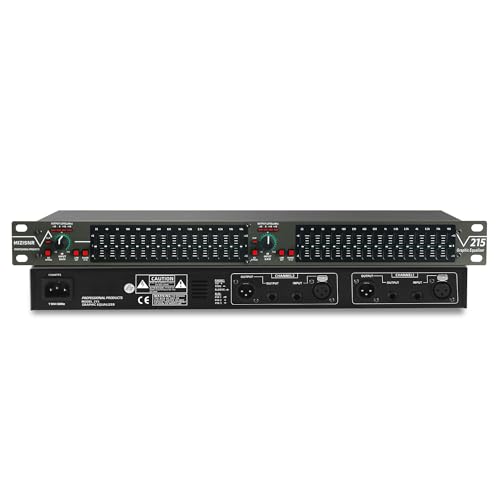
- 15 bands per channel for detailed tonal adjustment
- Low-cut filter helps reduce rumble and hum
- XLR and 1/4-inch connections in a 1U chassis
Best For: Permanent studio and rack-based podcast systems
Connected Audio Visualizer

- 15-band, two-channel EQ with spectrum display
- RCA, 3.5mm, USB, and Bluetooth 5.0 inputs
- Can also serve as an amplifier or preamplifier
Best For: Home podcast setups needing flexible connectivity and visual feedback
Feature-Rich 31-Band Pick
Digital Equalizer with Spectrum Display

- 31-band control with real-time LED spectrum monitoring
- Noise reduction, EQ bypass, and 10 preset modes
- Bluetooth 5.2, USB, XLR, and 1/4-inch connectivity
Best For: Podcast studios needing detailed visual EQ control
Versatile Studio Hub
31-Band Equalizer with Bluetooth

- 31-band tuning with 12 customizable modes
- Auto-save presets and real-time frequency monitoring
- Optical, coaxial, USB, and Bluetooth connectivity
Best For: Multi-device podcast and recording setups
Focused Rack-Mount Choice

- 15 bands per channel with ±12 dB adjustment
- Low-cut filter, EQ bypass, and dedicated bass output
- 1U rack design with XLR and 1/4-inch TRS connections
Best For: Rack-based dual-channel podcast studios
Flexible Analog Control – 7-Band Sound Equalizer
This compact two-channel unit is a practical option for shoppers comparing audio equalizers for podcasting and basic recording setups. It offers seven adjustable frequency bands, up to 5x preamp gain, and 3.5mm connectivity for headphones, microphones, and compatible mobile devices.
Best For: Podcasters and streamers who want hands-on frequency adjustment in a small, freestanding equalizer.
Pros:
- Seven bands cover frequencies from 60Hz to 15kHz with a ±12dB control range.
- Dual-channel design includes a preamp and headphone amplifier.
- Aluminum-alloy construction and 5V–12V DC power compatibility.
Cons:
- It is a standalone analog-style equalizer rather than a USB audio interface.
- The supplied notes do not specify included power accessories.
Choose this model when direct tonal shaping is more important than integrated computer recording. Its broad adjustment range and headphone support can help refine a simple podcast chain, but you may need additional equipment for USB capture.
Simple Recording Hub – M-AUDIO M-Track Solo USB Interface
Although it is an audio interface rather than a dedicated equalizer, the M-AUDIO M-Track Solo is a useful foundation for audio equalizers for podcasting. It connects microphones, instruments, and line-level sources to a Mac or PC while providing headphone monitoring and zero-latency direct monitoring.
Best For: New podcasters who need an affordable USB interface for connecting a microphone and monitoring a recording setup.
Pros:
- One combo XLR/line input includes phantom power for condenser microphones.
- Offers a separate line/instrument input for flexible two-channel recording.
- Includes headphone and RCA outputs plus a USB/Direct monitoring switch.
- Supports recording at up to 48kHz and includes MPC Beats software.
Cons:
- It does not provide built-in multi-band EQ controls.
- Recording resolution is limited to 48kHz according to the supplied specifications.
The M-Track Solo makes more sense as the signal-routing and recording core of a podcast system than as an EQ itself. Pair it with software equalization or an external processor if you want dedicated tone shaping.
Balanced Studio Tuning – Douk Audio T7 7-Band Equalizer
The Douk Audio T7 is a dedicated seven-band preamp for shoppers seeking audio equalizers for podcasting or other line-level audio systems. Its XLR and RCA input/output options make it adaptable, while the ±6dB adjustment range allows measured changes across bass, midrange, and treble frequencies.
Best For: Users with balanced or RCA equipment who want a dedicated hardware EQ between source and amplifier or powered speakers.
Pros:
- Seven frequency bands span 64Hz to 8kHz for targeted tonal adjustments.
- Provides both XLR and RCA inputs and outputs simultaneously.
- Specified 104dB-plus SNR and distortion as low as 0.003%.
- Compact aluminum-alloy casing helps provide shielding and durability.
Cons:
- It has no volume-control knob and outputs at the rated level.
- Its supplied frequency bands do not extend as high as some seven-band EQ designs.
This is a strong fit for a more established hardware chain where balanced connectivity matters. Because it lacks a volume control and is not a USB interface, confirm that your mixer, interface, or amplifier provides the remaining controls you need.
All-in-One Podcast Mixer – Aveek 4-Channel Mixer with USB Recording
For creators comparing audio equalizers for podcasting, the Aveek 4-channel mixer combines basic EQ with microphone inputs, USB recording, monitoring, and effects. Its channel controls include three-band high, mid, and low adjustment, while 48V phantom power supports compatible condenser microphones.
Best For: Podcasters and livestreamers who want mixing, recording, monitoring, Bluetooth playback, and basic EQ in one console.
Pros:
- Two XLR/6.35mm inputs accommodate microphones or guitars.
- Three-band EQ, gain controls, and output fader support quick channel adjustments.
- USB-C PC recording, USB playback/recording, and Bluetooth playback are built in.
- Includes headphone monitoring, 48V phantom power, and 99 DSP effects.
Cons:
- The EQ offers three bands rather than the more precise control of a dedicated seven-band unit.
- Bluetooth is for playback and cannot connect an output device according to the supplied notes.
- The mixer is larger and heavier than a small standalone EQ.
This mixer is the most versatile choice here for a multi-source podcast desk. It trades detailed frequency control for a broader feature set, making it useful when you also need inputs, effects, USB recording, and live monitoring.
Portable Tone Control – Fosi Audio SK01
The Fosi Audio SK01 is a compact option for podcast creators who need basic audio equalizers for podcasting adjustments at a headphone-monitoring station. Its analog bass, midrange, and treble controls can help you shape what you hear, while the gain switch accommodates headphones with different impedances.
Best For: Podcasters who want portable headphone amplification and hands-on three-band tone control.
Pros:
- Combines a headphone amplifier, analog preamp, and three-band equalizer.
- Provides bass, midrange, and treble adjustment with a tone-defeat button.
- Includes loudness compensation, gain switching, and up to 2,400mW in high-impedance mode.
- Offers 3.5mm and 6.35mm headphone jacks, a rechargeable 2,500mAh battery, and up to six hours of battery life.
Cons:
- Its three-band control is less detailed than a multi-band rack equalizer.
- It is designed around headphone and instrument connections rather than XLR studio routing.
The SK01 makes the most sense when monitoring flexibility and portability matter more than extensive frequency-by-frequency control. It is a practical personal listening tool, but not a full podcast mixing equalizer.
Rack-Mount Precision – 15-Band Stereo Graphic EQ
This 15-band stereo graphic equalizer is suited to podcast setups that need more precise audio equalizers for podcasting control across two channels. Its adjustable bands, low-cut filter, balanced XLR connections, and rack-mount format make it a more installation-focused choice for studio or live signal chains.
Best For: Fixed podcast studios, audio installations, and users who need detailed two-channel EQ control.
Pros:
- Provides 15 adjustable bands per channel with a range of up to ±12dB.
- Low-cut filtering helps attenuate wind noise, floor rumble, and electrical hum.
- Includes XLR balanced and 1/4-inch TRS unbalanced inputs and outputs.
- Standard 1U rack-mount design and a bypass switch support straightforward installation and troubleshooting.
Cons:
- The rack-mount design is less convenient for portable or compact podcast rigs.
- Its supplied features focus on wired audio processing rather than wireless or USB connectivity.
For creators who want hands-on control over multiple frequency ranges, this model offers substantially more adjustment than a simple tone-control unit. Its 1U chassis and professional connections are best matched with a dedicated rack or studio setup.
Connected Audio Visualizer – Decibelvibe TNZ SGE6
The Decibelvibe TNZ SGE6 combines audio equalizers for podcasting with broad connectivity and a visual spectrum display. It provides 15-band EQ for two channels, rear RCA and 3.5mm input/output, plus Bluetooth and USB inputs for flexible home-audio or hybrid content setups.
Best For: Home podcasters who want versatile source connections, two-channel EQ, and an animated audio display.
Pros:
- Offers 15-band equalization across two channels.
- Supports RCA and 3.5mm connections, along with USB and Bluetooth 5.0 inputs.
- Built-in microphone can drive the spectrum display without connected audio input cables.
- Includes 16 color options plus brightness, speed, and gain adjustments.
Cons:
- The supplied notes do not specify balanced XLR connections for professional microphone routing.
- Its visualizer-focused features may be unnecessary for a strictly audio-only podcast chain.
The SGE6 is a flexible choice when connectivity and presentation matter alongside EQ. It can also function as an amplifier or preamplifier, although podcasters should confirm that its RCA and 3.5mm format matches their existing equipment.
Feature-Rich 31-Band Pick – Digital Equalizer with Spectrum Display
For creators comparing audio equalizers for podcasting, this 31-band digital model offers detailed frequency control, real-time visual monitoring, and several connection options. Its noise-reduction function, adjustable bass/mid/high controls, and rack-mount design make it a flexible choice for a more involved recording or studio setup.
Best For: Podcast studios and audio setups that value visual EQ monitoring, extensive connectivity, and preset flexibility.
Pros:
- 31-band adjustment with real-time LED spectrum indication.
- Includes intelligent noise reduction and separate high, mid, and bass adjustment.
- Offers 10 preset modes, EQ bypass, Bluetooth 5.2, and USB playback.
- Supports XLR balanced and 1/4-inch TRS unbalanced inputs and outputs.
Cons:
- Its rack-mount format may be more equipment than a simple podcast desk requires.
- The many connection and adjustment options may add setup complexity for beginners.
This is a strong option when podcasting is part of a broader studio, live, DJ, or home-theater system. Choose it if you want granular control and a frequency display rather than a minimal plug-and-play equalizer.
Versatile Studio Hub – 31-Band Equalizer with Bluetooth
This 31-band graphic equalizer is one of the more adaptable audio equalizers for podcasting, with customizable modes, real-time frequency monitoring, and noise and echo reduction. Optical, coaxial, USB, and Bluetooth connectivity also make it useful when a podcast system shares equipment with music, home theater, or live audio sources.
Best For: Podcasters who want flexible source integration, customizable presets, and an equalizer suited to multiple audio environments.
Pros:
- Provides 31-band tuning with independent band adjustment.
- Includes 12 customizable modes and auto-save presets for quick switching.
- Supports optical, coaxial, USB lossless playback, and Bluetooth connectivity.
- Designed for use with studio monitors, mixers, home theater systems, and live setups.
Cons:
- The supplied notes do not specify dedicated microphone inputs or podcast-specific controls.
- Its broad multi-device feature set may be unnecessary for a basic single-source podcast rig.
Consider this model if your podcast setup includes several devices or you want saved EQ profiles for different voices and program types. Its versatility is the main attraction, while a simpler equalizer may be easier for a strictly voice-only workflow.
Focused Rack-Mount Choice – 15-Band Dual-Channel EQ
For podcast systems that need straightforward rack-mounted processing, this dual-channel 15-band equalizer provides focused control without the larger 31-band layout. Low-cut filtering, noise reduction, EQ bypass, and a dedicated bass output can help refine voice and program audio when integrated with compatible studio or live equipment.
Best For: Rack-based podcast studios and dual-channel setups that need practical EQ control and low-frequency management.
Pros:
- Provides 15 adjustable bands per channel with a ±12 dB range.
- Low-cut control helps reduce unwanted low-end noise.
- Includes EQ bypass and a 1U rack-mount form factor for easy integration.
- Offers XLR and 1/4-inch TRS connections plus an adjustable bass output.
Cons:
- Offers fewer bands than the two 31-band models in this roundup.
- Its rack-mount design may not suit compact desktop podcast stations.
- The product is specified for 110-volt AC power.
This is a sensible choice when you want essential shaping and low-cut control in a professional rack system. It favors practical dual-channel operation over extra presets, wireless features, or a built-in spectrum display.
How We Picked the Best Audio Equalizers for Podcasting
We evaluated these products by looking at the controls most useful for spoken-word recording: frequency-band coverage, adjustment range, channel design, noise-management features, and connection options. We also considered whether each unit suits a simple home setup, a computer-based recording workflow, or a more advanced mixer-and-rack system.
Because podcast studios vary widely, this list includes more than traditional rack EQs. Compact preamps, headphone amplifiers, mixers, and USB interfaces can also shape or manage audio, although they serve different roles in the signal chain.
Quick Comparison
| Setup type | Best match | What to prioritize |
|---|---|---|
| USB microphone or computer setup | USB interface or compact mixer | Reliable computer connectivity, monitoring, and simple gain control |
| Analog microphone chain | Balanced preamp or rack EQ | XLR inputs and outputs, low noise, and compatible levels |
| Solo host monitoring | Headphone amplifier with EQ | Comfortable headphone output and accessible tone controls |
| Multi-person or live podcast | Four-channel mixer | Multiple inputs, independent controls, USB recording, and monitoring |
| Detailed tonal shaping | 15- or 31-band graphic EQ | Fine frequency adjustments, channel flexibility, and rack compatibility |
Key Buying Factors for Audio Equalizers for Podcasting
Choose the Right Number of Bands
Fewer bands are easier to operate and work well for broad adjustments such as reducing muddiness or adding presence. A 15- or 31-band model offers more precise control, but it requires greater knowledge and makes it easier to over-process voices.
Check Inputs, Outputs, and Signal Levels
Confirm whether the equalizer uses XLR, RCA, 3.5mm, USB, or a combination of connections. Balanced XLR connections are generally preferable for longer cable runs and professional equipment. Also verify that the unit fits between your microphone preamp, mixer, interface, amplifier, or powered speakers.
Look for Useful Podcast Controls
For speech, practical features include independent left and right channels, adjustable bass and treble, low-noise operation, headphone monitoring, and a bypass switch for comparing processed and unprocessed sound. Bluetooth can be convenient for playback, but it is not a substitute for a proper microphone input or wired recording path.
Consider Where Processing Happens
Hardware EQ changes the signal before or during recording, while software EQ can be adjusted non-destructively afterward. If you are new to audio processing, a simpler hardware unit or a USB interface paired with recording software may be easier than a large graphic equalizer.
Who Should Buy Which Audio Equalizers for Podcasting?
For Beginners and Simple Home Studios
Choose a compact equalizer, headphone preamp, or USB interface with straightforward controls. These options take up less space and avoid the complexity of a full rack system.
For Two-Person or Remote-Style Productions
A USB mixer is the more practical choice when you need several inputs, independent level controls, and direct computer recording. Prioritize monitoring and input compatibility over the number of EQ sliders.
For Experienced Producers and Fixed Studio Racks
A 15- or 31-band graphic equalizer makes sense when you already have compatible outboard equipment and want detailed, repeatable tonal shaping. Select a model with the connections, channel count, and noise performance your rack requires.
For Podcasting with Occasional Music or Playback
Models with Bluetooth, USB, or auxiliary inputs can simplify background playback and testing. Keep the spoken-word microphone path wired whenever possible for dependable latency and signal quality.