The best trackballs for small hands make precise cursor control easier without forcing your fingers to stretch across an oversized shell. Compact designs, smaller balls, and adjustable angles can improve comfort for work, browsing, and creative tasks.
We compared 10 options across control layout, connection type, size, ergonomics, and everyday usability so you can find a trackball that fits your hand and workspace.
Best 10 Trackballs for Small Hands Picks for 2026
Best Compact Wireless Pick

- Compact right-handed design for smaller hands
- Bluetooth and 2.4GHz wireless switching
- Silent clicks and included travel pouch
Best For: Small-handed users seeking a quiet, portable wireless trackball
Best Simple Ambidextrous Option

- Ambidextrous layout for either hand
- Scroll ring for documents and web pages
- Detachable wrist rest and wired USB connection
Best For: Desktop users wanting simple, comfortable wired control
Best Multi-Device RGB Pick

- Three-device wireless connectivity
- Four adjustable DPI levels
- Thumb control with physical RGB modes
Best For: Right-handed multi-device users who want adjustable control
Best Ambidextrous Wireless Choice
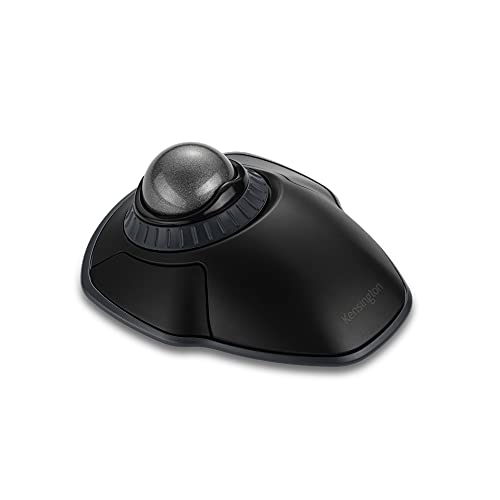
- 2.4GHz and Bluetooth wireless connectivity
- Ambidextrous design with scroll ring
- Four DPI settings and detachable wrist rest
Best For: Users wanting wireless flexibility and comfortable two-hand use
Best Mini Handheld Pick

- Compact ambidextrous handheld design
- Plug-and-play wired USB connection
- Thumb control with 4D scrolling
Best For: Travel, cramped desks, and couch use
Best Adjustable Wireless Pick
SABLUTE Ergonomic Trackball Mouse

- Adjustable 0° or 18° ergonomic tilt
- Bluetooth and 2.4GHz for three devices
- Rechargeable with five DPI levels
Best For: Right-handed multitaskers and long work sessions
Best Simple Wired Alternative
OATIPHO Mini Handheld Trackball

- Compact ambidextrous handheld form
- USB connection needs no wireless setup
- Useful where mouse-pad space is limited
Best For: Basic travel, presentations, and compact desks
Best Quiet Tilted Option
Nulea M511 Wireless Thumb-Control Trackball
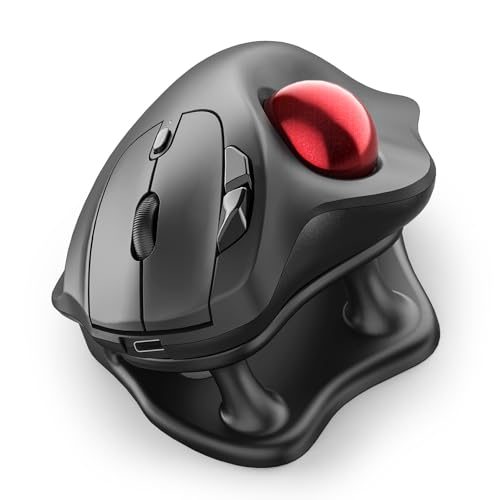
- 21.7° tilt stand for a more natural wrist position
- Silent operation across the controls and scroll wheel
- Bluetooth or USB connection for up to three devices
Best For: Right-handed users seeking quiet, ergonomic desk control
Best Left-Handed Pick
ELECOM EX-G Wireless Thumb-Control Trackball

- Purpose-built left-handed ergonomic layout
- Six programmable buttons with downloadable software
- 750/1500 DPI switch and USB wireless connection
Best For: Left-handed users wanting compact programmable control
Best Compact Wireless Pick – ELECOM BITRA Trackball
For shoppers comparing trackballs for small hands, the ELECOM BITRA stands out for its compact, right-handed design and thumb-operated control. It combines Bluetooth and 2.4GHz wireless connectivity, quiet buttons, and a travel pouch in a small 2.7-ounce body.
Best For: Small-handed users who want a quiet, portable wireless trackball.
Pros:
- Compact design is about 30 percent smaller than ELECOM’s previous generation.
- Switches between Bluetooth and 2.4GHz wireless without re-pairing.
- Silent switches, programmable buttons, receiver storage, and an included pouch add everyday convenience.
Cons:
- Right-hand orientation limits flexibility for left-handed users.
- Uses a smaller 25mm ball rather than the larger balls found on some alternatives.
The BITRA is one of the most purpose-built options here for smaller hands and mobile workspaces. Its compact shape and dual wireless setup make it especially practical for travel, offices, and devices that support Bluetooth Low Energy.
Best Simple Ambidextrous Option – Kensington Orbit Trackball
The wired Kensington Orbit is a straightforward choice among trackballs for small hands, particularly for users who prefer an ambidextrous layout and a stable desktop setup. Its optical tracking, scroll ring, detachable wrist rest, and USB connection focus on comfortable everyday productivity.
Best For: Right- or left-handed desktop users who prefer wired reliability and easy scrolling.
Pros:
- Ambidextrous design accommodates both right- and left-handed users.
- Scroll ring makes moving through documents and web pages convenient.
- Detachable wrist rest provides cushioned support during extended use.
Cons:
- USB wired connection offers less flexibility than wireless models.
- Only two buttons are provided.
- The listed dimensions are larger than the compact ELECOM BITRA.
This Orbit is a sensible desk-centered option when comfort, simple controls, and ambidextrous use matter more than portability. The scroll ring is its defining feature, while the wired design avoids battery management.
Best Multi-Device RGB Pick – Nulea M508 Wireless Trackball
The Nulea M508 gives shoppers considering trackballs for small hands a feature-rich wireless option with thumb control, a sculpted right-hand shape, and three-device switching. Its adjustable DPI range and physical RGB control make it suited to flexible office and home setups.
Best For: Right-handed users who want multi-device wireless control and adjustable cursor speed.
Pros:
- Connects through a 2.4GHz receiver, BT1, or BT2 and switches among up to three devices.
- Thumb-controlled trackball can reduce wrist and arm movement while saving desk space.
- Offers four DPI settings from 400 to 1600 and hardware-controlled RGB modes.
Cons:
- Right-hand-only design is not suited to left-handed use.
- The supplied notes do not specify dimensions, so its fit for very small hands is less certain.
- RGB lighting may be unnecessary for users seeking a simple productivity mouse.
The M508 is best viewed as a versatile productivity accessory rather than a minimalist compact model. Its three-device connectivity and adjustable sensitivity are useful for multi-screen workflows, though shoppers with especially small hands may want to confirm the physical fit.
Best Ambidextrous Wireless Choice – Kensington Orbit Wireless
Kensington Orbit Wireless Trackball with Scroll Ring - Space Gray (K72675WW),Black/Grey
Check Price On AmazonThe Kensington Orbit Wireless is a flexible alternative for shoppers comparing trackballs for small hands, with an ambidextrous shape, wireless connectivity, and a scroll ring. Its 40mm ball, four DPI settings, and detachable wrist rest support precise control and extended desktop use.
Best For: Left- or right-handed users who want wireless freedom, scrolling, and adjustable sensitivity.
Pros:
- Supports both 2.4GHz and Bluetooth 3.0/LE wireless connections.
- Ambidextrous design, scroll ring, and detachable wrist rest support varied users.
- Four DPI settings provide options from precision editing to faster browsing.
Cons:
- Its listed 5.46-by-4.51-inch dimensions are not especially compact.
- Only two buttons are included.
- Requires two AA batteries.
This model offers more wireless flexibility than the wired Orbit while retaining its scroll-ring concept and ambidextrous design. It is not the smallest product in the roundup, but its adjustable DPI and wrist support may suit users who prioritize comfort over a truly miniature footprint.
Best Mini Handheld Pick – YUMQUA Mini Finger Trackball
If you need trackballs for small hands, the YUMQUA Mini Handheld Trackball Mouse is designed for fingertip and thumb control rather than broad desk movement. Its compact, ambidextrous design works well when desk space is limited or you want a handheld option.
Best For: Travel, cramped desks, couch use, and users who prefer an ambidextrous handheld mouse.
Pros:
- Compact handheld design requires no mouse pad or desk surface.
- Thumb-operated trackball supports 4D scrolling.
- Plug-and-play USB connection needs no batteries, drivers, or software.
- Works with Windows, macOS, Linux, and Chrome OS.
Cons:
- Wired USB design limits cable-free flexibility.
- Three-button layout is simpler than more feature-rich mice.
This is a practical choice for small hands and compact setups, especially if you value simple wired reliability over wireless features or extensive customization.
Best Adjustable Wireless Pick – SABLUTE Ergonomic Trackball Mouse
For shoppers comparing trackballs for small hands, the SABLUTE offers a more configurable alternative with a thumb-operated ball, adjustable tilt, and wireless connectivity. Its 0° or 18° angle lets you choose a hand position that feels more natural during extended computer use.
Best For: Right-handed users who want wireless device switching, rechargeable power, quiet clicks, and adjustable cursor sensitivity.
Pros:
- Adjustable 0°/18° angle can support a more natural wrist position.
- Connects with up to three devices using Bluetooth and 2.4GHz.
- Five DPI settings range from 800 to 4800.
- Rechargeable battery, USB-C charging, and optional backlight.
Cons:
- Right-hand orientation is less flexible for left-handed users.
- Driver customization is not compatible with Mac OS.
- New trackball users may need an adjustment period.
This model suits users who want premium flexibility in a small workspace, though its larger feature set and right-handed shape may be more than needed for buyers seeking the simplest compact trackball.
Best Simple Wired Alternative – OATIPHO Mini Handheld Trackball
The OATIPHO Mini Finger Mouse is a straightforward option among trackballs for small hands, with a compact handheld shape and wired USB connection. Because it stays in your hand, it can be useful when a traditional mouse cannot move comfortably across a desk or mouse pad.
Best For: Basic navigation in compact desks, presentations, travel setups, and other space-limited environments.
Pros:
- Handheld design works without a mouse pad.
- Compact size is easy to store in a laptop case or work bag.
- Thumb-controlled rollerball supports everyday navigation and 4D scrolling.
- Ambidextrous design accommodates either hand.
Cons:
- USB wiring means it is not wireless.
- Supplied details list only one button, so controls are basic.
- No warranty is specified.
Choose this model if portability and simple off-table control matter most. It is a particularly practical fit for users who want a lightweight, no-frills handheld trackball rather than advanced wireless or ergonomic adjustments.
Best Quiet Tilted Option – Nulea M511 Wireless Thumb-Control Trackball
For shoppers comparing trackballs for small hands, the Nulea M511 emphasizes a palm-fitting shape, a 21.7° tilt stand, and thumb control. Its silent operation and wireless multi-device support make it practical for focused desk work, though its right-hand design and 128 g weight are worth noting.
Best For: Right-handed users who want quiet, tilted ergonomic control for office work and multi-device setups.
Pros:
- 21.7° tilt stand supports a more natural wrist position.
- Completely silent trackball, buttons, and scroll wheel.
- Bluetooth and USB receiver support pairing with up to three devices.
- Four DPI levels from 400 to 1600 support adjustable cursor control.
Cons:
- Designed for right-handed use only.
- Buttons are not programmable.
- Requires Windows 11 or macOS 14 Sonoma according to the listed minimum requirements.
The M511 is a strong fit when quiet clicks and a naturally angled posture matter more than customization. Its curved shape may suit smaller hands, but shoppers should confirm the right-handed layout and operating-system requirements before buying.
Best Left-Handed Pick – ELECOM EX-G Wireless Thumb-Control Trackball
The ELECOM EX-G stands out among trackballs for small hands because it is specifically shaped for left-handed use. Its compact 4.9-inch length, wireless USB connection, switchable DPI settings, and programmable buttons provide useful control without requiring broad arm movement.
Best For: Left-handed users who want a compact wireless trackball with programmable controls.
Pros:
- Dedicated left-handed ergonomic design with thumb-controlled operation.
- Six buttons can be assigned through ELECOM Mouse Assistant software.
- Switchable 750/1500 DPI settings accommodate slower or faster cursor movement.
- Compact 4.9-inch length and 4.5-ounce weight.
Cons:
- Uses a 2.4 GHz USB receiver rather than Bluetooth.
- Requires one AA battery.
- Listed compatibility and features vary by operating system, including limited horizontal scrolling in Windows RT 8.1.
For left-handed shoppers, the EX-G is one of the more targeted choices in this group. Its programmable buttons add flexibility, while the two DPI levels are less granular than the adjustable ranges offered by the Nulea models.
Best for Tight Workspaces – Nulea M505A Index-Finger Trackball
The Nulea M505A is a practical option among trackballs for small hands when desk space is limited. Its 44 mm index-finger ball allows cursor movement on nearly any surface, while Bluetooth and USB connectivity support up to three devices.
Best For: Right-handed users working in cramped spaces who prefer index-finger control and rechargeable power.
Pros:
- Index-finger trackball works well on small, cluttered, couch, or bed workspaces.
- Five DPI modes provide adjustable cursor control.
- Built-in rechargeable battery lasts up to 60 days per charge according to the product notes.
- Connects to up to three devices through Bluetooth or a USB receiver.
Cons:
- Right-handed design only.
- The unusual trackball operation may require an adjustment period.
- At 195 g, it is heavier than the listed ELECOM model.
The M505A makes the most sense for users who need precise pointer control without moving a mouse across a large surface. Its index-finger layout and larger body may not feel immediately natural for every small-handed user, so expect some acclimation.
How We Picked the Best Trackballs for Small Hands
We focused on the features that matter most when a standard mouse feels too large: compact body dimensions, reachable buttons, manageable ball size, and a shape that does not require excessive hand spread. The list includes finger-controlled and thumb-controlled designs, since hand size and preferred cursor technique vary.
We also considered wireless flexibility, wired reliability, scroll-wheel or scroll-ring controls, silent clicking, tilt adjustment, rechargeable batteries, and left-handed compatibility. Because compact trackballs can differ substantially in control placement, the best choice depends as much on grip style as on overall size.
Quick Comparison
| Best For | Look For | Potential Trade-Off |
|---|---|---|
| Smallest overall footprint | Mini or handheld design | Fewer buttons and less palm support |
| Precise pointer control | Index-finger ball and adjustable sensitivity | Requires a short adjustment period |
| Long work sessions | Contoured shell, tilt support, and reachable buttons | Larger than a travel model |
| Quiet environments | Silent-click switches | May offer less tactile feedback |
| Flexible setups | Bluetooth plus 2.4GHz wireless | More settings and batteries to manage |
Key Buying Factors for Trackballs for Small Hands
Control Layout and Ball Position
Index-finger trackballs place the ball near the center or top of the device and can reduce thumb strain. Thumb-control models feel closer to a conventional mouse but may be less comfortable if the thumb must reach too far. Check whether the main buttons sit beneath your index and middle fingers without stretching.
Overall Size and Palm Support
A compact shell is useful only if it remains stable. Very small handheld models save desk space but provide little palm support, while a slightly larger ergonomic model may be more comfortable for extended use. Look for buttons that remain accessible when your hand is relaxed.
Connection, Power, and Compatibility
Bluetooth is convenient for laptops and tablets, while a 2.4GHz receiver often provides simple plug-and-play performance. Wired models avoid charging and pairing concerns. Confirm operating-system support, receiver storage, and whether the trackball can connect to more than one device.
Angle, Scroll Control, and Maintenance
An adjustable or tilted base can reduce wrist rotation, but the ideal angle is personal. Scroll rings can be particularly easy to operate without moving the hand. Whichever model you choose, clean the ball and sensor area periodically to preserve smooth tracking.
Who Should Buy Which Trackballs for Small Hands?
- Choose a mini handheld model if portability and the smallest possible footprint matter more than palm support.
- Choose an index-finger design if you want precise control with less thumb movement.
- Choose a thumb-control model if you prefer a familiar mouse-like grip and easy access to standard buttons.
- Choose a wireless dual-connection model if you switch between a laptop, desktop, or tablet.
- Choose an angled ergonomic model if wrist position is your main concern during long sessions.
- Choose a left-handed trackball if conventional right-handed shapes cause discomfort or you want to alternate hands.
For most buyers, the safest starting point is a compact model with reachable buttons, dependable tracking, and a control layout that matches your preferred finger. If you are unsure, prioritize fit and hand posture over extra lighting or programmable features.