The best wireless trackballs make precise cursor control easier without requiring the repeated arm movement of a traditional mouse. They can be especially useful for desk workers, creators, and anyone managing limited workspace.
We compared 10 notable models across comfort, connectivity, tracking, controls, power options, and overall value to help you find the right fit for your hand and workflow.
Best 10 Wireless Trackballs Picks for 2026
Best Premium Ergonomic Pick

- 20-degree ergonomic tilt with a sculpted grip
- Bluetooth and Logi Bolt wireless connectivity
- Rechargeable battery with up to 120 days of use
Best For: Medium- to large-handed users wanting premium ergonomic comfort
Best Smooth-Tracking Value

- 36mm ball for broad pointer movement
- Ruby bearing supports smooth tracking
- Up to 25 months from one AA battery
Best For: Right-handed users seeking smooth tracking and simple 2.4GHz setup
Best Ambidextrous Design
Kensington Expert Wireless Trackball

- Large 55mm ball with optical tracking
- Patented scroll ring for page navigation
- Ambidextrous body with detachable wrist rest
Best For: Users wanting full-size, two-handed trackball control
Best Compact Comfort Pick

- Space-saving thumb control for any surface
- Bluetooth and Logi Bolt connectivity
- Up to 18 months from one AA battery
Best For: Right-handed users with compact desks and everyday workloads
Best Ambidextrous Pick
Kensington Orbit Wireless Trackball

- 2.4 GHz and Bluetooth LE connectivity
- Ambidextrous design with scroll ring
- Four DPI settings up to 1,600
Best For: Left- or right-handed users who want easy scrolling
Best Ergonomic Mainstay

- Space-saving thumb control
- Bluetooth and Logi Bolt connectivity
- Up to 18 months of AA battery life
Best For: Compact ergonomic workstations
Quiet Ergonomic Pick
Nulea Wireless Trackball Mouse
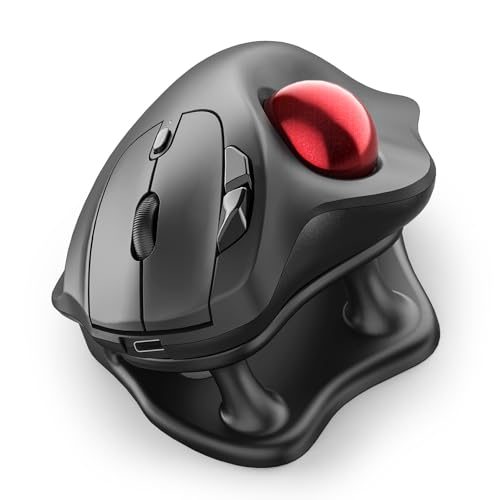
- 21.7° tilt stand supports a natural wrist position
- Silent operation for shared spaces and late-night work
- Bluetooth and USB connections for up to three devices
Best For: Right-handed office users seeking quiet, ergonomic multi-device control
Rechargeable Large-Hand Choice
TECKNET Wireless Trackball Mouse

- 16° vertical angle designed for reduced strain
- Bluetooth and 2.4GHz connections support three devices
- 500mAh rechargeable battery with fast charging
Best For: Medium- to large-handed users wanting rechargeable multi-device control
Customizable USB Pick
ELECOM EX-G Wireless Trackball

- Six programmable buttons with dedicated software
- Four-way tilt-wheel scrolling for horizontal navigation
- 2.4GHz USB connection with low-energy and high-speed modes
Best For: Right-handed desktop users needing programmable controls and USB wireless
Best Premium Ergonomic Pick – Logitech MX Ergo S
The Logitech MX Ergo S is a strong choice among wireless trackballs for users who want a rechargeable, feature-rich design. Its 20-degree tilt, thumb control, dual wireless connectivity, and customizable controls make it well suited to extended work sessions.
Best For: Medium- to large-handed users seeking premium ergonomic comfort and advanced productivity controls.
Pros:
- 20-degree tilt and sculpted grip support a more natural forearm posture.
- Switch between speed and high-precision tracking at the touch of a button.
- Bluetooth and included Logi Bolt receiver provide flexible connectivity.
- USB-C charging offers up to 120 days of use, with a one-minute charge providing up to 24 hours.
Cons:
- Right-handed design limits use for left-handed users.
- Charging cable is not included.
- Advanced customization requires the Logi Options+ app.
The MX Ergo S stands out when comfort, quiet clicking, customization, and rechargeable convenience matter more than a compact footprint or ambidextrous design.
Best Smooth-Tracking Value – ELECOM IST Wireless Trackball
The ELECOM IST is a practical option among wireless trackballs, combining a 36mm ball with a 28-degree ergonomic angle. Its ruby ball bearing is designed for smooth movement, while the 2.4GHz connection keeps setup straightforward for Windows PCs and Macs.
Best For: Right-handed users who want a large, smooth-moving ball and long AA-battery life.
Pros:
- Ruby ball bearing provides smooth tracking feel.
- 36mm ball helps move the pointer across large screens.
- 28-degree angled design supports a natural hand position.
- Included receiver, AA battery, and removal tool simplify setup and maintenance.
Cons:
- Uses a 2.4GHz USB connection rather than Bluetooth.
- Designed for right-handed use.
- Replacement RollMaster bearings are not included and are sold separately.
Choose the ELECOM IST if smooth bearing performance and long battery life are priorities, especially for a Windows-focused desktop setup.
Best Ambidextrous Design – Kensington Expert Wireless Trackball
The Kensington Expert Wireless Trackball is a versatile pick among wireless trackballs, pairing a large 55mm ball with a patented scroll ring. Its ambidextrous layout, detachable wrist rest, and Bluetooth or 2.4GHz connectivity suit shared workspaces and users who prefer a full-size trackball.
Best For: Left- or right-handed users who want a large ball, wrist support, and easy page scrolling.
Pros:
- Large 55mm ball and Diamond Eye optical tracking support precise cursor control.
- Patented scroll ring makes navigating long pages convenient.
- Ambidextrous design works for either hand.
- Bluetooth and USB dongle connectivity provide flexible setup options.
Cons:
- Large 1.4-pound design takes more desk space than compact models.
- Requires two AA batteries.
- Linux is not supported, and Windows ARM-based computers are not supported by KensingtonKonnect.
The Expert Wireless is a compelling choice for users who value a spacious control surface and ambidextrous comfort over portability.
Best Compact Comfort Pick – Logitech ERGO M575S
The Logitech ERGO M575S is an accessible choice among wireless trackballs for compact desks and everyday productivity. Its thumb-controlled ball keeps cursor movement contained to the hand, while Bluetooth and the included Logi Bolt receiver support flexible connections.
Best For: Right-handed users who want comfortable thumb control, quiet clicks, and long battery life in a space-saving design.
Pros:
- Sculpted shape supports a relaxed hand and improved forearm posture.
- Thumb control works well on any surface and saves desk space.
- Bluetooth and Logi Bolt connectivity support PC and tablet setups.
- One included AA battery can last up to 18 months.
Cons:
- Right-handed design is not suitable for left-handed users.
- Offers fewer controls than the MX Ergo S.
- Bluetooth requires macOS 13 Ventura or Windows 11 according to the supplied specifications.
The ERGO M575S is a sensible everyday option when you want ergonomic thumb control without the extra size or rechargeable setup of a premium model.
Best Ambidextrous Pick – Kensington Orbit Wireless Trackball
The Kensington Orbit is a flexible choice for shoppers comparing wireless trackballs, especially if multiple users need a comfortable pointing device. It supports both 2.4 GHz and Bluetooth LE connections, and its scroll ring provides a convenient way to move through documents and web pages.
Best For: Left- or right-handed users who want a scroll ring and adjustable cursor speed.
Pros:
- Dual wireless connectivity with 2.4 GHz and Bluetooth LE.
- Ambidextrous design helps reduce wrist and hand movement.
- Four DPI settings from 400 to 1,600 support precision and general browsing.
- 40mm ball and scroll ring provide precise tracking and easy document navigation.
Cons:
- Uses two AA batteries rather than a rechargeable battery.
- Only two buttons are listed, limiting built-in controls.
- KensingtonKonnect does not currently support Windows ARM-based computers.
Choose the Orbit if ambidextrous use, a scroll ring, and connection flexibility matter more than extensive button customization. Its included batteries and three-year warranty add practical value for everyday office use.
Best Adjustable Comfort – ProtoArc EM01 NL Wireless Trackball
The ProtoArc EM01 NL is a versatile option among wireless trackballs, combining a thumb-controlled ball with an adjustable 0–20° hinge. Its rechargeable battery, quiet primary clicks, and three-device wireless support make it well suited to changing workspaces.
Best For: Right-handed users who want adjustable positioning, rechargeable power, and multi-device control.
Pros:
- Adjustable 0–20° hinge helps tailor the angle to your hand position.
- Connects with Bluetooth or 2.4G wireless to up to three devices.
- Rechargeable battery and five DPI levels from 200 to 1,600.
- Quiet left and right clicks suit offices and shared spaces.
Cons:
- Designed for right-handed use only.
- Scroll wheel and side buttons are not silent.
- The ball and three white rollers require cleaning to maintain smooth tracking.
The EM01 NL stands out for ergonomic adjustability and device switching. It requires some adaptation to thumb control and routine trackball cleaning, but its rechargeable design and broad platform compatibility make it a practical desk or mobile-work option.
Best Ergonomic Mainstay – Logitech ERGO M575S Trackball
Logitech Ergo M575S Wireless Ergonomic Trackball Mouse, Black/Blue (910-007026)
Check Price On AmazonThe Logitech ERGO M575S is a compact ergonomic choice for shoppers looking at wireless trackballs for limited desk space. Its thumb control lets you move the cursor without moving the mouse, while Bluetooth and the included Logi Bolt receiver provide two connection options.
Best For: Users who want a space-saving ergonomic mouse with long battery life.
Pros:
- Thumb control works well on small or space-saving setups.
- Ergonomic shape supports the hand and forearm.
- Bluetooth and Logi Bolt receiver support flexible wireless connections.
- AA battery is rated for an average life of 18 months.
Cons:
- Uses a replaceable AA battery rather than a rechargeable battery.
- Its ergonomic shape is designed for a specific hand orientation.
- Three customizable buttons may offer less flexibility than models with more controls.
The M575S is a straightforward pick for everyday work, particularly where desk space is limited. Its long stated battery life and recycled-plastic construction are useful advantages, while the thumb-ball layout may take a short adjustment period.
Quiet Ergonomic Pick – Nulea Wireless Trackball Mouse
The Nulea M511 is a practical choice among wireless trackballs for users who want thumb control, quiet operation, and flexible device connectivity. Its 21.7° tilt stand supports a more natural wrist position, while Bluetooth and USB connectivity let you pair with up to three devices.
Best For: Right-handed office users who prioritize silent operation, ergonomic wrist positioning, and multi-device switching.
Pros:
- 21.7° ergonomic tilt stand helps support a natural wrist position.
- Completely silent trackball, buttons, and scroll wheel suit shared spaces and late-night work.
- Bluetooth and USB connectivity support up to three paired devices.
- Four DPI settings from 400 to 1600 accommodate precise or faster cursor movement.
Cons:
- Designed for right-handed use.
- Buttons are not programmable.
- Requires Windows 11 or macOS 14 Sonoma according to the listed minimum requirements.
Choose this model if quiet control and device flexibility matter more than extensive customization. The rechargeable, six-button design adds useful everyday features, though users wanting programmable controls will need another option.
Rechargeable Large-Hand Choice – TECKNET Wireless Trackball Mouse
The TECKNET TK-MS023 is one of the more adaptable wireless trackballs for larger hands, combining thumb control with a 16° vertical angle. It supports Bluetooth and 2.4GHz connections across three devices, and its rechargeable battery can provide a full day of use after a 15-minute charge.
Best For: Medium- to large-handed users who want rechargeable power, three-device switching, and adjustable tracking sensitivity.
Pros:
- 16° vertical angle is designed to promote a more natural forearm posture.
- Bluetooth and 2.4GHz connectivity support up to three devices.
- 500mAh rechargeable battery offers a stated full day of use after 15 minutes of charging.
- Five DPI levels range from 100 to 1200 for adjustable cursor control.
Cons:
- The larger body may not suit small hands.
- The manufacturer recommends a one- to two-week adjustment period.
- It is designed for right-handed use.
The TECKNET stands out for users who prefer a larger mouse and do not want disposable batteries. Its ergonomic angle and three-device support are useful for extended work, but the size and adaptation period should be considered before buying.
Customizable USB Pick – ELECOM EX-G Wireless Trackball
The ELECOM EX-G is a strong option among wireless trackballs for users who prefer a dedicated 2.4GHz USB connection and customizable controls. Its red ball, optical tracking, two DPI settings, and ergonomic hand-shaped design support precise cursor movement for office work, creative software, gaming, and web navigation.
Best For: Right-handed desktop users who want programmable buttons, four-way scrolling, and a reliable USB wireless connection.
Pros:
- Six programmable buttons can be customized through ELECOM Mouse Assistant software.
- Four-way tilt-wheel scrolling supports horizontal navigation.
- Switchable low-energy and high-speed modes balance battery conservation and rapid tracking.
- Includes a USB wireless connection and one AA battery.
Cons:
- Uses 2.4GHz USB wireless rather than Bluetooth.
- Only two DPI settings are available: 750 and 1500.
- Designed for right-handed use.
This EX-G model is best suited to a fixed workstation where USB connectivity and button customization are valuable. Its software support and four-way scrolling make it more flexible than simpler trackballs, while the two DPI choices keep adjustment straightforward.
How We Picked the Best Wireless Trackballs
We focused on the features that matter most in daily use: ergonomic shape, ball size and placement, cursor precision, button layout, scroll control, wireless reliability, and power management. We also considered whether each model uses Bluetooth, a 2.4GHz USB receiver, or both, since connection flexibility can be important when switching between computers.
Because trackball comfort is highly personal, this list includes thumb-controlled designs as well as finger-operated models. Build quality, software support, rechargeable batteries, and suitability for office, creative, and general productivity work also influenced the selection.
Quick Comparison
| Best For | What to Look For |
|---|---|
| Most users | Thumb control, comfortable contour, dependable wireless connection |
| Large or precise movements | Central ball with a generous tracking surface |
| Multiple devices | Bluetooth plus a USB receiver |
| Small desks | Compact footprint and easy scroll access |
| Long work sessions | Supported wrist angle, low-friction tracking, and convenient charging |
Key Buying Factors for Wireless Trackballs
Control Style and Hand Position
Thumb-operated trackballs usually feel familiar to conventional mouse users and keep the fingers available for buttons. Finger-controlled models can offer finer cursor control and reduce thumb strain, but they often require a short adjustment period.
Connectivity and Compatibility
Bluetooth is convenient for laptops and tablets, while a 2.4GHz receiver can provide simple plug-and-play setup on desktops. If you use multiple devices, look for dual connectivity or device switching. Confirm operating-system compatibility before buying, especially if you rely on customization software.
Tracking, Scrolling, and Buttons
A smooth ball and responsive sensor are more important than excessive sensitivity settings. Check whether the layout includes a usable scroll wheel or ring, back and forward buttons, and enough programmable controls for your workflow. Larger balls may feel better for broad movements, while smaller designs can be quicker to learn.
Power and Portability
Rechargeable models reduce disposable battery use and are convenient when a charging cable is nearby. Replaceable batteries can last a long time and are useful for travel. Wireless Trackballs are generally desk-oriented, so consider their size and whether the shape will fit your workspace and carrying setup.
Who Should Buy Which Wireless Trackballs?
Choose a thumb-controlled ergonomic model if you want the easiest transition from a standard mouse or prioritize relaxed wrist movement. A central-ball design is a better choice for users who value precise finger control, large cursor movements, or ambidextrous potential. Look for a compact model if desk space is limited, and prioritize Bluetooth support when you regularly move between a laptop and desktop.
For long office sessions, comfort and stable tracking should outweigh extra buttons. For creative applications, prioritize ball control, adjustable sensitivity, and programmable inputs. Whichever style you choose, give yourself several days to adapt before judging performance; trackballs often become more natural with consistent use.