The best trackballs can reduce desk movement while giving you precise cursor control, making them useful for workstations, compact desks, and users seeking a more ergonomic alternative to a traditional mouse.
We compared 10 trackballs across connection options, control layouts, adjustability, size, and everyday usability to help you find the right fit for your hand and workflow.
Best 10 Trackballs Picks for 2026
Best Wireless Ergonomic Trackball

- Wireless Bluetooth and Logi Bolt connectivity
- Thumb control saves desk space
- Up to 18 months from one AA battery
Best For: Right-handed users wanting a comfortable wireless office trackball
Best Large-Ball Trackball
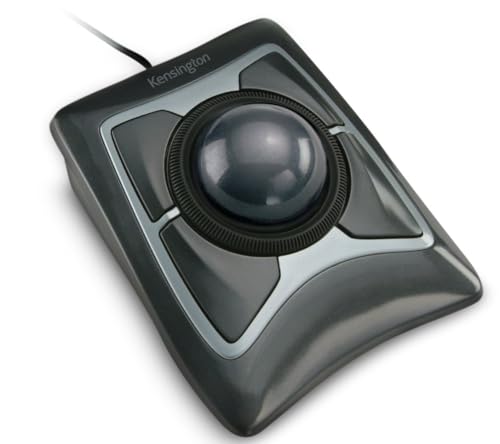
- Large 55mm ball for precise control
- Scroll ring simplifies page navigation
- Ambidextrous design with detachable wrist rest
Best For: Desk users who prefer wired, large-ball trackball control
Best Multi-Device Trackball

- Connects with up to three devices
- Rechargeable built-in battery
- Four DPI levels and six fixed-function buttons
Best For: Right-handed multitaskers using multiple wireless devices
Best Ambidextrous Trackball
Kensington Orbit with Scroll Ring

- Ambidextrous design for either hand
- Optical tracking and convenient scroll ring
- Detachable wrist rest with two programmable buttons
Best For: Left- or right-handed users wanting simple wired navigation
Top Ergonomic Pick

- 20-degree tilt supports a comfortable forearm position
- Dual wireless connectivity with rechargeable battery
- Customizable controls and adjustable tracking modes
Best For: Medium- to large-handed users wanting a premium ergonomic office trackball
Large-Handed Wired Pick

- 44mm index-finger-operated ball needs little desk space
- Five DPI levels support adjustable cursor control
- Plug-and-play USB connection for Windows and Mac
Best For: Large-handed users doing office, browsing, or design work
Ambidextrous Wireless Pick

- Large 55mm ball with Diamond Eye optical tracking
- Scroll ring and detachable wrist rest aid office use
- Bluetooth and 2.4GHz USB dongle connectivity
Best For: Ambidextrous users wanting a large wireless office trackball
Best Wired Ergonomic Pick

- 34mm thumb-operated ball with an angled ergonomic design
- Five DPI levels from 100 to 1200
- USB-A/USB-C wired connection with RGB lighting
Best For: Right-handed office users who prefer stable wired performance
Best Ambidextrous Pick
Kensington Orbit with Scroll Ring

- Ambidextrous design for left- or right-handed use
- 40mm ball with optical tracking and a scroll ring
- Detachable wrist rest and optional software customization
Best For: Shared workstations and users who scroll frequently
Best Wireless Multi-Device Pick
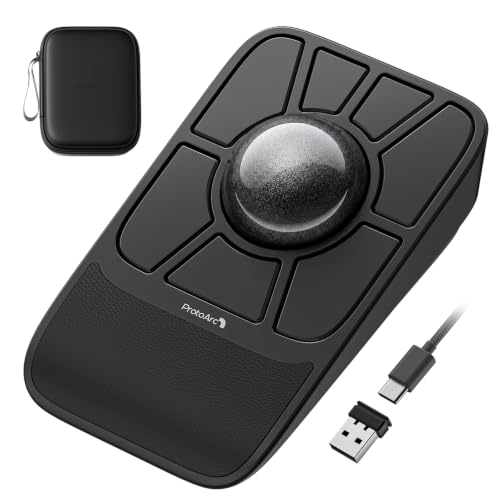
- Tri-mode Bluetooth, 2.4 GHz, and wired connectivity
- Large 55mm ball with dual-sensor tracking
- Rechargeable 930mAh battery and four profile slots
Best For: Users switching among multiple computers and tablets
Best Wireless Ergonomic Trackball – Logitech ERGO M575S
The Logitech ERGO M575S is a practical choice among trackballs for right-handed users who want wireless connectivity, thumb control, and a compact setup. Its sculpted shape is designed for relaxed hand positioning, while Bluetooth and the included Logi Bolt receiver offer flexible connections.
Best For: Right-handed users seeking a comfortable wireless trackball for office work and space-saving desks.
Pros:
- Thumb-controlled cursor movement requires little desk space and works on any surface.
- Bluetooth and Logi Bolt USB receiver connectivity support flexible setups.
- Up to 18 months of battery life from one included AA battery.
- Three customizable buttons and adjustable cursor speed through Logi Options+.
Cons:
- Designed for right-handed use only.
- Uses a battery rather than a built-in rechargeable power source.
- Customization requires the Logi Options+ app.
Choose this model if wireless convenience, long battery life, and an ergonomic thumb-controlled design matter more than extensive button programming.
Best Large-Ball Trackball – Kensington Expert Mouse
Kensington Expert Trackball Mouse (K64325), Black Silver, 5"W x 5-3/4"D x 2-1/2"H
Check Price On AmazonThe Kensington Expert Trackball Mouse is built for users who prefer a large control surface and wired reliability. Its 55mm ball, optical tracking, scroll ring, and detachable wrist rest make it a feature-rich option for precise navigation at a desk.
Best For: Users who want an ambidextrous, wired trackball with a large ball and dedicated scroll ring.
Pros:
- Large 55mm ball provides precise cursor control.
- Patented scroll ring makes moving through pages and documents convenient.
- Ambidextrous design accommodates right- and left-handed users.
- Four customizable buttons and speed settings work through KensingtonKonnect software.
Cons:
- Wired USB-A connection limits cable-free flexibility.
- The larger design takes more desk space than compact trackballs.
- ChromeOS users cannot customize the device through KensingtonKonnect.
This is a strong desk-based pick when precise large-ball control, ambidextrous use, and dependable USB connectivity are priorities.
Best Multi-Device Trackball – Nulea M501 Wireless Trackball
The Nulea M501 is one of the more flexible wireless trackballs for users switching among multiple devices. It supports up to three connections through Bluetooth or a USB dongle, includes adjustable DPI levels, and uses a built-in rechargeable battery.
Best For: Right-handed users who need rechargeable wireless control across several computers or tablets.
Pros:
- Connects with up to three devices using Bluetooth or the USB receiver.
- Built-in rechargeable battery eliminates disposable cell replacements.
- Four DPI levels support different cursor-speed preferences.
- Six buttons include forward and back controls for easier navigation.
Cons:
- Buttons are not programmable.
- Charging should use the included cable or a standard 5V source, not a fast charger.
- Designed for right-handed use.
The M501 makes the most sense for multitaskers who value device switching and rechargeable operation, provided fixed button functions are acceptable.
Best Ambidextrous Trackball – Kensington Orbit with Scroll Ring
The Kensington Orbit with Scroll Ring is a straightforward wired option among trackballs, combining optical tracking with an ambidextrous layout. Its scroll ring, detachable wrist rest, and configurable two-button design suit users who want comfortable document and web navigation without a large feature set.
Best For: Left- or right-handed users seeking a compact wired trackball with a scroll ring.
Pros:
- Ambidextrous design works for both left- and right-handed users.
- Optical tracking supports precise cursor movement with less hand movement.
- Scroll ring makes navigating pages and documents easier.
- Detachable wrist rest and adjustable settings add comfort and flexibility.
Cons:
- Uses a wired USB connection.
- Only two buttons are included.
- Software is required to assign button functions and adjust speeds.
Consider the Orbit when you want an uncomplicated, ambidextrous trackball for everyday desktop navigation and prefer the consistency of a wired connection.
Top Ergonomic Pick – Logitech MX Ergo S
The Logitech MX Ergo S is one of the most versatile trackballs for users who want wireless convenience, adjustable control, and a more supportive hand position. Its 20-degree tilt, thumb-operated ball, rechargeable battery, and dual wireless connectivity make it well suited to long office sessions.
Best For: Medium- to large-handed users seeking a premium ergonomic trackball for office and productivity work.
Pros:
- 20-degree tilt and sculpted grip support a more natural forearm position.
- Switch between speed and high-precision tracking at the press of a button.
- Bluetooth and included Logi Bolt receiver provide flexible wireless connections.
- Quick USB-C charging delivers up to 24 hours of use from a one-minute charge.
Cons:
- Designed for right-handed use only.
- Charging cable is not included.
- Advanced customization requires the Logi Options+ app.
The MX Ergo S is a strong all-around choice when comfort and productivity features matter more than a compact or budget design. Its rechargeable battery and customizable controls add useful convenience for daily work.
Large-Handed Wired Pick – PORLEI TM552 Trackball Mouse
The PORLEI TM552 is a practical wired option among trackballs, especially for users with larger hands who prefer index-finger control. Its 44mm ball, five DPI levels, and 1.8-meter cable support precise cursor movement without needing desk space for mouse travel.
Best For: Large-handed users who need a wired trackball for office work, browsing, or design tasks.
Pros:
- Hand-conforming design is intended to reduce muscle strain and wrist pressure.
- Large 44mm finger-operated ball works on virtually any surface.
- Five customizable DPI levels allow more tailored cursor control.
- Plug-and-play USB connection requires no drivers.
Cons:
- Wired USB-A connection limits portability compared with wireless models.
- Forward and backward buttons are not supported on Mac systems.
- Not recommended for gaming because of its tracking profile and response characteristics.
The TM552 focuses on stable, precise control and a roomy shape rather than wireless flexibility or gaming performance. It is a sensible choice for productivity users who have limited desk space and prefer a corded connection.
Ambidextrous Wireless Pick – Kensington Expert Mouse
The Kensington Expert Mouse is a flexible wireless choice for trackball users who want a large ball, integrated scrolling, and support for either hand. Its 55mm ball, scroll ring, detachable wrist rest, and Bluetooth or 2.4GHz connectivity make it a comfortable fit for office navigation.
Best For: Right- or left-handed office users who prefer a large trackball with dedicated scrolling and wireless connection options.
Pros:
- Large 55mm ball and Diamond Eye optical tracking provide precise control.
- Patented scroll ring makes navigating long pages convenient.
- Ambidextrous design and detachable wrist rest accommodate different users.
- Bluetooth and USB dongle connectivity offer flexible setup options.
Cons:
- Uses two AA batteries rather than a rechargeable battery.
- Linux is not supported.
- Windows ARM-based computers are not supported by KensingtonKonnect.
The Expert Mouse stands out for its large control ball and ambidextrous layout, making it a good shared-workspace option. Buyers should confirm operating-system compatibility and choose between Bluetooth and dongle connectivity based on their setup.
Best Wired Ergonomic Pick – RGB Thumb-Control Trackball
If you want a straightforward wired option among trackballs, this model combines a 34mm thumb-operated ball with an angled ergonomic shell. Its USB connection, adjustable DPI, and compact stationary design make it practical for office work and tight desks.
Best For: Right-handed users who want a wired trackball with RGB lighting and flexible placement.
Pros:
- Ergonomic angled design and thumb control help keep the palm in a natural position.
- Five DPI settings range from 100 to 1200 for slower precision or faster cursor movement.
- Works on desks, sofas, beds, carpets, and other surfaces without moving the mouse itself.
- Includes back/forward buttons, a scroll wheel, removable ball, and RGB lighting.
Cons:
- It is right-handed only, and the back/forward buttons are not compatible with macOS.
- All buttons are non-programmable.
- The wired design limits portability compared with wireless trackballs.
This is a sensible choice if stable USB connectivity and an ergonomic thumb layout matter more than wireless freedom. The modest 1200 DPI ceiling and right-handed design make it best suited to everyday productivity rather than users seeking extensive customization.
Best Ambidextrous Pick – Kensington Orbit with Scroll Ring
The Kensington Orbit is a simple wired trackball focused on precise control and easy scrolling. Its 40mm blue ball, dedicated scroll ring, detachable wrist rest, and ambidextrous shape suit shared workstations and users who switch hands.
Best For: Left- or right-handed users who prioritize easy document and web-page scrolling.
Pros:
- Ambidextrous design works for both left- and right-handed users.
- Optical tracking and a hard spherical 40mm ball support precise cursor control.
- The scroll ring makes moving through documents and web pages convenient.
- Detachable wrist rest cushions the hand, while KensingtonKonnect enables button and speed customization.
Cons:
- Only two buttons are included.
- Customization through KensingtonWorks is unavailable on ChromeOS, although HID functions work.
- The wired USB design does not offer wireless flexibility.
Choose this model when comfort, hand flexibility, and scrolling are more important than a large button count. It is a particularly practical fit for shared desks, though users wanting many programmable controls should look elsewhere.
Best Wireless Multi-Device Pick – ProtoArc EM06 Trackball
For shoppers comparing wireless trackballs, the ProtoArc EM06 stands out for its large 55mm ball, tri-mode connectivity, rechargeable battery, and wrist rest. It can connect through Bluetooth, 2.4 GHz, or a wired cable and supports switching among multiple devices.
Best For: Multi-device users who need wireless flexibility and a large, precise trackball for extended work.
Pros:
- Tri-mode connectivity supports Bluetooth, 2.4 GHz, and wired use across computers and tablets.
- Large 55mm ball and dual sensors provide precise tracking for office work, design, and video editing.
- Seven buttons, five DPI levels, customizable controls, and up to four saved profiles offer flexibility.
- Rechargeable 930mAh battery and included wrist rest support longer working sessions.
Cons:
- Customization supports only 2.4 GHz and wired connections, not Bluetooth.
- It may not be detected through a multi-port hub and is not compatible with Safari.
- The large ball requires regular cleaning and a short adjustment period for new users.
The EM06 is the most versatile option here for users moving between devices or working in changing environments. Its larger body and learning curve are trade-offs for the stronger connectivity, customization, and precision features.
How We Picked These Trackballs
We focused on the features that most affect daily use: tracking method, ball placement, connectivity, comfort, adjustability, and desk-space requirements. The roundup includes thumb-controlled and finger-controlled designs, wired and wireless models, compact options, and Trackballs with scroll rings or multiple connection modes.
Because hand size and control preference matter so much, we considered ergonomic shape alongside specifications. A comfortable design with reliable tracking is generally more valuable than a long feature list you will not use.
Quick Comparison
| Type | Best For | What to Consider |
|---|---|---|
| Wireless thumb control | General office work and portability | Familiar mouse-like layout; may provide less finger precision |
| Finger control | Precision, creative work, and larger hands | Usually takes more time to learn |
| Scroll-ring design | Document-heavy workflows | Excellent scrolling; larger footprint on some models |
| Wired | Reliable plug-and-play use | No battery management, but cable placement matters |
| Tri-mode wireless | Multi-device setups | More connection flexibility and setup choices |
Key Buying Factors for Trackballs
Ball Placement and Control
Thumb-control Trackballs feel closest to conventional mice and are often easier for everyday office tasks. Finger-controlled models place the ball under your index and middle fingers, which can offer finer control and may suit users with larger hands or those who dislike thumb strain.
Hand Size and Ergonomics
Check the product dimensions and shape before buying. A compact trackball can save space but feel cramped, while a larger palm rest may provide better support. Look for an angle that keeps your wrist relaxed and buttons within easy reach.
Connectivity and Power
Bluetooth is convenient for laptops and tablets, while a 2.4GHz receiver can offer dependable desktop connectivity. Wired models avoid charging and pairing entirely. If you switch between devices, consider a model with multiple connection modes or device profiles.
DPI, Buttons, and Scrolling
Multiple DPI settings help you balance precision and cursor speed. Extra buttons can improve productivity when they are easy to reach, and a dedicated scroll ring can be especially useful for long documents, spreadsheets, and web pages.
Who Should Buy Which Trackballs?
Choose a wireless thumb-control model if you want the easiest transition from a standard mouse. Pick a finger-control or large-hand design if precision and palm support are priorities. A scroll-ring trackball is a strong choice for office users who spend much of the day navigating documents. Wired models suit fixed workstations and anyone who prefers zero battery concerns, while tri-mode options are best for users who regularly move between computers, tablets, or operating systems.
Whichever style you choose, give yourself a short adjustment period. Trackball control feels different at first, but the reduced need to move the device can make a meaningful difference on a crowded or ergonomic desk.